How to Rank on Answer Engines: 10 Steps for AI Citations
Introduction: What It Takes to Be Cited in AI Answers
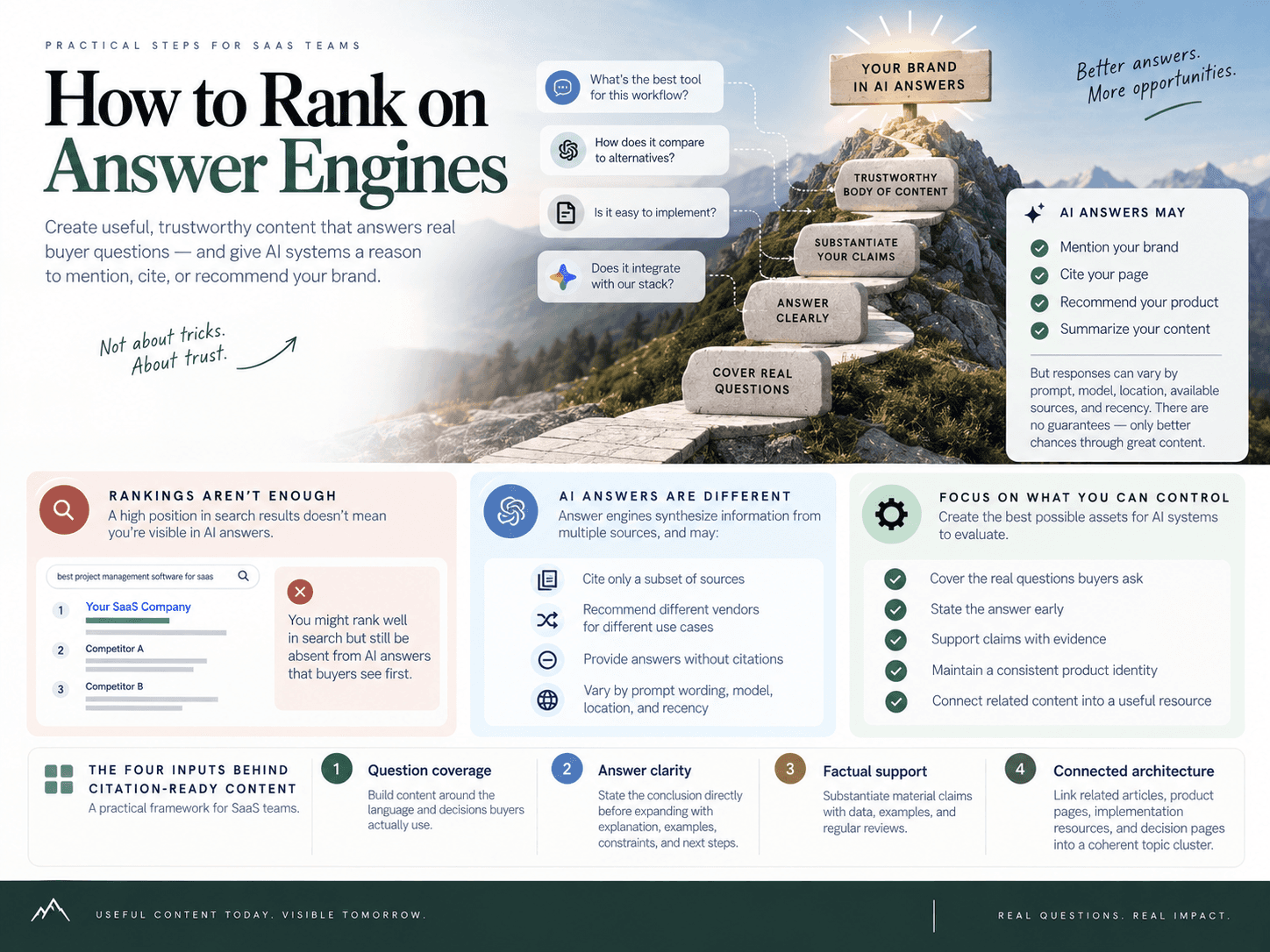
How to Rank on Answer Engines is really about improving the likelihood that your brand and pages are relevant enough to be mentioned, cited, or recommended when an AI system answers a buyer’s question. For SaaS teams, that means creating pages that answer specific questions clearly, substantiate important statements, and fit into a trustworthy body of related content.
The goal is not to “force” AI citations. Answer engines select sources and recommendations independently, and their responses can vary by prompt wording, model, location, available sources, recency, and conversational context. No content format, schema markup, or software platform can guarantee that a specific answer will cite your site.
What you can control is the quality of the assets an answer engine may evaluate: whether you cover the real questions buyers ask, state the answer early, support material claims, maintain a consistent product identity, and connect related pages into a useful resource. That is the practical foundation of answer engine optimization.
Visibility is not a guaranteed ranking outcome
Traditional search visibility often centers on a page’s position for a keyword. AI-answer visibility is more conditional. A model may synthesize information from multiple sources, cite only a subset of them, recommend different vendors for different use cases, or provide an answer without citations at all.
That makes the right operating question: “What would make our page a credible, useful source for this exact question?” A generic feature page is unlikely to satisfy a detailed prompt about implementation, alternatives, integrations, audience fit, or tradeoffs. A focused page with a direct answer, current facts, practical qualifications, and supporting context has a stronger reason to appear.
The four inputs behind citation-ready content
Question coverage: Build content around the language and decisions buyers actually use, including research, comparison, implementation, and expansion questions.
Answer clarity: State the conclusion directly before expanding with explanation, examples, constraints, and next steps.
Factual support: Treat material product, integration, pricing, performance, and competitor statements as claims that require substantiation and regular review.
Connected architecture: Link question-focused articles, product pages, implementation resources, and decision pages so each asset has context within a coherent topic cluster.
The following framework turns those inputs into a repeatable publishing and measurement process. It focuses on the controllable work—clear answers, credible information, useful commercial pages, and strong site connections—rather than promises about outputs no team can control.
Steps 1–2: Research the Questions AI Users Actually Ask
Answer engines respond to complete problems, not isolated keywords. A prospective buyer may ask, “What is the best SEO workflow for a small SaaS team?”, “Does this platform integrate with Framer?”, or “What are the alternatives to [competitor] for founders?” Your content must cover the questions behind those requests—not merely repeat the terms within them.
Start with the language buyers use when they are evaluating pain points, categories, vendors, integrations, implementation paths, and product fit. The goal is to build useful coverage where your company has a credible reason to be included. That improves AI search visibility, but it does not control whether a model chooses to mention, recommend, or cite your site in any individual response.
Step 1: Build a prompt map across the buyer journey
Create a prompt map: a structured inventory of the questions a potential customer could ask before, during, and after choosing a product. Unlike a conventional keyword list, it captures context: who is asking, what they need, how far along they are, and what type of page would genuinely answer them.
Group buyer prompts into six journey stages:
Awareness: Problem-led questions, such as “Why does our SEO content fail to generate pipeline?” or “How can a small team publish consistently?”
Research: Category and method questions, such as “What is an SEO automation platform?” or “How do AI citations work for SaaS content?”
Consideration: Evaluation questions, such as “What features should an SEO content workflow include?” or “What should founders look for in an SEO tool?”
Decision: Commercial questions, including “[Brand] vs [Competitor],” “alternatives to [Competitor],” pricing-oriented questions, and “best tools for [use case].”
Implementation: Operational questions, such as “How do I publish SEO content to WordPress?” or “How should a SaaS team build internal links?”
Expansion: Questions from existing customers who are trying to improve adoption, add use cases, or scale results.
For every prompt, record the audience, intent, likely page type, and the product or subject matter that must be addressed. For example, “best SEO automation tool for a founder-led SaaS” may require a fair decision page, while “how to create an SEO content calendar from Search Console data” calls for a practical guide. Treat these as different assets, even when they share a category.
Collect prompts from sales calls, support conversations, demos, customer interviews, Search Console queries, community discussions, and competitor pages. Preserve the full wording wherever possible. The difference between “SEO automation tools” and “Can I automate WordPress publishing without losing editorial review?” is the difference between broad category coverage and a page that resolves a real operational concern.
For foundational context on this discipline, see What Is AEO? Answer Engine Optimization for SaaS Teams.
Step 2: Prioritize questions by commercial value and content gaps
Do not attempt to publish for every prompt at once. Prioritize clusters where three conditions overlap: the question matters to revenue or retention, your brand has a legitimate fit, and your site lacks a strong page that answers it.
Assess commercial importance. Give greater weight to comparison, alternative, integration, implementation, and use-case questions that influence a buying or adoption decision.
Check your right to appear. Can you answer the question accurately with product documentation, customer-relevant expertise, or a clear point of view? Do not create a page merely because a competitor is visible.
Audit the existing asset. Identify whether you already have a page that directly answers the prompt. A generic feature page rarely substitutes for a credible integration guide, migration page, or audience-specific comparison.
Look for competitive gaps. Note where competitors are repeatedly mentioned, cited, or recommended and identify the missing asset, missing proof, or weak explanation that keeps your brand out of the answer.
Choose a single next action. Refresh an existing page, create a new page, add missing documentation, strengthen proof, or deprioritize the cluster if your offer is not a strong fit.
A useful prioritization table includes the prompt cluster, journey stage, audience, business value, existing page, competitor presence, gap type, and planned asset. This turns scattered ideas into a decision-ready content backlog rather than an unmanageable spreadsheet of terms.
SEO Autopilot’s Prompt Universe can help teams scale this process. It transforms product and market context into 1,000 buyer-oriented prompts, groups them into actionable opportunity clusters, and supports prioritization across awareness, research, consideration, decision, implementation, and growth stages. For selected representative prompts, an AI Visibility run analyzes OpenAI responses for brand mentions, website citations, recommendation position, sentiment, competitor presence, and missing content assets.
Use those findings as directional research, not a promise of future placement. A representative prompt is a practical proxy for a cluster, while answer-engine outputs can vary by wording, model behavior, freshness, and context. The operational value is knowing which content opportunities deserve attention first—and what a stronger, more relevant asset needs to address.
Steps 3–4: Turn Each Page Into a Direct, Useful Answer
Step 3: Match one primary question and intent to each page
Each page should resolve one primary question for one search intent. A page can cover related follow-up questions, but it needs a clear job: define a concept, explain a process, compare options, evaluate fit, or guide implementation.
When a single page tries to answer “what is it?”, “how does it work?”, “which tool is best?”, and “how much does it cost?” at once, the result is usually broad but extractable for none of those questions. A focused page gives answer engines a clearer passage to use and gives readers a faster route to a decision.
Start with a heading that mirrors the language a buyer would use. Prefer specific, descriptive headings such as:
“What is product-led SEO?”
“How do SaaS teams choose an internal linking tool?”
“Is a CMS integration necessary for automated publishing?”
“SEO Autopilot vs. manual content production for small teams”
Then confirm that the page format matches the question. A definition query needs a concise explanation and context. A “how to” query needs an ordered process. A decision query needs criteria, tradeoffs, and a recommendation by use case. This alignment between the question, page type, and search intent matters more than adding a question phrase repeatedly to the copy.
Use related questions to deepen the page without diluting its purpose. For example, an implementation guide can also answer prerequisites, common mistakes, expected timeline, and next steps. Those are natural follow-ups to the same core task—not unrelated topics competing for attention.
Step 4: Put the answer before the explanation
Place a concise, complete answer directly below the heading, then expand with explanation, proof, examples, caveats, and next steps. This makes the page easier to scan for people and easier for systems to identify as a useful response to a specific question.
A reliable answer-block structure is:
Answer: Give the conclusion in one to three sentences.
Explanation: Clarify what the answer means and why it is true.
Evidence: Support material factual statements with relevant sources, product documentation, data, or clearly identified methodology.
Example: Show how the guidance applies to a realistic SaaS scenario.
Caveat: State the conditions, exceptions, or audience differences that affect the recommendation.
Next step: Tell the reader what to evaluate, implement, or read next.
For example, rather than opening a section with a generic introduction, write the answer first:
Should SaaS teams create separate comparison pages? Yes—when buyers actively evaluate alternatives and the company can provide a fair, useful comparison for a defined audience and use case. A dedicated page should explain meaningful differences, include situations where another option may fit better, and keep time-sensitive details current.
The rest of the section can then explain comparison criteria, link to supporting resources, and document qualifications. The opening stands on its own; it does not force the reader or an answer engine to infer the conclusion from several introductory paragraphs.
Use the format that best fits the question:
Definition blocks for “what is” and “what does” questions.
Numbered steps for implementation and workflow questions.
Bulleted criteria for evaluation questions.
Comparison tables when readers need to assess options against the same criteria.
Short FAQ-style sections for important follow-up questions that require distinct answers.
A table is useful only when it makes a decision easier. For instance, a buyer comparing publishing workflows may need a consistent view of editorial review, CMS compatibility, internal-linking support, and operating effort. Do not use a table to compress vague marketing language; use it to make meaningful distinctions visible.
Qualification language is equally important. Replace absolute claims with precise statements: “best for small teams that need a streamlined workflow,” “appropriate when editorial approval is required,” or “depends on the CMS and publishing process.” Clear limits make an answer more trustworthy than unsupported superlatives.
Good answer formatting is not a shortcut to a citation. Answer engines independently decide what to mention or cite. But a page that answers the exact question, defines its terms, shows its reasoning, and acknowledges relevant conditions is far more useful than a vague summary—and more likely to remain useful when readers compare it against competing sources.
Steps 5–7: Make Claims Verifiable and Entities Consistent
Clear formatting is not enough to make a page citation-ready. Answer engines need content they can interpret confidently: specific statements, stable product information, and traceable support for material facts. Build that trust layer by verifying claims, maintaining a consistent entity footprint, and using structured data to reinforce—not replace—good editorial work.
Step 5: Verify Every Material Product and Market Claim
Treat every statement that could influence a buying decision as a claim that needs a basis. This is especially important on SaaS pages discussing features, integrations, pricing, performance, security, competitors, or implementation requirements.
First, label the type of statement before publishing:
Fact: A statement that can be confirmed, such as a supported CMS integration or a documented feature.
Estimate: A quantified projection, benchmark, or outcome that depends on assumptions and should state its methodology or conditions.
Opinion: An editorial judgment, such as “a strong choice for small teams,” which should be clearly framed as an assessment.
Recommendation: Guidance tied to a defined audience and use case, such as “choose this workflow when your team needs editorial approval before publishing.”
Support factual statements with a primary source whenever possible: official product documentation, pricing pages, release notes, public policies, original research, or a named third-party source. For time-sensitive details, such as pricing, product availability, regulations, or competitor capabilities, include a review or retrieval date where it helps readers understand currency.
Remove unsupported superlatives. “Best,” “fastest,” “most accurate,” and “leading” are weak unless you can define the comparison set, measurement method, and date. Replace them with useful specificity. Instead of claiming a platform is “the best for content automation,” explain the workflow, audience, and relevant capability.
For example, a stronger statement is: “SEO Autopilot supports publishing workflows for WordPress, Contentful, and Framer.” A recommendation based on that fact might be: “It can suit small teams that want to move from a planned content queue to scheduled CMS publishing with fewer handoffs.” The first is verifiable; the second is clearly contextual advice.
This distinction makes evidence-backed claims easier for readers to assess and safer for editorial teams to maintain over time.
Step 6: Keep Names, Features, and Positioning Consistent
An answer engine may encounter your company through a product page, help center article, integration guide, author bio, comparison page, directory listing, or structured markup. When those sources use conflicting names, categories, feature descriptions, or audience definitions, machine confidence can fall—and readers may receive an inaccurate picture of your offering.
Create a simple entity reference sheet that writers, product marketers, and subject-matter experts use across the site. At minimum, standardize:
Official company and product name
Product category and plain-language description
Core features and approved feature names
Supported integrations
Primary audiences and use cases
Important conditions, boundaries, and limitations
Expert names, roles, and author credentials
Use the same terms in page copy, documentation, comparison tables, metadata, author pages, and schema. That does not mean repeating identical phrasing everywhere. It means the underlying facts must agree. If a feature is described as “automatic internal linking” on a product page, do not describe it elsewhere as a manual service or imply capabilities it does not have.
Review commercial pages with extra care. A comparison page that calls your product an “enterprise analytics suite” while your own product documentation presents it as an SEO execution platform creates unnecessary ambiguity. Strong entity consistency gives both people and machines one coherent explanation of what you offer, who it serves, and when it is a fit.
Step 7: Use Structured Data as Machine-Readable Support
Relevant schema can make important page details easier for machines to interpret. JSON-LD structured data can reinforce information already visible on the page, including the organization, software product, article, author, FAQ, or breadcrumb context when those formats accurately match the content.
The operating rule is simple: markup should describe the page you published, not the result you want to earn. Do not add FAQ markup for questions that are absent from the page, inflate review information, or use product details that conflict with visible copy. Keep URLs, names, descriptions, authors, and other structured fields aligned with your entity reference sheet.
JSON-LD structured data can improve machine understanding and may support eligibility for richer search experiences, but it does not guarantee a rich result, answer-engine mention, recommendation, or citation. Citation selection remains independent of your markup.
SEO Autopilot includes JSON-LD structured-data generation as part of its content workflow. That can reduce repetitive implementation work, but the editorial team still owns the essential decisions: whether the selected markup fits the page, whether the visible content is accurate, and whether every material detail remains current before publication.
Steps 8–9: Publish Decision Pages and Connect the Topic Cluster
Step 8: Build fair, evidence-backed comparison pages
Commercial AI prompts are rarely limited to “what is this category?” Buyers also ask which tool is best for a specific team, what alternatives exist, whether a product integrates with their stack, or how difficult it is to switch. Create pages built to answer those questions: product comparisons, alternatives lists, best-tool guides, migration resources, integration pages, and audience-specific use-case pages.
These decision-stage content assets give answer engines a focused, useful source when users are evaluating options. They also help buyers move from broad research to a confident next step. A generic feature page may describe your product well; a comparison page explains fit in the context the buyer actually uses to make a decision.
A credible comparison should not read like a disguised landing page. Use this checklist before publishing:
Define the audience and use case: State who the page is for and the job they need to accomplish. “Best for small SaaS teams managing a WordPress content operation” is more useful than “best SEO tool.”
Use consistent evaluation criteria: Compare each option against the same relevant criteria, such as workflow, integrations, editorial control, implementation effort, or audience fit.
Include strengths and limitations: Explain where competitors may be a better choice. Balanced guidance is more useful than unsupported superiority claims.
Substantiate factual statements: Material claims about features, integrations, pricing, performance, or product availability should be supported by identifiable public sources.
Separate judgment from fact: Label recommendations as editorial assessments tied to the stated use case rather than presenting them as universal truths.
State the best fit for each option: A reader should be able to see which product fits which situation, not just which one you want them to choose.
Refresh changing details: Recheck product capabilities, integrations, pricing, and positioning on a defined schedule and whenever a material market change occurs.
For teams producing comparison pages at scale, SEO Autopilot’s Comparison Builder provides a more controlled workflow. It combines verified offer information with live competitor research, retains source traceability, and requires review of researched statements before article generation and publication. It supports brand-versus-competitor, alternatives, and best-tools formats, while keeping the evaluation tied to a defined audience, use case, and criteria.
That process matters because high-intent comparison queries are high-risk pages: a single outdated integration statement or exaggerated feature claim can weaken both buyer trust and the page’s usefulness. For a deeper commercial-page workflow, see Alternatives Page SEO: Build Comparisons That Sell.
Step 9: Link supporting pages to the strongest answer asset
Internal linking turns individual articles into an understandable topic system. Each relevant link gives readers—and crawlers—a route from an early-stage question to the page that resolves the next decision. A strong page can be overlooked when it is published as an isolated URL with no contextual paths pointing to it.
Build links around the buyer journey rather than adding links mechanically. For example:
Link informational question pages to the relevant comparison, use-case, or category page.
Link comparison pages to product pages, pricing or plan resources where relevant, integration documentation, and migration guidance.
Link implementation articles back to the product capability or integration page that supports the workflow.
Link use-case pages to supporting proof, tutorials, and related decision pages.
Use descriptive anchor text that tells readers what they will find after the click.
For example, an article answering “how do SaaS teams automate SEO content operations?” can link to a comparison of workflow tools. That comparison can then link to a WordPress or Framer publishing guide, relevant implementation resources, and the core product page. The result is a connected cluster that supplies context across research, evaluation, and adoption questions.
Prioritize links that genuinely improve the reader’s next action. Do not force every page to point to the homepage or repeat the same commercial anchor text. Instead, connect the question, the proof, the decision, and the implementation resource in a logical sequence. Learn more about this architecture in What Is Internal Linking? SaaS Topic Authority Guide.
SEO Autopilot can automatically add internal links between related articles as content moves through its publishing workflow. This helps new posts enter an existing cluster instead of launching as standalone pages—particularly useful for teams publishing across WordPress, Contentful, or Framer. Editorial review still matters: confirm that each suggested link is contextually accurate, useful to the reader, and aligned with the page’s intent.
Step 10: Measure AI Visibility, Refresh Gaps, and Scale Safely
Measure answer-engine visibility as a repeatable prompt-level benchmark, then use the gaps you find to improve or create the specific pages buyers need. A single favorable mention is not a strategy, and no tool can guarantee that an answer engine will cite, recommend, or even retrieve your site. Models determine their own responses and may produce different results by prompt wording, model, date, context, and source availability.
Track visibility by prompt cluster, not a single vanity query
Start with a baseline across a representative set of high-value prompts in each buyer-journey cluster: comparisons, alternatives, use cases, integrations, implementation questions, and category research. Test the same prompts again on a defined cadence so changes are interpretable.
For each test, record:
Exact prompt: Preserve the wording used, rather than reducing it to a keyword label.
Engine or model: Note the answer engine and model version where available.
Test date: AI answers and cited sources can change over time.
Full response: Save the answer so reviewers can assess context, not just a yes-or-no result.
Brand mention: Whether your company or product appeared in the answer.
Website citation: Whether the engine cited a page from your domain.
Recommendation position: Whether you were recommended and where you appeared relative to alternatives.
Competitor visibility: Which competitors were mentioned, cited, or ranked ahead of you.
Sentiment: Whether the framing was positive, neutral, mixed, or negative.
Cited domains and page type: Identify the sources selected and whether the missing asset is a comparison, integration guide, implementation resource, product page, or educational article.
Next action: Assign a concrete response, owner, and review date.
At the cluster level, calculate the percentage of tested prompts that produced a brand mention, a website citation, and a recommendation. Also track the share where a competitor appeared without you. This turns AI search tracking into a prioritization system: a cluster with frequent competitor recommendations and no credible comparison or migration page deserves more attention than an isolated missed mention on a low-value question.
For a deeper operating model, see AI Search Visibility Tracking for SaaS Teams Guide.
Create a review-to-publish loop for scalable execution
Every visibility finding should produce one of four actions:
Refresh the facts: Update stale product details, integrations, pricing references, performance statements, screenshots, or cited sources.
Improve the answer block: Rewrite the opening so it answers the tested question directly, adds needed qualifications, and makes the page’s best-fit recommendation clear.
Build the missing asset: Create the comparison, alternatives page, integration guide, implementation documentation, or use-case page the prompt requires.
Strengthen connections: Add relevant internal links from supporting educational pages, product resources, and decision-stage content to the most useful destination.
Re-test representative prompts after meaningful updates. Do not treat one response as proof that a change worked or failed; look for movement across a cluster and over repeated runs. A durable content refresh process also prevents high-intent pages from drifting as products, competitors, and buyer questions change. For an operational publishing model, read How to Scale SEO Content With a Repeatable Publishing and Refresh System.
Automation can reduce execution friction without removing editorial responsibility. SEO Autopilot can turn selected opportunities from a prioritized backlog into briefs, drafts, internal links, natural CTAs, scheduled posts, and optional CMS publishing for WordPress, Contentful, or Framer. Its Prompt Universe can organize buyer-oriented questions into clusters and test selected representative prompts in OpenAI answers for brand mentions, website citations, recommendation placement, sentiment, competitor presence, and missing content assets.
Use automation to maintain cadence and ensure pages do not ship as isolated drafts. For high-stakes factual, legal, pricing, product, or commercial comparison pages, choose Brief First or Manual workflows. A human reviewer should validate material statements, assess whether the page fairly represents alternatives, confirm that sources remain current, and approve the final positioning before publication.
The goal is not to chase every changing answer. It is to build a measurable loop: test valuable buyer questions, identify the clearest coverage or credibility gap, publish the best response, and review results on a consistent schedule.
Conclusion: Build a System for Citation Readiness
Citation readiness is an operating discipline, not a formatting trick. Answer engines choose what to mention, cite, or recommend independently, so no schema markup, publishing tool, or page template can guarantee inclusion. What your team can control is whether the best available page gives a clear answer, supports material claims, represents your product consistently, and addresses the buyer’s real question.
The repeatable system is straightforward: research the questions customers ask, match each page to a specific intent, lead with a direct answer, verify important facts, maintain a coherent product entity, publish fair decision-stage content, and connect related pages through purposeful internal links. Then measure outcomes across prompt clusters and use the gaps you find to guide the next refresh or new asset.
That process creates stronger AI search visibility over time because your site becomes easier for people and machines to understand, evaluate, and navigate. It also keeps commercial content credible: comparison, alternatives, integration, and implementation pages should help readers make a decision—not simply repeat unsupported marketing language.
Your next step: choose one high-value prompt cluster where prospects are actively researching a problem, comparing options, or planning implementation. Review the current answer your site provides. Identify its largest gap—missing proof, an unclear answer block, outdated details, an absent comparison page, or weak internal connections—and make that gap the next item in your publishing queue.

About the author: SEO Autopilot — Get recommended by Google and AI
SEO Autopilot is the SEO operating system for SaaS teams: it finds what to write from your site, competitors, and Search Console — then publishes evidence-verified comparison pages and intent-matched content on autopilot to WordPress, Framer, and more.
Areas of expertise: seo, aeo, geo, Search Engine Optimization, Answer Engine Optimization, Generative Engine Optimization, SEO Expert, Article Writer