Alternatives Page SEO: Build Comparisons That Sell
Introduction: Why Alternatives Pages Are High-Intent SEO Assets
alternatives page SEO works because it targets buyers who are already past basic education. They understand the product category, recognize at least one vendor, and are actively asking, “Is there a better fit for my use case?” For SaaS companies, that makes comparison content one of the most valuable forms of bottom-of-funnel SEO: the searcher is not just browsing; they are narrowing a shortlist.
These pages matter because software buyers rarely move from first touch to demo in a straight line. They compare pricing models, integrations, implementation effort, support quality, feature depth, and audience fit. They ask Google, review sites, communities, and AI assistants which tool is best for a specific situation. If your product is absent from those decision moments, competitors define the buying criteria without you.
Not all comparison content serves the same purpose. A strong SaaS SEO strategy separates page formats by buyer intent:
Alternatives pages target searches like “alternatives to [competitor]” or “best [competitor] alternatives.” They work when buyers know a well-known product but suspect it may not be the right fit.
Versus pages compare two named products directly, such as “[Brand] vs [Competitor].” They are useful when sales conversations, review sites, or search demand show that buyers are choosing between two specific vendors.
Best-tools pages evaluate multiple products for a category, audience, or use case, such as “best SEO tools for startups” or “best project management software for agencies.” They capture buyers who have category intent but have not finalized a shortlist.
Review-led comparison content uses third-party ratings, customer quotes, pricing context, and product experience signals to support a recommendation. This format is especially useful when trust is the main conversion barrier.
The mistake many teams make is treating SaaS comparison pages as thin competitor landing pages. They add a feature table, claim they are “easier” or “more affordable,” insert a demo CTA, and expect rankings or conversions. Buyers see through that quickly. Search engines and AI systems also have less reason to trust pages that make broad claims without clear criteria, evidence, or entity-rich product context.
High-performing comparison pages do the opposite. They start with a specific buyer, a specific use case, and a specific decision. They explain who each product is for, where each option is strong, what tradeoffs matter, and why one solution may be a better fit for a defined audience. The best pages do not win by attacking competitors. They win by helping the right buyer make a confident decision.
This guide shows how to build comparison assets as a repeatable operating system, not a one-off content experiment. The goal is to create pages that are credible enough for buyers, structured enough for search engines, and clear enough for AI-assisted research environments. If your team is already thinking about what answer engine optimization means for SaaS teams, comparison content should be part of that strategy because AI answers often summarize vendor fit, tradeoffs, and recommendations from well-structured public pages.
The standard is simple: compare real products against real buying criteria, support important claims, acknowledge limitations, and make the next step obvious. Done well, alternatives and comparison pages become decision assets that rank, convert, and help your sales team answer the questions buyers are already asking.
Choose the Right Comparison Opportunities Before You Build
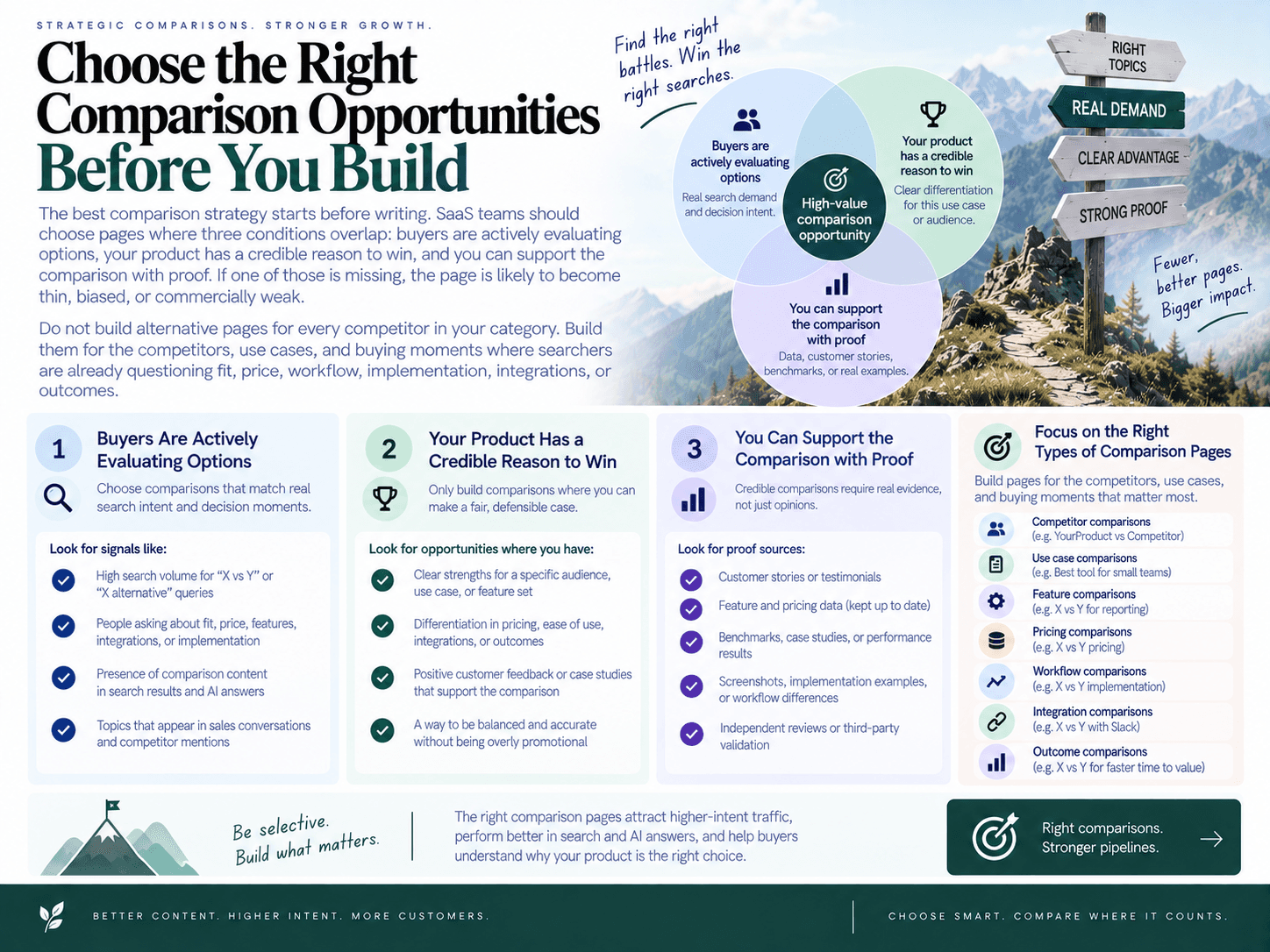
The best comparison strategy starts before writing. SaaS teams should choose pages where three conditions overlap: buyers are actively evaluating options, your product has a credible reason to win, and you can support the comparison with proof. If one of those is missing, the page is likely to become thin, biased, or commercially weak.
Do not build alternative pages for every competitor in your category. Build them for the competitors, use cases, and buying moments where searchers are already questioning fit, price, workflow, implementation, integrations, or outcomes.
Map buyer intent by query type
Different comparison queries reveal different levels of awareness. Treat each query type as a signal for what the buyer needs to decide next.
Competitor-alternative queries: Searches like “alternatives to [competitor]” usually come from buyers who know a product but are unsure whether it fits their needs. These pages should explain why someone may switch categories, workflows, pricing models, or implementation approaches.
Brand-versus-brand queries: Searches like “[brand] vs [competitor]” are direct evaluation moments. These pages work best when buyers are comparing two known options and need a clear breakdown of audience fit, strengths, limitations, integrations, and decision criteria.
Best-tools queries: Searches like “best [category] tools for [audience/use case]” are useful when buyers are still building a shortlist. These pages should compare multiple options using consistent criteria, not simply rank your product first without explanation.
Migration queries: Searches like “switch from [competitor]” or “[competitor] migration” indicate operational friction. These pages should focus on switching triggers, implementation steps, data or workflow considerations, and what changes after moving.
Use-case-specific comparison searches: Queries like “best [category] for startups,” “best [category] for agencies,” or “[tool] for WordPress teams” often convert well because they reflect context. The page should be built around the audience’s workflow, budget, team size, integrations, and success criteria.
This mapping also matters for what answer engine optimization means for SaaS teams. Buyers increasingly ask AI assistants for recommendations such as “What is the best alternative to X for a small SaaS team?” Pages that clearly state audience fit, tradeoffs, and decision criteria are easier for search engines and AI systems to interpret.
Prioritize pages by revenue potential and proof availability
A comparison opportunity is not valuable just because a competitor has search volume. Prioritize pages using a decision score that combines commercial intent, product fit, and available proof.
Buyer intent: Does the query suggest active evaluation, switching, budget approval, or vendor selection?
Product fit: Can your product genuinely solve the use case better for a specific audience?
Competitor awareness: Is the competitor known enough that buyers search for alternatives or direct comparisons?
Sales objections: Does your sales team repeatedly hear this competitor, category objection, pricing concern, or migration question?
Search Console data: Are you already getting impressions for competitor, category, “best,” or “alternative” queries that deserve a dedicated page?
Competitor gaps: Is there a clear difference in workflow, audience focus, integrations, service model, automation, pricing structure, or implementation experience?
AI-assisted buyer questions: Are prospects likely to ask AI tools for recommendations, comparisons, or shortlist help around this use case?
Proof availability: Can you support your positioning with product facts, public documentation, customer proof, reviews, integrations, or transparent limitations?
The strongest opportunities usually sit at the intersection of search demand and sales reality. For example, if prospects frequently ask how your product compares with a large incumbent, and Search Console shows impressions for that competitor’s name, a direct comparison page may be worth building. If a competitor is famous but your product has no meaningful differentiation for that buyer segment, the page should wait.
Decide which page format fits each opportunity
Choose the format based on the buyer’s question, not your preferred template. A mismatch between query intent and page type weakens rankings and conversions.
Use an alternatives page when the buyer is dissatisfied with, priced out of, or uncertain about a known vendor and wants a shortlist of credible options.
Use a versus page when the buyer is comparing your product against one specific competitor and needs a structured, side-by-side decision.
Use a best-tools page when the buyer has not chosen a shortlist and needs multiple options evaluated for a defined audience or use case.
Use a migration page when switching friction is the central concern and the buyer needs operational confidence before changing tools.
Use a use-case comparison page when the winning argument depends on context, such as team size, CMS, integration needs, workflow complexity, or level of automation.
High-performing competitor comparison pages are selective. They do not chase every rival keyword or manufacture differentiation where none exists. They focus on the buying moments where your product can make a fair, specific, and provable case for why it is the better fit for a defined customer.
That selectivity is what protects quality at scale. When every page is tied to a real buyer question, a clear audience, meaningful criteria, and proof you can stand behind, comparison content becomes a decision asset rather than a search traffic gamble. It also improves AI search visibility because the page gives machines and buyers the same thing: structured, credible answers about who should choose which product and why.
Use a Page Structure That Helps Buyers Decide
A strong alternatives page is not a list of vendors with a CTA at the bottom. It is a decision asset. The page should quickly answer three questions: which option is best for this buyer, why that recommendation is credible, and what tradeoffs the buyer should understand before taking the next step.
For SaaS comparison pages, the best structure usually moves from recommendation to evidence: open with a clear point of view, define who the page is for, summarize the options, compare them against meaningful criteria, then support the recommendation with proof, limitations, implementation context, and conversion paths.
Above-the-fold positioning
The top of the page should not hide behind a generic introduction. Buyers arriving on an alternatives or comparison page are usually already aware of the category and may already know the competitor. Use the first screen to orient them immediately.
Include these elements above the fold:
A specific recommendation: State who your product is best for and in what situation. For example: “Best for small teams that want SEO execution, not just research.”
Audience fit: Clarify whether the page is written for startups, agencies, enterprise teams, solo founders, technical teams, or a specific role.
Use-case framing: Anchor the comparison around a job-to-be-done, such as migration, automation, reporting, content production, sales outreach, onboarding, or customer support.
Short product summary: Give each major option a concise, factual description before asking readers to interpret a table.
Primary CTA: Offer a relevant next step, such as starting a trial, booking a demo, viewing pricing, or reading a detailed versus page.
This opening should feel useful even if the reader never scrolls. Avoid vague claims like “the best alternative for every team.” A narrower recommendation is more believable and converts better because the right buyers can self-select.
Comparison table and evaluation criteria
The comparison table should be a decision summary, not decoration. Many pages include tables that compare surface-level features buyers do not actually care about. A better table turns the buyer’s evaluation criteria into a compact recommendation engine.
Choose criteria based on the buying situation, not on whatever makes your product look strongest. Useful criteria often include:
Best-fit audience: Who each product is most appropriate for.
Primary use case: The main job each product helps complete.
Core strengths: The areas where each option is strongest.
Workflow coverage: Whether the product solves one step or supports the full process.
Integrations: The systems buyers need the tool to connect with.
Implementation effort: How much setup, migration, training, or process change is likely required.
Pricing model or pricing notes: Summarize public pricing context when available, but avoid pretending to know contract-specific details.
Limitations: Include honest constraints so the table does not read like an ad.
For comparison page SEO, this table also helps search engines and AI systems understand the entities being compared, the criteria that matter, and the relationship between products. But the buyer comes first: if the table does not help someone make a shortlist, it should be rewritten.
Competitor-by-competitor sections
After the summary table, give each product or competitor its own section. This is where you add nuance that cannot fit into a grid. A good competitor section should include:
What the product is: A concise, factual summary of the product’s positioning or category.
Where it fits best: The audience, company size, workflow, or use case where it makes sense.
Notable strengths: Real reasons a buyer might choose it.
Tradeoffs: Situations where another option may be a better fit.
Proof points: Customer evidence, integrations, review signals, public documentation, or product capabilities that support the analysis.
Decision guidance: A short “choose this if…” summary that helps readers act.
This format is especially useful when a page compares products with different philosophies. For example, a comparison example: SEO Autopilot vs Ahrefs can frame the decision around audience fit, workflow differences, and whether the buyer needs SEO execution or a broader research suite.
Use-case fit, tradeoffs, and proof
High-converting comparison pages do not only say “we are better.” They explain when each option is better. That distinction builds trust and reduces poor-fit conversions.
Add sections that cover:
Use-case recommendations: Break down which option fits specific scenarios, such as small-team execution, enterprise governance, agency reporting, migration from a competitor, or technical customization.
Review signals: Reference review themes, ratings, testimonials, case studies, or customer quotes where appropriate. The goal is to show that the positioning is reflected in customer experience.
Pricing notes: Help buyers understand packaging, free trials, usage-based pricing, seat-based pricing, or enterprise plans when that information is available and relevant.
Integrations: Call out integrations that affect adoption, such as CMS, CRM, analytics, data warehouse, support desk, or collaboration tools.
Limitations: State constraints plainly. Transparent limitations make the rest of the page more credible.
Migration or implementation considerations: Explain what it takes to switch, import data, connect tools, train users, or roll out the product internally.
These sections turn a comparison from a keyword-targeted landing page into a buying guide. They also help sales teams because the page addresses objections before a demo or trial starts.
FAQs and CTA blocks
End with FAQs that answer the questions buyers ask when they are close to a decision. Useful FAQ topics include product fit, switching from a competitor, integrations, pricing differences, onboarding, data migration, security, support, and whether the product is appropriate for specific team sizes or workflows.
Place CTA blocks at natural decision points rather than only at the end. For example:
After the opening recommendation, offer a primary demo or trial CTA.
After the comparison table, offer a “see how it works” CTA for readers who have enough context.
After migration or implementation details, offer a sales or onboarding CTA.
At the end, offer a final CTA that matches the page’s recommendation.
The best structure makes the buyer feel informed, not pressured. If the page clearly explains fit, tradeoffs, proof, implementation, and next steps, it can rank for commercial queries while also helping qualified buyers move forward with confidence.
Make Every Claim Verifiable, Fair, and Conversion-Oriented
The fastest way to weaken a comparison page is to make claims buyers cannot verify. Strong alternatives page SEO depends on trust: clear product facts, sourced competitor statements, transparent tradeoffs, and proof that supports the recommendation. The goal is not to “win” every row in a table. The goal is to help the right buyer recognize the right fit.
Separate product facts from competitor claims
Treat your own product information and competitor information as two different claim types. Your product facts should come from controlled internal sources: feature documentation, pricing pages, integration lists, security pages, customer stories, onboarding materials, and product marketing notes. Competitor claims should come from public sources: the competitor’s website, documentation, help center, pricing page, changelog, marketplace listings, public reviews, or other credible third-party pages.
For every meaningful comparison statement, keep a simple editorial record:
Claim: What the page says in plain language.
Source URL: Where the information came from.
Retrieval date: When the source was checked.
Claim type: Your product fact, competitor fact, customer proof, pricing note, integration evidence, or editorial conclusion.
Approval status: Reviewed, revised, rejected, or needs legal/product review.
This discipline matters because comparison pages often sit close to revenue and risk. A sentence like “we are easier to use than Competitor X” is weak unless you define what “easier” means. A stronger version is specific and supportable: “Teams that want a guided setup, built-in templates, and fewer manual configuration steps may prefer this workflow.” That framing connects the claim to buyer criteria instead of making a broad superiority statement.
The same standard should apply to comparison tables. Avoid vague rows like “Best UX,” “More powerful,” or “Better support” unless you can define the basis for comparison. Use criteria that can be checked: supported integrations, publishing workflow, approval controls, reporting views, onboarding model, public pricing structure, review themes, or use-case fit.
Show when your product is and is not the best fit
High-converting competitor comparison pages are not one-sided takedowns. Buyers are already skeptical of vendor-owned content, so exaggerated criticism usually reduces trust. A fair page should acknowledge where an alternative may be a better fit, especially when the difference is obvious from audience, workflow, complexity, or budget.
Use positioning statements like:
Best fit for us: “Choose this if you need…”
Best fit for the competitor: “Consider the alternative if your priority is…”
Not ideal for: “This may not be the right fit if…”
Decision factor: “The key difference is…”
This does not weaken conversion. It improves conversion quality. When buyers can see the tradeoff clearly, the right-fit prospects move forward with more confidence and fewer objections. The wrong-fit prospects disqualify themselves before entering the pipeline, which protects sales time and reduces churn risk later.
Documented limitations are especially valuable. If your product is strongest for small teams, say so. If a competitor is better suited to enterprise procurement, advanced customization, or a different workflow, say that too. Transparent constraints make the positive claims more believable because the page is not pretending every buyer has the same needs.
Use reviews, integrations, and limitations as trust signals
Comparison content should include proof that buyers already use when making software decisions. That includes customer quotes, review snippets, ratings themes, case studies, integration documentation, partner listings, migration notes, screenshots, and pricing caveats. These elements turn a page from a marketing argument into a decision-support asset.
When using review signals, summarize patterns instead of cherry-picking only flattering quotes. For example, “Customers often mention fast setup and responsive support” is more credible when paired with a short quote, the review platform name, and a clear indication that it reflects a theme. Do not imply a platform-wide consensus from one isolated review.
Integration evidence is equally important for SaaS buyers. If your page says a product works with WordPress, Salesforce, Slack, HubSpot, Shopify, or another tool, support that statement with a relevant documentation page, marketplace listing, or integration page. Integration claims are high-stakes because they affect implementation planning, technical feasibility, and switching cost.
Pricing also needs careful language. SaaS pricing changes frequently, and many vendors use custom quotes, usage tiers, add-ons, or annual discounts. Instead of overclaiming, use pricing caveats such as “based on publicly listed plans as of [date],” “check the vendor’s pricing page for current details,” or “pricing may vary by usage, seats, or contract terms.” The page can still be useful without pretending pricing is static.
Finally, convert proof points into buyer guidance. Do not simply list logos, ratings, or integrations. Explain what each proof element means for the decision: faster rollout, fewer tools to connect, better fit for a regulated team, stronger self-serve onboarding, or more control for a technical operator. Verifiable claims build trust; fair interpretation turns that trust into action.
Optimize Alternatives Pages for Search, AI Answers, and Internal Discovery
Strong comparison content needs more than a persuasive table. It should be easy for Google to crawl, easy for buyers to scan, easy for AI systems to summarize, and easy for visitors to find from related pages on your site. Treat each page as a structured decision asset, not an isolated landing page.
On-page SEO and entity coverage
Start with tight alignment between the title tag, H1, opening summary, and the actual comparison angle. If the page targets “Competitor alternatives,” the title and H1 should make that clear without drifting into a generic category page.
Title tag: Include the competitor or category, the alternatives angle, and the use case when relevant. Example: “Best [Competitor] Alternatives for Small SaaS Teams.”
H1: Match the search intent closely. Avoid clever headlines that remove the product or comparison entity buyers searched for.
Intro summary: Explain who the page is for, what products are compared, and the decision criteria used.
Product summaries: Give each product a concise, factual description before evaluating it. This helps buyers and answer engines understand the entities on the page.
Evaluation criteria: Use consistent sections for pricing model, audience fit, integrations, implementation effort, automation, reporting, support, and limitations where relevant.
Entity coverage matters because comparison searches are often brand-heavy. Mention product names, categories, use cases, integrations, customer segments, and adjacent alternatives in natural language. For what answer engine optimization means for SaaS teams, this kind of clear entity structure helps AI systems extract defensible recommendations instead of reducing your page to a vague product list.
FAQs also deserve more than filler. Use them to answer decision-stage questions such as “Which alternative is best for agencies?”, “Which tool is better for WordPress?”, “Does this product support migration?”, or “When should I choose a broader platform instead?” Each answer should be short, specific, and grounded in the comparison criteria already used on the page.
Schema and structured data
Structured data will not make a weak page rank, but it can make a strong page easier for search engines to interpret. For comparison pages, think in terms of clarity rather than markup tricks. There is no universal shortcut where comparison schema replaces the need for substantive content.
Useful JSON-LD patterns often include:
BreadcrumbList: Shows where the page sits in your site hierarchy, such as Home > Comparisons > [Competitor] Alternatives.
FAQPage: Marks up genuine FAQ content that is visible on the page and helpful to buyers.
Product or SoftwareApplication: Can be appropriate for your own product page sections when the information is accurate and visible to users.
ItemList: Can help describe a list of alternatives, especially on “best tools” or “top alternatives” pages.
Review markup: Use carefully. Do not mark up self-authored promotional claims as third-party reviews.
Keep structured data synchronized with the page. If pricing notes, product names, FAQs, or breadcrumbs change in the copy, update the JSON-LD as well. Inconsistent markup can weaken trust signals and create maintenance debt across a large comparison library.
Internal links, indexation, and freshness
Comparison pages should sit inside a deliberate site architecture. Link to them from category pages, feature pages, competitor hubs, relevant blog posts, integration pages, and sales-enablement content. Likewise, link out from each comparison page to deeper resources that help the buyer validate the recommendation.
A strong linking model might include:
Category hub to alternatives page: “Best tools for [use case]” links to specific competitor-alternative pages.
Alternatives page to versus page: A broad “[Competitor] alternatives” article links to a focused “[Your product] vs [Competitor]” page.
Feature page to comparison page: A workflow automation feature page links to comparisons where that feature is a key differentiator.
Blog post to commercial page: Educational content about the problem links to the relevant comparison for buyers ready to evaluate tools.
This is where automated internal linking for SaaS topic authority can help prevent new comparison assets from becoming orphaned pages. The goal is not to add links everywhere; it is to connect decision-stage pages to the topical clusters and product pages that give them context.
Technical discoverability is just as important. Make sure every comparison page is crawlable, included in your XML sitemap, linked from at least one indexable page, and not blocked by robots.txt, noindex tags, canonical mistakes, or JavaScript-only navigation. After publishing, use an indexing workflow to confirm the URL is discoverable and monitor whether Google has crawled and indexed it.
Finally, schedule refreshes. Alternatives pages age quickly because vendors change pricing, features, packaging, integrations, review volume, and positioning. Set review triggers for major product launches, pricing changes, new integrations, review milestones, competitor rebrands, and sales feedback. Freshness is not just an SEO maintenance task; it protects conversion by keeping buyer-facing claims current and credible.
Scale Comparison Publishing Without Creating Thin or Risky Pages
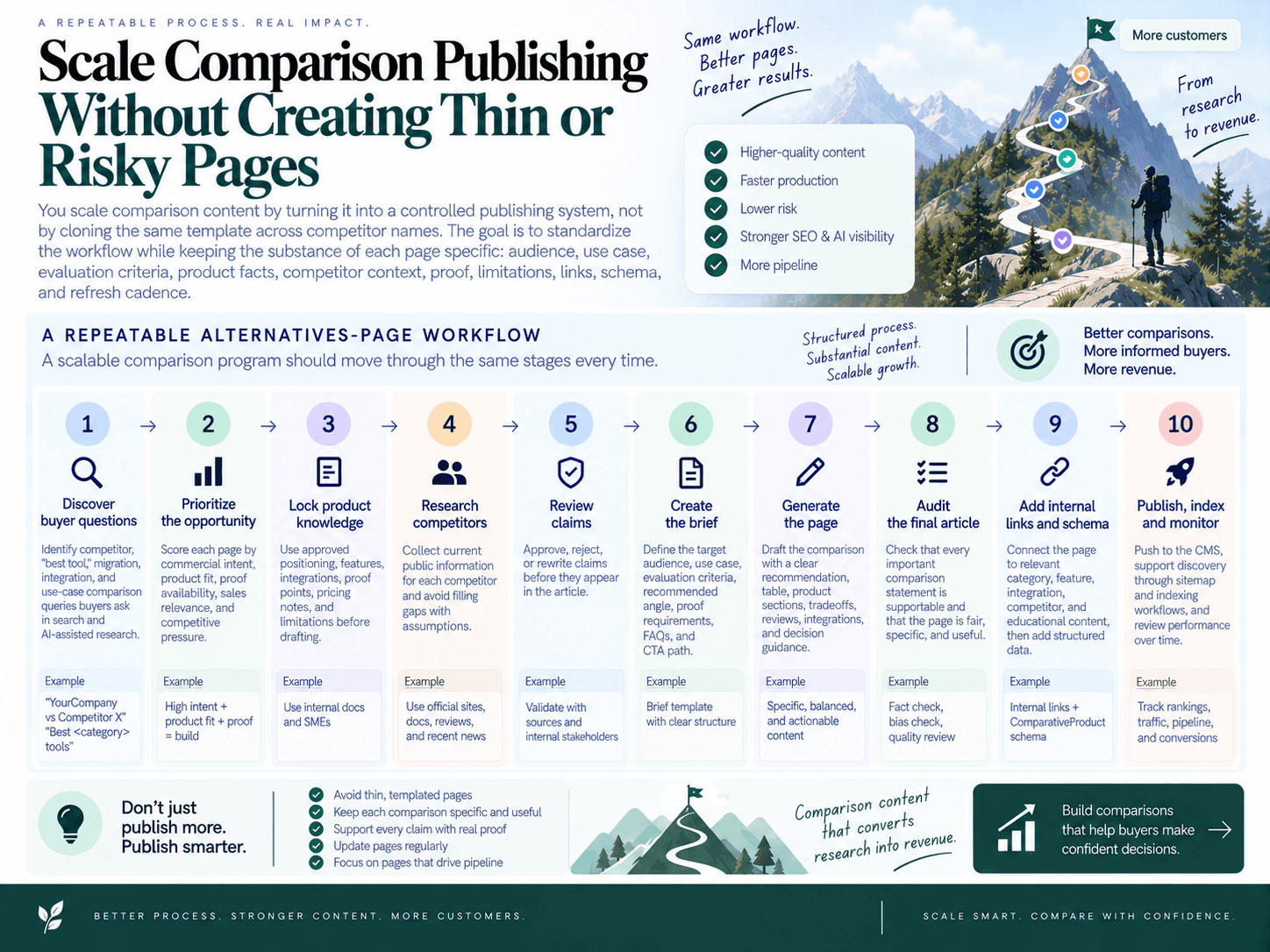
You scale comparison content by turning it into a controlled publishing system, not by cloning the same template across competitor names. The goal is to standardize the workflow while keeping the substance of each page specific: audience, use case, evaluation criteria, product facts, competitor context, proof, limitations, links, schema, and refresh cadence.
Build a repeatable alternatives-page workflow
A scalable comparison program should move through the same stages every time:
Discover buyer questions: Identify competitor, “best tool,” migration, integration, and use-case comparison queries buyers ask in search and AI-assisted research.
Prioritize the opportunity: Score each page by commercial intent, product fit, proof availability, sales relevance, and competitive pressure.
Lock product knowledge: Use approved positioning, features, integrations, proof points, pricing notes, and limitations before drafting.
Research competitors: Collect current public information for each competitor and avoid filling gaps with assumptions.
Review claims: Approve, reject, or rewrite claims before they appear in the article.
Create the brief: Define the target audience, use case, evaluation criteria, recommended angle, proof requirements, FAQs, and CTA path.
Generate the page: Draft the comparison with a clear recommendation, table, product sections, tradeoffs, reviews, integrations, and decision guidance.
Audit the final article: Check that every important comparison statement is supportable and that the page is fair, specific, and useful.
Add internal links and schema: Connect the page to relevant category, feature, integration, competitor, and educational content, then add structured data.
Publish, index, and monitor: Push to the CMS, support discovery through sitemap and indexing workflows, and review performance over time.
This is where many SaaS teams benefit from SEO workflow automation from research to publishing. The workflow should reduce manual production work without removing the controls that protect credibility.
Use automation for research, briefs, links, and publishing
SEO Autopilot supports this kind of operating system for commercial SEO content. Prompt Universe helps teams map buyer-oriented questions across research, comparison, purchase, implementation, and expansion moments, then groups those prompts into content opportunities. That is useful when your team needs to uncover the comparison angles buyers are likely to ask search engines and AI assistants, not just the keywords a tool exports.
From there, opportunities can move into a Unified Backlog, where topics from site analysis, competitors, keyword research, and Google Search Console signals become a ranked, selectable publishing queue. This prevents comparison programs from becoming a scattered spreadsheet of “maybe someday” pages.
For comparison page SEO, SEO Autopilot’s Comparison Builder is designed for evidence-backed commercial pages. It supports brand-versus-competitor pages, competitor-alternative pages, and best-tools articles. Teams can define the promoted offer, target keyword, audience, use case, competitors, URLs, and evaluation criteria. The workflow combines approved product information with competitor research, then gives editors control to approve or reject claims before generation.
That matters because safe scale is not just about publishing more pages. It is about publishing more pages with enough original decision value to avoid thin content. If you are expanding into dozens of competitor, use-case, or category comparisons, pair your workflow with a strategy for programmatic SEO pages at scale without thin content.
After drafting, SEO Autopilot can add automatic internal links so new comparison pages do not ship as isolated assets. Strong comparison clusters should connect to related alternatives pages, product pages, integration pages, feature explainers, and bottom-funnel blog posts. This supports automated internal linking for SaaS topic authority while helping buyers continue their evaluation path.
The platform also supports JSON-LD structured data generation, scheduling, and publishing integrations for WordPress, Contentful, and Framer. For teams running automated content publishing, that closes the gap between strategy and execution: brief, draft, internal links, CTA placement, structured data, CMS scheduling, indexing support, and analytics views can live in one workflow instead of separate tools and handoffs.
Keep human review where risk is highest
Automation should accelerate the low-risk parts of production and slow down the moments where accuracy matters most. Comparison pages make direct or implied claims about other products, so the highest-risk steps are competitor research, claim approval, superiority statements, pricing references, and limitation sections.
A practical review model is:
Manual review for strategic pages: Use hands-on editorial review for high-value competitor pages, legal-sensitive categories, or pages aimed at enterprise buyers.
Brief-first review for important pages: Approve the angle, criteria, proof points, and positioning before the article is drafted.
Full automation for lower-risk content: Reserve hands-off workflows for pages with clear inputs, low claim complexity, and established internal standards.
SEO Autopilot supports multiple automation modes, including Full Auto, Brief First, and Manual workflows, so teams can choose the right level of control for each page. That flexibility is especially important in bottom-of-funnel SEO, where one unsupported claim can reduce trust with buyers even if the page ranks.
Finally, scale should include maintenance. Comparison pages decay when competitors change pricing, launch features, reposition products, or collect new reviews. Use analytics views to monitor performance, indexing support to manage discoverability after publishing, and freshness monitoring to identify moments when a page should be updated. The result is not a one-time comparison campaign; it is a durable publishing system for decision-stage demand.
Conclusion: A Better Alternatives Page Is a Buyer Decision Asset
A strong alternatives or comparison page is not a keyword-targeted landing page with a table attached. It is a decision asset: a page that helps the right buyer understand fit, tradeoffs, proof, and next steps with enough clarity to choose confidently.
Before you publish, use this checklist to keep every page useful, credible, and commercially focused:
Choose a query with real buying intent. Prioritize competitor, “vs,” “best tool,” migration, and use-case searches where buyers are actively evaluating options.
Define the audience and use case. A comparison for solo founders should not use the same criteria as a comparison for enterprise procurement teams.
Compare against decision criteria, not generic features. Evaluate products by workflow fit, integrations, implementation effort, pricing considerations, support needs, proof, and limitations.
Verify every meaningful claim. Your own product facts should come from approved product knowledge, while competitor claims should be tied to public sources and reviewed before publication.
Include proof and tradeoffs. Reviews, customer examples, integrations, pricing notes, screenshots, limitations, and “best fit” guidance make SaaS comparison pages more trustworthy.
Structure the page for search and AI understanding. Use a clear H1, concise product summaries, comparison tables, FAQs, entity-rich sections, structured data, and direct answers that can be interpreted by search engines and AI assistants.
Connect the page internally. Link from category pages, feature pages, competitor hubs, related blog posts, and sales enablement content so comparison pages are not isolated.
Refresh regularly. Revisit pages when competitors change pricing, launch features, adjust positioning, earn new reviews, or when your own product gains new proof points.
Automate with guardrails. Scale research, briefs, internal links, schema, CMS publishing, indexing support, and performance monitoring, but keep human review where claims and competitive positioning carry risk.
The teams that win with comparison content are not the ones that publish the most pages. They are the ones that create the most useful buying experience at the exact moment a prospect is choosing between options.
SEO Autopilot helps SaaS teams build that system. With buyer-question discovery, a Unified Backlog for prioritizing opportunities, Comparison Builder for evidence-backed commercial pages, automatic internal linking, JSON-LD generation, CMS publishing for WordPress, Contentful, and Framer, indexing support, and analytics views inside the workspace, you can move from scattered comparison ideas to a repeatable publishing workflow.
Ready to build comparison pages that rank, earn trust, and convert? Start with SEO Autopilot and turn high-intent buyer questions into verified, internally linked, publish-ready comparison assets.

About the author: SEO Autopilot — Get recommended by Google and AI
SEO Autopilot is the SEO operating system for SaaS teams: it finds what to write from your site, competitors, and Search Console — then publishes evidence-verified comparison pages and intent-matched content on autopilot to WordPress, Framer, and more.
Areas of expertise: seo, aeo, geo, Search Engine Optimization, Answer Engine Optimization, Generative Engine Optimization, SEO Expert, Article Writer