What Is Internal Linking? SaaS Topic Authority Guide
What Is Internal Linking?
A simple definition
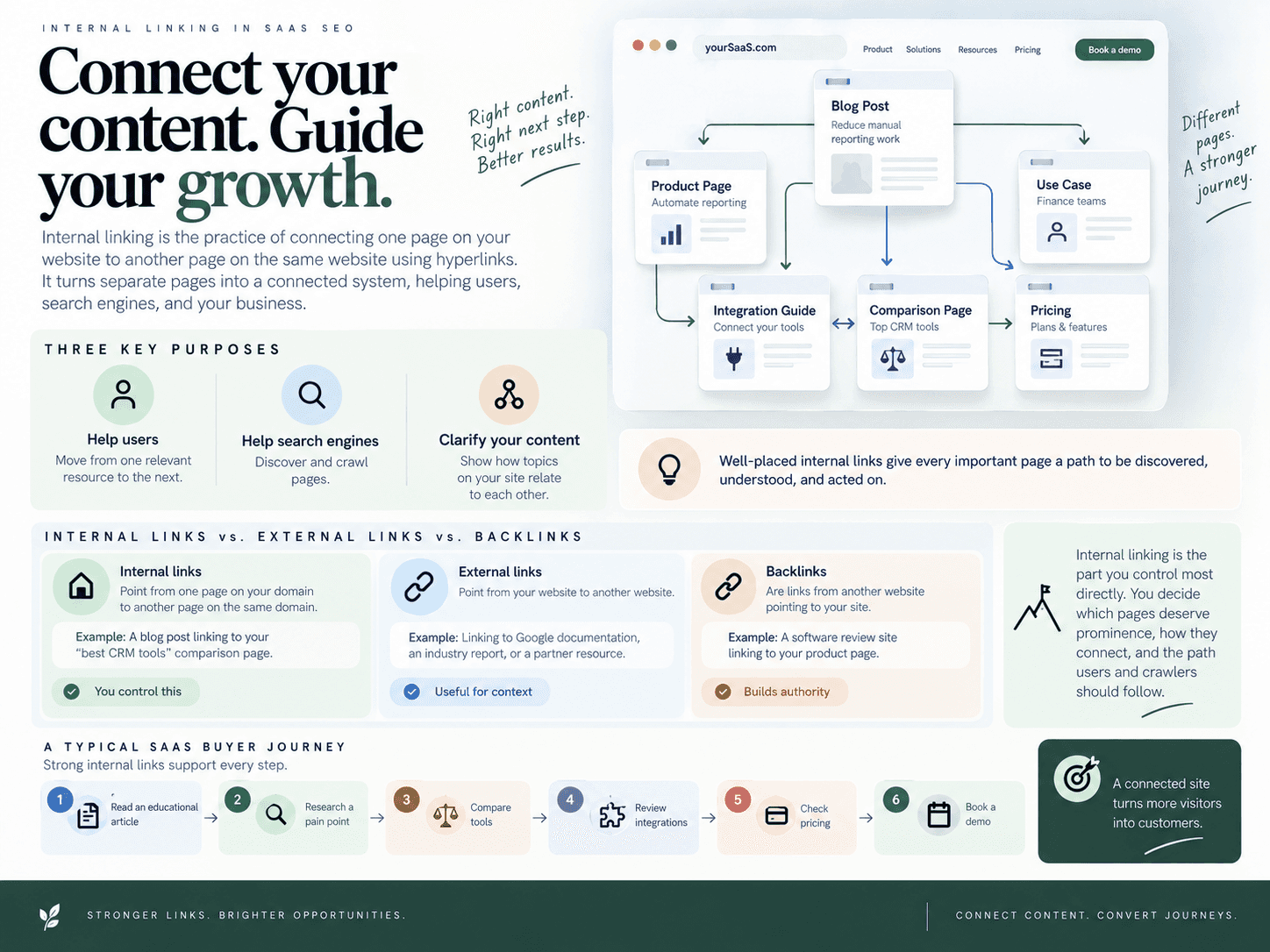
What is internal linking? It is the practice of connecting one page on your website to another page on the same website using hyperlinks. For example, a SaaS blog post about reducing manual reporting work might link to a related product page, use case page, integration guide, or comparison page.
Internal links serve three core purposes. They help users move from one relevant resource to the next, help search engines discover and crawl pages, and help clarify how different topics on your site relate to each other. When done well, they turn separate pages into a connected system rather than a loose collection of articles.
For software companies, this matters because buyers rarely move in a straight line. A visitor may start with an educational article, then research a pain point, compare tools, review integrations, and finally evaluate pricing or book a demo. Strong linking gives that journey a logical path.
Internal links vs. external links vs. backlinks
Beginners often confuse three different types of links:
Internal links point from one page on your domain to another page on the same domain. Example: a blog post linking to your “best CRM tools” comparison page.
External links point from your website to another website. Example: linking to Google documentation, an industry report, or a partner resource.
Backlinks are links from another website pointing to your site. Example: a software review site linking to your product page.
Backlinks can build authority from outside your domain. External links can cite useful sources or direct users to relevant third-party information. Internal linking, however, is the part you control most directly. You decide which pages deserve prominence, which related resources should be connected, and how users and crawlers should move through your content library.
In SaaS SEO, the goal is not simply to add links for the sake of adding links. The goal is to connect education, use cases, feature explanations, comparison content, customer proof, and conversion paths in a way that reflects how buyers evaluate software. A strong internal link structure helps your site communicate: “These topics belong together, this page is important, and this is the next useful step.”
Why Internal Links Matter for SaaS SEO and Topic Authority
Internal links matter because they turn separate pages into a connected system. For SaaS companies, that system helps search engines understand your expertise, helps newer and deeper pages get discovered, and helps buyers move from learning about a problem to evaluating your product as a solution.
Without deliberate linking, a SaaS site can look fragmented: blog posts explain problems, feature pages describe capabilities, comparison pages target high-intent buyers, and docs answer implementation questions, but none of them reinforce each other. Strong internal linking makes those assets work together instead of competing for attention in isolation.
They clarify topical relationships
Search engines do not evaluate a page only by its words. They also look at how that page fits into the rest of the site. When multiple related articles link to a central guide, product page, or use-case page, those links create a stronger topical signal.
For example, a SaaS company selling customer onboarding software might publish articles about onboarding checklists, activation metrics, user segmentation, lifecycle emails, and product-led onboarding. If those pages link to each other and to a core onboarding platform page, the site communicates a clear area of expertise. That structure supports topic authority because the website is not just publishing isolated articles; it is building a connected body of knowledge.
This is especially important for SaaS SEO, where buyers often research problems long before they search for a product category or vendor. A clean internal link structure helps connect early-stage education with the commercial pages that explain how the software solves the problem. If your team is planning build a clean topic map work, internal links are what turn that map into a visible site architecture.
They move users from education to evaluation
Internal links are not only for crawlers. They guide real buyers through the decision journey. A reader who lands on an informational post may not be ready to request a demo, but they may be ready to read a use-case page, compare approaches, or understand what features matter.
A strong SaaS internal link path often looks like this:
Educational article: explains a problem, trend, or best practice.
Pain-point or use-case page: shows how that problem appears in a specific workflow or team.
Commercial page: connects the problem to product capabilities, comparison content, integrations, proof, or a demo path.
This flow matters because many SaaS buyers do not convert from a single blog post. They need context, proof, and relevance. Contextual links help them find the next useful page without relying on the main navigation or a generic call to action.
They prevent content from becoming isolated
One of the most common SaaS content problems is the orphaned article: a post gets published, appears in the sitemap, maybe shows on the blog index for a short time, and then receives no meaningful links from related pages. Search engines can still find it, but the page has weak contextual support. Users are unlikely to discover it unless they land on it directly.
Internal links reduce that risk by creating crawl paths from established pages to newer or deeper assets. This is particularly valuable for high-intent pages such as alternatives, best-tools, and competitor comparison pages. Those pages should not depend only on header navigation or footer links. They need contextual support from relevant educational posts, feature pages, integration pages, and proof-driven content.
When blog posts, product pages, docs, and comparison assets are treated as one connected system, every new page has a clearer role. Search engines can interpret relationships more easily, buyers can progress through the funnel more naturally, and content clusters become more than a spreadsheet exercise—they become the working structure of your site.
Build Link Architecture Around SaaS Content Hubs
Strong internal linking starts before an article is drafted. For SaaS teams, the goal is not to scatter links across blog posts after publication; it is to design a clear path from education to evaluation. A useful structure connects broad learning content, pain-point articles, use-case pages, comparison pages, product pages, and proof assets so users and search engines can understand how each page supports the larger product story.
Start with hub pages and supporting articles
A SaaS content hub is a central page that organizes a major topic your product wants to be known for. Around that hub, supporting articles answer narrower questions, address related problems, and cover specific use cases. The hub gives the cluster a clear center of gravity, while the supporting articles expand topical depth.
For example, a SaaS company selling customer support software might create a hub around “AI customer support automation.” Supporting articles could cover chatbot routing, ticket deflection, support team productivity, help desk integrations, and customer satisfaction metrics. Each article should link back to the hub when the broader topic is relevant, and the hub should link out to the most important supporting pages.
This structure works best when the cluster is planned intentionally. Before publishing, teams should build a clean topic map that shows which pages serve as hubs, which pages support them, and which commercial pages need contextual support from the cluster.
Map links by intent stage
Internal links should guide readers based on where they are in the buying journey. A beginner reading an educational post may not be ready for a demo request, but they may be ready to learn about a specific pain point. A reader on a pain-point article may be ready for a use-case page, integration page, or comparison page.
A practical SaaS linking path might look like this:
Awareness article: “How to reduce manual reporting work” links to a pain-point page about reporting bottlenecks.
Pain-point article: “Why SaaS reporting workflows break at scale” links to a use-case page for automated reporting.
Use-case page: “Automated reporting for RevOps teams” links to a comparison page or alternatives page for buyers evaluating tools.
Comparison page: “Best automated reporting tools for SaaS teams” links to product pages, demos, customer proof, integrations, and implementation resources.
This kind of intent-based pathway makes the site easier to navigate and gives search engines a clearer signal about how informational pages, mid-funnel content, and commercial pages relate to one another.
Use links to support bottom-of-funnel pages
High-intent pages such as alternatives pages, “best tools” articles, and brand-vs-competitor comparisons should not rely only on the main navigation or footer links. Those pages need contextual links from relevant educational and mid-funnel content. That is especially important for bottom-of-funnel SEO, where the page may target fewer searches but influence more revenue.
For example, if a SaaS company has a comparison page for “Tool A vs. Tool B,” that page should receive links from related articles about implementation challenges, product category definitions, integration requirements, pricing considerations, migration planning, and use-case evaluation. Those links tell search engines that the comparison page is part of a broader decision-making cluster, not an isolated sales asset.
The same principle applies in reverse. Commercial pages should link back to supporting proof when it helps the buyer evaluate the product. A comparison page can link to a feature page, a customer story, an integration page, a security page, or a documentation resource. This creates a more credible path for buyers who need evidence before converting.
The best SaaS internal link systems feel like guided research journeys. They help a reader move from “I have a problem” to “I understand the category” to “I know which product fits my situation.” When that journey is reflected in the site’s internal structure, each page becomes part of a larger authority system rather than a standalone asset.
Use Anchor Text That Signals Relevance Without Looking Forced
Descriptive anchors beat generic labels
Anchor text is the clickable wording of a link, and it should tell both readers and search engines what they can expect on the destination page. A link labeled “click here” gives almost no context. A link labeled “automated SEO workflow” tells the reader the page is about a process, not just a vague next step.
For SaaS sites, the best anchors usually describe the destination by topic, use case, feature, or buyer intent. For example, a blog post about scaling content operations might link to a workflow page with “automated SEO workflow.” A post about safe automation could link to a guide on AI internal linking techniques if that page genuinely explains how AI can recommend and place relevant links.
Good anchors make contextual links feel useful rather than promotional. They answer the reader’s silent question: “Why should I follow this link?”
Weak: “Read more”
Better: “compare SEO automation platforms”
Weak: “This page”
Better: “WordPress auto-publishing workflow”
Weak: “Learn more”
Better: “internal linking strategy for SaaS content hubs”
Vary anchors naturally across a cluster
A healthy internal link profile does not repeat the same phrase every time it points to a page. If ten articles all link to a comparison page with the identical commercial phrase, the pattern can look engineered. More importantly, it may read poorly for users.
Use natural variation based on the sentence and the reader’s intent. A page about SEO automation could be linked with anchors such as “automated SEO workflow,” “brief-to-publish process,” “SEO publishing system,” or “content workflow automation,” depending on the surrounding context. Each phrase should still accurately describe the destination.
This variation helps search engines understand a broader topic relationship while keeping the reading experience smooth. Treat SEO links as editorial recommendations, not mechanical keyword placements.
Avoid over-optimized exact-match patterns
The goal is relevance, not keyword stuffing. Avoid forcing links into sentences where they do not help the reader, and do not link unrelated pages just to push authority toward a priority URL. A feature page about analytics should not be linked from a paragraph about competitor alternatives unless the connection is clear.
Use this quick test before adding a link: if the anchor were removed from the page, would the sentence still make sense and would the destination still be the logical next resource? If yes, the link is probably useful. If the answer is no, rewrite the surrounding context or skip the link.
Strong SaaS internal linking depends on clarity: descriptive wording, relevant destinations, and natural placement. When anchors reflect the actual topic of the linked page, they help users navigate confidently and give search engines cleaner signals about how your content system fits together.
Internal Linking for Comparison Pages and AI Search Visibility
Why high-intent commercial pages need supporting links
For SaaS companies, comparison pages, alternatives pages, and “best tools” articles often target the most commercially valuable searches. These visitors are not just learning the category; they are evaluating vendors, features, pricing fit, integrations, implementation risk, and proof. But these pages rarely perform well as isolated landing pages. They need contextual support from the rest of the site.
A strong internal link system gives those decision-stage assets a clear place in the broader content architecture. Educational articles can link to use-case pages. Use-case pages can link to alternatives or competitor comparison content. Commercial pages can then link to product pages, integration pages, case studies, demos, documentation, and proof assets that support the claims being made.
A practical SaaS pattern looks like this:
Problem-aware content links to use cases that explain how the product solves a specific workflow issue.
Use-case content links to relevant feature pages, integration pages, and category comparisons.
Alternatives and best-tools pages link to evidence, product documentation, migration guides, and customer proof.
Brand-vs-competitor pages link to specific differentiators, relevant features, and conversion paths such as demo or signup pages.
This structure helps buyers move from “I have this problem” to “this product might fit” without forcing every page to do every job. It also helps search engines understand that your decision-stage content is supported by a broader body of relevant material, not just a standalone sales page.
How links reinforce entity and product context
Internal links are also important for entity SEO because they help connect the people, products, categories, competitors, features, integrations, and use cases that define your SaaS positioning. When those relationships are consistently reinforced across the site, machines have more context for interpreting what your product is, who it serves, and how it compares with other options.
For example, a project management SaaS might have separate pages for resource planning, agency workflows, Jira integration, “best project management tools for agencies,” and “[Brand] vs. [Competitor].” If those pages do not link to one another, each one sends a weaker standalone signal. If they are connected with descriptive anchors and clear supporting copy, the site communicates a stronger semantic relationship: this product belongs in this category, solves these use cases, integrates with these tools, and competes in these buying scenarios.
The same logic applies to evidence-based commercial content. A comparison article is more credible when its claims are supported by internal links to feature documentation, integration details, methodology notes, customer examples, or product pages. SEO Autopilot’s Comparison Builder, for instance, is designed to help create evidence-backed commercial pages by combining verified product information with live competitor research, supporting formats such as brand-versus-competitor pages, competitor-alternative pages, and best-tools articles.
What AI systems may infer from connected content
AI search systems and answer engines do not rely on one signal alone. They may evaluate page content, citations, brand mentions, structured information, entity consistency, and how clearly a site explains relationships between concepts. Internal links do not guarantee inclusion in AI-generated answers, but a coherent architecture can improve machine understanding.
For SaaS teams, that means links should clarify relationships that matter in the buying journey:
Product to problem: which pain points the product addresses.
Product to audience: which teams, roles, or company types it is built for.
Product to category: which software category or workflow it belongs to.
Product to competitors: how it is positioned against alternatives.
Product to proof: which documentation, integrations, case studies, or evidence support the positioning.
This is where AI-oriented content planning becomes useful. SEO Autopilot’s Prompt Universe maps buyer questions across research, comparison, purchase, implementation, and expansion stages, then groups them into content opportunities and measures brand visibility in selected AI answers. That kind of question-led planning can reveal which commercial pages need stronger internal support, which proof assets are missing from the path, and which buying-stage topics deserve dedicated content.
The goal is not to manipulate AI systems with excessive links. The goal is to make your site easier to interpret. A connected SaaS site explains the market, the product, the use cases, the competitors, and the evidence in a way that both buyers and machines can follow.
Crawlability, Freshness, and Maintenance: The Hidden Internal Linking Work
The operational work behind internal links is keeping your site’s link graph accurate after every publish, update, migration, and page deletion. A strong linking plan can decay quickly if new articles are not added to hubs, commercial pages lose supporting links, or old URLs break after CMS changes.
For SaaS teams, this matters because search engines and buyers both need clear paths through the site. If a valuable comparison page, integration guide, or use-case article is buried too deeply, it may receive less discovery, less contextual support, and fewer qualified visits than it deserves.
Find and fix orphaned pages
Orphaned pages are URLs that exist on your site but are not linked from other crawlable pages. They may appear in a sitemap, but they are disconnected from the editorial and commercial structure of the site.
Common causes include:
Publishing a new blog post without linking to it from a hub or related article.
Creating comparison, alternatives, or feature pages that only appear in paid campaigns or navigation menus.
Importing old content during a CMS migration without rebuilding contextual links.
Removing hub sections that previously linked to supporting pages.
The fix is not simply “add a link somewhere.” Each important page should have relevant inbound links from pages that explain its context. For example, a “best tools for SaaS reporting” page should be linked from reporting-related educational content, analytics use-case pages, and relevant product pages, not only from a generic blog archive.
Refresh links when new content goes live
Internal linking breaks down when publishing and maintenance are treated as separate jobs. A new article may include links to older pages, but older pages often remain unchanged. That creates stale hubs, outdated “related reading” sections, and missed opportunities to pass readers toward newer, more complete resources.
Every new SaaS page should trigger a small link refresh:
Update the relevant hub page so the new post becomes part of the topic cluster.
Add contextual links from older high-traffic posts to the new article where it answers a logical next question.
Check whether commercial pages should link to the new proof asset, integration guide, or educational explainer.
Replace links to outdated articles if a newer page now provides the better answer.
This is where content freshness becomes more than updating publish dates. Freshness also means the structure around the content reflects the current state of your product, market, competitors, and buyer journey.
Keep crawl paths short and logical
Important pages should not require five or six clicks from the homepage or main content hubs. Deep URLs are not automatically bad, but if a page is strategically important and hard to reach, it sends a weak signal about its role in the site.
A practical SaaS rule: major money pages and cluster hubs should be reachable through multiple logical routes. A comparison page might be linked from a category hub, relevant educational posts, competitor-related content, and product-fit pages. A feature page might be linked from use-case articles, implementation guides, and integration content.
Maintenance should also include technical checks:
Fix broken internal links after redirects, slug changes, or CMS migrations.
Remove links to retired pages that no longer match current positioning.
Audit redirects so internal links point to final destination URLs, not redirect chains.
Review hub pages quarterly to ensure they include the strongest current resources.
As the library grows, the real challenge is internal linking at scale: keeping links, CTAs, hubs, and crawl paths consistent across hundreds of pages without turning every publish into a manual cleanup project. Teams that publish through WordPress, Framer, or another CMS should build link review into the publishing workflow so new content is connected before it goes live and older content is refreshed soon after.
Internal links also support indexing workflows by giving search engines more paths to discover and re-evaluate pages. Sitemaps help, but contextual links explain relationships. A sitemap can say a URL exists; a well-placed internal link helps show why that URL matters within the broader SaaS topic architecture.
Conclusion: Make Internal Linking a Repeatable Publishing System
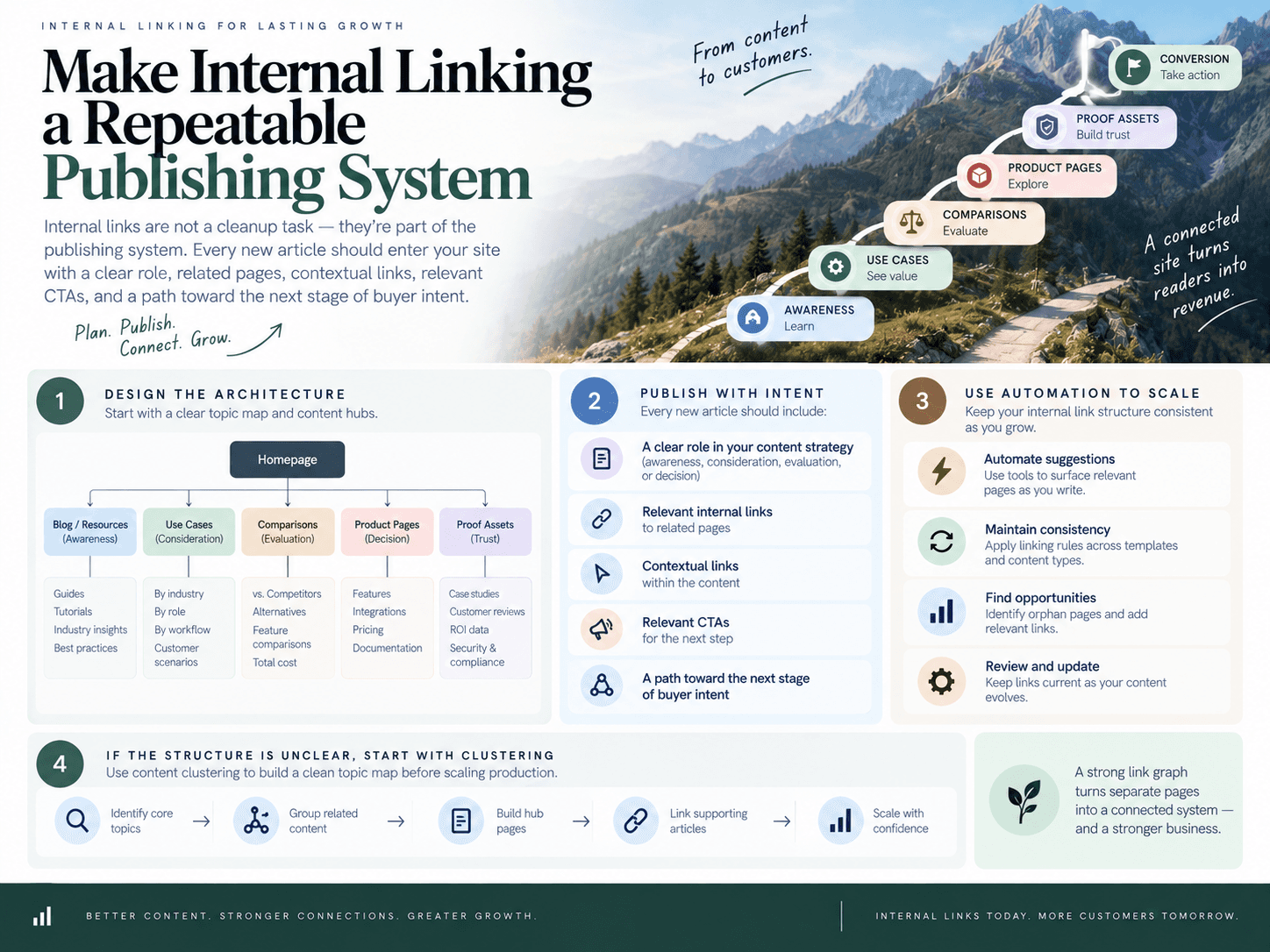
Internal links should not be treated as a cleanup task after content goes live. For SaaS teams, they are part of the publishing system itself: every new article should enter the site with a clear role, related pages, contextual links, relevant CTAs, and a path toward the next stage of buyer intent.
The practical takeaway is simple: design the architecture intentionally, then use automation to keep it consistent. A strong link graph starts with a clear topic map, content hubs, and defined paths between awareness content, use-case pages, comparison pages, product pages, and proof assets. If the structure is unclear, start by using clustering to build a clean topic map before scaling production.
What to automate
Automation is most useful when it turns internal linking into a repeatable part of content operations. Instead of relying on someone to remember which older posts should link to a new article, a system can help identify related pages, suggest contextual anchors, add links during draft creation, and reduce the risk of new posts shipping as isolated URLs.
Good automated internal linking should support the editorial strategy, not override it. It should connect closely related pages, avoid irrelevant authority-passing patterns, and preserve natural anchor variation. That is especially important for SaaS sites where links need to reflect product categories, use cases, integrations, alternatives, and buyer-stage intent. For a deeper look at safe patterns, see these AI internal linking techniques.
This is where an execution-focused platform can help. SEO Autopilot, for example, is built as an SEO operating system that supports the workflow from opportunity discovery to publishing. It can create briefs, generate full articles, add automatic internal links, place natural CTAs, schedule content, and publish through CMS integrations including WordPress, Contentful, and Framer. It also supports JSON-LD structured data generation, indexing workflows with sitemap/indexing support, and Google Analytics/live analytics views inside the workspace.
That matters because the maintenance burden grows with every article. A 20-post blog can be managed manually. A 200-post SaaS library with hubs, comparison pages, integration content, and product-led articles needs a system for internal linking at scale. Otherwise, links become stale, CTAs drift, new pages are under-supported, and high-intent pages fail to receive the contextual signals they need.
Where human review still matters
Automation should handle repeatable execution, but strategic pages still deserve human judgment. Review links on brand-vs-competitor pages, alternatives pages, best-tools pages, pricing-adjacent content, and major product pages. These URLs often influence revenue directly, so the link choices, anchor text, proof points, and CTAs should match your positioning and sales motion.
A practical review process is to let automation draft and connect the page, then have a marketer or SEO lead check three things before publishing:
Relevance: Do the internal links genuinely help the reader understand the topic or evaluate the product?
Intent flow: Does the page guide users naturally from education to evaluation or from comparison to conversion?
Anchor quality: Are anchors descriptive and varied without looking forced or over-optimized?
For teams publishing through WordPress or similar CMS workflows, the goal is not only speed. It is controlled consistency: links, CTAs, review steps, structured data, scheduling, and publishing should work together. If you are building that process, it is worth learning how to auto-publish SEO content safely rather than pushing drafts live without a review model.
The best SaaS SEO programs do not separate content strategy from link architecture. They plan topics by intent, connect related assets as they are created, and maintain the structure over time. Treat internal linking as part of your SEO content workflow automation, and your content library becomes easier for users, search engines, and AI systems to understand.

About the author: SEO Autopilot — Get recommended by Google and AI
SEO Autopilot is the SEO operating system for SaaS teams: it finds what to write from your site, competitors, and Search Console — then publishes evidence-verified comparison pages and intent-matched content on autopilot to WordPress, Framer, and more.
Areas of expertise: seo, aeo, geo, Search Engine Optimization, Answer Engine Optimization, Generative Engine Optimization, SEO Expert, Article Writer