How to Use a Keyword Clustering Tool to Build a Clean Topic Map
What a keyword clustering tool does (in plain English)

A keyword clustering tool takes a messy list of search queries and groups them into topics that should usually be handled by the same page. Instead of staring at hundreds of near-duplicate phrases, you get a cleaner view of what people are actually trying to find, which pages you need, and where different keywords may be competing for the same intent.
The core value is simple: it turns raw keyword data into a publishable planning layer. Good clustering reduces noise, reveals topic patterns, and helps prevent multiple pages from targeting the same search demand.
Keyword clustering vs keyword research: the missing middle step
Keyword research finds possible opportunities: queries, volumes, difficulty estimates, competitor ideas, and Search Console signals. On its own, that research is still just a list.
Keyword clustering organizes that list into related search intents. It answers questions like:
Which keywords belong together on one page?
Which keywords need separate pages because the intent is different?
Which existing URL should own this topic?
Where are we at risk of creating duplicate or overlapping content?
Keyword mapping comes after clustering. It assigns each cluster to a URL: an existing page to optimize, a new page to create, or a page to merge, redirect, or retire.
This is why clustering is the missing middle step between research and execution. Without it, teams often jump from an export to a content calendar too quickly, creating briefs from individual keywords instead of coherent topics. That is how spreadsheets become fragile at scale; if you are managing more than a few dozen opportunities, it is worth understanding why automation beats manual keyword spreadsheets at scale.
What clustering outputs: topics, not “groups”
A weak clustering process gives you folders of similar phrases. A useful one gives you topic decisions.
For example, a raw export might contain:
“best CRM for consultants”
“consultant CRM software”
“CRM for independent consultants”
“how consultants manage client relationships”
“HubSpot alternatives for consultants”
Basic keyword grouping might put these together because they share words like “CRM” and “consultants.” But a planning-ready cluster should separate them by intent. “Best CRM for consultants” may need a commercial comparison page. “How consultants manage client relationships” may be an informational guide. “HubSpot alternatives for consultants” may need a competitor-alternative article.
That distinction matters because each intent deserves a different page type, angle, title, and call to action. The goal is not to make the keyword list look tidy. The goal is to decide what should be published and what should not be duplicated.
In practice, strong topic clustering should help you move from this:
A spreadsheet with 1,000 keywords
No clear page ownership
Multiple writers choosing overlapping topics
Internal links added manually after publishing
To this:
A set of distinct topics
One primary intent per page
Primary and supporting keywords for each brief
A recommended page type for each topic
A cleaner backlog that can be prioritized and assigned
When clustering is worth it (and when it’s overkill)
Clustering is most valuable when you have enough keyword volume that manual review becomes inconsistent. If you have 20 keywords for a small landing page project, you can usually sort them by hand. If you have hundreds or thousands of queries from keyword tools, competitors, and Google Search Console, manual sorting becomes slow and error-prone.
Use clustering when:
You are building a content roadmap from a large keyword export.
You suspect several pages are targeting the same search intent.
You need to brief writers without creating duplicate articles.
You want a cleaner structure for hubs, supporting articles, and internal links.
You are combining keyword research, competitor gaps, and Search Console data into one plan.
It is overkill when the content decision is already obvious: one product page, one branded page, one small FAQ update, or a short list of known terms. In those cases, the better use of time is writing, improving the page, or adding internal links.
The practical expectation is this: clustering will not make the strategic decision for you, but it should make the decision visible. It should show which keywords belong together, where intent changes, and which topic deserves one clear URL owner before your team starts producing content.
Clustering concepts you need before you use any tool
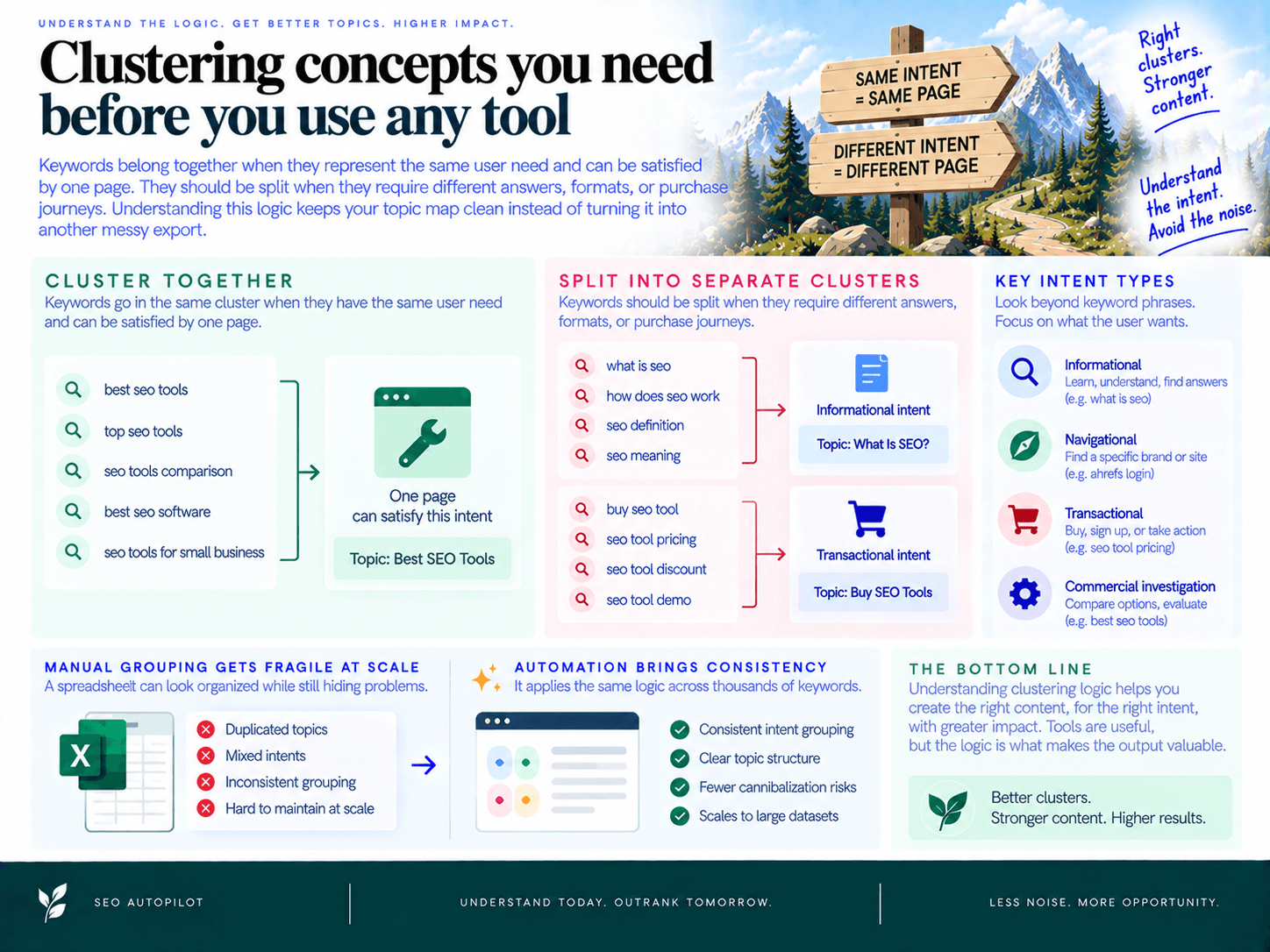
Before you trust any clustering output, you need to understand the logic behind it: keywords belong together when they represent the same user need and can be satisfied by one page. They should be split when they require different answers, formats, or purchase journeys. That distinction is what keeps a topic map clean instead of turning it into another messy export.
This matters because manual grouping gets fragile as volume grows. A spreadsheet can look organized while still hiding duplicated topics, mixed intents, and future cannibalization risks. That is where why automation beats manual keyword spreadsheets at scale becomes clear: the value is not just speed, but consistency in how topics are assigned to pages.
Group by intent first, wording second
The most important clustering rule is simple: similar words do not always mean similar pages. A clean cluster starts with search intent, not just phrase matching.
For example, these keywords are related, but they may not belong on the same URL:
“crm software” — likely a commercial category page or best-tools article.
“what is crm software” — likely an informational guide.
“salesforce alternative” — likely a comparison or alternatives page.
“crm login” — navigational and usually not a content opportunity.
A reliable cluster groups keywords when the searcher expects the same type of result. Use the SERP as your intent check. If Google shows guides, definitions, and featured snippets, the intent is probably informational. If it shows pricing pages, product pages, review lists, ads, and comparison articles, the intent is commercial or transactional. If it shows a specific brand’s homepage or login page, it is navigational.
Pick one primary target, then use variants to shape the page
Every cluster needs one primary keyword: the best representative phrase for the page’s main promise. It is usually the query with the strongest mix of relevance, demand, business value, and SERP fit.
Supporting terms then shape the page rather than compete with it. Use supporting keywords to decide subheads, sections, examples, FAQs, and internal anchor opportunities. They should help the page answer the topic more completely, not create separate near-duplicate pages.
A practical rule:
Title tag and H1: align with the primary target and core topic.
H2s and H3s: cover major subtopics and related questions.
FAQs: answer long-tail variations that do not deserve their own page.
Internal links: point to adjacent topics that have a different intent.
If a supporting term needs a different format, audience, or conversion path, it may not be supporting at all. It may be a separate cluster.
Use SERP overlap to validate whether keywords belong together
SERP similarity is the fastest way to check whether a cluster is accurate. If two queries return many of the same ranking URLs, Google likely sees them as the same or closely related intent. If the results are mostly different, splitting them is usually safer.
Use this rule of thumb during review:
High overlap: keep the terms in one cluster and target them with one page.
Partial overlap: review the angle carefully; one page may work if the intent is still aligned.
Low overlap: split the cluster because users probably want different content.
For example, “how to create a content calendar” and “content calendar template” may overlap enough for one practical guide with a downloadable template. But “content calendar software” may deserve a commercial page because the searcher is evaluating tools, not learning the process.
Assign one page owner per intent to prevent cannibalization
Cannibalization happens when multiple pages on your site target the same intent and force search engines to choose between them. The result is usually unstable rankings, diluted internal links, weaker topical signals, and editorial confusion about which page should be updated.
The prevention framework is straightforward:
One intent = one page. Each cluster should have a single URL owner.
Existing pages get first review. If you already have a page that satisfies the cluster, update it instead of creating a duplicate.
Overlapping pages need a decision. Merge them, differentiate the intent, or redirect the weaker page.
New pages need boundaries. Define what the page will cover and what it will intentionally link out to.
The goal is not to publish a page for every keyword. The goal is to build one strong page for each distinct intent, then connect related pages into a structure that search engines and users can understand.
Step-by-step: Turn hundreds of keywords into a topic map
The goal is not to create prettier keyword groups. The goal is to turn a raw keyword list into a decision-ready plan where every cluster has a clear intent, one URL owner, and a priority level. That is the difference between research and execution.
Manual sorting can work for 20 keywords, but it breaks quickly when exports grow across products, locations, modifiers, and funnel stages. If your workflow still depends on color-coded spreadsheets, it is worth understanding why automation beats manual keyword spreadsheets at scale.
Step 1: Start with a clean keyword set
Bad inputs create noisy clusters. Before you upload anything, clean the export so the tool groups meaningful opportunities instead of duplicates and junk.
Deduplicate exact matches: Remove identical keywords from multiple sources.
Normalize formatting: Lowercase terms, trim spaces, and standardize plural/singular variants where appropriate.
Filter irrelevant terms: Remove keywords outside your market, product, geography, or audience.
Keep useful metrics: Preserve search volume, keyword difficulty, CPC, current ranking URL, clicks, impressions, and conversions if available.
Tag the source: Mark whether the keyword came from Search Console, competitor research, paid search, sales calls, or another source.
Do not over-clean semantic variation. “Best CRM for startups” and “startup CRM software” may belong together, but you want the clustering process to confirm that through intent and SERP similarity rather than deleting one too early.
Step 2: Choose the right clustering inputs
Clustering accuracy depends on context. The same query can produce different results by country, language, device, and SERP source. Set these inputs before running the job.
Country: Use the market you actually sell into or publish for.
Language: Do not mix languages in one run unless you are intentionally building a multilingual plan.
Device: Mobile and desktop SERPs can vary, especially for local or commercial searches.
SERP source: Prefer tools that use live or recent SERP similarity, not only text similarity.
Existing URLs: Include current ranking pages when possible so clusters can be assigned to existing assets instead of creating duplicates.
If you are combining data from Google Search Console, competitors, and third-party keyword tools, keep source columns intact. They help later when you decide whether a cluster is a net-new opportunity, a refresh candidate, or a competitor gap.
Step 3: Run clustering and label intent per cluster
After the tool groups the terms, review each cluster at the intent level. A cluster is only useful if the keywords can be satisfied by the same page.
Use SERP clues to label intent quickly:
Informational: Featured snippets, “People also ask,” how-to guides, definitions, and educational blog posts dominate.
Commercial investigation: Listicles, comparison pages, “best” queries, alternatives pages, and review-style results appear.
Transactional: Product pages, pricing pages, category pages, ads, shopping modules, or signup-focused pages dominate.
Navigational: Brand pages, login pages, support docs, or official sites take most of the results.
Then give the cluster a practical label such as “AI content brief software,” “CRM migration checklist,” or “best project management tools for agencies.” Avoid vague labels like “software keywords” because they do not tell a writer or editor what page should exist.
Step 4: Assign one URL or page owner per cluster
Every cluster needs one owner. This is the step that prevents five future articles from targeting the same intent.
For each cluster, choose one of three actions:
Assign to an existing URL: Use this when you already have a page that matches the cluster’s intent but needs optimization, expansion, or better internal links.
Create a new URL: Use this when the topic is valuable, distinct, and not already served by a current page.
Merge into another cluster: Use this when two clusters have the same dominant SERP results or would require nearly identical content.
The URL owner should match the page type. Do not assign a commercial “best tools” cluster to a generic educational post if the SERP is full of comparison content. Do not assign a beginner “what is” query to a product landing page if Google is rewarding explanatory guides.
A simple ownership field is enough: Existing URL, New URL needed, or Merge with cluster. The important rule is that no two pages should be approved for the same intent.
Step 5: Prioritize clusters and create a roadmap
Once ownership is clear, prioritize. A useful topic map should tell your team what to publish, update, merge, or ignore next.
Score each cluster using four practical factors:
Search opportunity: Volume, impressions, ranking distance, and traffic potential.
Business value: Relevance to your product, service, audience, and conversion path.
Difficulty: SERP strength, content depth required, authority gap, and production effort.
Urgency: Seasonal demand, competitor movement, declining rankings, or freshness requirements.
Then translate the cluster into a backlog item with a clear next action:
Publish: New page required and priority is high.
Refresh: Existing URL owns the intent but underperforms.
Consolidate: Multiple assets compete for the same intent.
Support: Lower-volume article that should strengthen a hub or commercial page.
Hold: Valid topic, but low business value or poor timing.
This is where clustering becomes a content roadmap. Instead of “500 keywords to review,” your team has a ranked queue of page-level decisions: create this article, update that guide, merge these two posts, and link this support piece to its parent hub.
In SEO Autopilot, this execution layer is handled through a Unified Backlog that pulls opportunities from site analysis, competitor patterns, keyword research, and Google Search Console data, then lets teams prioritize, cluster, and approve topics before moving them into a publishing workflow.
What ‘good’ clustering output looks like (the backlog template)
Good clustering output is not a prettier keyword export. It is a content backlog where every cluster has a clear topic, one URL owner, a recommended page type, a priority level, cannibalization checks, and internal link targets. If the output does not help someone decide “create, update, merge, or skip,” it is still just research.
The practical test is simple: a strategist, writer, or founder should be able to open the backlog and know exactly what page needs to exist, what it should target, why it matters, and how it connects to the rest of the site.
Use these fields for every cluster
Backlog field | What it should answer | Example |
|---|---|---|
Cluster name / topic label | What is the page about in plain language? | “Keyword clustering for SEO content planning” |
Primary keyword | What is the main query the page should be optimized around? | “keyword clustering tool” |
Variants and supporting terms | Which related queries should be covered on the same page instead of split into separate articles? | “keyword grouping,” “topic clustering,” “SEO keyword clusters” |
Intent label | What does the searcher want to do: learn, compare, buy, navigate, or solve a specific problem? | Informational / consideration |
Recommended page type | What format best matches the SERP and user expectation? | How-to guide, comparison page, landing page, hub page, glossary page |
URL owner | Which existing or future URL is responsible for this cluster? | /blog/how-to-use-keyword-clustering-tool |
Action | Should you create a new page, update an existing page, merge pages, redirect, or skip? | Create new guide |
Priority score | How important is this cluster compared with everything else? | High: strong business fit, medium difficulty, clear content gap |
Cannibalization flag | Does another page already target the same intent? | Possible overlap with /blog/keyword-mapping-guide |
Internal links | Which hub, child pages, and sibling pages should this URL link to or receive links from? | Parent: SEO content strategy hub; Siblings: keyword mapping, content briefs, internal linking |
Cluster name / topic label
The cluster name should describe the topic, not repeat the highest-volume keyword mechanically. A useful label gives editors and writers context. For example, “keyword clustering for content planning” is more operational than “keyword clustering,” because it tells the team what job the page performs.
Keep labels mutually exclusive. If two clusters are named “SEO content planning” and “content roadmap planning,” they may need separate intent labels or one may need to be merged.
Primary keyword plus variants
The primary keyword is the phrase that best represents the page’s core intent. It usually influences the title tag, H1, introduction, URL slug, and the main angle of the page.
Variants belong inside the same page when they express the same need with different wording. These terms typically shape subheadings, examples, FAQ sections, image captions, and supporting explanations. Splitting every variant into a separate article is how teams accidentally create thin, overlapping pages.
Use the primary keyword for the main promise of the page.
Use variants to cover subtopics and natural search language.
Do not create new URLs unless the variant has a different intent or SERP pattern.
Intent and recommended page type
Every cluster needs an intent label and a recommended format. This prevents teams from writing a blog post when the SERP clearly wants a product page, or creating a sales landing page when the searcher needs a tutorial.
For example, a cluster around “how to group keywords for SEO” likely needs an educational guide. A cluster around “best keyword clustering software” likely needs a comparison-style commercial page. A cluster around “keyword clustering tool pricing” may need a product or pricing-adjacent page, not another top-of-funnel article.
Suggested title, angle, and content brief fields
A good backlog item should include enough direction to become a content brief without another round of research. At minimum, include:
Working title: The search-aligned promise of the page.
Search intent: What the reader is trying to accomplish.
Audience: Who the page is for and what they already know.
Must-cover points: Concepts, steps, examples, objections, and definitions the page needs to include.
Information gain: What the page will add beyond generic SERP coverage.
CTA: The next logical action for the reader.
This is where a workflow-focused platform can remove a lot of manual handoff. For example, SEO Autopilot turns selected opportunities into strategy-grade briefs, generates full articles, adds natural CTAs, and supports scheduling or auto-publishing to WordPress, Contentful, and Framer depending on the workflow mode.
Priority score
Priority should not be based on search volume alone. A low-volume cluster with strong buying intent and a clear product fit can be more valuable than a broad informational topic with thousands of searches.
Score each cluster using a simple model:
Demand: Search volume, impressions, or query growth.
Difficulty: SERP competitiveness and content depth required.
Business value: Relevance to your product, service, or offer.
Freshness: Whether the topic is time-sensitive or recently changed.
Existing performance: Whether you already have impressions, rankings, or conversions from related queries.
The output should make sequencing obvious: what to publish first, what to update, what to merge, and what to hold. That is what turns clusters into a usable publishing roadmap.
Cannibalization and duplication flags
Each cluster should show whether an existing URL already owns the same intent. This field is critical because duplicate intent creates ranking confusion, weakens internal links, and splits performance signals across multiple pages.
Use three simple labels:
Clear: No existing page owns this intent. Create or assign a URL.
Overlap: Another page partially covers the same intent. Differentiate the angle or consolidate sections.
Duplicate: Another page already satisfies the same intent. Merge, redirect, or update the existing URL instead of creating a new one.
The best backlog items force a decision before content production begins. “Maybe write an article about this” is not a decision. “Update /blog/keyword-mapping-guide and add a section on clustering outputs” is.
Internal links: parent hub and sibling pages
Finally, every cluster should include link instructions before the page is drafted. Add a parent hub, related sibling pages, and suggested anchor ideas based on natural variants in the cluster.
Parent hub: The broader page this article supports.
Child pages: More specific articles this page should link to.
Sibling pages: Closely related pages with adjacent intent.
Anchor text: Natural phrases that describe the destination page without over-optimizing.
SEO Autopilot includes automatic internal linking between related articles, which helps new content ship as part of a connected site structure rather than as isolated posts. That matters because clustering is not only about deciding what to write; it is about deciding where each page belongs.
How clusters power internal linking (and why it matters)
Keyword clusters are not only planning units; they are linking units. Once each cluster has a parent topic, supporting pages, and assigned URLs, you can turn the map into an internal linking strategy that shows which pages should pass relevance to each other before content goes live.
This matters because search engines and users both need structure. A clean cluster tells Google which page is the main resource, which pages explain subtopics, and how those pages relate. It also prevents new articles from becoming orphan content that gets published, indexed poorly, and forgotten.
Pillar–cluster model: hubs, spokes, and topical authority
The simplest model is a hub-and-spoke structure. The hub is the broad resource, often a pillar page, and the spokes are narrower articles that answer specific questions or cover subtopics in more depth.
Hub page: Targets the broad topic and links to the most important supporting pages.
Spoke pages: Target narrower intents and link back to the hub.
Sibling pages: Related spokes link to each other when the user journey naturally continues between them.
For example, a cluster around “SEO content planning” might have a hub page for the overall process, then supporting articles for keyword clustering, content briefs, internal linking, and publishing cadence. The cluster is no longer a list of keywords; it becomes a site architecture.
If you want to go deeper on this, read more about internal linking as a scalable system (not an afterthought).
Link rules: parent → child, child → parent, sibling cross-links
Use simple rules so linking decisions are consistent across the team:
Parent to child: The hub page should link to the highest-value supporting pages in the cluster. This helps users drill into specific subtopics.
Child to parent: Every supporting article should link back to the hub using natural, descriptive anchor text.
Sibling to sibling: Link between supporting articles when the next page answers a related follow-up question.
New to existing: Every new article should link to relevant existing pages before publishing.
Existing to new: After publishing, update older related pages so the new URL is not isolated.
These rules are where clustering becomes operational. Instead of asking “What should we link to?” for every draft, your cluster map already shows the parent, children, and likely sibling links. Tools like SEO Autopilot support this execution layer by adding internal links between related articles as part of the content workflow, so new posts do not ship as disconnected pages.
After defining hub, spoke, and sibling rules, it is worth understanding how AI improves internal linking suggestions and automation, especially when your content library becomes too large to manage manually.
Anchor text mapping from supporting keywords
Your cluster’s supporting keywords are useful because they describe how people talk about the topic. Use them to guide anchor text, but do not paste them mechanically into every link.
A practical anchor map looks like this:
Primary topic: “keyword clustering” → link to the main clustering guide.
Supporting phrase: “group keywords by intent” → link from a section about intent analysis.
Use-case phrase: “build a content roadmap” → link to the planning or backlog page.
Problem phrase: “avoid duplicate SEO pages” → link to the cannibalization prevention page.
The goal is not exact-match repetition. The goal is clear context. Good anchor text tells the reader what they will get after the click and tells search engines why the destination page is relevant.
Common internal linking mistakes and fixes
Mistake: Linking only to top navigation pages. Fix it by linking from body copy to the most relevant supporting URLs inside the same cluster.
Mistake: Publishing new content without links from older pages. Fix it by adding a post-publish task to update two to five related existing articles.
Mistake: Using the same anchor text for every link. Fix it by rotating natural variants based on the section context and supporting phrases.
Mistake: Cross-linking unrelated articles because both mention the same broad keyword. Fix it by linking only when the pages share intent or help the same user complete the next step.
Mistake: Treating all pages in the cluster as equal. Fix it by deciding which URL is the hub and which pages are supporting assets.
Done well, clustered internal linking creates a cleaner path from broad education to specific answers, product pages, comparisons, or conversion-focused assets. That is the practical value of topic clusters: they turn content from isolated posts into a connected authority system.
How to prevent cannibalization with clustering (practical checks)
A keyword clustering tool helps prevent cannibalization by forcing every keyword group to answer one question: which single URL should own this search intent? The goal is not to eliminate every similar phrase. It is to stop two or more pages from competing for the same query, the same SERP, and the same user need.
The “one intent = one page” rule
Use this rule as your baseline: one distinct search intent gets one primary URL owner. That URL can target a primary keyword, include close variants, and answer related subquestions. But you should not create separate pages just because two keywords have slightly different wording.
For example, these should usually live on one page:
“keyword clustering examples”
“keyword clustering example”
“SEO keyword cluster example”
They have the same likely user goal: seeing what a cluster looks like in practice. Splitting them into separate posts creates thin, overlapping pages and makes it harder for search engines to identify the best URL to rank.
These may deserve separate pages:
“what is keyword clustering”
“best keyword clustering tools”
“keyword clustering template”
The first is educational, the second is commercial/comparison-driven, and the third is asset-driven. Similar topic, different intent.
Detect overlaps: shared SERPs and near-duplicate intents
The fastest practical check is SERP similarity. If two clusters produce mostly the same ranking pages, they probably should not become separate URLs.
Use this QA process before adding a cluster to your roadmap:
Pick the primary keyword from each suspicious cluster.
Search both terms in the same country and language setting you are targeting.
Compare the top 10 results. Look for repeated URLs, not just repeated domains.
Check page types. Are the results mostly guides, product pages, category pages, templates, or comparisons?
Check the angle. Are the top pages solving the same problem in the same format?
As a rule of thumb, if two keywords share four or more of the same top 10 results and the page types match, treat them as the same intent unless there is a strong business reason to separate them.
Also look for internal warning signs:
Two proposed pages have nearly identical H1s.
The same primary keyword appears in multiple briefs.
One existing URL already ranks for the new cluster’s target query.
The outline sections for two pages are 70% the same.
The same internal links would be used to support both pages.
This is where keyword mapping matters: each cluster needs a named URL owner before it becomes a brief, draft, or content task.
Decide: merge, differentiate, or redirect
When you find competing pages or planned clusters, do not automatically delete one. Choose the fix based on intent and performance.
Situation | Best decision | What to do |
|---|---|---|
Two pages target the same intent and both are weak | Merge | Create one stronger page, combine useful sections, and update internal links to point to the surviving URL. |
One page ranks or earns traffic, the other does not | Consolidate | Keep the stronger URL, move any unique value from the weaker page, then redirect or deindex the weaker page if appropriate. |
Pages are similar but serve different funnel stages | Differentiate | Rewrite the angle, title, CTA, and structure so each page has a clearly separate job. |
An old page targets an outdated version of the topic | Refresh or redirect | Update the stronger page or redirect the outdated URL into the current owner. |
Differentiation must be visible on the page. Changing only the title tag is not enough. Make the page type, search intent, examples, CTA, and internal link targets distinct.
Run an overlap check before publishing
Use this five-minute pre-publish check for every new article:
URL owner: Is there exactly one page assigned to this intent?
Existing rankings: Does another page already get impressions for the target query?
SERP match: Does the planned page type match what currently ranks?
Outline uniqueness: Does this brief add a new angle, or does it duplicate an existing article?
Internal links: Do links point to the correct canonical page for the topic?
If the answer is unclear, pause publication. It is cheaper to adjust a brief than to clean up rankings after two similar pages compete for months.
Re-cluster as you publish
Cannibalization prevention is not a one-time cleanup task. Your site changes every time you publish, update, merge, or redirect content. Re-run clustering and review ownership whenever you add a batch of new topics, import fresh Search Console queries, or notice ranking volatility across related pages.
For ongoing maintenance, keep a simple ownership log with these fields:
Cluster name
Primary intent
Assigned URL
Primary keyword
Supporting variants
Related pages to link from
Merge or differentiation notes
Last reviewed date
This turns content overlap from a hidden SEO problem into a visible editorial decision. Every cluster either gets a clear URL owner, gets merged into an existing page, or gets rewritten to serve a different intent.
Choosing a keyword clustering tool: what to look for
The right tool should not just group similar phrases. It should turn a messy keyword set into a usable publishing roadmap: clear topics, one URL owner per intent, recommended page type, prioritization signals, brief inputs, and internal link opportunities.
If the output still needs hours of spreadsheet cleanup before your team can act on it, the tool is solving only part of the problem.
Prioritize SERP-based clustering over NLP-only grouping
NLP grouping can identify terms that look similar linguistically, but search behavior is not always that tidy. Two keywords may use different wording and still return nearly identical search results. Another two may sound similar but have completely different page types ranking.
SERP-based clustering is more useful for SEO planning because it groups keywords by what Google is actually ranking, not just by semantic similarity. Look for tools that can account for:
Shared ranking URLs: If the same pages rank for multiple terms, they likely belong in one cluster.
Ranking page type: Blog posts, category pages, comparison pages, tools, and homepages indicate different content formats.
Intent differences: “Best,” “how to,” “pricing,” “alternatives,” and “near me” modifiers often require separate pages.
Market settings: Country, language, and device can change SERP overlap enough to affect clustering accuracy.
The practical question is: would one strong page realistically satisfy this whole cluster? If the tool cannot help answer that, your team will still have to do the hard part manually.
Look for competitor and first-party enrichment
A cluster is more valuable when it explains why the topic matters. Basic grouping tells you what keywords sit together. Better planning tools enrich clusters with opportunity signals from your own site, competitors, and search performance data.
Useful enrichment includes:
Existing URL matches: Shows whether you already have a page that should own the cluster.
Competitor gap signals: Identifies topics competitors cover that your site has not addressed well.
Search Console signals: Surfaces queries where you already have impressions, weak rankings, or under-optimized pages.
Business relevance: Helps separate high-volume distractions from topics tied to product, pipeline, or customer education.
This is where clustering starts to become a planning system instead of a keyword exercise. SEO Autopilot, for example, combines website analysis, Google Search Console signals, competitor pattern analysis, and automated keyword research with intent categorization to build a topic and intent map from multiple inputs.
Demand exports that match how content actually gets made
A CSV with “cluster 1, cluster 2, cluster 3” is not enough. Your team needs fields that map directly to planning, briefing, publishing, and maintenance.
A useful export or workspace should include:
Cluster/topic label: A human-readable topic name, not just a keyword group ID.
Primary keyword: The phrase that should guide the title, H1, URL slug, and main angle.
Supporting keywords: Variants and subtopics to use in subheads, FAQs, examples, and body copy.
Intent label: Informational, commercial, transactional, navigational, or a more specific custom label.
Recommended page type: Blog post, landing page, comparison page, glossary page, hub, or product-led article.
URL assignment: Existing URL to update, new URL to create, or cluster to merge into another page.
Priority score: A simple way to rank topics by opportunity, effort, and business value.
Cannibalization flag: A warning when multiple pages may compete for the same intent.
Internal link targets: Parent hub, child pages, sibling articles, and suggested anchor text.
If you are comparing broader platforms, use a checklist for evaluating automation features in SEO tools so you can separate nice dashboards from workflow-critical capabilities.
Check whether the tool supports the full content workflow
Clustering is only valuable if it improves execution. The strongest tools help move a cluster into a brief, draft, internal linking plan, and publishing queue without forcing the team to rebuild context in separate documents.
Look for workflow integration around:
Backlog management: Can you approve, defer, merge, or prioritize clusters in one queue?
Brief creation: Can the tool convert the cluster into a brief with intent, angle, must-cover points, and suggested structure?
Internal linking: Does it recommend links before publication so new content does not ship as an orphan page?
Publishing handoff: Can the approved plan move into scheduling or CMS publishing without repetitive copy-paste?
Performance feedback: Can you review analytics or Search Console signals later and update the cluster or URL owner?
This is where SEO automation matters most: not replacing strategy, but removing the operational drag between “we found the topic” and “the page is live, linked, and measurable.” SEO Autopilot is built around that execution path with a Unified Backlog, strategy-grade briefs, full article generation, automatic internal linking, scheduling, CMS publishing integrations for WordPress, Contentful, and Framer, and analytics views inside the workspace.
Insist on quality controls and review visibility
Do not treat clustering output as automatically correct. A good tool should make review faster, not hide the logic. Your team still needs enough visibility to catch mixed intent, bad merges, or clusters that should be split into multiple pages.
Look for quality controls such as:
Adjustable similarity thresholds: Tighter thresholds create smaller clusters; looser thresholds create broader clusters.
SERP overlap visibility: Review which ranking pages caused keywords to be grouped together.
Manual merge and split controls: Editors should be able to fix clusters before they become briefs.
Existing URL review: The tool should make it obvious when a cluster overlaps with a live page.
Status tracking: Each cluster should have a state such as new, approved, briefed, drafted, published, or refresh needed.
The buying criterion is simple: choose the platform that gives you the cleanest path from grouped demand to assigned URLs and publishable work. Clustering accuracy matters, but the real ROI comes from turning those clusters into a repeatable content workflow your team can run every week.
Example workflow: From clusters to publish-ready posts
A useful clustering workflow does not end with a spreadsheet export. It should turn each approved cluster into a work item with an owner URL, brief, internal links, publishing date, and measurement plan. The goal is simple: every cluster either becomes a new page, improves an existing page, or gets parked because it is not worth producing yet.
Pick the next 10 clusters: quick prioritization example
Start each week by reviewing the clusters in your backlog and selecting a small batch you can actually ship. For a lean team, 5–10 clusters is usually enough to maintain momentum without creating planning debt.
Score each cluster against four practical criteria:
Search opportunity: Is there enough demand or visible Search Console interest to justify the page?
Business value: Does the topic attract buyers, evaluators, or users likely to convert later?
Difficulty: Can your site realistically compete based on authority, content depth, and current topical coverage?
Execution fit: Can this cluster be turned into publish-ready content this week, or does it require product, legal, or expert review?
For example, a B2B SaaS team might choose three comparison clusters, four educational clusters, and three integration-related clusters. The comparison topics may have lower volume but higher business value. The educational topics may support top-of-funnel discovery. The integration topics may strengthen relevance for product-led search demand.
In SEO Autopilot, this is the role of the Unified Backlog: opportunities from site analysis, Google Search Console, keyword research, and competitor patterns are collected into one ranked queue where teams can curate, prioritize, cluster, and approve topics before production.
Generate outlines and briefs per cluster
Once the next batch is selected, convert each cluster into a brief. The brief should not simply list keywords. It should define the page’s job.
At minimum, each brief should include:
Cluster/topic name: The working topic the page will own.
Primary keyword: The phrase that shapes the title, H1, intro, and main angle.
Supporting terms: Variants and subtopics to cover in subheads, examples, FAQs, and body copy.
Intent label: Informational, commercial, transactional, navigational, or mixed with a dominant intent.
Recommended page type: Blog post, landing page, comparison page, hub, guide, or update.
Existing URL decision: Create new, refresh existing, merge into another page, or defer.
Internal link targets: Parent hub, related siblings, and pages that should link back after publication.
CTA: The natural next step for the reader based on intent.
This is where clustering becomes operational. A writer or editor should be able to open the brief and know exactly what to produce, what not to duplicate, and how the new page fits into the broader site architecture. For teams formalizing this handoff, it helps to document how to build a repeatable SEO content production workflow so clusters move consistently from backlog to brief to draft to publication.
SEO Autopilot supports this handoff by generating strategy-grade briefs from chosen topics, including recommended angles, must-include points, and intent alignment. It can also generate full articles with internal links and natural CTAs as part of the publishing workflow.
Add internal links before publishing, not after
Internal links should be part of the production checklist, not a cleanup task three months later. Before a draft is approved, identify where the new URL belongs in the cluster structure.
Use a simple rule set:
Hub to spoke: The main pillar or hub page links to the new supporting article.
Spoke to hub: The new article links back to the parent hub using a descriptive anchor.
Sibling to sibling: Closely related articles link to each other when the reader would naturally need the next topic.
Commercial path: Informational posts link toward relevant product, service, comparison, or conversion pages.
The anchor text should come from natural supporting phrases in the cluster, not exact-match stuffing. For example, if the cluster includes “CRM onboarding checklist,” that phrase might become a contextual link to a checklist article from a broader CRM implementation guide.
SEO Autopilot includes automatic internal linking, helping new posts connect with related existing content instead of shipping as isolated pages.
Build the content calendar around clusters, not random titles
A cluster-based content calendar is easier to manage because every article has a strategic reason to exist. Instead of scheduling “four blog posts this month,” schedule a balanced mix of cluster types:
One hub or high-value page that strengthens a core topic.
Two to four supporting articles that expand the hub.
One commercial or comparison page tied to buying intent.
One refresh of an existing URL with cannibalization or decay risk.
This keeps publishing focused. You are not just filling dates; you are building topical depth, reducing overlap, and creating clear internal pathways between related pages.
With SEO Autopilot, approved topics can be converted into a sequenced blog plan, generated into content, scheduled, and published to supported CMS platforms such as WordPress, Contentful, and Framer depending on the selected automation mode.
Measure results by cluster, not only by URL
After publication, review performance at the cluster level. A single article may not show the full impact of a topic map. The better question is whether the group of related pages is gaining visibility, traffic, engagement, and conversions together.
Track:
Indexing: Are new pages discoverable and included in sitemaps where appropriate?
Traffic: Are cluster pages earning more organic sessions over time?
Query expansion: Are pages picking up supporting terms from the original cluster?
Internal link performance: Are users moving from supporting content to hub or conversion pages?
Conversions: Are commercial clusters contributing leads, trials, demos, purchases, or assisted conversions?
SEO Autopilot includes indexing workflow and sitemap/indexing support, plus Google Analytics/live analytics views inside the workspace, so teams can connect publishing activity with performance monitoring without treating measurement as a separate project.
The weekly operating rhythm is straightforward: approve the next clusters, generate briefs, produce the pages, add links, schedule publication, and measure by cluster. That is how clustering becomes a repeatable publishing system instead of another static export.
Common clustering mistakes (and how to fix them)
Most “bad” clusters are not caused by the software alone. They usually come from messy inputs, weak intent checks, or skipping URL ownership decisions. The most common keyword clustering mistakes happen when teams treat clusters as final answers instead of planning recommendations that need quick editorial validation.
Mixing multiple intents into one cluster
A cluster is not clean just because the keywords share similar words. “CRM software,” “what is a CRM,” and “best CRM for startups” all contain the same core term, but they need different pages because the searcher wants different outcomes.
Fix it: check the SERP before approving the cluster. If Google shows definition articles for one keyword, comparison listicles for another, and product landing pages for a third, split the cluster by intent.
Informational: definitions, tutorials, guides, “how to” queries.
Commercial: “best,” “top,” “alternatives,” “vs,” “reviews.”
Transactional: pricing, demos, templates, product-led landing pages.
Navigational: brand, login, support, integration-specific queries.
A clean cluster should answer one searcher need with one URL. If you need two different page types to satisfy the keywords, you need two clusters.
Picking the wrong primary keyword
The primary keyword is not always the highest-volume phrase. It should be the clearest representation of the cluster’s intent and the phrase most likely to shape the page’s title, H1, URL, and opening angle.
Fix it: choose the primary keyword using three filters:
Intent fit: Does this phrase best describe what the page is actually about?
SERP fit: Do the top-ranking pages match the type of page you plan to create?
Business fit: Does the phrase attract readers who could become qualified visitors, leads, or customers?
Supporting keywords should then become subtopics, FAQ questions, comparison points, examples, or natural variants in the copy. They should not each become separate pages unless they represent a meaningfully different intent.
Creating too many pages from micro-clusters
Over-segmentation creates a bloated roadmap. If every tiny variation becomes its own article, you end up with weak pages that repeat the same answer in slightly different language. That leads to thin content, wasted production time, and internal competition.
Fix it: ask whether the micro-cluster can support a standalone page with a distinct angle, useful depth, and unique internal links. If not, fold it into a stronger parent article.
Merge synonym clusters that share the same SERP and same page type.
Use narrow variants as sections inside a broader guide.
Create standalone pages only when the query has different intent, audience, product relevance, or SERP format.
Good clustering reduces the number of pages you need to create. It should make the roadmap sharper, not larger for the sake of volume.
Ignoring existing URLs and historical performance
A cluster is only useful if it accounts for what already exists on your site. If you approve a new page without checking current rankings, Search Console queries, backlinks, conversions, or internal links, you may accidentally create a duplicate competitor for an existing URL.
Fix it: assign a URL owner before creating any brief. For each cluster, decide whether the owner is:
An existing page to update: the page already ranks or has partial topical coverage.
A new page to create: no suitable URL exists, or the current page targets a different intent.
A page to merge: two or more URLs compete for the same searcher need.
A page to redirect: the older URL has no distinct value after consolidation.
This is where a lightweight SEO content audit improves clustering accuracy. You are not just organizing keywords; you are matching search demand to the best current or future URL.
Treating clustering as a one-time project
Clusters decay as your site grows. New content changes your internal competition, SERPs shift, competitors publish new assets, and Search Console reveals queries you did not target directly. A topic map that was clean six months ago may now have overlap, missing links, or outdated priorities.
Fix it: review clusters on a recurring cadence. For most small teams, a monthly or quarterly check is enough.
Re-check clusters that have multiple ranking URLs for similar queries.
Update primary keywords if the SERP intent has shifted.
Consolidate pages that are splitting impressions and clicks.
Add internal links from newly published related pages.
Promote high-performing supporting topics into standalone pages only when intent justifies it.
The goal is not perfect clustering. The goal is a clean publishing system where each page has a clear job, each cluster has one owner, and every new article strengthens the topic map instead of creating more overlap.
Wrap-up: your 30-minute clustering-to-roadmap checklist
Use this 30-minute SEO checklist whenever you turn a raw keyword export into a publishing plan. The goal is simple: every cluster should have one intent, one URL owner, one priority level, and a clear next action.
0–5 minutes: Clean the inputs
Remove duplicates: Merge exact duplicates, plural/singular variants, and obvious formatting differences.
Filter irrelevant terms: Delete keywords that do not match your product, audience, geography, or content strategy.
Keep useful modifiers: Preserve terms like “best,” “pricing,” “how to,” “template,” “alternatives,” and “near me” because they often reveal intent.
Add existing URL data: If a keyword already gets impressions or clicks in Google Search Console, note the current ranking URL before assigning a new page.
5–12 minutes: Label intent before you approve clusters
Assign one intent per cluster: Informational, commercial, transactional, navigational, or local.
Check the SERP pattern: Look for featured snippets, product pages, comparison articles, videos, local packs, ads, or forum results.
Split mixed clusters: If “how to choose CRM software” and “best CRM software” appear together, separate them unless the SERP clearly supports one combined page.
Name the cluster by topic, not by volume: Use a readable label like “CRM software comparison” instead of only the highest-volume keyword.
12–18 minutes: Assign the URL owner
Choose one primary page: Every cluster needs one URL that owns the main intent.
Decide new vs existing: If an existing page already matches the intent, update it. If no page satisfies the intent, create a new backlog item.
Mark cannibalization risk: Flag clusters where two or more URLs could target the same query set.
Choose the action: Merge overlapping pages, differentiate the angle, redirect outdated content, or keep separate pages only when intent is clearly different.
18–24 minutes: Build the internal link plan
Assign a parent hub: Connect each supporting article to the most relevant pillar, category, or solution page.
Add child-to-parent links: Every supporting post should link back to its hub using descriptive anchor text.
Add parent-to-child links: The hub should point readers to the most important supporting pages in the cluster.
Add sibling links where useful: Connect closely related articles when they help the reader move to the next logical question.
Map anchors from supporting terms: Use natural phrases from the cluster as anchor ideas, but avoid forcing exact-match anchors repeatedly.
24–30 minutes: Prioritize the backlog
Score impact: Consider search demand, business value, funnel stage, product relevance, and whether you already have authority in the topic.
Score effort: Estimate research depth, subject-matter expertise required, design needs, and approval complexity.
Pick the next batch: Select 5–10 clusters for the next publishing cycle instead of trying to plan the entire year at once.
Define the next action: Brief, update, merge, redirect, publish, or monitor.
Measure by cluster: Track performance at the topic level, not just by individual keyword, so you can see which clusters are gaining visibility.
This is the practical difference between a grouped keyword export and a real content planning checklist: the output is not “keywords in buckets.” It is a prioritized roadmap with intent labels, URL ownership, internal links, and production actions.
If you want to move from roadmap to execution faster, connect this checklist to how to build a repeatable SEO content production workflow. SEO Autopilot supports this kind of operating system by combining site analysis, Google Search Console signals, intent-based topic mapping, a Unified Backlog, brief creation, content generation, automatic internal linking, scheduling, and optional CMS publishing in one workspace.

About the author: SEO Autopilot — Get recommended by Google and AI
SEO Autopilot is the SEO operating system for SaaS teams: it finds what to write from your site, competitors, and Search Console — then publishes evidence-verified comparison pages and intent-matched content on autopilot to WordPress, Framer, and more.
Areas of expertise: seo, aeo, geo, Search Engine Optimization, Answer Engine Optimization, Generative Engine Optimization, SEO Expert, Article Writer