How to Automate Your SEO Content Workflow From Brief to Publish
What “brief-to-publish” really includes (and why it breaks)
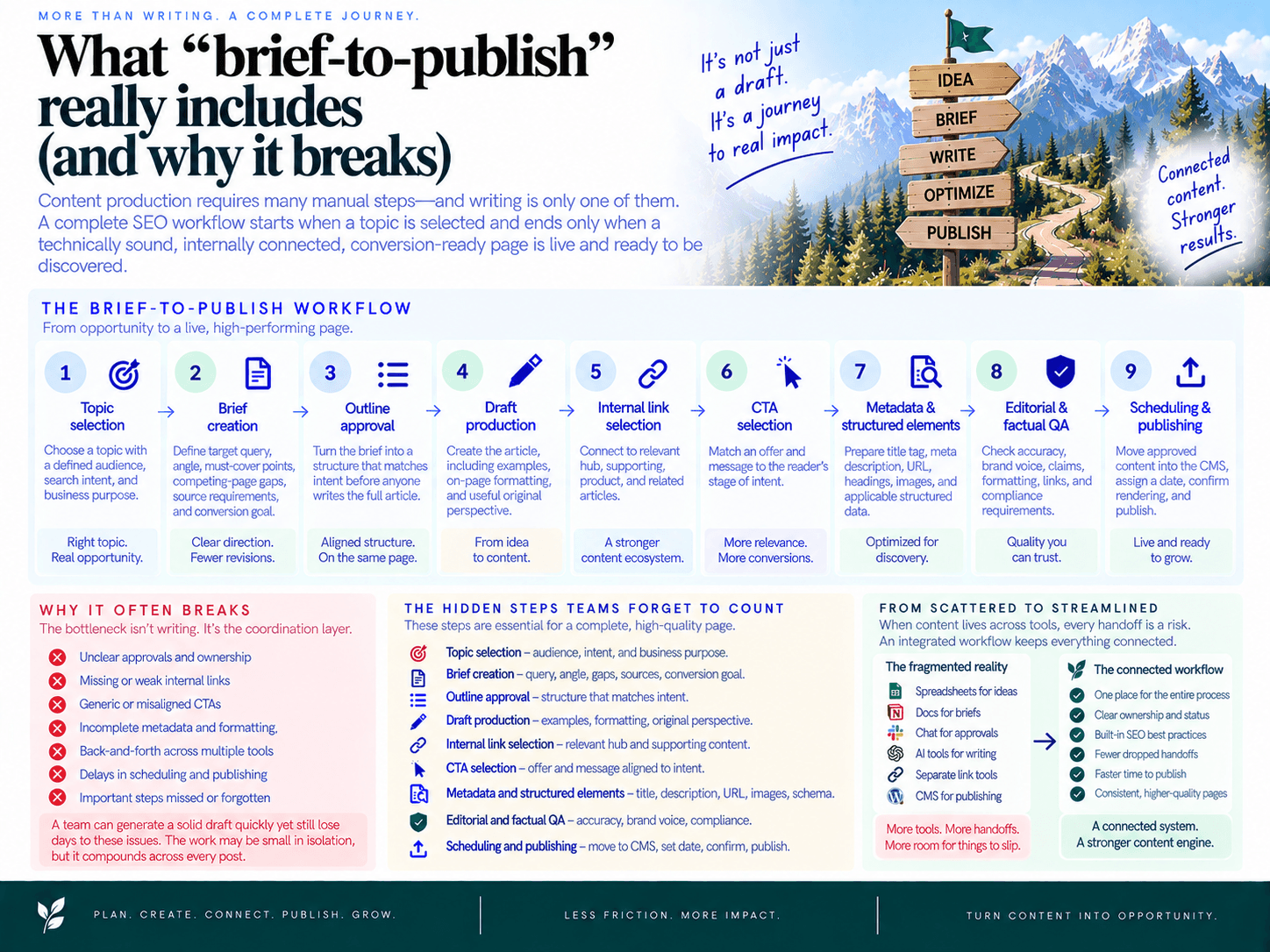
Content production requires many manual steps (briefs, outlines, internal linking, CTAs, scheduling, publishing)—and writing is only one of them. A complete SEO workflow starts when a topic is selected and ends only when a technically sound, internally connected, conversion-ready page is live and ready to be discovered.
That distinction matters. A team can generate a solid draft quickly yet still lose days to unclear approvals, missing links, outdated CTAs, metadata cleanup, CMS formatting, and scheduling. The bottleneck is rarely the blank page alone. It is the coordination layer around it.
True end-to-end SEO automation software for the full pipeline treats content as a connected production system, not a collection of separate writing tasks.
The hidden steps teams forget to count
A reliable content production workflow includes a chain of decisions and deliverables:
Topic selection: Choose a topic with a defined audience, search intent, and business purpose.
Brief creation: Define the target query, angle, must-cover points, competing-page gaps, source requirements, and conversion goal.
Outline approval: Turn the brief into a structure that matches intent before anyone writes the full article.
Draft production: Create the article, including examples, on-page formatting, and useful original perspective.
Internal link selection: Connect the page to relevant hub, supporting, product, and related articles.
CTA selection: Match an offer and message to the reader’s stage of intent rather than dropping in the same generic button everywhere.
Metadata and structured elements: Prepare the title tag, meta description, URL, headings, images, and applicable structured data.
Editorial and factual QA: Check accuracy, brand voice, claims, formatting, links, and compliance requirements.
Scheduling and publishing: Move approved content into the CMS, assign a date, confirm rendering, and publish.
When these activities live across spreadsheets, project boards, documents, chat threads, AI writers, link tools, and a CMS, each handoff becomes a point of failure. The work may be small in isolation, but it compounds across every post.
Why manual handoffs cause quality drift
Manual processes create variability because critical context gets lost as the article moves from one owner to another. The strategist knows why the topic matters. The writer sees an abbreviated brief. The editor spots a missing product angle. The SEO specialist adds links late. The person publishing may never see the CTA guidance at all.
That creates a predictable cascade:
A thin brief produces a generic outline.
A generic outline produces a draft that only loosely matches intent.
A late SEO review reveals missing sections, links, or conversion paths.
Late fixes trigger another edit cycle and delay scheduling.
Under deadline pressure, the post ships with omissions—or does not ship at all.
Brief quality is especially high leverage. If the article starts without a clear search intent, reader problem, unique angle, and required coverage, downstream review becomes expensive. Teams can generate SERP-based content briefs in minutes, but the important operational outcome is consistency: every writer begins from the same decision-ready inputs.
Manual internal linking is another common break. It is often postponed until final editing, when the reviewer is rushing, lacks a current content inventory, or uses anchors that do not fit naturally. The result is an isolated article that fails to strengthen the broader topic cluster.
CTAs drift for the same reason. One writer uses “Start free,” another uses “Book a demo,” and a third leaves the article with no next step. Without a governed CTA library, traffic may increase while conversion paths remain inconsistent.
Finally, publishing is frequently treated as an administrative task rather than part of SEO production. Copying content into a CMS, fixing formatting, uploading images, entering metadata, requesting approval, and assigning a date can add days after editorial work is complete. That is how a nominally “finished” article sits in a queue for weeks.
When automation helps—and when it hurts
Content workflow automation helps when it removes repeatable coordination work and applies agreed standards at the right time. It can carry a selected topic through a structured brief, intent-aligned draft, internal links, natural CTAs, scheduling, and optional CMS publishing in one controlled pipeline.
For example, SEO Autopilot can turn opportunities from website analysis, competitor patterns, and Google Search Console into a prioritized backlog, then generate strategy-grade briefs and full articles with internal links and natural CTAs. It supports Brief First, Manual, and Full Auto workflows, so teams can choose the level of review appropriate to the page.
Automation hurts when it accelerates unclear inputs. A vague topic, unapproved claim, outdated positioning statement, or poor CTA rule does not become better because software processes it faster. It simply creates faster rework.
Keep humans accountable for decisions that require judgment:
Brand voice and point of view: Ensure the article sounds like your company and says something worth reading.
Factual and product accuracy: Review claims, examples, customer references, pricing, and feature descriptions.
Compliance and risk: Approve content in regulated, financial, legal, medical, or otherwise sensitive categories.
Strategic exceptions: Decide when a high-value page needs a custom angle, subject-matter expert input, or additional research.
The goal is not a hands-off content machine. It is a repeatable SEO workflow where routine production work is standardized, quality gates are visible, and human reviewers spend their time on judgment instead of chasing documents, inserting forgotten links, and moving completed posts between tools.
The typical manual workflow (step-by-step) + failure points
The default SEO content process rarely fails because a team cannot write. It fails because each article moves through disconnected documents, inboxes, project boards, and CMS screens. Every handoff creates a chance to lose context, skip an SEO requirement, or wait for someone who owns the next task.
Here is how the typical manual content workflow unfolds—and how small misses compound into weaker rankings, lower conversions, and an unreliable publishing cadence.
Step 1: Brief creation — failure: vague goals and missing SERP inputs
Typical owner: SEO lead, content strategist, or agency account manager.
The process usually begins with a keyword in a spreadsheet, then a brief assembled from search results, competitor tabs, Search Console exports, and institutional knowledge. Under deadline pressure, the brief often becomes a title, a target keyword, and a few bullet points.
The breakdown is not merely “a thin brief.” It is a missing decision framework: search intent, target reader, page goal, required subtopics, differentiating angle, and conversion action are undefined or implied rather than explicit.
Downstream ranking impact: writers optimize for a phrase instead of solving the searcher’s underlying task.
Conversion impact: the draft may attract informational traffic while pointing to an irrelevant offer.
Velocity impact: reviewers send the piece back for strategic rewrites after drafting is already complete.
A useful brief should give a writer fewer open questions, not more. Teams that need a faster starting point can generate SERP-based content briefs in minutes, then apply their own editorial judgment to the recommended direction.
Step 2: Outline approval — failure: intent drift and generic H2s
Typical owner: Writer creates the outline; strategist, editor, or client approves it.
Outlines are often treated as a formality: a few H2s copied from competing pages, sent for approval, then forgotten. But this is where intent alignment either becomes real or starts to drift. A “how-to” query can quietly turn into a product pitch; a comparison query can become a broad educational listicle.
Generic headings also create generic coverage. If the outline does not assign a clear job to each section—answer, proof, process step, objection, or decision criterion—the writer fills space instead of building a useful page.
Downstream ranking impact: the article misses essential subtopics and fails to satisfy the query efficiently.
Conversion impact: readers do not reach the right commercial context at the right moment.
Velocity impact: strategic feedback arrives during editing, when restructuring costs the most.
Step 3: Drafting — failure: inconsistent coverage and on-page basics
Typical owner: In-house writer, freelancer, subject-matter expert, or agency writer.
Once the brief and outline reach the writer, quality depends heavily on who received them. One writer includes examples, concise answers, metadata suggestions, and product context. Another delivers clean prose but omits critical questions, descriptive headings, or factual proof.
This is where manual systems reveal their core weakness: requirements live in people’s heads. The writer may not know which existing pages deserve mentions, which claims require review, or which CTA fits the reader’s stage.
Downstream ranking impact: inconsistent topical depth and missing on-page elements weaken the page’s usefulness.
Conversion impact: product relevance is bolted on late—or omitted entirely.
Velocity impact: editors spend time correcting predictable omissions instead of improving the argument.
Step 4: Internal linking — failure: gaps, irrelevant links, and weak anchors
Typical owner: SEO specialist, editor, or whoever remembers to do it before publication.
Internal linking is commonly left until the end because it requires another crawl, another spreadsheet, or someone searching the site manually. That makes it easy to skip entirely. New posts ship as isolated URLs, while older high-value pages receive no fresh contextual support.
When links are added manually at speed, the alternative can be just as damaging: vague “learn more” anchors, repeated links to the same page, or links inserted where they interrupt the reader rather than clarify the topic. These internal linking gaps weaken topic clusters and leave crawlers and readers with fewer relevant paths through the site.
Downstream ranking impact: related pages are less connected, and new content may be harder to discover and contextualize.
Conversion impact: readers miss logical next steps to solution, product, or decision pages.
Velocity impact: linking becomes a recurring cleanup project instead of a standard production step.
Step 5: CTA selection — failure: inconsistent offers and messaging
Typical owner: Content marketer, demand generation lead, product marketer, or editor.
CTAs are frequently added after the article is “done.” The writer inserts the familiar footer line, the editor swaps in the campaign of the month, or the CMS manager chooses a generic banner. The result is inconsistent messaging across articles covering similar intents.
A top-of-funnel educational post may push a demo too aggressively. A high-intent comparison article may end with a newsletter signup. Neither choice is necessarily wrong in isolation, but inconsistency makes content performance difficult to evaluate and optimize.
Downstream ranking impact: indirect—poor engagement and weak next-page journeys reduce the business value of earned traffic.
Conversion impact: readers receive an offer that does not match their readiness or the article’s purpose.
Velocity impact: marketers repeatedly debate CTA wording and placement instead of selecting from approved options.
Step 6: Editing and QA — failure: no checklist and subjective reviews
Typical owner: Editor, SEO lead, subject-matter expert, legal/compliance reviewer, or client.
Editing should improve clarity, accuracy, and brand fit. In practice, it often becomes an unstructured catch-all for strategy, SEO, factual review, conversion review, and formatting checks. Reviewers comment from different priorities, and nobody can confirm whether the article is actually ready to publish.
Without a shared checklist, routine tasks become optional: validating claims, checking title and meta description, reviewing links, confirming CTA alignment, formatting images, and ensuring the CMS draft matches the approved copy.
Downstream ranking impact: metadata, structure, links, and schema-related requirements can be missed.
Conversion impact: messaging changes late without checking whether the CTA still fits the article.
Velocity impact: subjective feedback creates multiple revision cycles and unclear approval ownership.
Step 7: Scheduling and publishing — failure: tool switching and delayed launches
Typical owner: Content operations manager, marketer, agency publisher, or web team.
The final mile is often the slowest. Someone copies content into the CMS, repairs formatting, uploads images, adds categories and metadata, inserts links again, schedules the post, then waits for a final approval. If the approved draft changes after it enters the CMS, the team may repeat part of the process.
Publishing delays are costly because the calendar becomes aspirational rather than operational. A finished article can sit in “ready for review” or “needs upload” for days, breaking topical momentum and making it harder to maintain a dependable cadence.
Downstream ranking impact: timely opportunities reach search later, while supporting cluster pages remain unpublished.
Conversion impact: campaigns and product launches lack the supporting content intended to capture demand.
Velocity impact: copy-paste publishing and approval chasing become the bottleneck, not writing.
The fix is not simply writing drafts faster. It is creating a connected operating process that carries intent, links, CTAs, review requirements, and scheduling details from the first topic decision through publication. Teams looking to remove the final-mile bottleneck should be able to schedule SEO content and auto-publish reliably rather than treating every post as a separate production project.
Before vs After: the same workflow inside an autopilot platform
The real gain from an autopilot platform is not simply faster drafting. It is a repeatable operating system: each article follows the same inputs, produces the same required assets, and passes defined checks before it reaches the CMS. People still make the decisions that require judgment; the system removes the chasing, copying, and forgotten steps.
Before vs After: fewer handoffs, consistent outputs
Workflow stage | Before: manual workflow | After: unified automated workflow | Human owner and QA gate |
|---|---|---|---|
Topic selection | Marketer exports keyword data, reviews Search Console separately, updates a spreadsheet, and asks stakeholders what to prioritize. | Site analysis, Search Console signals, competitor patterns, topics, and intent are collected into a ranked backlog for approval. | SEO lead chooses priorities based on business value, timing, and capacity. |
Brief | Strategist builds a document from scratch. Intent, audience, angle, source notes, and conversion goal may be incomplete or inconsistent. | A selected topic becomes a structured brief with intent alignment, recommended angles, and must-cover points. | Editor verifies positioning, factual requirements, and the article’s unique point of view. |
Outline and draft | Writer interprets the brief, produces an outline, waits for comments, then revises. Coverage varies by writer and project manager follow-up. | The approved plan informs an outline and full draft built around the same brief requirements. | Editor checks narrative flow, expertise, brand voice, and claims that need substantiation. |
Internal links | Someone searches the site manually near the end of production. Relevant pages are missed, anchors are inconsistent, or links become an afterthought. | Related articles are connected automatically as content is generated, so new pages support existing topic clusters. | SEO reviewer removes irrelevant links and confirms priority hub or commercial pages receive appropriate support. |
CTA selection | Writer adds a generic CTA, uses an outdated offer, or skips it because no one assigned the task. | Natural CTAs are included in the publish-ready workflow using the team’s approved conversion path. | Marketing owner confirms offer, landing page, message, and intent fit. |
Formatting and SEO assets | Metadata, structure, and schema are handled in separate tools or inside the CMS during a rushed final review. | Content can include structured SEO assets such as JSON-LD, with publishing requirements handled in the same workflow. | Publisher performs final visual and technical checks in the CMS. |
Scheduling and publishing | Approved copy sits in a folder until someone transfers it to the CMS, formats it, selects a date, and remembers to publish. | Articles move from an approved plan into a schedule and can publish directly to connected WordPress, Contentful, or Framer workflows. | Publisher approves the final version or uses the appropriate automation mode for the page’s risk level. |
In the manual version, a single article often moves between strategist, writer, editor, SEO specialist, demand generation, and CMS owner. Every owner may be necessary; the problem is that the handoff itself becomes the system. In a unified workflow, the brief, draft, links, CTA, schedule, and publication status remain attached to one record.
That means the team spends less time asking, “Which version is final?” and more time deciding whether the page is strategically right. Teams that want the complete connected model can auto-generate drafts with links, CTAs, and scheduling rather than stitching together isolated writing and publishing tools.
Automation enforces standards, not just output volume
Speed without controls only creates more content to fix. Effective end-to-end SEO automation makes required inputs and checks part of the workflow, so quality is less dependent on who happens to own an article.
Required brief fields: A draft cannot begin from a bare keyword alone. It starts with intent, audience, angle, must-cover information, and conversion goal.
Standardized output: Every article carries the same baseline components: structured sections, internal links, CTAs, and publishing status.
Visible approval states: Brief approval, editorial review, and publishing approval are explicit gates—not requests hidden in email threads.
One source of operational truth: The backlog determines what is next; the plan determines when it is due; the workflow records whether it is approved, scheduled, or live.
Post-publish continuity: Indexing and sitemap support, plus analytics views in the workspace, keep the process connected after the article goes live.
For example, SEO Autopilot turns opportunities from site analysis, competitor patterns, keyword and intent mapping, and connected Search Console data into a Unified Backlog. From there, teams can select priorities, generate strategy-grade briefs and full articles, add internal links and natural CTAs, then schedule or optionally auto-publish through supported CMS integrations. That is end-to-end SEO automation software for the full pipeline: not a writing shortcut disconnected from the rest of content operations.
Keep human judgment at the points where it matters
Automated content production should reduce administrative work, not eliminate editorial accountability. The highest-performing setup uses automation for repeatable assembly and humans for decisions that affect trust, accuracy, and differentiation.
Brand voice and point of view: A reviewer should sharpen opinions, terminology, examples, and positioning so the article sounds like your company rather than a generic summary.
Facts, claims, and compliance: Humans should verify product descriptions, pricing references, legal language, regulated-industry guidance, customer claims, and time-sensitive statements.
Search intent exceptions: A system can classify intent, but an SEO lead should intervene when the SERP is changing, the topic has mixed intent, or the business needs a deliberate contrarian angle.
Link and CTA relevance: Automation can surface and place useful elements; reviewers should ensure each link helps the reader and each CTA matches the page’s stage of intent.
High-stakes publishing: Product launches, comparison pages, executive bylines, and compliance-sensitive content deserve a required approval gate before publication.
Use automation modes to match risk. A low-risk educational post may move quickly through a Full Auto workflow. A strategic commercial page may use a Brief First or Manual workflow, where the team approves the brief and final article before it is scheduled. The result is controlled consistency: a reliable process that moves quickly without treating every page as equally hands-off.
Lightweight process diagram: manual vs automated
The difference is not simply “AI writes faster.” Effective workflow automation removes the waiting, context switching, and repeat rework that happen between production steps.
Manual workflow: every handoff creates a delay
Where time disappears: each owner works in a different document, tool, or queue. A weak brief produces outline revisions; revisions can invalidate links and CTAs; a final edit can push a post past its scheduled date. The result is content ops built around chasing status rather than moving approved work forward.
Automated workflow: one pipeline, defined checkpoints
In an autopilot platform, the same source context follows the article from selection through publication. The brief, draft, links, CTA, and schedule are connected records—not separate tasks that need to be reconstructed at every stage.
For example, SEO Autopilot can turn selected opportunities into intent-aligned briefs and full articles, add internal links and natural CTAs, then schedule or auto-publish to supported CMS platforms such as WordPress, Contentful, and Framer. Teams can choose Full Auto, Brief First, or Manual workflows based on the level of review required.
The key operational change is simple: humans approve decisions; the system carries out repeatable production work. Review brand voice, factual accuracy, claims, legal or compliance requirements, and strategic positioning. Let the workflow handle the repeatable assembly and routing work that otherwise creates bottlenecks.
Recommended standards to automate (copy/paste)
Automation only becomes reliable when the inputs are standardized. Content production requires many manual steps (briefs, outlines, internal linking, CTAs, scheduling, publishing), but each step can run from a defined schema instead of individual preference, scattered notes, or last-minute CMS edits.
Use the standards below as the operating rules for every article. Store them in your project workspace, template library, or automation platform so they are applied by default—not remembered when someone has time.
A. Minimum viable brief schema
A strong content brief template gives the writer, editor, and automation system the same source of truth. If a field is unknown, mark it as “TBD” and block drafting until it is resolved. Do not compensate for a weak brief with more editing later.
Primary topic: The query or topic the page is designed to own.
Search intent: Informational, commercial investigation, transactional, navigational, or mixed.
Audience: Specific role, company stage, problem awareness, and relevant constraints.
Desired outcome: What the reader should understand, decide, or do after reading.
Page type: Guide, comparison, use-case page, checklist, template, category page, or product-led article.
Angle: The distinct point of view that prevents a generic rewrite of existing results.
Must-cover questions: The decisions, objections, definitions, and implementation details required for a complete answer.
Evidence requirements: Approved data, product facts, customer examples, expert input, or sources that require verification.
Internal link targets: Priority hub, product, solution, and related educational pages to consider.
CTA goal: The offer and conversion action appropriate to the reader’s intent.
Success metric: Organic clicks, assisted conversions, demo starts, sign-ups, newsletter subscriptions, or another measurable outcome.
Automation rule: Do not generate an outline until intent, audience, angle, must-cover points, and CTA goal are complete. These fields prevent the most expensive form of rework: discovering halfway through editing that the page answers the wrong question.
B. Outline rules that preserve intent
An outline is a coverage map, not a decorative list of headings. Make it pass these checks before drafting:
The introduction states the reader problem and gives a direct answer quickly.
Every H2 supports the declared intent; remove sections included only because “competitors have them.”
Each H2 answers one distinct reader question, with no overlapping sections.
The sequence follows decision order: definition or diagnosis, approach, execution, tradeoffs, then next action.
The article includes the stated angle, original examples, or operational guidance—not just broad explanations.
Product mentions and CTAs appear only where they advance the reader’s next logical step.
Automation rule: Flag an outline for review when it lacks a direct-answer section, fails to include a must-cover brief item, or contains headings unrelated to the chosen intent.
C. CTA library and governance
A CTA library prevents every article from ending with the same vague “learn more” button. It also keeps conversion language aligned with funnel stage, page type, and offer.
Create one record for each approved CTA with these fields:
CTA name: A clear internal label, such as “Product tour—commercial guide.”
Audience and intent: Who should see it and on which search intent it fits.
Trigger context: The section or problem that should precede the CTA.
Primary action: Start a trial, view how it works, request a demo, use a template, or subscribe.
Approved copy variants: Short in-line, mid-article, and end-of-article versions.
Destination URL: The exact landing page, not a generic homepage fallback.
Exclusions: Topics, audiences, or regulated contexts where the CTA should not appear.
Owner and review date: The person responsible for offer accuracy and when the language must be refreshed.
CTA placement standard: Use one primary CTA per article, then add a secondary CTA only when it serves a separate, relevant reader need. Place CTAs after value has been delivered. Avoid interrupting definition-heavy or early educational sections with a hard sell.
D. Internal linking rules that build clusters
Internal links should guide readers and search engines through a deliberate topic structure. They are not a quota-filling exercise. For deeper implementation guidance, see internal linking rules and AI techniques at scale.
Link by relevance first: Add a link only when the destination expands, proves, or helps the reader act on the current point.
Use descriptive anchors: Explain what the reader will get after clicking. Avoid repetitive exact-match anchors and generic phrases like “click here.”
Link upward: Supporting articles should link to their relevant hub, service, category, or pillar page where appropriate.
Link sideways: Connect related articles when they solve the next question in the same workflow or buying journey.
Link downward selectively: Hub pages should route readers to the most useful supporting resources, not every page in a cluster.
Protect page focus: Keep links contextual. Do not insert a competitor, unrelated product, or broad homepage link merely because it is available.
Refresh old posts: When a new article is published, identify relevant existing pages that should link to it. Linking should work both directions.
Automation rule: Set a minimum of two contextually relevant internal-link candidates for a standard blog post: one strategic destination, such as a hub or commercial page, and one closely related educational resource. Route ambiguous link suggestions to editorial review rather than forcing them into the draft.
E. Publish-ready checklist
A draft is not finished when the copy is complete. It is finished when the page can be published without a separate hunt for missing SEO, conversion, and technical details.
Intent and accuracy: The page answers the target question, reflects the approved angle, and all factual, product, legal, and compliance-sensitive statements have been reviewed.
On-page elements: Title tag, meta description, URL slug, H1, heading hierarchy, and featured image are complete.
Links: Internal links work, anchors are descriptive, priority destinations are included, and no irrelevant links were added.
CTA: The selected CTA matches intent, points to the correct destination, and uses approved language.
Readability: The opening delivers the answer quickly; sections are scannable; examples and lists are formatted cleanly.
Schema and media: Relevant structured data is present, images have appropriate alt text, and image rights or approvals are confirmed.
CMS readiness: Author, category, tags, canonical settings, publish date, and social-sharing fields are correct.
Measurement: Conversion tracking and any campaign parameters are in place before the post goes live.
Final approval: A named owner approves the article, with a clear status: revise, schedule, or publish.
In SEO Autopilot, teams can turn selected opportunities into intent-aligned briefs and full articles with internal links and natural CTAs, then schedule publishing to supported CMS platforms such as WordPress, Contentful, and Framer. Its automation modes—Full Auto, Brief First, and Manual—make it practical to enforce these standards while keeping the right review gate for each content type.
Keep human review where judgment matters: brand voice, proprietary claims, factual accuracy, legal or compliance language, strategic positioning, and sensitive conversion pages. Automate repeatable checks and assembly work; reserve human attention for decisions that affect trust, differentiation, and risk.
How to implement automation in phases (without breaking production)
A successful SEO automation rollout does not begin by turning on auto-publish for every article. Start by standardizing the inputs that create quality, automate repeatable production work next, and add scheduling only after your team trusts the outputs. Keep your existing calendar running while each phase proves its value on a controlled batch of content.
Phase 1: Standardize the inputs before automating outputs
Automation will reproduce whatever process you give it. If briefs are vague, CTAs are improvised, and internal links are chosen at the last minute, faster production simply creates faster inconsistency.
Start with a small set of non-negotiable standards:
Brief schema: target query/topic, search intent, target reader, business goal, primary angle, required sections, proof points, source requirements, and conversion goal.
CTA library: approved CTA copy grouped by intent and funnel stage—for example, educational readers get a guide or demo CTA, while solution-aware readers get a trial or consultation CTA.
Linking rules: define which hub pages deserve priority, how many relevant contextual links a post should include, approved anchor-text patterns, and pages that should never be linked from certain topics.
Approval ownership: assign one owner for strategy, one for factual and brand review, and one final publishing owner. Avoid committee approval for routine posts.
Run these standards manually for two to four weeks. The goal is not perfection; it is to remove ambiguity before it enters the workflow. Document exceptions as they appear, then update the template instead of solving the same edge case in comments on every draft.
Phase 2: Automate briefs, outlines, drafts, links, and CTAs in a pilot lane
Once inputs are stable, select a low-risk content lane: supporting informational articles, glossary pages, long-tail how-to posts, or updates to existing cluster content. Do not start with your homepage, pricing pages, regulated claims, or high-stakes thought leadership.
Use automation to create the repeatable production package: an intent-aligned brief, outline, draft, suggested internal links, and an appropriate CTA from the approved library. The reviewer should assess the package against the standard—not rebuild it from scratch.
Choose 5–10 topics from the next publishing cycle.
Generate briefs and have the content lead approve or adjust the angle.
Generate outlines and drafts using the approved brief.
Review factual accuracy, unique perspective, brand voice, claims, and link relevance.
Track edits by category: missing context, weak positioning, factual corrections, voice, CTA fit, or linking issues.
This edit log is your training signal for the content ops process. If every reviewer changes the opening tone, update the voice guidance. If links repeatedly point to weak or irrelevant pages, refine the linking rules. If CTAs feel too aggressive on informational posts, revise CTA-to-intent mapping.
Platforms such as SEO Autopilot can turn chosen opportunities into strategy-grade briefs and full drafts, add internal links and natural CTAs, and support a Brief First workflow when editorial approval is required. That lets teams automate production mechanics while keeping strategic judgment in human hands.
Phase 3: Add QA gates, scheduling, and controlled auto-publishing
Only automate publishing after the pilot consistently clears review with minor edits. The safest progression is draft generation → approved scheduling → limited auto-publishing, not an immediate hands-off switch.
Build explicit gates into the publishing workflow:
Strategy gate: intent, audience, angle, and topic priority are approved.
Editorial gate: claims are accurate, the voice is on-brand, and the article adds useful perspective rather than generic coverage.
SEO gate: title, URL, meta description, headings, internal links, CTA, images, structured data where applicable, and indexability are checked.
Publishing gate: CMS formatting, author details, category, canonical settings, and publish date are correct.
Begin by auto-scheduling approved posts. Then allow automatic publishing for proven, lower-risk templates while retaining approval for commercial, sensitive, executive-authored, or compliance-reviewed pages. This removes the copy-paste bottleneck without removing accountability.
For teams ready to connect the final step, use a system that can schedule SEO content and auto-publish reliably to the CMS. SEO Autopilot supports scheduled publishing and optional auto-publishing through integrations including WordPress, Contentful, and Framer, with the level of automation determined by your selected workflow mode.
Phase 4: Feed performance back into the publishing queue
Automation becomes more valuable when it improves decisions, not only output volume. Review performance on a recurring cadence—usually monthly for most teams—and use the results to adjust priorities, refresh weak posts, and refine your templates.
Which topics earned impressions but failed to earn clicks?
Which posts converted, and which CTA patterns were used?
Which new pages have few internal links or no clear cluster connection?
Which content types needed the most human edits before publishing?
Which topics should be refreshed, expanded, consolidated, or deprioritized?
Feed those answers into a ranked backlog rather than a disconnected reporting spreadsheet. SEO Autopilot combines site analysis, competitor patterns, keyword and intent mapping, and Google Search Console signals in a Unified Backlog, helping teams select the next topics with a clear operational reason.
Use a parallel-run model to protect the calendar
Do not replace the current process overnight. For the first cycle, run automated production alongside your established method for a limited set of posts. Compare approval time, revision volume, missed checklist items, time from approved brief to scheduled post, and publish consistency.
Expand only when the pilot meets agreed thresholds. A practical benchmark is simple: automated posts should require fewer revisions, not merely reach a first draft faster. If quality drops, pause expansion, fix the governing standard, and rerun the pilot. That is how you build a durable publishing workflow instead of introducing another tool that creates work around the work.
Common pitfalls (and how to avoid them)
Automation improves throughput only when it runs on clear inputs, enforceable rules, and visible review gates. Without those controls, teams simply publish weak content faster: vague briefs become vague drafts, generic links clutter pages, and mismatched CTAs reduce trust. Avoid these SEO automation pitfalls by treating the workflow as a governed production system—not a one-click writing tool.
Automating bad briefs creates faster bad content
A brief that lacks search intent, audience context, a unique angle, required evidence, and a conversion goal leaves the draft open to interpretation. Automation cannot reliably correct a missing strategy decision; it can only scale the ambiguity.
How to avoid it: make a complete brief a required input before generation. At minimum, require the target query or topic, intent, reader, primary problem, page goal, angle, must-cover questions, source requirements, internal-link targets, and CTA assignment. If a field is blank, route the item back to planning instead of generating a draft.
For high-value topics, add a human brief-approval gate. The goal is not to slow every article down. It is to prevent expensive rework on pages where positioning, factual accuracy, or commercial intent matter most.
Over-linking—or adding irrelevant links—weakens the reader experience
Automatic internal linking is valuable when it connects readers to the next useful page in a topic cluster. It becomes counterproductive when a system adds links merely because two pages share a keyword. Excess links interrupt reading, create awkward anchors, and can send visitors to pages that do not answer their next question.
How to avoid it: set link eligibility rules before automating placement:
Link only when the destination page adds clear context or enables the next action.
Prioritize pillar pages, relevant cluster articles, product pages, and recently published strategic pages.
Use descriptive, natural anchor text; do not force exact-match anchors repeatedly.
Cap in-body links based on article length and relevance rather than using a fixed quota.
Exclude redirects, noindex pages, outdated pages, and URLs with overlapping intent.
Review links on money pages, regulated topics, and articles with dense product messaging.
These internal linking rules and AI techniques at scale keep automation focused on useful discovery paths rather than link volume. Strong internal linking best practices make each new post part of a connected content system, not another isolated URL.
CTA fatigue happens when conversion prompts ignore intent
Not every visitor is ready for a demo, trial, or sales conversation. An early-stage educational article with a hard-sell CTA can feel disconnected from the reader’s goal. Conversely, a comparison or implementation page may underperform if it ends with a vague “learn more” prompt.
How to avoid it: govern CTAs by intent and funnel stage. Assign each article one primary CTA and, where appropriate, one secondary contextual CTA. Informational pages can point to a template, related guide, newsletter, or product education. Commercial pages can use a direct product action. Keep offer language, destination URLs, tracking parameters, and approved variants in one maintained CTA library.
Review CTA performance quarterly. Retire low-performing offers, update destination pages when positioning changes, and ensure automated drafts pull only from approved CTA options.
Publishing without QA gates turns small defects into public defects
Formatting errors, unsupported statements, outdated product details, broken links, missing metadata, and off-brand language are not writing-speed problems. They are quality-control problems. Full automation should not mean removing judgment from every stage.
How to avoid it: define risk-based approval paths. Low-risk, evergreen educational posts may move through a light editorial check before scheduled publishing. High-stakes content—pricing, product claims, legal or medical topics, comparison pages, executive thought leadership, and regulated industries—should require named human approval.
Automated checks: required brief fields, title and meta presence, heading structure, link validity, CTA assignment, image requirements, schema availability, and CMS formatting.
Human checks: factual claims, brand voice, original point of view, sensitive language, compliance, and whether the page genuinely serves the query.
Final release check: confirm the canonical URL, publish date, category, author, tracking, and intended CMS status before the post goes live.
This is where content quality control earns its place: automation catches repeatable omissions, while people evaluate nuance, truth, and brand risk.
Tool sprawl is not end-to-end automation
Connecting a keyword tool, document editor, AI writer, spreadsheet, link checker, project board, scheduler, and CMS can still leave the core problem intact: people move context manually between systems. Every copy-paste handoff creates a chance for stale data, duplicate work, lost approvals, or a draft that never reaches the publishing queue.
How to avoid it: use one operational record for each article—from prioritized topic through brief, draft, links, CTA, approval, schedule, and performance review. A platform such as SEO Autopilot is designed to connect site analysis, Search Console signals, topic prioritization, strategy-grade briefs, content generation, internal links, CTAs, scheduling, and optional CMS publishing in a single workflow.
The practical test is simple: can a team see what should be published next, why it was selected, what approval it needs, and whether it was published—without rebuilding the answer across multiple tabs? If not, the workflow is integrated at the tool level but not automated at the operating level.
Measuring volume instead of outcomes hides workflow problems
More published URLs do not automatically mean more qualified traffic or pipeline. A workflow can appear efficient while producing pages that are never indexed, target the wrong intent, fail to earn engagement, or send readers nowhere useful.
How to avoid it: monitor a small set of operational and business metrics together:
Time from approved topic to published URL
Rework rate after drafting or editorial review
Percentage of posts shipped with approved links, CTAs, metadata, and QA completed
Indexing and early search-performance signals
Organic conversions, assisted conversions, or CTA engagement by content type
Use those findings to improve the rules behind the workflow. If informational pages attract impressions but generate little engagement, refine the angle, CTA mapping, or internal paths. If editors repeatedly rewrite introductions, update the brand and opening-section standards. Automation should create a feedback loop—not lock a weak process into place.
Quick checklist: what “autopilot-ready” looks like
An autopilot workflow is ready when your team has defined inputs, repeatable quality rules, clear approval gates, and a reliable path from approved topic to published URL. Use this checklist to audit your current process—or to evaluate an automation platform.
Inputs ready
One prioritized topic queue: Every proposed article has an owner, target audience, primary intent, priority, and planned publish date.
A minimum brief schema: Briefs consistently include the target query/topic, search intent, audience problem, angle, must-cover points, proposed H2 structure, source requirements, internal-link targets, and conversion goal.
An approved CTA library: Each CTA has a defined audience, funnel stage, destination URL, approved message, and rules for when it should not be used.
Internal link rules: Writers or systems know how many relevant links to add, which hub or pillar pages deserve priority, what makes an anchor natural, and when a link would be forced or irrelevant. For deeper guidance, use these internal linking rules and AI techniques at scale.
Brand guardrails: Voice, terminology, prohibited claims, audience knowledge level, and editorial preferences are documented rather than held in one editor’s head.
Outputs verified before publishing
Intent matches the page: The title, introduction, headings, examples, and CTA all serve the same informational, commercial, or comparison intent.
Each draft is connected: Relevant internal links are present, anchors describe the destination naturally, and new posts support an existing topic cluster rather than becoming isolated pages.
CTAs fit the reader’s next step: Educational posts do not receive an overly aggressive sales CTA, and decision-stage posts point to the most relevant product, demo, trial, or contact path.
On-page publishing details are complete: Title tag, meta description, URL, headings, featured image, alt text, author details where needed, and structured data are ready before the post enters the CMS.
Factual and legal checks have owners: A qualified reviewer signs off on product claims, customer examples, regulated statements, pricing references, and any sensitive advice.
Operations ready
Every stage has a decision owner: Someone is accountable for topic approval, brief approval, editorial QA, final publish approval, and post-publish review.
Approvals are explicit: “Waiting for feedback” is not a workflow stage. Use defined statuses such as Draft, In Review, Approved, Scheduled, Published, and Needs Revision.
Exceptions have a route: High-stakes pages, new product launches, compliance-sensitive content, and major thought-leadership pieces automatically receive more human review.
Publishing is systematized: Approved posts can move into a schedule without copy-paste handoffs, last-minute metadata requests, or forgotten CMS tasks. Teams should be able to schedule SEO content and auto-publish reliably when their review requirements allow it.
Performance feeds the next cycle: Search Console and analytics signals inform what gets refreshed, expanded, linked to, deprioritized, or added back to the content queue.
If most boxes are unchecked, do not start by automating publishing. Standardize the brief, CTA, linking, and QA rules first. If most are checked but production still stalls, the missing piece is usually a connected system that carries those rules through planning, drafting, linking, scheduling, and publication without repeated handoffs.
The practical test: Can a new team member—or an automation platform—take an approved topic and produce a reviewable, correctly linked, conversion-ready draft without asking where the brief lives, which CTA to use, or who is responsible for publishing? If yes, your content operation is autopilot-ready.

About the author: SEO Autopilot — Get recommended by Google and AI
SEO Autopilot is the SEO operating system for SaaS teams: it finds what to write from your site, competitors, and Search Console — then publishes evidence-verified comparison pages and intent-matched content on autopilot to WordPress, Framer, and more.
Areas of expertise: seo, aeo, geo, Search Engine Optimization, Answer Engine Optimization, Generative Engine Optimization, SEO Expert, Article Writer