How to Use a Competitor Keyword Analysis Tool to Build a Content Plan
What a competitor keyword analysis tool should do (beyond reports)
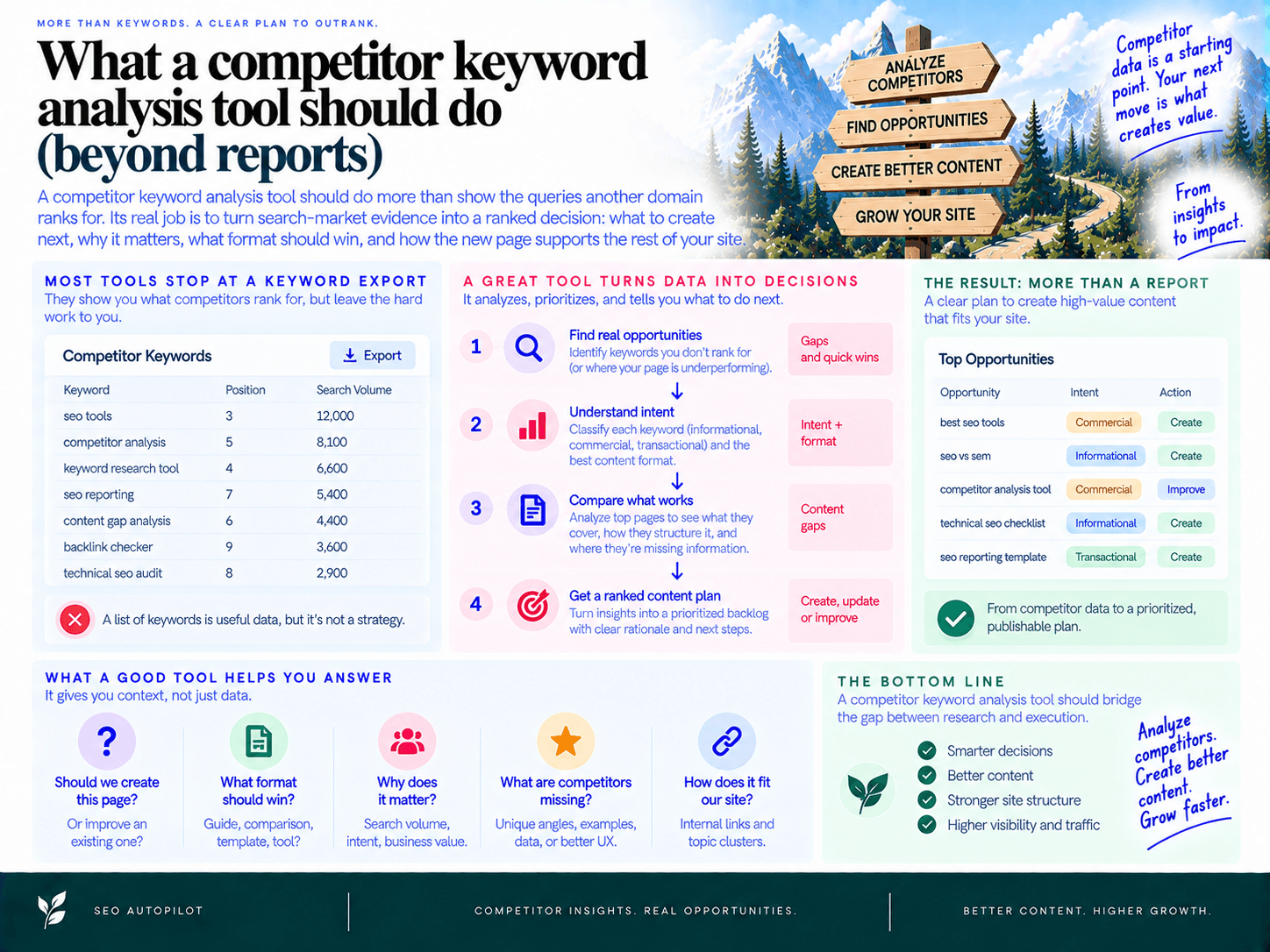
A competitor keyword analysis tool should do more than show the queries another domain ranks for. Its real job is to turn search-market evidence into a ranked decision: what to create next, why it matters, what format should win, and how the new page supports the rest of your site.
A keyword export is useful research input, but it is not a content plan. It does not distinguish a high-intent comparison page from a broad educational guide, reveal whether your existing page is weak rather than missing, or tell a writer what information competitors failed to cover. Most importantly, it does not get a post from a spreadsheet to a scheduled, internally linked page.
“What they rank for” is step 1—execution is the real bottleneck
Traditional competitor keyword research often ends with thousands of rows: keyword, volume, difficulty, position, and ranking URL. The team still has to clean the data, remove irrelevant terms, identify intent, group related ideas, assign owners, write briefs, create drafts, add links, and publish.
That manual handoff is where opportunity disappears. A practical system should make keyword gap analysis actionable by connecting each opportunity to the next production step. Instead of asking, “Which keywords should we target?” it should answer:
Which missing or underperforming topic best supports a business goal?
Which ranking pages and SERP patterns define the format searchers expect?
What should the page cover that current results do not?
Where does it fit within an existing topic cluster?
Which internal pages should link to it—and which pages should it support?
What is ready to brief, draft, review, and publish this week?
The expected output is not a larger spreadsheet. It is a prioritized publishing queue with enough context for a marketer, writer, or automation workflow to move immediately.
The modern workflow: discover → prioritize → cluster → brief → draft → link → publish
High-performing content operations treat competitive analysis as a pipeline. Each stage removes uncertainty from the next one:
Discover: identify the pages, queries, and content formats that earn visibility for true search competitors.
Prioritize: rank opportunities by search intent, realistic difficulty, traffic potential, and business value—not volume alone.
Cluster: group related opportunities into hub-and-spoke structures instead of publishing disconnected articles.
Brief: define the target audience, SERP intent, angle, required entities, questions, proof points, and information gain.
Draft: create a complete first draft that follows the approved brief and brand requirements.
Link: connect the page to relevant hubs, spokes, product pages, and existing high-authority articles.
Publish: schedule the approved post, apply required on-page elements, and monitor its performance after launch.
This approach matters because rankings compound at the cluster level. A useful guide may win initial traffic; a connected set of guides, comparisons, templates, and commercial pages gives search engines clearer topical context and gives readers a path toward conversion.
For small teams, the operational advantage is substantial. SEO Autopilot, for example, combines site analysis, competitor patterns, Search Console signals, topic and intent mapping, and prioritization in a Unified Backlog. From there, selected opportunities can become sequenced plans, strategy-grade briefs, full articles, internally linked posts, and scheduled CMS publications. The point is not to automate judgment away—it is to eliminate the repetitive work between a valid opportunity and a finished asset.
What you should have when the analysis is finished
By the end of this process, you should be able to point to a concrete operating plan rather than a research folder. A useful output includes:
A clean opportunity backlog: duplicates removed, irrelevant queries excluded, and each topic ranked by opportunity value.
Intent labels: a clear distinction between informational education, commercial investigation, transactional action, and navigational demand.
A cluster map: a hub page, supporting pages, and an internal-linking path for each priority subject area.
Production-ready briefs: a recommended angle, outline, must-cover subtopics, FAQ opportunities, and differentiation requirements.
A realistic publishing sequence: quick wins first where appropriate, followed by supporting pages that build durable topical authority.
If your current platform stops after data collection, you need a separate process to build a publish-ready content backlog from search and competitor data. The best workflow closes that gap automatically or makes it simple to manage from one workspace.
Who benefits most from this approach
This workflow is built for teams that already understand SEO’s value but cannot afford a fragmented process for every article. That includes founders running content with a lean team, in-house SEO managers coordinating writers and approvals, agencies managing several client calendars, and solo marketers responsible for strategy and execution.
It is especially valuable when the constraint is not a lack of ideas, but a lack of throughput. When every topic must be copied from a research tool into a spreadsheet, transformed into a brief, handed to a writer, edited, linked, uploaded, and scheduled manually, even strong research produces inconsistent publishing.
The goal of the following process is straightforward: move from competitor visibility data to a defensible list of pages your team can actually publish—organized by intent, connected by internal links, and sequenced around the opportunities most likely to matter to your business.
Step 1: Choose the right competitors (and avoid false benchmarks)
Start with the sites competing for the same search results—not necessarily the companies competing for the same customers. A competitor analysis built around the wrong domains produces misleading gaps, unrealistic difficulty assumptions, and a content plan you cannot execute.
Your goal is to build a small, topic-specific set of SERP competitors: domains and pages that repeatedly rank for the queries your audience uses at each stage of research.
SERP competitors and business competitors are not always the same
A business competitor sells a similar product or service. A search competitor earns visibility for the queries you want to own. Sometimes these are the same company; often, they are not.
Business competitor: A direct alternative customers compare during a buying decision.
Search competitor: Any site ranking for your target topics, including publishers, review sites, templates, communities, and adjacent software brands.
For example, a project-management platform may compete commercially with other project-management tools. But for “project plan template,” its real organic competitors may be template libraries, productivity blogs, and document tools. Analyzing only direct vendors would miss the pages and content formats that actually win that SERP.
Use business competitors for positioning and comparison content. Use SEO competitors to determine what content needs to exist, what format search engines reward, and where your site has a credible opening.
Build a competitor set for each topic category
Do not choose one universal list of competitors for the entire website. Rankings change by category, intent, and format. A domain that dominates “best CRM software” may have no relevance for “sales pipeline template” or “how to qualify leads.”
Build a focused set for each product category or content cluster:
Choose 10–20 representative queries. Include a mix of core category terms, problem-aware questions, use-case terms, templates, comparisons, and integration queries relevant to the category.
Review the first page for each query. Record the ranking domain and the specific URL—not just the domain name.
Count repeated appearances. A domain that appears across several representative searches is a meaningful benchmark. A site that appears once for an unrelated query is noise.
Group the winners by intent and page type. Note whether each ranking page is a guide, template, category page, free tool, comparison, glossary entry, or product landing page.
Select three to five recurring domains. Keep the set tight enough to study closely. Add one or two aspirational leaders only if they rank for the same intent and content types you plan to pursue.
A practical selection rule: prioritize domains that appear in at least three of your representative SERPs and publish pages serving the same audience or use case. That prevents a high-authority but irrelevant publisher from becoming your benchmark simply because it ranks everywhere.
Use the ranking page as the unit of analysis
Domain-level overlap is useful, but pages reveal the actionable insight. Two URLs on the same competitor site can target entirely different audiences, intents, and conversion paths.
For every competitor page you retain, capture:
The primary query theme it appears to target
The page format and content type
The audience or use case addressed
The dominant intent suggested by the query and page
Whether the page is evergreen, programmatic, commercial, or editorial
This page-first view stops you from treating every ranking keyword as a separate article idea. It also exposes patterns: perhaps competitors win with editable templates for operational queries, detailed guides for early research, and comparison pages for decision-stage searches.
Segment competitors by their content model
Not every competitor wins for the same reason. Segmenting their publishing model makes your competitive analysis more realistic and helps you avoid copying tactics that do not fit your site.
Blog-heavy publishers: Usually compete through guides, tutorials, research, and educational content. Analyze their topical coverage, recurring formats, and depth.
Programmatic publishers: Often rank with scalable pages such as templates, integrations, locations, directories, or use-case combinations. Analyze the page architecture and whether your audience genuinely needs the same asset type.
Landing-page-led brands: Win commercial searches with product, feature, industry, and solution pages. Analyze message-to-intent alignment rather than trying to turn every commercial query into a blog post.
Editorial and review sites: Frequently dominate “best,” “alternatives,” and category comparison queries. Treat them as SERP realities, not automatic models to imitate.
A strong benchmark is not simply the biggest domain. It is the competitor whose ranking pages demonstrate a repeatable content pattern you can improve on for a shared audience and query class.
Remove false benchmarks before they distort the plan
Exclude domains that look competitive in a report but do not offer a useful model for your strategy. Common false benchmarks include:
Wikipedia, Reddit, Quora, and major media sites that rank because of broad authority or community content rather than a repeatable commercial content strategy.
Domains ranking only for branded terms, navigational queries, or one-off news events.
Publishers serving a different geography, price point, audience, or product category.
Pages that rank because they own a proprietary dataset, marketplace, or tool you cannot credibly reproduce.
Competitors whose content format is incompatible with the query you want to target.
Do not discard these results entirely—they still indicate what Google is rewarding—but do not let them define your publishing targets or difficulty assumptions. Keep them in a separate “SERP constraint” note and benchmark your execution against sites with comparable resources and content models.
When your competitor set is correct, every later decision becomes cleaner: the gaps are relevant, the formats are grounded in actual ranking behavior, and the resulting plan is built around opportunities your team can realistically pursue.
Step 2: Pull the keywords and pages competitors rank for
Do not begin with a giant keyword export. Begin with the ranking pages that earn visibility, then examine the queries attached to each page. A page-first view preserves the context that a raw keyword list removes: what format ranks, which intent it serves, how broad the topic is, and whether the result is worth competing for.
The useful output is not “10,000 keywords a competitor ranks for.” It is a structured record of which URL wins for which query group, why that page likely wins, and whether your site needs a better version, a supporting page, or no page at all.
Start from ranking URLs, not raw keyword lists
Exporting every keyword a competitor ranks for creates predictable noise: branded searches, irrelevant legacy content, low-value long-tail variations, and multiple queries that belong to one page. Instead, pull a competitor’s organic pages first—usually from its blog, resources, guides, templates, tools, comparisons, or solution pages.
For each URL, collect the keyword set it ranks for and group close variants together. This lets you see the actual content model behind the rankings. A page ranking for “content calendar template,” “editorial calendar template,” and “content planning spreadsheet” is one opportunity centered on a downloadable template—not three separate articles.
Review the competitor’s top pages by estimated organic visibility and by relevance to your audience. A high-traffic page about an adjacent audience may be impressive, but it is not automatically a content opportunity for your business.
Capture the fields that turn rankings into planning inputs
A useful extraction should retain enough detail to make a publishing decision later. For every meaningful query-to-page relationship, capture:
Query or keyword group: The main term plus close variants that share the same search need.
Ranking URL: The exact competitor page, not just the root domain.
Position and visibility range: Whether the page consistently appears near the top or only occasionally reaches page one.
Estimated traffic potential: A directional measure of the total demand represented by the keyword group, not volume alone.
Search intent: What the searcher is trying to learn, compare, download, calculate, or buy.
Content type: Guide, template, checklist, calculator, product page, comparison, glossary entry, or category page.
SERP features: Featured snippets, People Also Ask, video carousels, image packs, local results, shopping results, and AI-generated answer experiences where present.
Your equivalent URL: A matching page, a weak page that needs improvement, or a clear indication that no relevant page exists.
This structure makes competitor rankings actionable. You can immediately distinguish between a missing page worth creating and a query where your existing page simply needs a stronger format, clearer angle, or more complete coverage.
Use SERP features to understand the real competition
Traditional rank position is only part of the opportunity. A keyword at position three can generate little traffic if ads, a featured snippet, videos, and People Also Ask boxes push standard results below the fold. Conversely, a strong snippet opportunity can make a lower-ranking page strategically valuable.
Record which features appear and who owns them. Then adjust the content format accordingly:
Featured snippet: Create a direct definition, numbered process, concise table, or comparison block that answers the query early.
People Also Ask: Treat recurring questions as proof of required subtopics, not as filler FAQs.
Video results: Decide whether a short demonstration or walkthrough is necessary to compete.
Template or tool-heavy results: A generic article is unlikely to win; build a usable asset, template, calculator, or interactive workflow.
Comparison-heavy results: Searchers are evaluating options, so a broad educational guide will usually miss the intent.
The goal is to identify what Google is rewarding on that result page—not to reproduce the competitor’s title tag.
Identify the content types that repeatedly win
As you review competitor URLs, tag each one by format. Patterns emerge quickly. One competitor may earn most of its visibility through practical templates. Another may dominate comparison pages. A third may rank because it publishes deep, definitional guides that collect many long-tail queries.
For example, an SEO software company might find that its competitor’s winning pages fall into four repeatable groups:
How-to guides: “How to create an SEO content plan” and similar process-driven searches.
Templates: Downloadable editorial calendars, content brief templates, and audit checklists.
Commercial comparisons: “Best content planning tools” and alternative pages.
Product-led utility pages: Calculators, generators, or free workflow tools.
That is a far more useful finding than a list of individual keywords. It tells you where the competitor’s authority comes from, which assets attract awareness-stage traffic, and which pages capture decision-stage demand.
Filter out noise before it enters the plan
Exclude branded queries, irrelevant geographies, obsolete product categories, job searches, support queries, and topics outside your ideal customer profile. Also flag pages that rank only because of a temporary news event or because the competitor has exceptional authority that your site cannot realistically match yet.
A practical filter is simple: retain a page group only if it satisfies at least two of these conditions:
It serves a customer problem your product, service, or expertise can credibly address.
It attracts an audience you want to acquire or educate.
Its ranking format is feasible for your team to produce.
There is a logical next step from the page to your offer.
You can identify a way to make the asset more useful than the current results.
At this point, your dataset should look less like a keyword report and more like a catalog of proven page opportunities: a ranking URL, its query cluster, its intent, its winning format, and the search-result conditions surrounding it. That context is what makes later prioritization accurate instead of speculative.
Step 3: Find topic gaps (the ones that actually matter)
A ranking gap is only useful when it represents a realistic way to attract the right audience and move them closer to your product. Do not treat every competitor query you do not rank for as an opportunity. Most raw gap reports contain brand terms, irrelevant how-to searches, career queries, and high-volume topics with no connection to revenue.
The goal is to turn competitor rankings into a short list of commercially meaningful content gaps: topics your ideal customer searches for, your product can credibly help solve, and your site can support with a useful page.
Classify each gap before adding it to the plan
Start with the competitor’s ranking URL and the group of queries it earns visibility for. Then place the opportunity in one of three categories.
Missing topic: The competitor has a page or content cluster on a relevant subject, but your site has no meaningful page addressing it. For example, a project-management platform may be missing content around “resource planning template” or “agency capacity planning.”
Weak coverage: You have a page, but it is too shallow, outdated, poorly structured, or narrowly focused compared with the pages winning the SERP. The answer may be to improve an existing URL rather than create another article.
Under-optimized page: Your page covers the subject well enough but does not match the query language, format, or depth searchers expect. A guide may need a template, comparison table, FAQ section, clearer title, or stronger internal links—not a full rewrite.
This distinction prevents keyword cannibalization and stops the content calendar filling up with duplicate posts. One missing topic might deserve a new hub page; a weak page may need a refresh; an under-optimized page may be a fast on-page fix.
Filter out vanity keywords with a business-fit test
Before saving a gap, ask five questions:
Is the searcher part of our ICP? A broad query can generate traffic from students, job seekers, or hobbyists rather than potential buyers.
Does the topic connect to a problem our product solves? The connection should be natural enough to support a useful next step, not an awkward product mention.
Can we create a better asset than the current results? Look for a clearer framework, original example, template, calculator, implementation guidance, or audience-specific angle.
Does the topic fit a conversion path? High-value gaps help a reader discover a problem, evaluate options, implement a solution, or expand usage. They should lead logically to a relevant product page, demo, signup, or supporting resource.
Can the domain credibly compete? Favor adjacent topics where you already have expertise, relevant pages, and internal linking support over disconnected traffic plays.
For example, a payroll software company may see a competitor ranking for “remote work statistics.” The query may have substantial volume, but it is usually a weak planning choice if the visitors are looking for citations rather than payroll help. “How to run payroll for remote employees,” by contrast, has a direct problem-to-product connection and supports a stronger conversion path.
A practical rule: if you cannot explain the audience, the business problem, and the next relevant page in one sentence, do not prioritize the gap yet.
Find subtopic gaps inside pages that already rank
The most valuable opportunities are not always missing URLs. Often, competitors rank because they answer adjacent questions your page ignores. Compare your page with the top-ranking pages at the section level, not just at the title level.
Review these sources for missing coverage:
Headings: Which steps, definitions, use cases, industries, or decision criteria appear repeatedly on competing pages but not yours?
People Also Ask questions: These reveal follow-up questions that searchers commonly need answered before they can act.
Related searches and SERP features: Templates, videos, calculators, product grids, and comparison modules reveal the format search engines associate with the topic.
Entities and examples: Note tools, frameworks, roles, regulations, integrations, or metrics that competitors discuss and your page omits.
Comments and review patterns: On commercial queries, recurring objections—pricing, migration effort, implementation time, integrations, or limitations—often signal missing decision-stage content.
This is where topic gap analysis becomes more useful than a simple keyword export. Instead of creating another generic “ultimate guide,” you can improve the page around the unanswered questions that block a searcher from choosing, implementing, or trusting a solution.
Turn raw gaps into decision-ready opportunities
Create one record per page-level opportunity, not one row for every keyword variation. Group close variants under a single proposed asset and capture the planning context beside it:
Proposed topic: The page you would actually publish or improve.
Gap type: Missing topic, weak coverage, or under-optimized page.
Primary audience: The role, company type, or maturity stage behind the search.
Business connection: The feature, use case, service, or product category the topic supports.
Winning competitor format: Guide, template, comparison, tool, landing page, or category page.
Why you can win: A specific advantage such as first-party expertise, a better template, more current examples, or a clearer audience angle.
Recommended action: Create, refresh, consolidate, or optimize.
For a content operations platform, a competitor’s ranking page for “SEO content calendar template” might become one opportunity: create a practical template-led guide for small teams, supported by a workflow for turning planned topics into scheduled posts. Ten close keyword variations should not become ten separate article ideas.
Once opportunities are grouped this way, they can move into a ranked queue rather than remain in a spreadsheet. Teams that need an operational handoff can build a publish-ready content backlog from search and competitor data, then approve only the topics that meet their relevance and business-fit criteria.
Use a simple “matter or not” screen
Apply this fast scoring screen before a gap enters your backlog. Score each factor from 0 to 2:
Audience fit: 0 = wrong audience; 1 = adjacent audience; 2 = clear ICP match.
Product relevance: 0 = no natural connection; 1 = indirect connection; 2 = directly supports a use case or buying decision.
Content advantage: 0 = no credible improvement; 1 = modest improvement possible; 2 = clear information or format advantage.
Site fit: 0 = isolated from existing coverage; 1 = somewhat related; 2 = strengthens an existing subject area and can be internally linked.
Keep opportunities scoring 6–8. Rework or defer those scoring 4–5. Drop anything below 4 unless it supports a deliberate strategic initiative. This approach surfaces keyword opportunities that can earn qualified traffic and reinforce the site, rather than producing reporting metrics with no practical payoff.
Step 4: Map gaps to intent (so you don’t chase the wrong wins)
A ranking gap is not automatically a content opportunity. Before assigning it to your backlog, determine why searchers use the query and which page format Google already rewards. A detailed educational guide will rarely outrank a comparison page for a “best” query, and a product landing page will rarely satisfy someone searching for a definition or tutorial.
Use the live results page as the final authority on search intent. Keyword modifiers are useful clues, but the composition of the top results tells you what Google believes will solve the searcher’s problem now.
Classify every gap into one primary intent bucket
Keep the system simple. Assign one primary label to each topic, then use a secondary label only when the SERP genuinely mixes formats.
Informational: The searcher wants to learn, understand, or complete a task. Common formats include how-to guides, explainers, checklists, tutorials, and glossaries. Queries often contain “how,” “what,” “why,” “examples,” or “guide.”
Commercial investigation: The searcher is evaluating options before choosing. The winning assets are usually comparison pages, alternatives pages, reviews, “best tools” lists, pricing explainers, or use-case guides. Look for “best,” “vs,” “alternatives,” “review,” and “for [audience/use case].”
Transactional: The searcher is ready to take action: sign up, buy, request a demo, download, or start a trial. These queries generally need a focused landing page, product page, service page, template download page, or conversion-oriented tool page.
Navigational: The searcher wants a specific brand, product, login page, or known resource. These are rarely useful competitor gaps unless the query includes your own brand or a meaningful branded comparison opportunity.
For example, “how to create an SEO content calendar” is typically informational and calls for a practical guide with a template or workflow. “SEO content planning tools” is commercial investigation and usually requires a category or comparison page. “SEO content planning software pricing” indicates high commercial or transactional intent, depending on the mix of pricing pages, product pages, and review platforms in the results.
Read SERP clues before choosing a format
Do not classify a keyword from its wording alone. Open the results and inspect the first page. This is SERP intent analysis in practice: identify the formats, publishers, features, and conversion paths Google consistently surfaces.
Ads and shopping-style placements: Strong commercial or transactional demand. Build a page that helps a buyer evaluate or act, not a broad educational article.
“Best,” “alternatives,” or “vs” pages in the top results: Commercial investigation. A comparison, alternatives page, or buyer’s guide is the appropriate response.
Featured snippets, People Also Ask questions, and long-form guides: Informational demand. Create a direct, well-structured explainer that answers the core question early.
Templates, calculators, generators, or interactive tools: The searcher wants an outcome, not just an explanation. A downloadable template or lightweight tool may be the real competitive format.
Product pages and category pages: Transactional intent. Match the query with a focused commercial page and a clear next action.
Mixed results: Treat this as a split-intent query. If guides and product pages both rank, choose the format that matches your business goal and create a distinct angle rather than forcing one page to serve everyone.
Also note what the ranking URLs actually are. If competitors rank with dedicated templates while your planned response is a 2,500-word blog post, the issue is not word count. It is format mismatch.
Match intent to the asset, not just the keyword
Content mapping works when every opportunity has a job in the buyer journey and a page type designed to do that job.
Primary intent | Best-fit asset | What the page must do |
|---|---|---|
Informational | Guide, tutorial, glossary, checklist, template | Answer the question quickly, explain the process, and provide practical next steps. |
Commercial investigation | Comparison, alternatives page, buyer’s guide, use-case page | Help readers evaluate choices using criteria relevant to their situation. |
Transactional | Product, service, feature, tool, or conversion landing page | Make the offer clear, remove friction, and present one logical conversion action. |
Navigational | Brand, login, documentation, or designated resource page | Get the user to the intended destination with minimal detours. |
A useful rule: do not ask an informational post to rank, educate, compare vendors, and convert a purchase-ready visitor all at once. Create separate assets where intent differs, then connect them through relevant internal links. Your guide can point readers toward a buyer’s guide; the buyer’s guide can point qualified readers toward the product page.
Use a fast intent-validation workflow
Open the top 10 results. Record the dominant page type: guide, listicle, comparison, product page, template, tool, or documentation.
Count the format majority. If seven of the top 10 are comparison pages, label the query commercial—even if it sounds educational at first glance.
Inspect SERP features. Capture ads, snippets, PAA questions, videos, local results, and tools. These show what type of answer earns visibility.
Identify the expected outcome. Is the reader trying to learn, evaluate, act, or reach a known destination?
Assign the asset type and conversion role. Define both the page format and the next logical action: subscribe, download a template, compare options, start a trial, or contact sales.
For instance, a competitor may rank for “content brief template” with a downloadable resource, while your site only has a generic article about writing briefs. The gap is not simply the phrase. The real gap is a template-led informational asset with an immediate, usable output.
Reject gaps that conflict with your business or site architecture
Intent fit is necessary, but it is not sufficient. A topic can have a clear format and still be a poor choice if it attracts an audience you cannot help, requires a product capability you do not offer, or belongs on a different type of site.
Before keeping a gap, ask:
Does the searcher match our ideal customer profile?
Can this page lead naturally to a relevant next step?
Can we create the format the SERP expects—not merely publish another blog post?
Do we have enough firsthand expertise, examples, templates, data, or product context to make the asset useful?
Would this page strengthen an existing topic area rather than create an isolated branch?
This filter prevents teams from pursuing vanity traffic. A high-volume competitor term may look attractive in a spreadsheet, but if it carries navigational intent for another brand or attracts users outside your market, it should not consume production capacity.
Once each gap has an intent label, expected page format, and business role, it becomes a viable planning input rather than an ambiguous keyword. That clarity is what lets you compare opportunities fairly—and avoid spending weeks producing the wrong asset for the query.
Step 5: Score and prioritize opportunities (intent × difficulty × value)
A gap is not automatically a priority. The goal is to turn a long list of competitor-derived ideas into a ranked queue your team can realistically execute. Use a simple score that weighs intent fit, achievable difficulty, and business value—not search volume alone.
Use a simple prioritization formula
Score each opportunity from 1 to 5 across three dimensions, then multiply the scores:
Opportunity score = Intent fit × Difficulty score × Business value
Use a higher difficulty score to mean more achievable, not more competitive. That keeps the ranking intuitive: high scores represent the best near-term opportunities.
Factor | Score 1 | Score 3 | Score 5 |
|---|---|---|---|
Intent fit | Weak connection to your audience or offer | Useful for an adjacent audience or early-stage journey | Directly serves your ICP and a meaningful buying-stage need |
Difficulty score | Dominated by authoritative brands and deeply established pages | Competitive SERP, but visible quality or topical gaps exist | Relevant pages rank with modest authority, thin coverage, or weak intent match |
Business value | Little relevance to revenue, activation, or retention | Supports awareness or nurtures a qualified audience | Can influence trials, demos, product adoption, or high-value leads |
For example, “how to create a content calendar” may score 4 × 4 × 3 = 48. It is likely attainable and relevant, but may sit higher in the funnel. “SEO content planning software” might score 5 × 2 × 5 = 50. Despite being harder, its commercial value justifies early investment.
This approach makes content prioritization transparent. A teammate can see why a topic is scheduled now, deferred, or rejected—without debating vanity metrics.
Assess difficulty from the SERP, not one metric
Keyword difficulty is a useful directional input, but it should never make the decision alone. A single score cannot tell you whether the ranking pages are outdated, poorly matched to intent, or vulnerable to a stronger resource.
Review these practical SERP signals before assigning your difficulty score:
Ranking-domain strength: Are the top results dominated by major publishers and category leaders, or do smaller, relevant sites appear?
Page-level authority: Check whether the specific ranking URLs appear well-supported by links and internal site architecture—not just whether their domains are large.
Content depth and freshness: Thin, generic, dated, or incomplete pages create a clearer opening than comprehensive, recently updated resources.
Intent alignment: If results mix templates, tools, listicles, and guides, the SERP may be unsettled. A better-matched asset can compete even when the headline metric looks difficult.
Your topical authority: A site with several strong, related pages can often compete more effectively than a new site publishing its first article on the subject.
SERP feature pressure: Ads, featured snippets, video carousels, shopping modules, and AI-generated result elements can reduce organic clicks. Treat them as part of the opportunity calculation.
In other words, SEO opportunity scoring should answer: Can we create the most useful page for this query and give it enough topical support to earn visibility? It is a more useful question than “Is this keyword easy?”
Balance quick wins with strategic moat topics
A healthy backlog needs two lanes. If you only chase low-competition terms, traffic may grow without creating meaningful commercial leverage. If you only pursue difficult category terms, the team can spend months waiting for results.
Quick wins: Existing pages that need improvement, specific long-tail queries, underserved templates, and topics where your site already has related authority. These create early momentum and measurable learning.
Strategic moat topics: High-value guides, comparison pages, tools, frameworks, and category-defining resources that require deeper research and multiple supporting articles. These compound over time.
A practical starting mix is roughly 70% achievable opportunities and 30% strategic investments. Adjust based on your site’s maturity: newer domains usually need more attainable, tightly related topics; established sites can commit more capacity to competitive commercial terms.
Also separate urgent fixes from net-new production. A page already ranking on page two with clear intent alignment may outperform a new article because it has history, relevance, and some existing authority. Put these optimization opportunities in the same ranked queue rather than treating content refreshes as an afterthought.
Turn scores into an execution-ready backlog
Do not stop with a spreadsheet sorted by score. Each approved opportunity needs enough context for someone to act on it without reopening the research.
Topic or target query
Primary intent and recommended page type
Opportunity score and the reason behind it
Target audience or use case
Whether it is a new page, refresh, or consolidation task
Its role in the publishing sequence: quick win, support piece, or strategic asset
Platforms such as SEO Autopilot consolidate opportunities from your site analysis, competitor patterns, keyword research, and Google Search Console into a Unified Backlog, where teams can curate, prioritize, cluster, and approve topics. That is the operational difference between collecting competitor data and using it: you build a publish-ready content backlog from search and competitor data instead of leaving high-potential ideas in disconnected exports.
Re-score the queue regularly. Rankings change, competitors update their pages, and business priorities shift. A lightweight model works because it is fast enough to use every week—not because it pretends to predict SEO outcomes with perfect precision.
Step 6: Turn competitor insights into clusters (not scattered posts)
A gap list becomes useful only when you organize it around the subjects search engines and readers see as connected. Instead of publishing one article for every promising query, group related opportunities into a cluster with one authoritative hub page and several focused supporting pages. This creates a clearer content architecture, reduces keyword cannibalization, and gives every new post a logical place to link.
A capable competitor keyword analysis tool should help you move from “these are the terms a competitor ranks for” to “these are the pages we need to own a topic.”
Cluster by entities, shared SERPs, and parent questions
Do not cluster terms solely because they contain the same word. Group them when they address the same underlying entity, problem, or decision—and when Google returns substantially similar pages for them.
Entities: the product, process, audience, metric, or concept being discussed. For example, “content brief,” “SEO workflow,” and “internal linking” can each anchor distinct groups.
SERP overlap: queries that repeatedly return the same ranking URLs usually belong on one page or within one tightly connected cluster.
Parent question: the broader problem a searcher is trying to solve. “How to create a content brief,” “content brief template,” and “what to include in a content brief” may support one guide, while “AI content brief generator” requires a more product-led page.
Start by placing each competitor page into a subject group, then assign uncovered queries and subtopics to that group. If two query groups require different formats, audiences, or intents, separate them even if they share vocabulary.
Build a hub-and-spoke topic map from competitor page groups
For each cluster, define a hub that answers the broad, high-level question and spokes that resolve narrower questions, comparisons, templates, or use cases. The hub is not simply the page with the highest search volume. It is the page that can naturally introduce and connect the full subject area.
For example, competitor research may reveal several ranking pages around content planning:
Hub: “How to build an SEO content plan” — a comprehensive guide to the overall process.
Spoke: “SEO content calendar template” — a downloadable or practical planning asset.
Spoke: “How to prioritize SEO topics” — a focused decision framework.
Spoke: “How to create an SEO content brief” — an execution guide.
Spoke: “Content planning tools” — a commercial evaluation page.
This structure helps you decide whether a gap deserves a new URL, a section on an existing page, or no separate treatment at all. A small variation that adds no new intent should usually become a heading or FAQ within an existing page. A query with a distinct intent, format, or conversion role deserves its own spoke.
Use keyword clustering to build a clean topic map from competitor gaps before committing articles to a calendar. The output should show the hub, each supporting asset, the target reader question, and the relationship between pages—not an unstructured collection of titles.
Assign internal links before you publish
Internal links are the mechanism that turns a set of articles into a cluster. Plan them at the same time as the content, not as a cleanup task after dozens of posts are live.
Hub → spokes: The hub links to every relevant supporting page where the reader needs more detail.
Spokes → hub: Every spoke links back to the central guide using descriptive, natural anchor text.
Related spoke → related spoke: Add contextual links where one task logically follows another, such as prioritization linking to brief creation.
Existing pages → new cluster: Identify older, relevant pages that can pass readers and context into the new hub or spoke.
Keep links useful to the reader. A planning guide can link to a brief guide because the next action is clear; it should not link to every page that happens to contain the word “SEO.” As the cluster grows, automate internal linking so clusters reinforce each other rather than leaving new posts isolated and dependent on navigation or external links alone.
Use one cluster record, not separate spreadsheets
For each cluster, maintain a single record containing the hub, approved spokes, page format, target intent, publishing order, and planned internal links. This makes overlap visible before writers create competing pages and gives the team a practical definition of “cluster complete.”
A simple cluster record can include:
Cluster name and primary reader problem
Hub URL or proposed hub title
Supporting pages, each with one distinct job
Recommended publishing sequence
Links each page should send and receive
Gaps competitors leave unanswered, such as templates, examples, decision criteria, or implementation details
The result is a connected publishing system: each new page strengthens a defined subject area, supports a conversion path, and makes the next editorial decision easier.
Step 7: Generate briefs that are designed to beat the SERP
A ranking page starts with a strong content brief, not a competitor’s title tag. The brief should preserve what the results page tells you about intent and format while giving the writer a clear plan to add value competitors did not provide.
Use competitor pages as a benchmark for completeness, not a template to copy. If the top results are practical guides, publishing a thin definition page will miss intent. If they are comparison pages, a generic “what is” article is unlikely to earn clicks or conversions.
Include the decisions that prevent generic drafts
A useful brief turns search findings into specific editorial decisions. At minimum, it should include:
Primary intent and reader job: State what the searcher is trying to accomplish, such as choosing a tool, solving a workflow problem, or learning a process.
Recommended angle: Define the point of view that makes the page distinct. For example: “A page-first process for turning competitor rankings into a publish queue,” rather than another generic keyword research tutorial.
Winning content format: Specify whether the page should be a how-to guide, template, comparison, checklist, landing page, or tool-oriented resource.
Outline and required sections: Build headings around the questions, entities, and decision points visible across leading pages—not around a list of loosely related terms.
Must-cover entities and concepts: List the products, workflows, metrics, frameworks, and terminology a credible answer needs to explain.
Proof and examples: Request a worked example, screenshots, templates, calculations, use cases, or original process details that make the advice actionable.
Conversion role: Identify the appropriate next action: subscribe, use a template, book a demo, compare options, or start a workflow.
The output of SERP analysis should be a brief a writer can execute without reopening ten competitor tabs. That reduces interpretation errors and keeps every draft aligned with the opportunity you chose.
Find information gain in what competitors leave out
Information gain is the useful new value a reader gets from your page beyond what already ranks. It is not adding more words, rewriting the same headings, or inserting extra keywords. It is answering an important question better, more specifically, or more practically.
Review the ranking pages and use this checklist to identify the gap your article should fill:
Which People Also Ask questions are absent or answered only superficially?
Which steps are described but not demonstrated with an example, template, or decision rule?
Which audience segments are ignored—for example, founders, agencies, or small teams with limited production capacity?
Which tradeoffs are missing, such as when to create a guide versus a comparison page?
Which related entities or subtopics are mentioned without explanation?
Are competitors offering a keyword list without showing how it becomes a prioritized backlog, brief, draft, and linked page?
Is there an outdated assumption, missing recent workflow, or unsupported recommendation that your page can clarify?
Turn those findings into explicit instructions. Instead of telling a writer to “cover competitor keywords,” say: “Include a scoring example that weighs commercial fit against ranking difficulty,” or “Show the internal links this page should receive from the hub and related spokes.” Specific requirements create a page with a reason to rank.
Define on-page SEO requirements before drafting
The brief should also establish the page-level requirements that support relevance, crawlability, and a coherent user journey. This is where on-page SEO becomes part of the production system rather than a final editing task.
Title and meta direction: Write a clear search-focused title concept that matches the format winning in the SERP while communicating your distinct angle.
Heading hierarchy: Use one H1, then organize major decisions and questions into descriptive H2s and H3s. Headings should make the article scannable without repeating the same phrase.
FAQ candidates: Select only questions that genuinely need a concise answer. Use them to close coverage gaps, not to pad the page.
Structured data: Identify relevant schema needs, such as Article, FAQ, HowTo, Product, or Review where appropriate to the page and its visible content.
Internal-link instructions: Specify 2–5 relevant pages to link out to, plus the hub or supporting pages that should link back once the article is live.
CTA placement: Place the call to action after the reader has received enough value to understand why the next step matters.
For teams that want to remove manual briefing overhead, use a workflow that can generate SERP-based briefs in minutes (instead of writing them from scratch). SEO Autopilot can generate strategy-grade briefs with recommended angles, must-include points, and intent alignment from selected topics—giving editors a structured asset to review before content generation.
A brief is ready when it answers four questions unambiguously: Who is this for? What do they need to accomplish? What format does the SERP reward? What will this page provide that competing pages do not? If those answers are vague, the draft will be vague too.
Step 8: Produce publish-ready articles automatically (with safeguards)
A ranked topic and a strong brief only create value when they become a useful, connected page on your site. The goal of SEO automation is not to publish unreviewed text at volume. It is to remove repetitive production work while keeping humans responsible for factual accuracy, brand voice, product positioning, and final approval.
Move from approved brief to a reviewable draft
Use the brief as the production specification. A draft should inherit the approved search intent, audience, angle, required entities, outline, FAQs, conversion goal, and information-gain requirements—not merely a target phrase.
A practical workflow looks like this:
Lock the brief: Confirm the page type, search intent, primary reader question, unique angle, and required sections before generation starts.
Generate the full draft: Create a complete article with a logical heading structure, concrete examples, natural CTA placement, and on-page elements appropriate to the page.
Run editorial review: Check facts, claims, terminology, product references, tone, and whether the article actually delivers the promised information gain.
Approve links and metadata: Review internal links, title tag, meta description, URL, images, structured data, and any conversion elements.
Schedule or publish: Push only approved content to the CMS, then monitor indexing and performance.
This is where AI content generation is most useful: it turns a detailed strategy into a complete first draft quickly, so editors spend their time improving judgment-heavy work rather than rebuilding every outline from zero.
For high-stakes pages—product comparisons, regulated topics, original research, or pages with detailed product claims—use a brief-first or manual approval workflow. Faster, lower-risk educational posts can move through a more automated path once the quality standard is proven. If you need a fuller framework for balancing throughput and review, see how to scale SEO content automation without losing quality controls.
Automate internal linking without turning links into clutter
New articles should not launch as isolated URLs. Each page needs clear pathways to the hub page, closely related supporting pages, and the next logical step for a reader. This helps search engines understand the relationship between pages while giving visitors a useful route through the topic.
Apply simple link rules during production:
Link upward: Every supporting article links to its cluster hub using descriptive, natural anchor text.
Link downward: Hub pages link to the most important spokes where readers need deeper guidance.
Link sideways selectively: Add links between related spokes only when they answer a real next question.
Link to conversion pages when relevant: A tutorial can point to a product, template, demo, or service page when that is a natural solution—not as a forced footer link.
Avoid repetition: Do not add multiple links to the same destination or use identical keyword-heavy anchors throughout the article.
Automated link suggestions are valuable because they apply the same cluster logic across every new post and reduce the chance that a useful older page is forgotten. Review placement in context: the link should clarify the reader’s next step, not interrupt the paragraph. Teams can automate internal linking so clusters reinforce each other while retaining editorial control over final placement.
Use a pre-publish QA gate before content goes live
Auto-publishing should be the final step of a controlled workflow, not a substitute for one. Before a post is scheduled, run a short QA gate that checks whether the page is accurate, differentiated, technically complete, and connected to the rest of the site.
Intent match: Does the opening answer the query in the format the SERP rewards?
Information gain: Does the page include a useful framework, example, template, data point, comparison, or explanation missing from competing pages?
Accuracy: Are statistics, product claims, quotes, prices, and technical instructions current and supportable?
Brand fit: Does the language match your editorial style, audience sophistication, and positioning?
Readability: Are headings descriptive, paragraphs scannable, examples specific, and jargon explained?
Internal links: Does the post link to its hub and relevant related pages, with no broken or irrelevant destinations?
On-page completion: Are the title, meta description, URL, images, alt text, CTA, and applicable structured data ready?
Publishing checks: Is the canonical URL correct, is the page indexable, and is it assigned to the right author, category, and publication date?
SEO Autopilot connects this execution stage to the planning workflow: selected opportunities can move from a prioritized backlog into strategy-grade briefs, full drafts, automatic internal links, natural CTAs, and scheduled publishing. It supports WordPress, Contentful, and Framer, with Full Auto, Brief First, and Manual modes so the approval process can match the risk of the page.
The result is a content operation that turns competitive findings into finished assets—not another spreadsheet of keywords waiting for someone to act on it.
Tool checklist: how to evaluate a competitor keyword analysis tool
The right platform should turn competitor visibility into a ranked publishing decision—not another CSV for someone to clean, sort, and forget. Use this checklist to assess whether a tool can support the full path from search gaps to content execution.
Non-negotiables: analysis that leads to action
Page-level competitor analysis: The tool should show the ranking URL alongside the query, position, and likely content format. A raw keyword list cannot tell you whether Google rewards a guide, template, comparison page, calculator, category page, or product landing page.
Intent labeling: Look for a way to classify opportunities by informational, commercial, transactional, or navigational intent. This prevents a common failure: writing a blog post for a SERP dominated by comparison pages or product pages.
Meaningful gap detection: It should distinguish between topics you do not cover, pages that need stronger coverage, and existing pages that are under-optimized. Treating every competitor keyword as a new article creates duplication and cannibalization.
Prioritization controls: You need a practical way to weigh ranking difficulty, intent, audience fit, and commercial value. Search volume alone is not a publishing strategy.
Clustering and topic-map support: The system should group related opportunities into hubs and spokes rather than leaving you with disconnected keyword ideas. This is essential for assigning internal links and building topical authority.
Brief creation: A useful workflow converts an approved opportunity into a brief with target intent, recommended angle, required subtopics, key entities, FAQs, and differentiation opportunities. Otherwise, your team still has to translate analysis into instructions manually.
Internal-link planning: New pages need recommended connections to relevant existing and planned content. A cluster is only a diagram until its pages link to one another.
A practical SEO tool checklist asks one question at every stage: “Can this output become the next item in our publishing queue?” If the answer is no, the platform may be useful for research, but it is not a complete content planning tool.
Nice-to-haves that remove operational drag
Once the core analysis is sound, evaluate the workflow features that determine whether your team can publish consistently.
A unified backlog: Opportunities from competitor patterns, your site, and Google Search Console should land in one curated queue. The team should be able to approve, cluster, and sequence topics without maintaining separate spreadsheets.
Content calendar and status workflow: Look for clear stages such as planned, brief ready, in review, scheduled, and published. This gives founders, marketers, writers, and reviewers one operating view.
Draft generation with editorial control: The platform should support a workflow where humans can review a brief or draft before publication, particularly for commercial, regulated, or brand-sensitive content.
CMS integrations: Direct scheduling and publishing to systems such as WordPress, Contentful, or Framer eliminates copy-paste errors and makes a publishing cadence easier to maintain.
On-page publishing support: Schema generation, CTA placement, indexing support, and analytics visibility help ensure the work does not stop when the draft is written.
Performance feedback: The best workflow connects published content back to Search Console or analytics signals, so underperforming clusters can be improved and the backlog can be reprioritized.
For small teams, these capabilities matter because the bottleneck is usually coordination, not the ability to find one more keyword. The goal is to build a publish-ready content backlog from search and competitor data that survives handoffs from research to writing, review, publishing, and measurement.
Red flags: signs you are buying a report, not a workflow
Keyword dumps without ranking-page context: If you cannot see the URL and content type behind an opportunity, you cannot reliably infer what should be created or improved.
No intent layer: A tool that treats “best,” “how to,” “pricing,” and “template” queries alike encourages mismatched pages and wasted production.
No cluster logic: A long list of isolated terms creates fragmented publishing, competing pages, and weak internal architecture.
Volume and difficulty are the only filters: These metrics omit buyer relevance, conversion potential, existing topical authority, and the effort needed to create a genuinely better page.
No route from insight to brief: Exporting data shifts the hardest work—deciding the angle, outline, proof points, and internal links—into documents and meetings.
Generated drafts with no QA workflow: Automation should make production faster, not remove editorial judgment, factual review, brand checks, or publishing safeguards.
No internal-link support: Posts published as standalone pages rarely compound into a defensible topic cluster.
A practical buying test
Before choosing competitor analysis software, run one real topic through a product trial or demo. Start with a competitor’s ranking page, then ask the platform to show the gap, label the intent, score the opportunity, place it in a cluster, produce a brief, and identify internal links. If those steps require exports, manual reconciliation, and multiple disconnected tools, calculate that operational cost before comparing subscription prices.
SEO Autopilot is designed for this execution layer: it combines competitor gap analysis, site analysis, and Google Search Console signals into a unified backlog; maps topics by intent; and supports briefs, article generation, automatic internal linking, scheduling, and optional CMS publishing. That makes it a fit when the priority is moving from opportunity discovery to a managed content pipeline rather than maintaining a research dashboard alone.
Example: Turn one competitor into a 30/60/90-day content plan
Here is a practical example of how one competitor’s ranking pages become a sequenced publishing system—not a spreadsheet full of disconnected terms.
Assume you sell project-management software for small agencies. A SERP competitor has a strong /guides/ section that ranks for agency workflow, client reporting, and project-planning searches. Start with that section rather than their entire domain. Export the ranking URLs, associated queries, positions, estimated opportunity, SERP format, and intent signals. Then remove pages that do not serve your audience, such as enterprise procurement content or unrelated product categories.
Build the initial opportunity set from pages that already win
After grouping the competitor’s winners by parent topic, you might find three useful page groups:
Agency project planning: “project plan template,” “creative project management,” and “agency workflow.”
Client reporting: “client reporting template,” “marketing report template,” and “how to report campaign results.”
Tool evaluation: “best project management software for agencies,” “agency project management tools,” and comparison-style searches.
Next, compare those groups against your existing site. Perhaps you have a broad product page about agency project management, one thin blog post on reporting, and no templates or comparison content. That produces three types of work: strengthen an existing page, create missing supporting content, and publish a commercial decision-stage asset.
Days 1–30: capture quick wins and establish the hub
The first month should focus on topics where you have product credibility, an obvious conversion path, and a realistic chance to create a better result than the current ranking pages. In this example, templates and practical workflow guides are more attainable than a broad “best software” query dominated by established review sites.
Month-one backlog:
Refresh: “Agency project management software” product page. Clarify audience fit, add an agency-specific workflow, implementation steps, and links to supporting resources.
Publish: “Agency Project Plan Template” with downloadable or copyable structure, project phases, owner fields, client approval checkpoints, and an example timeline.
Publish: “How to Build a Creative Agency Workflow” focused on intake, resourcing, review cycles, approvals, and handoff rules.
Publish: “Client Reporting Template for Marketing Agencies,” including a reporting cadence and explanation of which metrics belong in each section.
These pages form the foundation of the cluster. The product page acts as the commercial hub; the template and workflow pages answer implementation questions; the reporting page reaches teams that feel the operational pain but may not yet be actively shopping for software.
Days 31–60: deepen coverage around the problems competitors leave unresolved
In month two, use the first pages to identify missing subtopics in the competitor’s coverage. For example, their workflow guide may explain process stages but omit client approval governance, capacity planning, or a clear distinction between internal and client-facing reporting. Those omissions are opportunities for information gain.
Month-two backlog:
Publish: “Agency Capacity Planning: A Practical Guide to Workload Allocation.”
Publish: “How to Manage Client Approvals Without Delaying Projects.”
Publish: “Marketing Agency KPI Dashboard: Metrics, Examples, and Reporting Cadence.”
Refresh: the project-plan template with links to capacity planning and approval management once those articles are live.
This is where a content plan becomes more valuable than individual keyword decisions. Each new piece answers a distinct question while reinforcing the same commercial theme: agencies need a repeatable way to plan work, manage approvals, and show results.
Days 61–90: add decision-stage pages and reinforce the cluster
Once the educational base exists, publish pages for readers evaluating solutions. These assets can compete for commercial searches because they are supported by relevant guides, templates, and product-context pages—not launched as isolated sales content.
Month-three backlog:
Publish: “Best Project Management Software for Small Agencies,” using transparent evaluation criteria such as client collaboration, workflows, reporting, and ease of adoption.
Publish: “[Competitor] Alternatives for Creative Agencies,” but only if your product offers a credible, audience-specific alternative.
Publish: “Agency Project Management Checklist” as a lightweight lead-generation asset that links into the workflow and template pages.
Refresh: the hub product page with contextual links to the comparison, checklist, and the most relevant implementation guides.
The result is a 90-day SEO roadmap with a deliberate sequence: establish relevance, expand topical coverage, then compete for higher-intent commercial searches.
Example output: one prioritized backlog, not 10 disconnected ideas
Priority | Asset | Intent | Role in the cluster | Timing |
|---|---|---|---|---|
1 | Agency Project Plan Template | Informational / template | Quick-win spoke | Days 1–30 |
2 | Creative Agency Workflow Guide | Informational | Core educational spoke | Days 1–30 |
3 | Agency Project Management Software | Commercial | Hub / conversion page refresh | Days 1–30 |
4 | Agency Capacity Planning Guide | Informational | Depth-building spoke | Days 31–60 |
5 | Best Project Management Software for Small Agencies | Commercial investigation | Decision-stage asset | Days 61–90 |
Keep this queue in a single place where topics can be approved, ordered, and assigned. The goal is to build a publish-ready content backlog from search and competitor data, rather than repeatedly revisiting raw exports.
Turn one backlog item into a brief and publishing package
Take the highest-priority item: Agency Project Plan Template. Its brief should contain more than a target phrase and word count:
Audience: small-agency operations leads and account managers.
Intent: readers need a usable planning framework, not a generic definition of project management.
Angle: a template built around agency realities: client approvals, revision cycles, billable capacity, dependencies, and reporting milestones.
Must-cover sections: project intake, scope, milestones, owners, resource allocation, client review dates, risk log, and post-project review.
Information gain: include a completed example for a campaign launch, instructions for adapting the template to retainer work, and a checklist for preventing approval bottlenecks.
Conversion path: a natural CTA to the agency workflow or relevant product page.
Use the brief to generate SERP-based briefs in minutes (instead of writing them from scratch), then review the draft for product accuracy, brand voice, and genuine usefulness before publication.
Finally, apply explicit link rules: the template links to the workflow guide and the product hub; the workflow guide links to capacity planning and approvals; commercial pages link back to the most relevant educational pages. This architecture helps readers move from problem discovery to solution evaluation while signaling a coherent topic area to search engines. Teams can automate internal linking so clusters reinforce each other as new pages are published.
That is the operational output to expect: a ranked backlog, a cluster map, article-level briefs, connected drafts, and a schedule your team can execute over the next 90 days.
Common mistakes (and how to avoid them)
The most expensive competitor-research failures happen after the data export. Teams collect rankings, choose familiar keywords, and publish pages that look similar to what already exists in the SERP—without matching the real intent, adding anything new, or connecting the page to a broader content strategy.
Copying competitor titles instead of beating intent
A ranking title is a clue, not a content brief. Rewriting “Best CRM for Small Business” as “Top CRM Tools for Small Businesses” produces a near-duplicate angle and gives searchers little reason to choose your page.
Instead, identify the job the searcher is trying to complete and the format Google is rewarding. For example, a “best” query may require a transparent comparison, audience-specific recommendations, decision criteria, pricing context, and clear trade-offs—not a generic listicle.
Check the dominant page type: guides, comparison pages, templates, tools, product pages, or category pages.
Check the decision stage: is the searcher learning, evaluating options, or ready to act?
Add a distinct angle: tailor the page to a use case, company size, implementation constraint, or measurable outcome.
Answer unresolved questions: use related questions, recurring headings, and comment or review themes to find friction competitors leave unanswered.
This is the practical meaning of information gain: your page should help the reader make more progress than the pages already ranking. Useful additions include an original template, a comparison matrix, a decision tree, implementation steps, examples for a specific audience, or candid guidance on when the solution is not the right fit.
Ignoring SERP volatility and feature ownership
Not every ranking gap is a stable opportunity. A keyword may look attractive in a tool while the live results are dominated by ads, shopping results, local packs, video carousels, large forums, or a rapidly changing news cycle. In those cases, an organic blog post may receive far less visibility than the raw search volume suggests.
Before assigning a topic to production, inspect the live SERP and record who owns the visible real estate. This small SERP optimization check prevents you from treating every keyword position as equally valuable.
If comparison pages dominate, create a decision-stage comparison asset rather than an introductory guide.
If video results dominate, support the article with a video or choose a less format-constrained query.
If a local pack dominates, route the opportunity to location or service pages.
If news results are volatile, publish only when you can add timely expertise and maintain the page as the topic changes.
If the top results repeatedly change, lower the priority until you understand whether the query has unstable intent.
Recheck priority topics shortly before writing and again before publishing. A competitor page that ranked when you built the backlog may no longer represent the format Google prefers.
Publishing isolated posts with no internal links or cluster strategy
Single-post publishing creates thin topical coverage. Even a strong article can struggle when it has no clear relationship to existing pages, no contextual links, and no supporting content that demonstrates depth on the subject.
Every new page should enter a cluster with a defined role: a hub that explains the parent topic, a spoke that answers a specific subproblem, or a commercial page that helps readers evaluate solutions. Link from the hub to its spokes, from each spoke back to the hub, and between closely related spokes where the next step is genuinely useful.
Do not add links as an afterthought. Define the destination pages, anchor concepts, and likely placements in the brief. Then automate internal linking so clusters reinforce each other as the library grows.
Letting difficulty scores overrule business value
Low difficulty is not the same as high value. A low-competition definition query may be easy to rank for but irrelevant to your audience or conversion path. Conversely, a difficult comparison query may deserve investment because it reaches qualified buyers.
Use difficulty as one input, not the final decision. A practical content strategy weighs three questions: Can you credibly compete? Does the query match a valuable audience and product journey? Does the page strengthen a priority cluster? When the answer is yes to the latter two, a harder keyword can be a better bet than an easy vanity win.
Turning research into another spreadsheet
A keyword export is not a publishing plan. If each finding requires manual sorting, briefing, drafting, linking, and scheduling across separate tools, promising opportunities will sit untouched.
Convert validated gaps into named topics with an intent label, cluster assignment, priority score, target page type, and next action. Keep that queue in a system built to build a publish-ready content backlog from search and competitor data, rather than a static spreadsheet.
The goal is simple: competitor research should produce better decisions and connected pages—not more rows of keywords. Avoid these common SEO mistakes, and each new article can improve both its own chance of ranking and the authority of the cluster around it.
Next steps: operationalize competitor research into a repeatable system
Competitor research creates value only when it becomes a recurring publishing decision, not a one-time audit. Build a simple SEO system in which new ranking gaps enter one queue, approved topics move into production, published pages are linked into their clusters, and performance data changes next week’s priorities.
Run a weekly discover-to-publish cadence
Refresh opportunities: Review new competitor pages, changing SERP results, Search Console queries, and pages that have lost or gained visibility.
Reprioritize the backlog: Score fresh opportunities against intent, realistic difficulty, business value, and the cluster they support. Remove topics that no longer fit the product, audience, or current SERP.
Approve the next publishing batch: Select a manageable number of topics—for example, one hub page and two to four supporting pages—rather than publishing unrelated posts.
Produce and review: Turn approved items into briefs and drafts, then check factual accuracy, brand voice, search intent, CTA relevance, and information gain before scheduling.
Link and publish: Add links from relevant existing pages, connect spokes to their hub, and ensure each new page has a clear place in the site architecture. You can automate internal linking so clusters reinforce each other as the library grows.
Measure and learn: Review results by topic cluster, then use those findings to adjust the next backlog—not merely to report on last month’s traffic.
For small teams, a 30-minute weekly backlog review and a monthly cluster review is usually enough to keep content operations moving. The important rule is that every research finding must end in one of four states: publish now, strengthen an existing page, monitor, or discard.
Measure cluster progress, not just individual keyword positions
Individual rankings fluctuate. Better operating metrics show whether a topic area is becoming more useful, visible, and commercially valuable over time:
Ranking distribution: Track how many target queries sit in positions 1–3, 4–10, 11–20, and beyond page two. Movement from positions 11–20 into the top 10 is often the clearest signal that a cluster deserves further investment.
Cluster coverage: Measure the proportion of high-priority hub and spoke assets that are live, internally linked, and aligned to the current SERP format.
Click-through rate and impressions: Use Search Console to spot pages with growing impressions but weak clicks; these are often title, angle, or intent-alignment opportunities.
Assisted conversions: Track demo requests, sign-ups, email captures, or product-page visits influenced by organic content—not only last-click conversions.
Content decay and competitor movement: Flag pages where rankings, clicks, or SERP ownership decline after a competitor publishes a stronger or fresher asset.
Keep these metrics attached to the backlog. A topic that produces qualified visits or assists conversions should generate follow-up spokes, comparison content, templates, or refresh work. A topic that earns impressions but never reaches the right audience should not consume unlimited production time.
Use automation to preserve momentum, not remove judgment
A connected workflow reduces the handoffs that cause competitor insights to die in spreadsheets. SEO Autopilot can combine site analysis, competitor patterns, and Google Search Console signals into a Unified Backlog, where teams can curate and prioritize opportunities before turning selected topics into a sequenced blog plan. From there, it can create intent-aligned briefs, generate articles, add internal links and natural CTAs, and schedule publishing to supported CMS platforms.
Choose the review level by page risk. Use a hands-on or brief-first workflow for core commercial pages, new product categories, regulated subjects, and high-stakes comparison content. Reserve more automated workflows for repeatable educational topics that already have clear editorial standards. This is how you scale SEO content automation without losing quality controls.
Expand into programmatic pages only after the pattern is proven
Programmatic SEO is appropriate when many pages share the same search intent and page structure but vary by a meaningful entity: integration, industry, location, use case, template type, or comparison. Do not scale because a competitor has thousands of URLs. Scale after a manual cluster proves that the template serves a real query pattern, contains unique useful data, and has a clear internal-linking path.
Validate a representative set of pages manually before templating.
Give every page distinct inputs, examples, recommendations, or data—not swapped keywords.
Create category hubs that explain the broader use case and link to the relevant variants.
Set quality thresholds for thin pages, duplicate intent, outdated entities, and weak conversion paths.
The goal is a reliable loop: competitor movement reveals a gap, the gap enters a ranked backlog, a connected asset ships, and performance determines what expands next. When research, planning, production, linking, and measurement happen in one operating rhythm, content becomes a compounding acquisition channel rather than a collection of isolated posts.

About the author: SEO Autopilot — Get recommended by Google and AI
SEO Autopilot is the SEO operating system for SaaS teams: it finds what to write from your site, competitors, and Search Console — then publishes evidence-verified comparison pages and intent-matched content on autopilot to WordPress, Framer, and more.
Areas of expertise: seo, aeo, geo, Search Engine Optimization, Answer Engine Optimization, Generative Engine Optimization, SEO Expert, Article Writer