How to Use an AI Blog Post Generator for SEO Without Losing Quality
What an AI Blog Post Generator for SEO Should Do
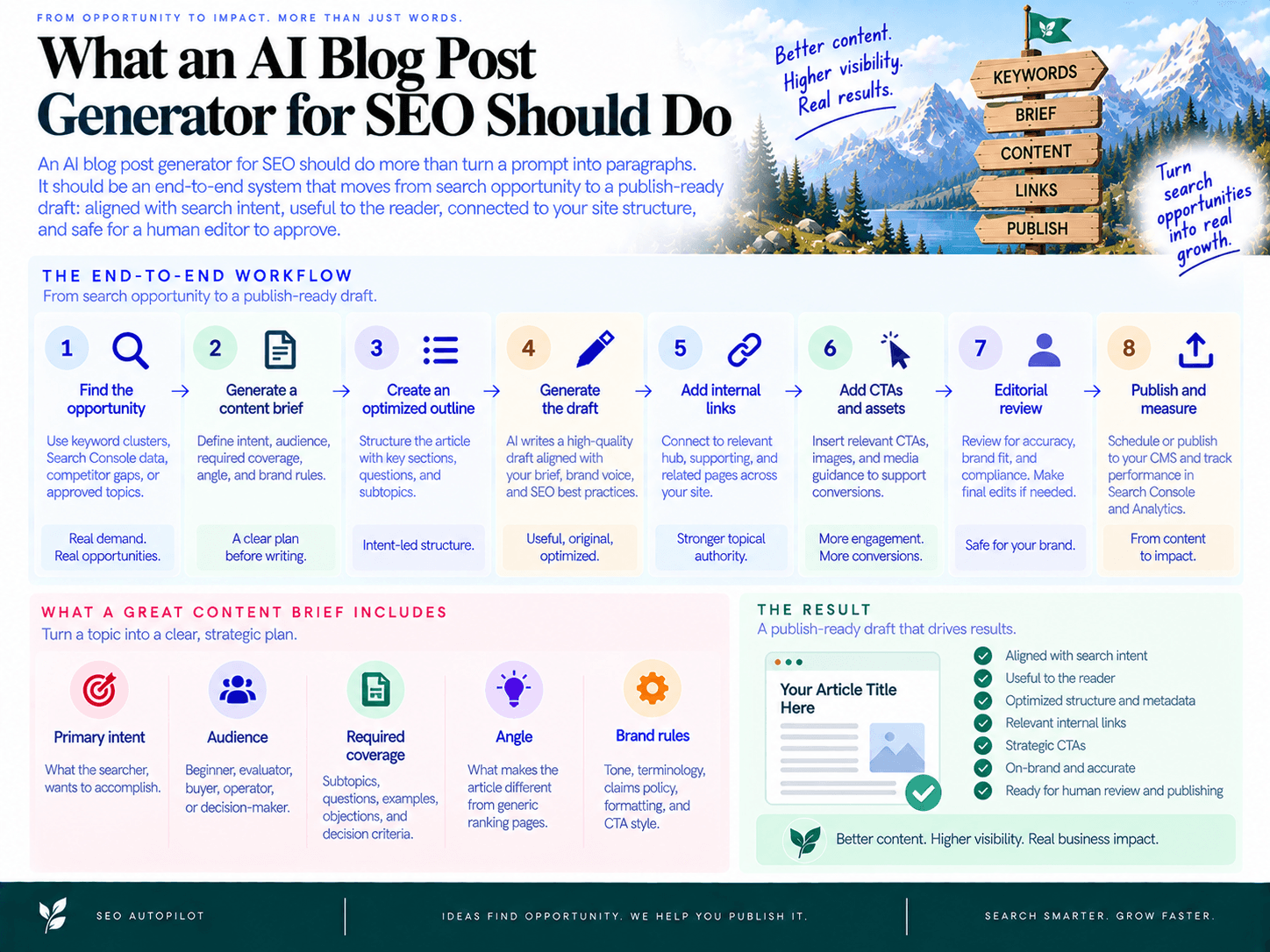
An AI blog post generator for SEO should do more than turn a prompt into paragraphs. The standard is an end-to-end system that moves from search opportunity to brief, outline, optimized draft, internal links, CTA placement, and editorial review. The output should be a publish-ready draft: aligned with search intent, useful to the reader, connected to your site structure, and safe for a human editor to approve.
From keyword cluster to content brief, not just a prompt
The workflow should start with inputs that explain why the article should exist. A keyword cluster, Search Console signal, competitor gap, or approved topic should become a brief that defines:
Primary intent: what the searcher wants to accomplish.
Audience and awareness level: beginner, evaluator, buyer, operator, or decision-maker.
Required coverage: subtopics, questions, examples, objections, and decision criteria.
Angle: what makes the article different from generic ranking pages.
Brand rules: tone, terminology, claims policy, formatting, and CTA style.
This is where many teams lose momentum: keyword research produces a list, but not a production queue. A stronger SEO content workflow converts opportunities into approved briefs that writers, editors, and automation can execute consistently. If you are evaluating tools, use an SEO automation checklist for evaluating tools to separate simple writing assistants from platforms that support planning, optimization, and publishing operations.
Draft, on-page SEO, and internal links must be part of the same workflow
A usable SEO draft is not finished when the body copy is generated. It should already include the structural elements an editor expects to review:
A clear H1 and logical H2/H3 hierarchy.
Sections mapped to the searcher’s questions and intent.
Natural keyword usage without stuffing or repetitive phrasing.
Metadata suggestions, FAQ opportunities, and snippet-friendly formatting.
Internal link suggestions with relevant anchors and placement logic.
A contextual CTA that fits the reader’s stage instead of interrupting the article.
SEO Autopilot is built around this broader execution model: it can use website analysis, Google Search Console signals, competitor patterns, intent categorization, a Unified Backlog, strategy-grade briefs, full article generation, automatic internal linking, natural CTA placement, scheduling, and CMS publishing integrations such as WordPress, Contentful, and Framer. That matters because the bottleneck is rarely “write 1,500 words.” The bottleneck is coordinating every step needed to ship a page that can perform.
Where most AI writers fail
Most generic AI writing workflows fail in predictable ways: they produce broad summaries, invent unsupported claims, repeat the same phrasing, ignore internal linking, and create articles that sound polished but add little value. The fix is not to remove AI from the process. The fix is to add quality gates before publishing.
Intent gate: Does the outline answer the real search problem?
Specificity gate: Does the draft include concrete steps, examples, constraints, or decision rules?
Factuality gate: Are product claims, statistics, and comparisons verified before publication?
Brand gate: Does the article sound like your company, not a generic content farm?
SEO gate: Are titles, headers, metadata, links, and readability ready for review?
The goal is not hands-off content at any cost. The goal is a repeatable production system where automation handles the heavy workflow steps and humans approve strategy, accuracy, and final quality. To decide where automation should replace manual work and where editors should stay involved, it helps to compare manual vs automated SEO workflows before choosing your operating model.
Inputs You Need: Cluster, SERP Insights, and Brand Rules
High-quality AI-assisted SEO content starts with three inputs: a structured topic cluster, practical notes from the current search results, and clear writing rules for your brand. Without these, the tool is forced to guess intent, angle, terminology, and level of depth—which is how teams end up with generic drafts that need heavy rewriting.
The goal is not to over-brief every article. The goal is to give the system enough direction to produce a draft that is aligned with search demand, differentiated from competitors, and safe for editorial review.
Keyword cluster: primary topic, supporting queries, and intent
A keyword cluster should tell the generator what the article is really about, which related questions it should answer, and what search intent it must satisfy. Treat it as the strategic input, not just a list of terms to sprinkle into the copy.
At minimum, define:
Primary topic: the main query or theme the page should rank for.
Supporting queries: related questions, subtopics, and modifiers the article should cover naturally.
Intent type: informational, commercial, comparison, transactional, or mixed.
Audience: who is searching and what they already understand.
Content job: what the reader should be able to do after reading the post.
Example input:
Primary topic: generate SEO blog posts with AI
Supporting queries: AI content brief, SEO outline generator, internal link suggestions, on-page SEO checklist, AI content review
Intent: informational with commercial evaluation
Audience: SEO managers and small content teams
Reader job: understand how to turn a content opportunity into a publish-ready article without losing editorial control
In SEO Autopilot, this input can be built from website analysis, Google Search Console signals, competitor patterns, and intent categorization. That matters because the article plan is grounded in actual site context and search opportunity rather than a disconnected prompt.
Competitor/SERP insights: headings, gaps, angle opportunities
SERP analysis should answer one question: what does the current ranking landscape prove the article must cover, and where can your version add something better?
Do not copy competitor outlines. Extract patterns and gaps. Look at the top-ranking pages and note:
Repeated headings: topics Google likely expects for this intent.
Common formats: how-to guide, checklist, comparison, template, list, or product walkthrough.
Depth gaps: areas competitors mention but do not explain operationally.
Missing examples: places where screenshots, sample outputs, templates, or workflows would improve usefulness.
Outdated advice: recommendations that ignore current AI review, factuality, or publishing workflows.
Commercial clues: whether searchers are comparing tools, validating process fit, or looking for implementation help.
A useful competitor note is specific enough to shape the draft. For example:
Weak note: “Competitors talk about outlines.”
Strong note: “Most ranking articles explain outline generation, but few show how to map H2s and H3s to intent, avoid cannibalization, and add editorial quality gates.”
That second note gives the generator a clear angle: create a more operational guide, not another surface-level overview.
Brand voice + compliance: what the AI must and must not do
Your brand voice sheet keeps the draft from sounding like a generic content farm. It should be short, explicit, and enforceable.
Include rules for:
Tone: direct, practical, expert, conversational, technical, or founder-led.
Point of view: what your company believes about the topic.
Terminology: preferred product names, category language, and phrases to avoid.
Formatting: paragraph length, list style, heading style, examples, and CTA treatment.
Claim policy: what requires a source, what cannot be stated, and how to handle uncertainty.
Do-not-say rules: banned clichés, exaggerated claims, competitor attacks, or unsupported guarantees.
Example brand rules for this type of article:
Use plain, operational language: “brief,” “outline,” “internal links,” “approval,” “publish.”
Avoid vague claims like “revolutionize your content” or “rank instantly.”
Explain automation as workflow leverage, not a replacement for strategy or review.
Use examples and checklists instead of broad marketing statements.
Keep CTAs contextual and tied to the reader’s workflow problem.
SEO Autopilot’s website analysis can infer site topic, audience, and tone/style from the website URL, which helps reduce setup time. Still, teams should maintain a simple written rule set so editors, writers, and automation tools are all working from the same standards.
Step 1 — Turn a Keyword Cluster Into a Strong Outline
A strong outline is not a reordered list of keywords. It is a decision document: what this article will answer, what it will intentionally avoid, which search intents it will satisfy, and where the article needs proof, examples, or product context.
In SEO Autopilot, this starts from an approved opportunity or cluster in the backlog. The platform uses site context, Search Console signals, competitor patterns, and intent categorization to generate a strategy-grade brief with recommended angles, must-include points, and a structured article plan. Your job is to review whether the structure matches the searcher’s real task before drafting begins.
Choose the primary intent and define the “job to be done”
Before building the outline, assign one primary intent to the article. Most clusters contain mixed intent, but the page still needs a dominant purpose.
Informational intent: the reader wants to learn how something works, compare approaches, or solve a workflow problem.
Commercial investigation: the reader is evaluating tools, features, tradeoffs, or implementation fit.
Transactional intent: the reader is close to taking action, booking a demo, starting a trial, or choosing a vendor.
For a topic like generating SEO blog posts with AI, the primary job might be: “Help a content team turn a keyword cluster and SERP notes into a publish-ready article workflow they can trust.” That job should shape every H2. If a section does not help the reader complete that job, it should be removed or folded into another section.
This is where the content brief matters. It should define the audience, intent, angle, must-cover subtopics, differentiation opportunities, and any constraints such as brand tone, claim policy, or required product references.
Build an outline that covers the cluster without cannibalization
The best outline gives each subsection a unique role. Thin outlines happen when every H2 says the same thing with slightly different wording. Cannibalized outlines happen when one article tries to satisfy multiple page types at once, such as “how to,” “best tools,” and “pricing comparison” in a single post.
Use the cluster to decide what belongs in the main article and what should become supporting content. A practical keyword mapping pass can look like this:
Main article: “how to generate an SEO blog post from a keyword cluster” because it owns the workflow intent.
Supporting article: “AI content quality checklist” because it deserves a deeper QA-focused page.
Supporting article: “internal linking automation” because it is a related but narrower operational topic.
Commercial page: “best SEO automation tools” because it serves evaluation intent, not tutorial intent.
A clean SEO outline should then move from problem framing to execution. For example:
H2: Inputs needed before generation
H3: Keyword cluster and primary intent
H3: SERP patterns and competitor gaps
H3: Brand voice and factuality rules
H2: Step-by-step article generation workflow
H3: Outline creation
H3: Draft generation
H3: On-page optimization
H2: Quality controls before publishing
H3: Brand voice review
H3: Claim verification
H3: Editorial approval
Each H2 should answer a distinct question. Each H3 should add specificity, not repeat the parent section. If an H3 cannot support at least two useful paragraphs, an example, a checklist, or a decision point, it is probably too thin.
Add SME and experience hooks before drafting
AI-generated drafts become generic when the outline lacks original inputs. Add experience hooks before you generate the article so the draft has something specific to build around.
Examples: sample outline, sample CTA block, sample internal link placement, sample QA checklist.
Screenshots or product moments: backlog view, generated brief, publishing workflow, analytics view.
Constraints: “Do not make unsupported performance claims,” “avoid keyword stuffing,” or “write for small SEO teams, not enterprise content operations.”
Point of view: “The draft is not the finish line; the workflow is what makes the content publish-ready.”
For SEO Autopilot users, this is the review point before moving from brief to draft. The platform can generate the strategy-grade structure, but a human editor should confirm the angle, remove irrelevant sections, and add any subject-matter context the model would not know on its own.
Outline quality gate: approve the outline only when every major section maps to a clear reader intent, the hierarchy flows logically, no section exists only to capture a keyword, and the article has enough examples or operational detail to avoid thin content.
Step 2 — Generate the First Draft (That Doesn’t Sound Like AI)
The goal of the first draft is not perfection. It is to turn the approved outline into a usable article with clear structure, specific examples, and enough substance for an editor to improve—not rewrite from scratch. Good AI content generation starts with constraints: who the article is for, what the reader is trying to do, what the brand would say, and what the draft must avoid.
Draft settings: audience, reading level, POV, and formatting
Before generating the first draft, define the writing rules. If you skip this step, the output will usually default to broad, polished, and forgettable.
Audience: Name the exact reader, such as “SEO manager at a small B2B SaaS company” or “agency content lead managing 20 client posts per month.”
Reading level: Choose a practical level. For most SEO content, aim for clear, executive-readable prose rather than academic depth or beginner fluff.
Point of view: Decide whether the article should use second person, first-person plural, or a neutral advisory tone.
Formatting: Specify short paragraphs, scannable lists, examples, mini-checklists, and no unnecessary introductions inside each section.
Brand rules: Include words to use, words to avoid, claims that need support, and the level of directness expected.
In SEO Autopilot, this draft step is connected to the strategy-grade brief: the system generates full blog content aligned to search intent, recommended angles, must-include points, and information gain. That matters because the draft is not being created from a blank prompt; it is built from the planned topic, intent, and brief.
Inject specificity: steps, tool outputs, constraints, and examples
The fastest way to make an AI-assisted draft feel more human is to require concrete detail. A generic draft says, “Optimize your article for SEO.” A useful draft says, “Rewrite the H1 to match the title tag intent, add one FAQ for the comparison query, and place a contextual internal link after the first tactical explanation.”
Use instructions like these when generating or refining the draft:
Turn broad advice into actions: Replace “create quality content” with named tasks, decision criteria, and pass/fail checks.
Add realistic constraints: Mention limited team capacity, approval bottlenecks, CMS publishing steps, or lack of dedicated SEO operations.
Use examples: Include sample headings, example bullets, short CTA blocks, or before-and-after rewrites.
Reference the reader’s workflow: Connect advice to briefs, outlines, drafts, reviews, publishing, and measurement.
Remove unsupported certainty: Avoid claims like “this will guarantee rankings” or “AI always produces better content.”
A useful prompt instruction for this stage is:
“Draft this section for a busy content marketer. Use direct language, short paragraphs, and concrete examples. Avoid generic SEO advice. Every subsection should tell the reader exactly what to do, what output they should expect, and what quality issue to watch for.”
Common draft issues and quick fixes
Even with a strong brief, the first output may need tightening. Treat draft review as a quality pass, not a failure of the system.
Problem: The draft is too generic.
Fix it by adding missing context: audience, product category, workflow stage, constraints, examples, and “what not to do” rules. Ask for a rewrite that includes specific steps and sample outputs.Problem: The draft is too verbose.
Ask for a 20–30% reduction while preserving instructions, examples, and key definitions. Cut repeated setup paragraphs first.Problem: The draft repeats the same idea in different words.
Merge overlapping paragraphs and assign each subsection a distinct job: explain, demonstrate, warn, or give a checklist.Problem: The tone sounds robotic.
Add brand voice examples and ask for more decisive verbs, fewer abstractions, and less “it is important to” phrasing.Problem: The draft makes vague claims.
Replace broad statements with qualified, reviewable language. If a claim cannot be verified, remove it or reframe it as a recommendation.
A strong draft should pass this simple test: if an editor deleted the tool name and read only the section, would the guidance still feel useful, specific, and operational? If yes, the draft is ready for the next optimization pass. If not, the issue is usually not the AI model—it is missing direction, missing examples, or weak content quality standards at the draft stage.
Step 3 — On-Page SEO Optimization Checklist (Automated + Human)
The optimization pass turns a strong draft into a page that is clear to readers and legible to search engines. The goal is not to “SEO-ify” the article after the fact; it is to confirm that the page satisfies the cluster’s intent, covers the expected subtopics, and is formatted so Google can understand the answer quickly.
Use automation for consistency: title checks, header coverage, missing entities, metadata length, readability flags, FAQ opportunities, and schema suggestions. Then use a human editor for judgment: whether the article actually answers the searcher’s problem, whether the examples are useful, and whether the copy still sounds like your brand.
Title tag + H1 alignment and CTR considerations
The title tag, H1, and intro must all point to the same promise. If the title sells a practical workflow, the article should not open with a generic definition. If the keyword cluster is commercial-investigation heavy, the framing should acknowledge evaluation criteria, not just education.
Title tag: Include the core topic, make the outcome clear, and avoid inflated claims. Example: “AI Blog Post Generator for SEO: From Brief to Publish-Ready Draft.”
H1: Match the title’s intent without being an exact duplicate if a clearer editorial version is better.
Intro alignment: Confirm the first 100–150 words state who the article is for, what problem it solves, and what workflow the reader will get.
CTR check: Add specificity where possible: “checklist,” “workflow,” “template,” “examples,” or “quality gates” often communicate more value than broad adjectives like “ultimate.”
Pass/fail rule: A reader should be able to look at the title, H1, and opening paragraph and predict the exact job the article will help them complete.
Header coverage and topical completeness
Headers are not just formatting. They are the article’s information architecture. In a practical SEO checklist, each H2 should map to a major decision or task the searcher expects to complete. Each H3 should clarify a step, criterion, example, or exception.
Automated checks can flag missing topics from the cluster, repeated headings, thin sections, and mismatches between the outline and the draft. A human editor should then confirm whether the page has real information gain or is simply restating what every competitor already says.
Intent coverage: Does the article answer the primary search intent before moving into secondary points?
Cluster coverage: Are supporting queries addressed in natural sections rather than forced into awkward paragraphs?
No cannibalization: Is this article focused on one clear job, or is it drifting into topics that deserve separate pages?
Section depth: Does each major section include practical detail, examples, criteria, or steps?
Header clarity: Could a reader skim the H2s and H3s and understand the workflow without reading every paragraph?
Pass/fail rule: Every heading should either advance the workflow, answer a known searcher question, or remove a decision point. If it only exists to hold a keyword, cut or rewrite it.
Entities, FAQs, and snippet-friendly formatting
Search engines need enough context to understand what the page is about. For this section, that means using precise terms related to the process: content brief, title tag, H1, search intent, SERP analysis, metadata, schema, image alt text, internal review, and publishing workflow. The point is not to stuff terms; it is to make the subject unambiguous.
Automation can suggest missing entities and common questions from the cluster. The human role is to decide whether each addition improves the article or bloats it. If a question is important enough to answer, answer it directly and briefly before adding nuance.
Definition-ready sentences: Use clear, quotable explanations for key concepts.
Step formatting: Use ordered lists when sequence matters and bullets when comparing checks or criteria.
FAQ fit: Add FAQs only when they answer real follow-up questions not already covered in the body.
Snippet structure: For “how to” queries, include concise steps; for “what is” queries, include a direct definition; for comparison intent, include criteria.
Structured data: Where relevant, add schema support. SEO Autopilot includes JSON-LD structured data generation as part of its workflow.
Pass/fail rule: If a subsection answers a question, the answer should appear in the first one or two sentences, not after a long setup.
Metadata, image alt text, and readability pass
The final on-page pass should remove friction. Metadata should set the right expectation in search results. Images should support comprehension. Sentences should be easy to scan. This is where an AI assistant can catch mechanical issues quickly, while an editor protects clarity and taste.
Meta title: Keep it specific, readable, and aligned with the page promise.
Meta description: Summarize the outcome and audience. Avoid vague copy like “learn everything you need to know.”
Image file names: Use descriptive names that explain the visual, such as seo-content-brief-workflow.png.
Alt text: Describe the image’s function, not just its topic. Example: “Workflow diagram showing brief, outline, draft, optimization, internal links, and publishing stages.”
Readability: Break long paragraphs, remove repeated phrases, and replace abstract claims with concrete examples.
Formatting: Use bullets, tables, bold labels, and short paragraphs where they help a busy marketer apply the advice faster.
Pass/fail rule: The page should be easy to scan on a laptop and a phone. If the reader has to work to find the next action, the optimization pass is not finished.
A simple automated + human review model
Use this split to keep the process fast without handing editorial judgment to software:
Automate: Missing headings, metadata length, entity gaps, repeated phrasing, broken structure, basic readability, FAQ opportunities, and schema suggestions.
Human review: Intent fit, usefulness, brand voice, claim accuracy, example quality, and whether the article deserves to be published.
Approve only when: The article has a clear promise, complete coverage, clean formatting, accurate claims, and a next-step path for the reader.
This is the difference between basic content optimization and a publish-ready editorial workflow: automation speeds up the checks, but a human still confirms that the page is useful, credible, and aligned with the searcher’s real problem.
Step 4 — Internal Link Suggestions (With Anchors That Make Sense)
Internal links should be generated before the article reaches final review, not added as a rushed publishing task. The goal is to connect the new post to relevant pages in the same topic cluster, help search engines discover relationships between pages, and move readers toward the next useful resource.
In SEO Autopilot, automatic internal linking is part of the content workflow, so new posts do not ship as isolated pages. The practical output should be a short link map: target page, suggested placement, and the phrase that will become the link.
How to choose links: relevance, intent, and freshness
A good internal linking strategy starts with selection criteria. Do not link to pages just because they need more traffic. Link when the destination helps the reader complete the job they came to do.
Topical relevance: the target page should belong to the same cluster or a closely related subtopic.
Intent match: an informational section should usually link to a guide, checklist, or explainer; a commercial section can link to a product, comparison, or demo page.
Reader progression: the link should answer the logical next question, not interrupt the current explanation.
Freshness: prioritize current, maintained pages over outdated posts with stale screenshots, old positioning, or obsolete recommendations.
Cluster strength: link from the new article to cornerstone pages, and update existing cluster pages to link back to the new article where it adds depth.
For a deeper explanation of why this belongs inside the production system, not after publication, see how automated internal linking boosts SEO performance.
Anchor text rules: descriptive, varied, and non-spammy
Anchor text should tell the reader what they will get after clicking. Avoid vague phrases like “click here,” and avoid repeating the same exact-match phrase every time. The best anchors are specific, natural, and context-aware.
Use descriptive language: “SEO automation checklist for evaluating tools” is clearer than “this checklist.”
Vary phrasing: use close variations when linking to the same page from multiple articles.
Avoid forced keywords: if the sentence sounds written for a crawler instead of a person, rewrite it.
Keep anchors concise: link the meaningful phrase, not the whole sentence.
Match the destination: do not use a high-intent anchor if the target page is a beginner guide.
If your team wants a more tactical model for anchor selection and placement, read this guide to advanced internal linking with AI (anchors + placement).
Where to place links: early proof, mid-depth, and next-step
Placement matters as much as the target page. A strong draft usually needs three types of link placements:
Early proof link: place one near the beginning when a concept needs context or credibility.
Mid-depth link: place one inside a detailed section where the reader may want a deeper tactical resource.
Next-step link: place one near the end of a section when the reader is ready to act, compare options, or continue the workflow.
Example link map for a post about generating SEO articles:
Section context | Target page type | Suggested anchor | Placement logic |
|---|---|---|---|
Explaining the full SEO workflow | Automation checklist | SEO automation checklist for evaluating tools | Helps readers assess whether their tool covers planning, drafting, optimization, and publishing. |
Discussing internal linking quality | Internal linking guide | automated internal linking boosts SEO performance | Adds depth for readers who want to understand crawl paths, clusters, and page discovery. |
Explaining anchor and placement decisions | Advanced tactics guide | advanced internal linking with AI | Gives tactical next steps without bloating the current article. |
Quality gate: before approving the draft, check that every link has a clear reason to exist. If the link does not improve the reader journey, clarify a concept, or strengthen the topic cluster, remove it.
Step 5 — Add CTAs Without Killing the Reader Experience
A strong SEO CTA should feel like the next helpful step, not an interruption. For a tutorial-style post, use two primary placements: one contextual CTA after the reader understands the problem and one end-of-post CTA after they have seen the full workflow.
The rule is simple: match the offer to the reader’s level of commitment. Someone halfway through a how-to guide may want a template, checklist, or workflow example. Someone who reaches the end is more likely to consider a product demo, trial, or “start now” action.
Match the CTA to the reader’s intent
Do not use the same CTA everywhere. A reader comparing workflows is not always ready to buy, but they may be ready to save time, copy a process, or evaluate a tool.
Early or mid-article CTA: offer a practical next step, such as a checklist, brief template, content workflow, or example output.
End-of-post CTA: offer the primary product action, such as starting a project, viewing the workflow, or connecting a site.
Commercial-intent section CTA: connect the pain point directly to the platform when the reader is evaluating execution options.
For example, after explaining outline, draft, on-page optimization, and internal linking, a contextual CTA could say:
Example mid-article CTA: “Want to turn your keyword cluster into a brief, draft, internal links, and publishing plan without managing five separate tools? SEO Autopilot helps you move from SEO opportunity to publish-ready content in one workflow.”
This works because it is tied to the reader’s current problem: workflow friction. It does not stop the tutorial to make a generic sales pitch.
Use the problem → promise → proof → action pattern
Good conversion copy is specific. Instead of “Try our tool,” build the CTA around the pain the reader just experienced.
Problem: Name the workflow bottleneck. Example: “Still turning keyword research into briefs manually?”
Promise: State the operational improvement. Example: “Build a ranked backlog, generate briefs, create drafts, add internal links, and schedule posts from one workspace.”
Proof: Use concrete capabilities. Example: “SEO Autopilot supports workflows from Google Search Console insights through content planning, internal linking, structured data, CMS publishing, and analytics views.”
Action: Make the next step obvious. Example: “Start Now” or “View how it works.”
This structure keeps the CTA grounded in product-led content rather than promotional filler. The product is introduced as the mechanism for completing the workflow the article already taught.
Choose the right CTA format for the page
CTA design should support the reading experience. Use the lightest format that can do the job.
In-line CTA: Best for a short, contextual nudge inside a paragraph. Use it when the offer directly relates to the sentence around it.
Callout box: Best for a mid-article offer that deserves visual separation but should not dominate the page.
End-of-post module: Best for the primary product action after the reader has completed the guide.
Example contextual CTA module:
Stop after the brief? Or ship the post?
SEO Autopilot turns approved topics into strategy-grade briefs, full articles, internal links, natural CTAs, and scheduled CMS publishing from one workflow.
CTA: View how it works.
Example end-of-post CTA module:
Ready to turn SEO opportunities into published content?
Connect your site, use Search Console and competitor signals to build a prioritized backlog, generate briefs and articles, add internal links, and schedule posts to your CMS with SEO Autopilot.
CTA: Start Now.
Before publishing, check every CTA against one standard: would this help the reader take the next logical step? If the answer is no, rewrite it, move it lower, or remove it. The goal is not more CTAs. The goal is better-timed CTAs that connect search traffic to business outcomes without weakening trust.
Quality Controls: Brand Voice, Factuality, and Review Workflow
AI-generated SEO content becomes trustworthy when it moves through clear quality gates. The goal is not to “trust the draft”; it is to define what the draft must prove before it can be published: on-brand language, accurate claims, search-intent fit, useful examples, and a named human owner for final approval.
Brand voice guardrails: make the style testable
Brand voice should be documented before generation, not fixed after the draft is written. A lightweight voice sheet is enough if it gives the writer or tool specific rules to follow.
Tone: direct, practical, expert, conversational, or executive.
Point of view: what the brand believes about the topic and what it pushes back against.
Preferred terms: product names, category language, feature names, and approved phrasing.
Banned language: hype, vague superlatives, unsupported claims, jargon, or phrases your brand would never use.
Formatting rules: paragraph length, list style, CTA format, capitalization, and screenshot or example requirements.
A simple pass/fail rule works best: if a paragraph could appear on any competitor’s blog with the logo swapped out, it fails the voice check. The fix is to add a stronger point of view, a product-specific example, a customer scenario, or a clearer recommendation.
Factuality checks: separate claims from commentary
The most important part of fact checking AI-assisted content is knowing which statements need proof. Opinions, process advice, and definitions can often stand on their own. Product claims, statistics, legal or financial guidance, competitor comparisons, and performance promises need verification before publication.
Product claims: confirm features, integrations, workflows, and limitations against approved product documentation.
Data claims: verify statistics, dates, benchmarks, and quoted research from the original source.
Competitive claims: avoid unsupported “better than” language unless the comparison is sourced and current.
Performance claims: replace guarantees with grounded language such as “can help,” “supports,” or “is designed to.”
YMYL topics: add subject-matter review for content involving health, finance, legal, safety, or compliance decisions.
Use a claims policy. For example: “Every factual claim must be either common knowledge, supported by a source, or verified by an internal owner. Any uncertain claim is removed, softened, or sent back for review.” This prevents hallucinated features, inflated promises, and outdated details from slipping into publish-ready content.
Editorial workflow: assign one owner per gate
A practical editorial workflow keeps production moving without turning every article into a committee review. Assign a specific owner to each stage so quality improves without slowing the entire content calendar.
Brief owner: confirms the keyword cluster, search intent, target reader, angle, and must-include points before drafting.
Draft reviewer: checks structure, usefulness, originality, examples, and whether the article actually answers the query.
SEO reviewer: reviews title/H1 alignment, headers, metadata, internal links, schema opportunities, and readability.
Fact owner: verifies product, data, and industry claims against approved sources.
Final approver: confirms the piece is safe to publish and aligned with brand, product, and business goals.
In SEO Autopilot, teams can match the review depth to the risk of the article. Use Brief First or Manual workflows when the topic is strategic, commercial, or sensitive. Use Full Auto for lower-risk content where the structure, voice, linking, and publishing rules are already well defined.
AI content review checklist
Before approval, run a short AI content review that looks for the most common quality failures:
Generic writing: Does the post include specific examples, constraints, and recommendations?
Repetition: Are the same points repeated under different headings?
Keyword stuffing: Does the content read naturally, or were terms inserted for density?
Unsupported claims: Are product, market, or performance claims verified?
Thin sections: Does every section provide a useful decision, step, checklist, or example?
Off-brand tone: Would your sales, product, or founder team recognize the voice?
Missing next step: Is the reader guided toward the right CTA or related resource?
Versioning and accountability
Every article should have a simple approval record: draft date, reviewer names, key changes, sources checked, and final approver. This does not need to be complex. A CMS note, project comment, or content calendar field is enough.
The rule is straightforward: automation can create the draft, suggest links, and prepare the page for publishing, but a human should own the final decision for any page that affects brand trust, product positioning, or revenue. That balance is what makes AI-assisted SEO content scalable without making it careless.
Publish, Measure, and Feed Learnings Back Into Your Backlog
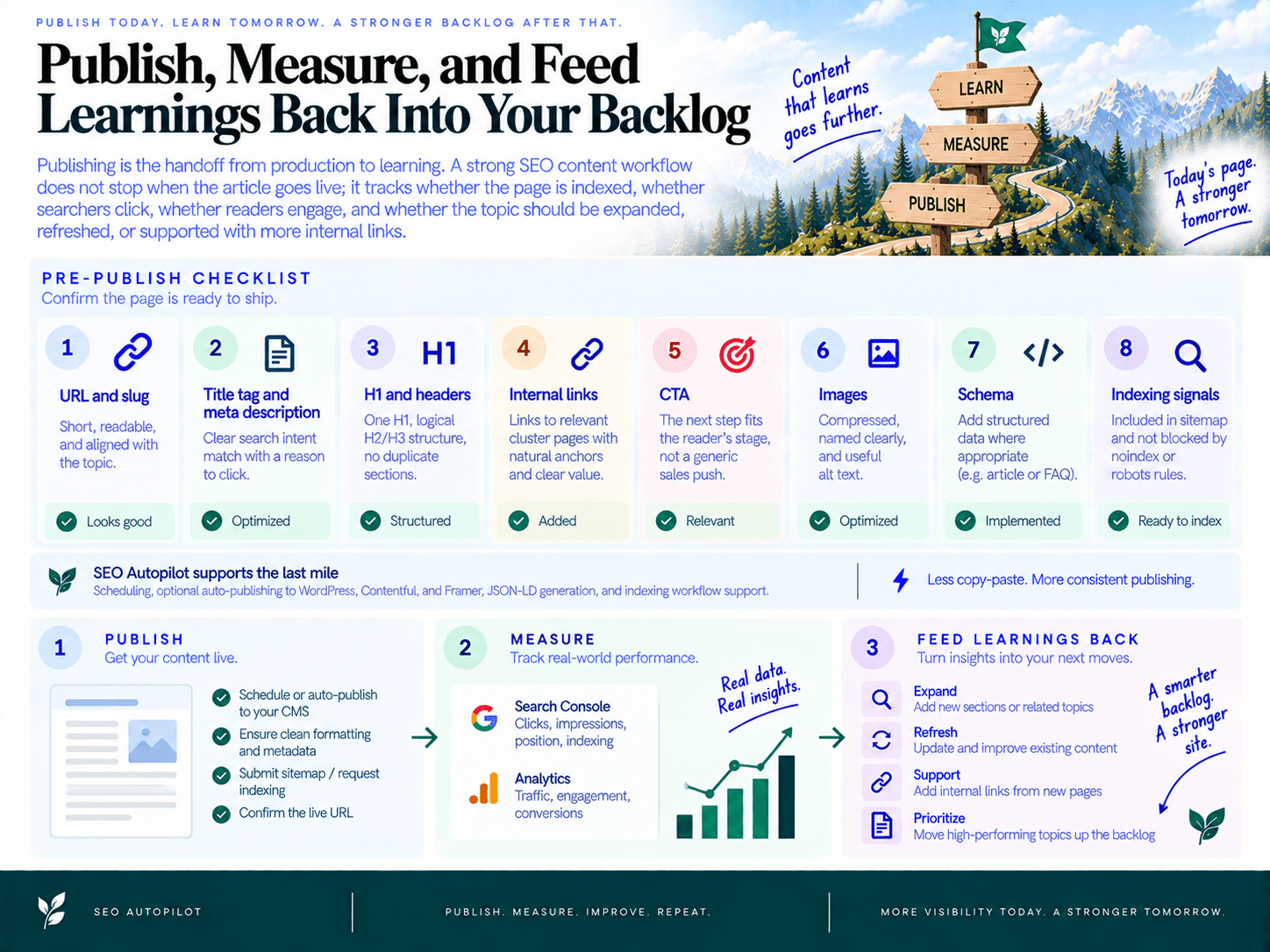
Publishing is the handoff from production to learning. A strong SEO content workflow does not stop when the article goes live; it tracks whether the page is indexed, whether searchers click, whether readers engage, and whether the topic should be expanded, refreshed, or supported with more internal links.
Pre-publish checklist: confirm the page is ready to ship
Before scheduling or publishing, run one final operational check. This is where automation protects consistency, but a human editor should still confirm the page makes sense for the reader and the business.
URL and slug: Short, readable, and aligned with the topic.
Title tag and meta description: Clear search intent match with a reason to click.
H1 and headers: One H1, logical H2/H3 structure, no duplicate sections.
Internal links: Links point to relevant cluster pages with natural anchors and clear reader value.
CTA: The next step fits the reader’s stage, not a generic sales push.
Images: Compressed, named clearly, and supported with useful alt text.
Schema: Add structured data where appropriate, such as article or FAQ markup.
Indexing signals: Confirm the page is included in your sitemap and not blocked by noindex or robots rules.
SEO Autopilot supports this last mile with scheduling, optional auto-publishing to CMS platforms such as WordPress, Contentful, and Framer, JSON-LD structured data generation, and indexing workflow support. The goal is to reduce copy-paste errors and keep the publishing cadence moving without skipping essential QA.
Post-publish: monitor the signals that show whether the article is working
In the first days after publishing, focus on discoverability. Confirm the page is crawlable, included in the sitemap, and eligible for indexing. Once impressions begin to appear, move from “is Google finding it?” to “is the page earning attention?”
Indexing status: Has the page been discovered and indexed?
Impressions: Is the page appearing for the intended query set?
CTR: Are the title tag and meta description attracting clicks?
Average position: Is the page moving toward page-one visibility?
Engagement: Are readers scrolling, staying, clicking internal links, or converting?
Query drift: Is the page ranking for unexpected terms that suggest a new angle or section?
SEO Autopilot includes Google Analytics and live analytics views inside the workspace, so teams can connect publishing activity to performance without separating execution from reporting. For a broader operating model, use a step-by-step guide to automating your SEO tasks to standardize the recurring checks around publishing, indexing, monitoring, and updates.
Turn performance data into the next keyword cluster
The most useful output of measurement is not a report; it is a decision. Each article should create one of four actions:
Keep: The page is gaining impressions, clicks, and engagement. Let it mature while monitoring trendlines.
Improve: The page gets impressions but low CTR. Test a stronger title tag, meta description, or opening angle.
Expand: The page ranks for related queries that deserve their own supporting article or FAQ section.
Refresh: The page is slipping, outdated, or missing newly important subtopics. Add a content refresh to the queue.
This is where a unified planning system matters. Instead of leaving insights in Search Console exports or analytics dashboards, feed them into your content backlog. SEO Autopilot’s Unified Backlog is designed for this: opportunities from site analysis, competitors, keyword research, and Search Console can be prioritized into a ranked publishing queue, then turned into new briefs and articles.
The weekly rhythm is simple: publish, check indexing, monitor SEO performance, identify gaps, update the backlog, and approve the next cluster. That loop is what turns AI-assisted content from one-off drafting into a repeatable growth system.

About the author: SEO Autopilot — Get recommended by Google and AI
SEO Autopilot is the SEO operating system for SaaS teams: it finds what to write from your site, competitors, and Search Console — then publishes evidence-verified comparison pages and intent-matched content on autopilot to WordPress, Framer, and more.
Areas of expertise: seo, aeo, geo, Search Engine Optimization, Answer Engine Optimization, Generative Engine Optimization, SEO Expert, Article Writer