Google Search Console Integration: Auto-Ranked SEO Backlog
What the Google Search Console integration does
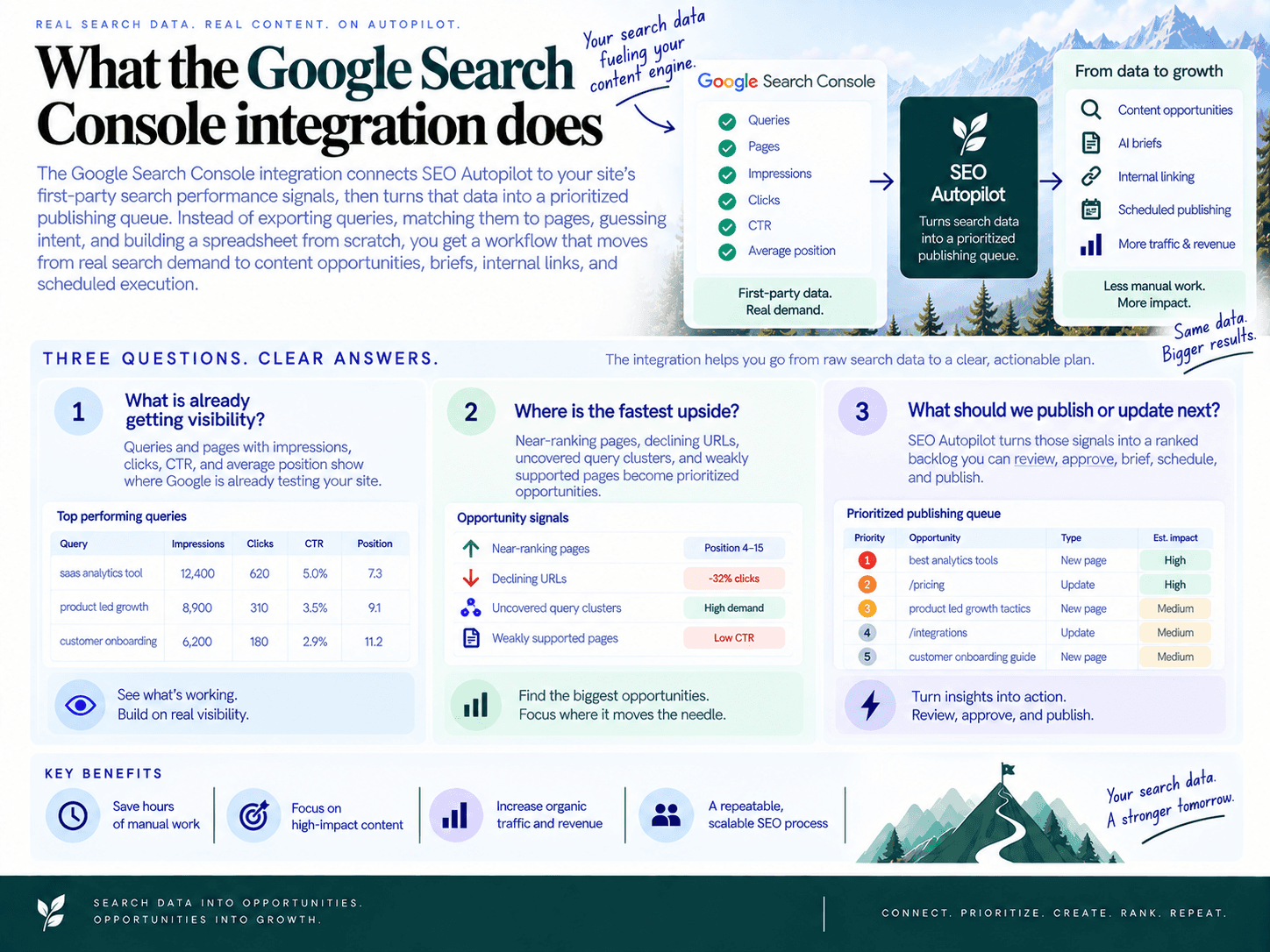
The google search console integration connects SEO Autopilot to your site’s first-party search performance signals, then turns that data into a prioritized publishing queue. Instead of exporting queries, matching them to pages, guessing intent, and building a spreadsheet from scratch, you get a workflow that moves from real search demand to content opportunities, briefs, internal links, and scheduled execution.
In practical terms, the integration answers three questions content teams ask every week:
What is already getting visibility? Queries and pages with impressions, clicks, CTR, and average position show where Google is already testing your site.
Where is the fastest upside? Near-ranking pages, declining URLs, uncovered query clusters, and weakly supported pages become prioritized opportunities.
What should we publish or update next? SEO Autopilot turns those signals into a ranked backlog you can review, approve, brief, schedule, and publish.
Who this is for
This workflow is built for operators who need SEO execution, not another pile of reports. That includes content marketers, SEO leads, founders, consultants, creators, and small teams that publish regularly but do not want manual SEO ops slowing the calendar down.
If your current process looks like “open Search Console, export CSV, clean rows, group keywords, inspect pages, write briefs, add links, copy into WordPress or Framer,” this integration compresses that work into one operating system. SEO Autopilot connects Search Console insights with automated keyword research, intent categorization, a Unified Backlog, brief creation, internal linking, scheduling, and optional publishing integrations for platforms including WordPress, Contentful, and Framer.
What you get first: a ranked backlog, not a raw dashboard
The main output is an SEO content backlog: a ranked, selectable queue of opportunities with a clear reason behind each recommendation. The point is not to recreate Search Console charts inside another tool. The point is to transform performance data into decisions.
After connecting, SEO Autopilot uses Search Console signals alongside your site analysis, topic map, and competitor patterns to surface opportunities such as:
Quick wins: pages already close to stronger rankings that may benefit from intent alignment, title improvements, added sections, FAQs, or stronger internal links.
Refresh targets: existing content that is losing visibility or underperforming relative to its prior baseline.
New topic clusters: query patterns where your site earns impressions but lacks a strong, dedicated page matching the search intent.
Support actions: internal linking recommendations that help important pages stop shipping as isolated URLs.
Each opportunity is designed to be actionable. A backlog item should tell you what the opportunity is, why it matters, what type of work it requires, and what the next step should be: refresh, expand, create, link, brief, schedule, or publish.
Why GSC is the fastest credible source for prioritization
GSC data is first-party performance data from your own site in Google Search. That makes it different from generic keyword lists. It shows actual impressions, actual clicks, actual pages, and average ranking positions for queries where your domain is already participating.
That matters because prioritization gets more credible when it starts from evidence:
Impressions show demand. People are already searching, and your site is already being shown.
Clicks show current capture. You can see which topics are converting visibility into traffic and which are not.
Average position shows distance to upside. A page ranking near the top often needs a different action than a page buried far down the results.
Page-query pairings show intent fit. If one page is ranking for many loosely related queries, that may signal a refresh, split, or new cluster opportunity.
This is why Search Console is often the shortest path from “we should do SEO” to “here is what we should publish next.” You are not starting with a blank keyword universe. You are starting with proven visibility, then using automation to separate noise from action.
How SEO Autopilot uses the connection
SEO Autopilot uses the connection as part of a broader execution workflow. Search Console insights inform the opportunity layer, but they do not stop there. The platform combines those signals with automatic website analysis, SEO analysis, keyword and intent mapping, competitor pattern analysis, and backlog prioritization.
From there, selected opportunities can move into strategy-grade briefs, full article generation, automatic internal linking, natural CTA placement, scheduling, and optional auto-publishing depending on the workflow mode you choose. The value is not just finding topics. It is keeping the path from insight to published content short enough that the plan actually ships.
The result: a more defensible content roadmap, built from real search performance, organized into a backlog your team can act on immediately.
What data we pull from GSC (and what we don’t)

SEO Autopilot uses Google Search Console performance data to understand where your site already has search traction. The integration is focused on the data needed to identify content opportunities: search demand, ranking visibility, landing URLs, and performance trends.
Dimensions: queries, pages, country, and device
The core pull is built around the relationship between the search term and the URL receiving visibility for that term. That gives the backlog enough context to answer: “Is this an existing-page optimization, a refresh, a new article, or a support/internal-linking opportunity?”
Search term: The exact search phrase reported in Search Console.
Landing URL: The page on your site that appeared or earned traffic for that term.
Date range: The selected reporting window used to evaluate recent performance.
Country: Optional segmentation when location-specific performance matters.
Device: Optional segmentation for desktop, mobile, or tablet differences.
Country and device filters are useful when rankings or click behavior differ by market or screen type. For example, a SaaS site may prioritize US desktop terms for commercial articles, while a local business may care more about mobile visibility in a specific country.
Metrics: clicks, impressions, CTR, and average position
The integration pulls the core Search Console performance metrics needed to evaluate both demand and upside:
Clicks: How many visits Google Search generated for a term, URL, or term-URL pair.
Impressions: How often your result appeared in Google Search.
CTR: The percentage of impressions that turned into visits.
Average position: The average ranking position for the selected term, URL, or segment.
These metrics are more useful together than separately. High impressions with low CTR can point to a title or meta angle problem. Strong impressions with average position in the 4–20 range can indicate a near-term ranking opportunity. Declining visits across comparison windows can flag content decay.
Time ranges and comparison windows
SEO Autopilot uses recent Search Console windows to separate current opportunities from stale historical noise. Common analysis windows include recent periods such as the last 28 days or last 90 days, plus comparison views to detect movement over time.
Recent performance window: Shows what Google is currently rewarding or testing.
Comparison window: Helps identify pages gaining or losing traction.
Trend direction: Used to distinguish stable opportunities from decaying content.
This matters because a keyword that looked promising twelve months ago may no longer be relevant, while a term with rising impressions this month may deserve immediate action.
Brand vs. non-brand handling
Brand terms can be handled separately so they do not distort prioritization. If your site already receives branded demand, those terms may show strong CTR and position, but they often do not represent the best opportunity for new content growth.
Typical handling includes tagging known brand phrases, separating branded and non-branded performance, and prioritizing non-branded opportunities when the goal is net-new organic acquisition.
What we don’t access
The Search Console connection is designed for search performance analysis. It does not require access to unrelated Google products or private account data.
No Gmail access: We do not read or access your email.
No Google Drive access: We do not access files, documents, or folders.
No Google Ads access: Paid search data is not pulled through the Search Console connection.
No Google Analytics access unless separately connected: Analytics data is handled through its own integration flow.
No CMS changes from GSC: Connecting Search Console does not edit your WordPress, Framer, or Contentful site.
No Search Console setting changes: The integration is for reading performance signals, not changing your Google property configuration.
No personal search history: Search Console reports aggregated site performance, not an individual user’s private searches.
In short: the integration pulls the search visibility data needed to build a credible SEO backlog, not your broader Google account data.
How raw GSC data becomes a ranked content backlog
Raw Search Console exports are useful, but they are not a plan. SEO Autopilot turns query, page, click, impression, CTR, and position data into a ranked backlog by cleaning the data, matching search demand to existing URLs, detecting opportunity patterns, and scoring each item by likely impact, execution effort, and confidence.
Step 1: Normalize query and page data
The first step is making messy performance data usable. A single page may rank for hundreds of similar queries. A single query may appear across multiple pages. SEO Autopilot groups and maps those signals so the backlog is based on meaningful opportunity units, not duplicate spreadsheet rows.
Query cleanup: Similar query variants are grouped so “best CRM for consultants” and “best consultant CRM” can be evaluated as one intent cluster.
Query-to-page mapping: Queries are matched to the pages currently earning impressions, clicks, and rankings.
Page-level aggregation: The platform looks at how a URL performs across all relevant queries, not just one keyword.
Intent grouping: Queries are categorized by search intent so informational, commercial, comparison, and support-style topics do not get mixed into one generic task.
This matters because content decisions should be based on search behavior, page fit, and business relevance together. A high-impression query is not automatically a good article idea. It may be a title rewrite, a refresh, a supporting post, or an internal linking task.
Step 2: Detect the four opportunity types
Once the data is normalized, SEO Autopilot classifies opportunities into four execution buckets. This is where raw metrics become actual work your team can approve, brief, schedule, and publish.
Quick wins: Existing pages that already rank within striking distance, often around positions 4–20, where better intent alignment, titles, headings, FAQs, or internal links could improve clicks.
Refresh targets: Pages that show declining clicks, impressions, CTR, or position across comparison windows and need updated content, consolidation, or stronger topical support.
New topic clusters: High-signal queries where your site is earning impressions but does not have a strong, dedicated page that satisfies the intent.
Internal linking and support actions: Pages with valuable rankings that need more contextual links from related content to strengthen discovery and topical authority.
The goal is not to produce a bigger keyword list. The goal is content prioritization: deciding whether the next best move is to update an existing URL, create a new article, connect related pages, or improve a near-ranking asset.
Step 3: Score each opportunity by impact, ease, and confidence
SEO Autopilot’s backlog is prioritized so small teams can act without debating every query manually. The scoring logic is built around a practical model: impact × ease × confidence.
Impact: How much upside exists if the opportunity works. Signals include impressions, current clicks, average position, CTR gap, and whether the topic maps to meaningful business intent.
Ease: How hard the action is likely to be. Updating a page already ranking on page one or two is usually easier than creating a brand-new cluster from scratch.
Confidence: How much evidence supports the recommendation. A page with consistent impressions, stable query intent, and an existing ranking URL has higher confidence than a noisy one-off query.
For example, a query with 8,000 impressions, position 7.8, and below-average CTR may score highly as a quick win because the page already has visibility and the action is relatively contained. A query with 12,000 impressions but no dedicated matching page may also score highly, but as a new content opportunity with more effort attached.
Step 4: Avoid the impressions-only trap
Good SEO opportunity scoring does not chase the biggest impression number by default. Impressions without rankability, intent fit, or a relevant page can create a backlog full of attractive distractions.
SEO Autopilot weighs impressions against the context around them:
Position: Is the page close enough to realistically improve, or is it buried too deep?
CTR: Is there a click-through gap that suggests the title, meta angle, or SERP fit can be improved?
Existing URL fit: Does the ranking page actually satisfy the query, or is Google showing it because nothing better exists on the site?
Intent match: Would a refresh solve the problem, or does the query deserve a separate article?
Cluster value: Does the topic strengthen an existing content theme, or is it disconnected from the site’s core authority?
That is what makes the automation reliable: the backlog is not simply sorted by traffic potential. It is filtered through page fit, intent, effort, and evidence. The result is a publishing queue that tells you what to do next and why: refresh this page, build this cluster, improve this snippet, or add support links to help an existing asset move.
Opportunity type #1: Quick wins (page 1–2 lift)
A quick win is a query/page pair where Google is already giving your site visibility, but the page is not capturing enough traffic yet. In practical terms: the page is ranking close enough to move, has meaningful impressions, and needs targeted improvements rather than a brand-new content strategy.
How a query/page pair qualifies as a quick win
SEO Autopilot looks for signals that indicate the page already has a foothold in search results. The strongest candidates usually match this pattern:
Average position: roughly positions 4–20, where small gains can move a page from lower page one or page two into higher-click territory.
Meaningful impressions: enough search demand to justify the work, such as 100+ impressions over 28 days or 300+ over 90 days, depending on site size.
Existing page match: the query already maps to a live page, so the recommendation is to improve that page instead of creating a new one.
CTR upside: impressions are present, but clicks are underperforming for the current position, suggesting the title, meta description, angle, or SERP fit can be improved.
Intent fit is close: the page broadly satisfies the query, but may need better sections, clearer examples, stronger formatting, or missing subtopics.
Low execution effort: the fix is likely an update, not a full rewrite, technical migration, or new content cluster.
This is the classic quick wins SEO pattern: Google has already tested the page for the query. The job is to make the result more click-worthy, more complete, and easier for Google to trust.
Recommended actions for quick-win opportunities
For each quick-win row, the backlog should not just say “optimize this page.” It should tell the team what to do next. Typical recommendations include:
Rewrite the title tag and meta description to better match the query’s intent and improve CTR.
Tighten the H1 and intro so the page immediately confirms relevance for the target query.
Add missing sections that answer related questions appearing in query data.
Add an FAQ block when the query set shows repeated how, what, cost, comparison, or implementation questions.
Improve on-page SEO by aligning headings, examples, terminology, and internal anchors with the topic people are actually searching for.
Add supporting internal links from related posts or hub pages when the page is close to ranking but needs more topical support.
Generate or update the brief so the writer knows which angle, intent, and must-include points matter most.
When quick wins get prioritized
Not every position-12 query deserves attention. The backlog ranks quick wins higher when the upside is obvious and the fix is lightweight.
High impact: the query has strong impressions and the page is close to the top results.
High ease: the page only needs title, heading, FAQ, internal linking, or section-level updates.
High confidence: the query and page are clearly aligned, with enough GSC data to avoid guessing.
A query at position 6 with 8,000 impressions and weak CTR is usually a stronger backlog item than a query at position 19 with 90 impressions. The first one has visible demand, reachable rankings, and a clear action path.
Example quick-win backlog rows
Priority | Query | Ranking page | Clicks | Impressions | CTR | Avg. position | Why it qualifies | Recommended action |
|---|---|---|---|---|---|---|---|---|
High | content refresh checklist | /blog/update-old-blog-posts | 86 | 4,900 | 1.8% | 7.4 | Strong impressions, page-one visibility, low CTR for position range | Rewrite title/meta around “checklist,” add checklist section, add FAQ, strengthen internal links from content strategy posts |
High | framer seo best practices | /blog/framer-seo-guide | 42 | 3,200 | 1.3% | 9.8 | Near page one, clear intent match, topic has publishing relevance | Add implementation steps, update H2s for technical and content setup, add examples, refresh CTA |
Medium | how to build seo content calendar | /blog/seo-content-calendar | 31 | 1,750 | 1.8% | 12.6 | Page-two ranking with meaningful demand and clear informational intent | Add calendar template section, include workflow steps, improve intro, link from planning-related posts |
Medium | wordpress internal linking strategy | /blog/internal-linking-for-seo | 58 | 2,100 | 2.8% | 10.9 | Relevant existing page, moderate CTR, ranking can improve with more specific WordPress guidance | Add WordPress-specific examples, update subheadings, add anchor text recommendations, include CMS workflow notes |
Each row gives the team enough context to act without opening GSC, exporting CSVs, or manually comparing query performance. The query shows demand. The page shows where to work. The metrics explain the opportunity. The recommended action turns the data into an executable task.
Opportunity type #2: Refresh targets (declines & decay)
Refresh targets are existing pages that used to perform better and now show measurable loss in Search Console signals. Instead of asking, “What should we publish next?” this bucket asks, “Which pages are already trusted by Google, but are starting to slip?” That makes a content refresh one of the fastest ROI levers in the backlog: the page exists, it has search history, and the opportunity is tied to real lost clicks or impressions.
How decline is detected
SEO Autopilot compares performance windows for page and query combinations, typically looking for drops across clicks, impressions, CTR, and average position. A page is flagged when the decline is meaningful enough to justify action—not just normal day-to-day volatility.
Clicks down: the page is receiving fewer visits from organic search compared with the previous window.
Impressions down: Google is showing the page less often, which can indicate lost relevance, reduced demand, or stronger competing pages.
Average position slipping: a page that ranked around positions 3–8 may now sit around 8–15, where click share drops quickly.
CTR dropping: rankings may be stable, but the title, meta angle, or SERP presentation is attracting fewer clicks.
Query mix changing: the page may still get traffic, but the original high-value queries are weakening while lower-value queries replace them.
A simple example: if a page had 420 clicks and an average position of 5.8 over the previous 28 days, then drops to 260 clicks and position 9.7 in the next 28 days, it becomes a strong refresh candidate. The issue is not theoretical. The page is already losing search value.
What the refresh list shows
Refresh rows are designed to make the next action obvious. Instead of showing a raw export, the backlog explains what changed, why it matters, and what to do next.
Page | Previous window | Current window | Decay signal | Recommended action |
|---|---|---|---|---|
/blog/seo-content-calendar | 420 clicks, 18.2K impressions, position 5.8 | 260 clicks, 15.1K impressions, position 9.7 | Clicks down 38%, position down 3.9 | Update examples, expand missing sections, add internal links from newer planning posts |
/blog/best-ai-writing-tools | 310 clicks, CTR 3.4%, position 6.2 | 215 clicks, CTR 2.1%, position 6.8 | CTR drop with mostly stable ranking | Rewrite title/meta angle, add clearer comparison criteria, refresh product details |
/blog/content-brief-template | 190 clicks, 9.6K impressions, position 8.4 | 122 clicks, 8.9K impressions, position 13.1 | Ranking slip across primary queries | Consolidate overlapping sections, add FAQ coverage, strengthen links from related templates |
Refresh playbooks: update, consolidate, or support
Not every decline needs a rewrite. The recommended action depends on the pattern behind the drop.
Update the page when the topic has changed, examples are stale, screenshots are outdated, or newer subtopics now dominate the SERP.
Improve intent alignment when queries suggest users want a checklist, comparison, template, calculator, or implementation guide instead of the current angle.
Rewrite title and meta positioning when rankings are steady but CTR is falling.
Consolidate pages when multiple similar URLs split impressions and neither page is clearly winning.
Add internal links when the page is important but under-supported by related content on the site.
This is where automation matters. SEO Autopilot does not stop at “traffic is down.” It turns the decline into an execution item: refresh the article, generate a brief, add internal links, place natural CTAs, and schedule the update through the content workflow.
Why refresh targets often beat net-new topics
A new article starts with no performance history. A declining page already has impressions, queries, and ranking signals. That makes the confidence level higher: Google has already associated the page with the topic, and Search Console shows exactly where the loss is happening.
For small teams, that matters. A page showing content decay can often recover faster than a brand-new post can rank, especially when the fix is targeted: improve the sections tied to slipping queries, close intent gaps, and strengthen internal links from relevant pages. The backlog prioritizes these refresh targets when the potential click recovery is high and the required effort is lower than producing a new article from scratch.
The result is a practical recovery queue for every SEO decline: which page is slipping, which queries are responsible, what changed between comparison windows, and what action should happen next.
Opportunity type #3: New content from uncovered queries
New-content opportunities come from queries where your site is already earning impressions, but no existing page is doing a strong enough job of satisfying the search intent. That matters because the demand is already validated. You are not guessing what people might search for; you are using real search visibility to find content gaps hiding inside your own GSC data.
Definition: high-impression queries without a strong matching page
An uncovered query is usually a query with meaningful impressions, weak clicks, and either no clearly relevant ranking page or a page that ranks only because Google has nothing better from your site to show.
Common patterns include:
Wrong-page ranking: A homepage, product page, or broad guide is ranking for a specific informational query it does not fully answer.
Thin topical coverage: Your site appears for a subtopic, but the current page only mentions it briefly.
Scattered query intent: Multiple related queries earn impressions across different URLs, but no single page owns the topic.
Low-position discovery: Queries sit around positions 20–60 with impressions, signaling relevance but insufficient content depth or authority.
In SEO Autopilot, these signals can feed the Unified Backlog so uncovered demand becomes a selectable publishing opportunity instead of another row lost in a Search Console export.
Intent clustering: turning loose queries into publishable topics
A single query rarely tells the whole story. The useful move is grouping related queries by intent, topic, and likely page type. SEO Autopilot’s keyword and topic intelligence uses Search Console data alongside site analysis and competitor patterns to build an intent-aware map, helping separate one-off keyword noise from real topic clusters.
For example, these queries should not become five separate posts:
“how to plan blog content from search console”
“search console content ideas”
“gsc queries for content strategy”
“find blog topics in google search console”
“turn gsc data into content plan”
They likely belong to one article or cluster entry: a practical guide on using Search Console queries to build a content plan. The backlog should then recommend a primary topic, supporting angles, and the intent behind the page—not just dump every query into the queue as a separate assignment.
Cannibalization check: create, refresh, or consolidate?
Not every uncovered query deserves a new URL. Before treating it as net-new content, the key decision is whether the query should be handled by an existing page or become its own page.
Create a new article when the query has distinct intent, enough related demand, and no strong page already serving it.
Refresh an existing page when the current URL is relevant but incomplete, outdated, or missing important sections.
Consolidate when multiple weak pages compete for similar queries and would perform better as one stronger asset.
Support with internal links when the page is directionally correct but needs more contextual authority from related content.
This prevents the classic “publish more” trap: creating new SEO topics that split relevance across too many URLs. The goal is not volume. The goal is giving each search intent one clear, useful destination.
Output: article recommendation with primary keyword and outline direction
When an uncovered-query opportunity is strong enough, the backlog item should be specific enough for execution. A useful recommendation includes the target topic, matched query set, intent, suggested page type, and next action.
Signal from GSC | Interpretation | Recommended action |
|---|---|---|
High impressions across related “how to” queries | Validated informational demand | Create a practical guide with step-by-step sections |
Current ranking URL is a broad category page | Google sees relevance, but the page is not intent-matched | Create a dedicated article and link from the category page |
Several URLs ranking weakly for similar terms | Potential cannibalization or fragmented coverage | Consolidate or choose one canonical page to strengthen |
A brief-ready new-content opportunity might look like this:
Recommended article: “How to Use Search Console Queries to Build a Content Plan”
Primary intent: Informational, workflow-driven
Recommended angle: Show how to move from query data to prioritized publishing decisions
Must-cover sections: finding query patterns, grouping by intent, choosing create vs refresh, prioritizing by impressions and ranking position
Follow-up actions: add internal links from existing SEO planning pages and monitor impressions/clicks after publishing
That is the advantage of using first-party query data: your content roadmap starts with searches where Google has already tested your relevance. The backlog simply turns those signals into cleaner decisions: what to create, what to group, and what to avoid publishing twice.
Opportunity type #4: Internal linking & page support opportunities
Ranking movement is not always a “write more content” problem. Sometimes the page already exists, the intent is close, and Google is showing interest — but the page needs more support from the rest of your site. With the google search console integration connected, SEO Autopilot can use query and page performance signals to identify pages that deserve stronger link support.
Finding pages that need authority
The platform looks for pages that are already earning impressions but are not yet breaking into stronger click positions. These are often pages with real demand, partial relevance, and a clear opportunity to move with better on-site support.
High-impression, low-click pages: pages appearing often but not capturing enough traffic.
Important queries ranking outside the top results: query/page pairs sitting around positions 8–20 where additional relevance signals may help.
New or under-supported posts: pages that match a useful topic but have few related articles pointing to them.
Cluster gaps: topics where several related posts exist, but they are not connected clearly enough to reinforce the main page.
This turns link work into a prioritized action item, not an afterthought buried in a post-publish checklist.
Suggested links: source pages and anchor text
For each support opportunity, SEO Autopilot can recommend relevant source pages from your existing content and suggest natural anchor text that matches the destination page’s search intent. The goal is to connect pages that already belong together, not force links into unrelated posts.
Destination page | Signal from GSC | Suggested source page | Recommended action |
|---|---|---|---|
/blog/content-refresh-checklist | 12,400 impressions, avg. position 11.8 | /blog/seo-content-audit | Add a contextual link from the audit section about declining traffic |
/blog/framer-seo-guide | 7,900 impressions, avg. position 14.2 | /blog/website-seo-basics | Add a link where CMS setup and technical SEO are discussed |
/blog/topic-cluster-strategy | 5,600 impressions, avg. position 9.6 | /blog/internal-content-planning | Link from the planning workflow section to reinforce cluster structure |
How link support is prioritized with content work
Link recommendations are ranked alongside new articles and refresh targets so your backlog reflects the highest-leverage next move. A page with strong impressions, decent position, and weak support may outrank a brand-new content idea because the effort is lower and the confidence is higher.
That matters for small teams. Instead of publishing endlessly, you can strengthen the assets that are already close to producing results. Over time, this helps build topical authority by making every related article part of a connected system rather than a standalone page.
Impact: How much search demand the page or query already shows.
Ease: Whether the opportunity can be addressed with links instead of a full rewrite or new article.
Confidence: Whether the page already ranks, earns impressions, and has relevant supporting content available.
The result is a more practical SEO queue: create when there is a true gap, refresh when performance is slipping, and add link support when a page is already close but needs a stronger path through your site.
What the output looks like (examples you can expect)
After GSC data is processed, the main output is a ranked backlog: a practical publishing and optimization queue that shows what to work on, why it matters, and what action to take next. Instead of a spreadsheet full of query exports, you get rows that connect performance signals to execution.
Ranked backlog table: columns and definitions
A typical backlog row connects a query, ranking page, performance metrics, opportunity type, and next action. Think of it as a working content backlog template for SEO execution.
Column | What it means | Example |
|---|---|---|
Query | The search term or clustered query theme found in GSC. | “crm onboarding checklist” |
Page | The URL currently earning impressions or clicks for that query. | /blog/crm-implementation-guide |
Clicks | Clicks from Google Search for the selected time window. | 42 |
Impressions | How often the query/page appeared in search results. | 3,850 |
Position | Average ranking position from GSC. | 8.7 |
Opportunity Type | The recommended bucket: quick win, refresh target, new content, or internal linking support. | Quick Win |
Priority Score | A score based on likely impact, ease of execution, and confidence from the data. | 87/100 |
Recommended Action | The next practical move: update, create, consolidate, link, or brief. | Refresh title, add checklist section, improve CTA |
Brief Status | Where the item sits in the content workflow. | Ready for Brief |
Example ranked backlog rows
Priority | Query / Topic | Page | Clicks | Impressions | Avg. Position | Opportunity Type | Recommended Action | Brief Status |
|---|---|---|---|---|---|---|---|---|
92 | “crm onboarding checklist” | /blog/crm-implementation-guide | 42 | 3,850 | 8.7 | Quick Win | Add checklist module, tighten title/H1, add FAQ block | Ready for Brief |
88 | “best crm for consultants” | /blog/best-crm-small-business | 61 | 5,400 | 11.3 | New Content | Create dedicated consultant-focused article and link from CRM hub | Brief Generated |
81 | “sales pipeline stages” | /blog/sales-pipeline-management | 118 | 7,900 | 6.4 | Refresh Target | Update examples, add stage-by-stage table, improve internal links | Needs Review |
74 | “crm implementation plan” | /blog/crm-implementation-guide | 36 | 2,700 | 14.8 | Internal Linking Support | Add links from onboarding, sales ops, and CRM migration posts | Action Only |
Opportunity cards: the “why” behind each recommendation
Each backlog item should be easy to audit. The goal is not just to say “write this.” The goal is to show the performance signal that triggered the recommendation.
Quick win card: “This page already ranks in positions 4–20 for a query with meaningful impressions. Improve alignment, CTR, and completeness before creating a new page.”
Refresh card: “This page has existing search traction but is losing momentum. Update the content, improve relevance, and add stronger supporting links.”
New content card: “Your site is earning impressions for this topic, but the current ranking page is not a strong intent match. Create a dedicated article or cluster page.”
Internal linking card: “This page is close enough to move, but needs more contextual support from related content already on the site.”
Auto-generated brief highlights
When a backlog item is selected, SEO Autopilot can turn it into a strategy-grade SEO brief with intent, recommended angles, must-include points, and structure. That gives your team a clear starting point instead of a blank doc.
Brief Element | Example Output |
|---|---|
Recommended H1 | CRM Onboarding Checklist: A Step-by-Step Plan for New Teams |
Search Intent | Practical informational intent. The searcher wants a usable checklist, not a broad CRM overview. |
Suggested Angle | Position the article as an implementation-ready checklist with phases, owners, timelines, and common mistakes. |
Recommended Headings |
|
FAQ Ideas |
|
Recommended Actions | Add a checklist table, include internal links to CRM implementation and sales pipeline content, and place a natural CTA near the implementation section. |
From backlog item to scheduled content
The output does not stop at recommendations. Selected topics can move from backlog to brief, draft, internal links, CTA placement, scheduling, and optional CMS publishing depending on your automation mode. SEO Autopilot supports publishing integrations including WordPress, Contentful, and Framer, so the backlog becomes an operational queue—not another planning document that dies in a spreadsheet.
For small teams, the practical win is focus. Your content workflow becomes a sequence of approved actions: refresh this page, create this cluster, add these internal links, publish this next. Every item has a reason tied back to real search performance.
Security, permissions, and data access (trust & compliance)
Connecting Search Console should not feel like handing over the keys to your business. SEO Autopilot uses a narrow, purpose-built connection: read search performance signals, turn them into backlog opportunities, and keep you in control of access at all times.
OAuth permissions: what is requested and why
The connection is handled through OAuth, so you authorize access through Google rather than sharing your Google password. SEO Autopilot only needs Search Console performance access to analyze queries, pages, clicks, impressions, CTR, and average position.
Permission area | Why it is needed | What it does not allow |
|---|---|---|
Search Console property access | Lets SEO Autopilot see the verified properties available to your Google account so you can choose the right site. | Does not grant access to unrelated Google accounts or properties you do not authorize. |
Search performance data | Used to pull query and page-level metrics such as clicks, impressions, CTR, and average position. | Does not change rankings, submit manual actions, edit sitemaps, or modify Search Console settings. |
Optional filters such as country or device | Used to segment opportunities when you want market- or device-specific prioritization. | Does not access personal user identities or individual visitor-level search behavior. |
Workspace storage for selected SEO signals | Allows the platform to build and maintain your backlog, opportunity cards, briefs, and prioritization history. | Does not require access to Gmail, Google Drive, Google Ads, or Google Analytics unless you connect those separately. |
Data handling: what is stored and how it is used
SEO Autopilot uses Search Console data for one purpose: turning first-party search performance into an actionable content workflow. The data supports opportunity detection, prioritization, brief generation, internal linking recommendations, and performance review inside the workspace.
Stored data is limited to SEO planning signals: query/page combinations, performance metrics, selected dimensions, opportunity classifications, and backlog outputs.
Credentials are not shared in briefs or exports: connection tokens are used to maintain the integration, not exposed in generated content.
Access follows a least-privilege model: the integration does not need publishing access to your CMS unless you separately connect WordPress, Framer, Contentful, or another publishing destination.
User control remains with your Google account: you can disconnect the integration from SEO Autopilot and revoke Google authorization at any time.
For security-conscious teams, the important distinction is simple: Search Console access helps SEO Autopilot read performance signals. It is not the same as granting permission to edit your website, change Google account settings, or access private files.
Least-privilege controls for teams
If you manage SEO for a client, founder-led company, or multi-site portfolio, use the smallest access level that lets the integration work. In practice, that means connecting with a Google account that already has the correct GSC permissions for the property you want to analyze.
Use a dedicated work Google account rather than a personal account when possible.
Grant access only to the Search Console properties that need analysis.
Review connected apps periodically in your Google account security settings.
Remove access when an employee, contractor, or agency no longer manages the site.
How to disconnect or revoke access
You can remove access from either side: inside SEO Autopilot or directly from your Google account. For a clean offboarding process, do both.
Disconnect inside SEO Autopilot: go to the relevant workspace or integration settings and remove the Search Console connection for that project.
Open your Google Account: visit your Google Account security settings.
Find third-party app access: open “Your connections to third-party apps and services” or the equivalent connected-apps section.
Select SEO Autopilot: review the permissions granted to the app.
Revoke access: choose the option to delete or remove the connection.
Confirm in Search Console: if needed, check Search Console user and permissions settings for the property to ensure only approved users remain.
Common security questions
Can SEO Autopilot change my Search Console settings?
No. The Search Console connection is used to read performance data for planning and prioritization. It is not used to edit your Search Console configuration.
Can it access Gmail, Drive, or Ads?
No. Connecting Search Console does not grant access to Gmail, Google Drive, Google Ads, or other Google products. Separate integrations require separate authorization.
Can it publish to my site through Search Console?
No. Search Console is not a CMS. Publishing requires a separate CMS connection, such as WordPress, Framer, or Contentful, and depends on the workflow mode you choose.
What happens if I revoke access?
SEO Autopilot will stop pulling fresh Search Console data for that property. Existing backlog items and briefs may remain in your workspace, but new performance updates require reconnecting the property.
Why is this better than exporting CSVs manually?
Manual exports spread sensitive SEO data across downloads, spreadsheets, and shared folders. A controlled integration centralizes the workflow, reduces file sprawl, and keeps the data security model easier to review.
How to connect Google Search Console (setup guide)
To connect Google Search Console, start from your SEO Autopilot project, choose your site, sign in with the Google account that has access to your Search Console property, approve the connection, then select the property you want to analyze. The goal is simple: give the workspace enough first-party search data to turn queries and pages into a prioritized backlog.
Prerequisites before you start
A Search Console property for your site: Your website must already be added to Google Search Console.
A verified property: Google must show the property as verified before it can be used reliably for performance data.
The right Google account: Use the account that can view the site’s Performance report in Search Console. Owner or Full access is the safest option.
Your production site URL: Use the live domain you want SEO Autopilot to analyze and plan content for.
Step-by-step connection flow
Open your SEO Autopilot project. If this is a new project, enter your website URL first so the platform can run its site and SEO analysis.
Choose Google Search Console as a data source. In the connection flow, select the option to connect Google Search Console.
Sign in with Google. Pick the Google account that has access to the Search Console property you want to use.
Approve the requested access. Google will show a permissions screen. Review it, then approve the connection so SEO Autopilot can read the Search Console performance signals used for planning.
Select the correct property. Choose the domain or URL-prefix property that matches the site you are planning content for.
Confirm and let the initial sync run. Once connected, SEO Autopilot can use Search Console signals alongside site analysis and keyword intelligence to surface opportunities in the Unified Backlog.
Screenshot callout: The most useful screenshots to include in your internal onboarding docs are the Google account selector, the permission approval screen, and the property picker. Those are the three places where most setup confusion happens.
Choosing the right property: domain vs. URL prefix
If you see multiple properties, choose the one that best represents the site you actually publish on.
Domain property: Usually best when you want complete coverage across protocols and subdomains, such as
example.com,www.example.com, and other subdomains.URL-prefix property: Best when your Search Console setup tracks one exact version of the site, such as
https://www.example.com/.Multiple country or subfolder setups: Choose the property that matches the content program you want to prioritize. For example, select the main blog property if your backlog should focus on blog growth.
For most small teams, the simplest rule is: connect the property that matches your canonical public website. If your site redirects from non-www to www, or from HTTP to HTTPS, choose the final version users and Google actually see.
Optional filters during GSC setup
If your workspace supports property-level filtering, keep the first sync broad unless you have a specific reason to narrow it. A broad pull gives SEO Autopilot more context for query patterns, page performance, and internal linking opportunities.
Use country filters when your content strategy targets one market and global data would create noise.
Use device filters only when mobile and desktop behavior are materially different for your site.
Avoid over-filtering early. You can make better prioritization decisions once the first backlog is populated.
Troubleshooting common connection issues
The property is missing: You are probably signed into the wrong Google account, the property has not been verified, or your access was granted to a different account. Open Search Console directly and confirm you can see the property there.
You see an insufficient permissions error: Ask the property owner to upgrade your access. Owner or Full access is recommended for a clean setup.
The wrong version of the site appears: Check whether your site uses
www, non-www, HTTP, or HTTPS. URL-prefix properties are exact, sohttps://example.com/andhttps://www.example.com/may appear separately.No data appears after connecting: New Search Console properties may not have enough performance history yet. Confirm that the Performance report in GSC contains clicks or impressions for the selected property.
You connected the wrong property: Disconnect it in your project settings, then reconnect with the correct Google account and property selection.
Once the connection is live, the manual export work disappears. No CSV downloads, no pivot tables, no copy-pasting query lists into planning docs. Your Search Console data becomes an operational input for backlog prioritization, briefs, internal linking, scheduling, and publishing workflows.
Why GSC-driven planning beats spreadsheets (ROI narrative)
Spreadsheets are useful for analysis. They are terrible as an operating system for organic growth. A GSC-driven workflow starts with real search performance data, turns it into a ranked backlog, and connects every content decision to measurable outcomes: clicks, impressions, CTR, and average position.
That is the difference between “we think this keyword matters” and “this page already has 18,000 impressions, ranks in position 8.4, has weak CTR, and needs a refresh this week.” One is opinion. The other is an execution-ready opportunity.
Speed: from search data to a prioritized plan in minutes
Manual GSC planning usually means exports, filters, VLOOKUPs, pivot tables, screenshots, and a meeting to debate priorities. By the time the plan is approved, the team still has to create briefs, assign writers, add internal links, and schedule posts.
With SEO Autopilot, Search Console signals feed directly into the Unified Backlog. The platform can surface opportunities from your queries and pages, combine them with site analysis and keyword intelligence, and help you curate a publishing queue without rebuilding the same spreadsheet every month.
Quick wins move near-ranking pages higher with focused updates.
Refresh targets identify pages where performance is slipping.
New topic opportunities turn uncovered query demand into article ideas.
Internal linking actions help support pages that need more topical authority.
The result is faster movement from “data review” to “approved backlog.” For small teams, that speed matters because execution capacity is usually the constraint—not access to more keyword ideas.
Credibility: first-party signals beat guesswork
GSC is one of the fastest paths to a credible content strategy because it shows how your own site is already performing in Google Search. You are not starting from a generic keyword database or a competitor’s estimated traffic. You are starting from your real impressions, your real clicks, your current rankings, and the pages Google already associates with your topics.
That makes prioritization easier to defend. A founder, SEO lead, or client can see why a recommendation exists: the query has demand, the page has visibility, the position is within striking distance, or the trend shows decay. The backlog becomes an evidence-based plan instead of a list of opinions.
Focus: separate quick wins from long bets
Not every opportunity deserves the same level of effort. A new pillar article may be valuable, but it usually takes longer to rank. A page already sitting in positions 4–20 may produce a faster return with a sharper title, better intent match, stronger section coverage, or more internal links.
That is where effort-aware prioritization improves SEO ROI. Instead of treating every keyword as equal, the backlog helps distinguish:
Low-effort, high-confidence work: optimize pages already earning impressions.
Medium-effort refreshes: update decaying pages with better coverage and links.
Higher-effort expansion: create new articles for validated query clusters.
Support work: strengthen existing pages with internal links and related content.
This keeps the team from spending all its time on speculative net-new content while existing ranking assets are under-optimized.
Measurement: close the loop back in GSC
The cleanest part of a GSC-led workflow is that the same metrics used to identify the opportunity can be used to measure the result. After a refresh, new article, or internal linking update goes live, performance can be tracked back against the original signals:
Clicks: did the page earn more organic visits?
Impressions: did Google show the page for more relevant queries?
CTR: did the title, meta angle, or intent match improve searcher response?
Average position: did the page move closer to the top results?
SEO Autopilot connects that planning loop to execution. Teams can move selected backlog items into briefs, generate content, add internal links, schedule posts, and optionally publish to CMS platforms such as WordPress, Contentful, or Framer depending on their workflow. That turns GSC from a reporting dashboard into a practical SEO automation input.
The takeaway is simple: spreadsheets can store SEO data, but they do not create momentum. A GSC-driven backlog gives your team a ranked plan, a reason for every recommendation, and a measurable path from search opportunity to published content to performance lift.
FAQ
Do you support multiple properties and countries/devices?
SEO Autopilot plans from the website URL and connected Search Console property you choose. If you manage multiple sites, connect the relevant verified property for the site you want to analyze and build a backlog for.
Country and device dimensions can be useful when a query behaves differently by market or device type—for example, strong mobile impressions with weak CTR. When those dimensions are available in the Search Console data, they help separate broad opportunities from market- or device-specific fixes.
Will connecting Search Console change my data or site settings?
No. The Search Console connection is used to read performance signals such as queries, pages, clicks, impressions, CTR, and average position. It does not rewrite your GSC data, change your Search Console settings, or modify your website.
Publishing changes only happen through separate content workflows, such as scheduling or optional CMS publishing to WordPress, Contentful, or Framer, depending on the workflow mode you choose.
How often does data refresh?
Search Console is not real-time. Google updates performance data after processing search activity, so the newest clicks, impressions, CTR, and position data may lag behind live search behavior.
For planning, the important point is consistency: use the same comparison windows when reviewing movement. A 28-day window is useful for recent changes, while a 90-day window is better for spotting durable opportunities, decay, and seasonal patterns. Treat data refresh as an input to the backlog—not a reason to rebuild your strategy every morning.
Can I export the backlog and briefs?
SEO Autopilot is built around execution inside the workspace: prioritize opportunities in the Unified Backlog, select topics, generate strategy-grade briefs, create content, add internal links, and schedule or publish through supported CMS integrations.
If your team’s main requirement is to export content backlog data into a separate spreadsheet-first process, confirm the exact handoff format you need before building your workflow. The strongest value comes from reducing the spreadsheet loop entirely: data becomes a ranked queue, the queue becomes briefs, and briefs become publishable content.
What if I also want competitor-driven topics?
Use both. GSC is best for first-party demand: queries and pages where your site is already earning impressions, clicks, or near-page-one visibility. Competitor pattern and gap analysis is best for finding topics your site may be missing.
SEO Autopilot combines Search Console signals with site analysis, competitor patterns, and automated keyword research with intent categorization. That means the backlog is not just “what competitors wrote” or “what a keyword tool found.” It is a prioritized publishing queue based on where you already have traction, where competitors expose gaps, and where a new or refreshed page has a clear reason to exist.
What is the fastest way to validate ROI from the backlog?
Start with quick wins and refresh targets. These usually have the clearest baseline because the page already has impressions, clicks, CTR, and average position in Search Console.
Before publishing: record the query/page baseline for clicks, impressions, CTR, and position.
After updates go live: monitor the same query/page pairs in Search Console.
Operationally: assign the backlog item, approve the brief, publish the update or new post, then review performance in the same metrics that created the opportunity.
That closed loop is the point: Search Console gives the signal, SEO Autopilot turns it into work, and Search Console shows whether the work moved the numbers.

About the author: SEO Autopilot — Get recommended by Google and AI
SEO Autopilot is the SEO operating system for SaaS teams: it finds what to write from your site, competitors, and Search Console — then publishes evidence-verified comparison pages and intent-matched content on autopilot to WordPress, Framer, and more.
Areas of expertise: seo, aeo, geo, Search Engine Optimization, Answer Engine Optimization, Generative Engine Optimization, SEO Expert, Article Writer