SEO Automation Software: Buyer’s Guide to Workflow, Integrations, and ROI
What “SEO Automation Software” Means (and What It Isn’t)
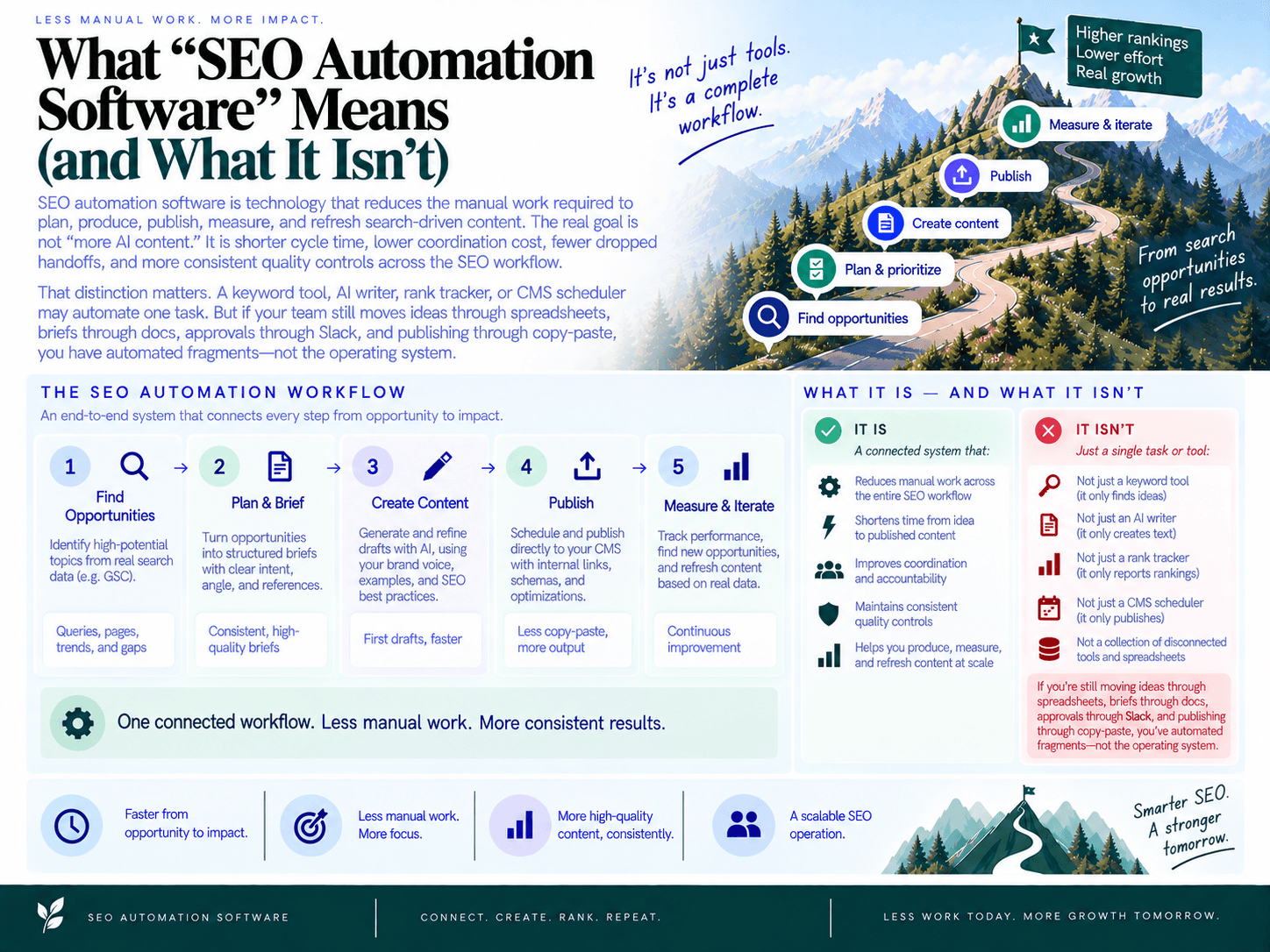
SEO automation software is technology that reduces the manual work required to plan, produce, publish, measure, and refresh search-driven content. The real goal is not “more AI content.” It is shorter cycle time, lower coordination cost, fewer dropped handoffs, and more consistent quality controls across the SEO workflow.
That distinction matters. A keyword tool, AI writer, rank tracker, or CMS scheduler may automate one task. But if your team still moves ideas through spreadsheets, briefs through docs, approvals through Slack, and publishing through copy-paste, you have automated fragments—not the operating system.
Point tools vs end-to-end platforms: the single-source-of-truth test
Most SEO stacks grow accidentally. A team buys one tool for research, another for briefs, another for writing, another for reporting, and another for project management. Each tool may be useful. The problem is that none of them owns the full workflow state.
A point tool answers a narrow question:
What keywords could we target?
What pages are ranking?
Can we generate a draft?
Can we schedule a post?
An end-to-end seo platform answers the operational question: what should we publish next, who needs to review it, what state is it in, where will it go live, and how did it perform?
That is the difference between task automation and workflow automation. In a real SEO operating system, opportunities become a prioritized backlog, backlog items become briefs, briefs become drafts, drafts pass review, approved content gets published, and performance data flows back into future planning. If you are evaluating vendors, this is the first filter: does the platform connect the chain, or does it just make one link faster?
For a deeper breakdown of this operating-system approach, see how to stop fragmented SEO workflows with a single platform.
Automation vs autonomy: humans still own judgment
Automation means the system performs repeatable work faster and more consistently. Autonomy means the system makes decisions without human approval. Buyers often confuse the two, and that is where SEO programs get risky.
Good seo workflow automation should remove repetitive labor, not accountability. The software can surface opportunities, cluster topics, draft briefs, suggest internal links, generate metadata, schedule content, and assemble reports. Humans should still control the decisions that affect positioning, legal exposure, brand trust, and commercial strategy.
Keep people in the loop for:
Topic approval: Is this opportunity aligned with the business, audience, and funnel?
Search intent judgment: Does the page actually satisfy what the searcher wants?
Claims and compliance: Are product, pricing, legal, medical, financial, or competitive claims safe?
Brand voice: Does the content sound like your company, not a generic content farm?
Publishing risk: Should this go live automatically, or does it need editorial, legal, or founder review?
The best setup is not “AI publishes everything.” It is automation with gates: low-risk tasks move quickly, high-risk assets require review, and every stakeholder knows where they are expected to intervene.
What it isn’t: a magic traffic machine or a replacement for strategy
Automation will not fix weak positioning, thin expertise, broken site architecture, or a product that does not match the market. It also will not turn random keyword lists into revenue by default.
In practice, automation helps most when the strategy is already directionally clear but execution is slow. For example, you know your audience, have a set of priority topics, and understand which pages support acquisition or activation—but your team cannot brief, draft, review, link, and publish fast enough.
That is where workflow software earns its keep. It compresses the gap between insight and shipped work. It also makes the process visible: what is waiting, what is blocked, what has shipped, and what needs refreshing.
The typical failure mode: “integrations” that don’t create workflow state
Many tools claim integrations because they can import a CSV, push a document, or display a dashboard. That is not enough. A useful integration changes what the system knows and what the team can do next.
For example, a shallow Google Search Console connection may only show query data. A deeper workflow integration should help turn that data into prioritized content opportunities. A shallow CMS connection may export HTML. A useful publishing integration should preserve titles, metadata, authorship, status, scheduling, links, and post structure without creating cleanup work.
Use this simple test: when data enters the platform, does it update the workflow?
If a keyword opportunity is approved, does it move into a backlog or queue?
If a brief is generated, does it have a review status?
If a draft is edited, is there a version history?
If a page is published, does the system know the live URL?
If performance changes, can that trigger refresh or follow-up work?
If the answer is no, the integration may be cosmetic. It may save a few clicks, but it will not reduce operational drag. The buying standard should be higher: data, decisions, approvals, publishing, and measurement should live in one connected workflow—not in five tabs and three Slack threads.
What to Automate First: A Practical Prioritization Playbook
The best answer to what to automate in SEO is not “everything.” Automate the step that currently limits output, creates repeat errors, or consumes expert time without improving quality. Start with low-risk operational work, then move toward planning, production, publishing, and refresh once guardrails are in place.
Phase 1: Automate high-volume, low-risk operations
Begin with tasks that are frequent, rules-based, and easy to verify. These automations save time without giving software control over strategy or brand-sensitive decisions.
Reporting pulls: recurring GSC, GA4, ranking, and page performance summaries.
Alerts: traffic drops, indexing issues, content decay, broken links, or missing metadata.
Content ops: status updates, assignment reminders, due-date nudges, and publishing calendar notifications.
Inventory maintenance: page lists, last-updated dates, author fields, target keywords, and canonical URLs.
Measure success by: hours saved per week, faster issue detection, fewer missed handoffs, and reduced manual reporting errors.
Required guardrails: define alert thresholds, avoid noisy notifications, and keep a human owner for each workflow. Automation should route work; it should not create a second inbox everyone ignores.
Phase 2: Automate planning before production
Once operations are cleaner, automate research synthesis and prioritization. This is where many teams get real leverage: they already have keyword lists, Search Console data, competitor ideas, and customer questions. The problem is turning them into a publishing queue.
A strong planning layer should help you cluster related topics, classify intent, identify cannibalization risk, and rank opportunities by business value. For example, SEO Autopilot combines site analysis, Google Search Console signals, competitor patterns, keyword research, and intent categorization into a Unified Backlog so teams can choose what to publish next from one prioritized queue.
Automate: keyword clustering, topic maps, opportunity scoring, intent labels, and brief creation.
Do not fully automate yet: final topic approval, positioning, audience selection, or business priority.
Measure success by: reduced planning time, fewer duplicate topics, faster brief creation, and a clearer rationale for every article in the queue.
Required guardrails: require approval before a topic enters production, check for overlapping URLs, and document the intended search intent before drafting begins.
Phase 3: Automate production with review gates
Production automation is powerful, but it is also where weak systems create thin, repetitive, or off-brand pages. Do not start here unless your briefs, approval rules, and quality standards are already defined.
Use automation to generate first drafts, on-page recommendations, title options, meta descriptions, schema suggestions, internal links, and natural CTAs. In a mature seo automation workflow, the software accelerates assembly while editors focus on judgment: accuracy, originality, narrative, examples, and conversion fit.
Automate: draft generation, outline expansion, internal link suggestions, on-page checks, and structured data creation.
Keep human-led: claims, examples, expert perspective, product positioning, compliance review, and final publish approval.
SEO Autopilot supports this middle ground with multiple automation modes, including Brief First, Manual, and Full Auto workflows. That matters because not every page deserves the same level of autonomy. A low-risk glossary post and a comparison page targeting purchase-intent traffic should not follow the same approval path.
Measure success by: draft turnaround time, editor revision time, QA defect rate, number of publish-ready articles per month, and percentage of posts requiring major rewrites.
Required guardrails: use mandatory checks for intent match, factual accuracy, duplication, internal link relevance, CTA fit, and brand voice. For a deeper tactical list, see these examples of high-ROI SEO automations to implement first.
Phase 4: Automate publishing and refresh only after the pipeline is stable
Publishing automation should come after the upstream workflow is reliable. If your briefs are inconsistent or approvals are unclear, auto-publishing only makes mistakes faster.
At this stage, automate CMS draft creation, metadata transfer, scheduling, internal link insertion, sitemap or indexing workflows, and refresh queues. Platforms with CMS integrations can reduce the copy-paste drag that quietly kills cadence. SEO Autopilot, for example, supports publishing integrations for WordPress, Contentful, and Framer, plus scheduling and optional auto-publishing depending on the selected automation mode.
Automate: CMS draft creation, publishing schedules, internal links, JSON-LD, indexing workflows, and refresh detection.
Keep controlled: final approval for strategic pages, regulated content, pricing claims, and product comparisons.
Measure success by: publish rate, time from approved brief to live URL, percentage of posts shipped on schedule, indexing speed, and refresh velocity for decaying content.
Required guardrails: use staging previews, version history, rollback options, approval states, and post-publish monitoring. Publishing is not the finish line; it is the handoff to measurement.
How to avoid automating the wrong bottleneck
Before buying or expanding tooling, map the constraint in your seo content pipeline. Pick one recent article and write down every step from idea to live URL: research, approval, brief, draft, edit, SEO QA, CMS formatting, internal links, publish, indexing, and performance review.
Then identify the slowest or most failure-prone handoff:
If ideas pile up but nothing ships: automate prioritization, backlog management, and brief creation.
If drafts stall in review: automate QA checks, routing, reminders, and approval states.
If editors rewrite everything: fix brief quality and content standards before increasing draft automation.
If publishing is the bottleneck: automate CMS draft creation, metadata, scheduling, and internal links.
If old content decays unnoticed: automate performance alerts and refresh queues.
The rule is simple: automate the constraint, not the task that looks most impressive in a demo. A flashy AI draft generator will not solve a broken approval process. A reporting dashboard will not fix weak topic selection. Sequence automation around the bottleneck, prove the lift, then expand.
Must-Have Integrations (and How to Validate Them)
An SEO automation platform is only as useful as the systems it can read from and write to. The minimum integration stack is simple: Google Search Console for search opportunity data, GA4 for performance and conversion data, and your CMS for publishing. Everything else is secondary until those three work cleanly.
The key word is “work.” A CSV import, one-way export, or dashboard screenshot is not a real workflow integration. Real integration means data flows into the platform, changes the content queue, supports decisions, and pushes approved work back into production without copy-paste. If you want a broader demo checklist, use this end-to-end workflow checklist for SEO automation platforms alongside the tests below.
Google Search Console: Validate Opportunity Discovery
A strong GSC integration should do more than show clicks and impressions. It should help the system identify what to create, update, consolidate, or monitor based on first-party search data.
In a demo or trial, ask the vendor to show how Search Console data becomes an action. You want to see queries, pages, impressions, clicks, average position, CTR, and date ranges connected to planning—not buried in a reporting tab nobody uses.
Queries and pages: Can the platform identify pages with high impressions but low CTR, declining clicks, or queries ranking just outside page one?
Opportunity mapping: Can it turn those signals into recommended topics, refresh candidates, or content gaps?
Indexing and coverage: Can it help monitor whether published URLs are discoverable and eligible to perform?
Annotations: Can you connect publishing dates, refreshes, or major edits to performance changes?
Permissions: Does it request appropriate access, or does it require unnecessarily broad permissions?
Proof test: Connect a real GSC property during the trial. Pick one page with impressions but weak CTR and one query where you rank between positions 8 and 20. Ask the platform to turn those signals into a recommended action: new article, refresh, internal link, title update, or consolidation. If the system can only display the data, it is analytics—not automation.
Google Analytics 4: Validate Business Impact, Not Just Traffic
Search Console tells you how searchers find you. GA4 tells you what they do after they land. A useful GA4 integration connects content operations to outcomes: engaged sessions, conversions, assisted revenue, trial signups, demo requests, newsletter subscriptions, or whatever matters to your business.
Do not accept “we integrate with analytics” at face value. Many tools simply embed a chart. That is not enough. The platform should make it easy to compare content cohorts, understand landing page performance, and prioritize work based on business value—not only keyword volume.
Landing page reporting: Can you see organic landing page performance by URL?
Conversion visibility: Can the platform show which pages contribute to key events or conversions?
Segments: Can you filter by organic traffic, geography, device, or campaign-relevant audience groups?
Content cohorts: Can you compare newly published, refreshed, and untouched pages?
Attribution sanity: Does the data reconcile with what your GA4 property shows directly?
Proof test: Choose five existing organic landing pages. Compare sessions, engagement, and conversions inside the platform against GA4. The numbers do not need to be identical in every view, but the definitions should be clear and directionally consistent. If nobody can explain the mismatch, expect reporting fights later.
CMS Integration: Validate Drafts, Metadata, and Publishing Control
The CMS integration is where workflow automation either becomes real or collapses into copy-paste. At minimum, the platform should create drafts, populate core SEO fields, preserve formatting, and support scheduled or controlled publishing.
For WordPress, headless CMSs, and modern site builders, test the details. The boring fields are where implementation pain hides.
Draft creation: Can the tool create a CMS draft without publishing it immediately?
Metadata: Does it populate title tags, meta descriptions, slugs, categories, authors, excerpts, and canonical fields where applicable?
Formatting: Are headings, lists, tables, images, embeds, and internal links preserved correctly?
Custom fields: Can it handle your templates, components, schema fields, localization, or headless content models?
Scheduling: Can approved posts be scheduled reliably without manual handoff?
Rollback path: If something publishes incorrectly, can you revert in the CMS quickly?
Proof test: Generate or import one test article and push it to a staging environment or unpublished draft. Check the slug, title tag, meta description, H1, internal links, CTA placement, schema fields, author, category, featured image, and publish status. Then edit the draft in the platform and confirm how updates sync. One clean test publish tells you more than ten sales slides.
For example, SEO Autopilot supports publishing integrations for WordPress, Contentful, and Framer, and includes Google Search Console plus Google Analytics/live analytics views inside the workspace. That combination matters because planning, publishing, and performance monitoring can happen in one operating flow instead of across disconnected tabs.
Optional Integrations: Valuable, but Not Always Day-One Requirements
After GSC, GA4, and CMS are validated, consider the supporting integrations that match your maturity level.
Rank tracking: Useful for monitoring priority terms, but it should not replace page-level performance analysis.
Backlink data: Helpful for competitive analysis and authority assessment, especially for more mature SEO teams.
SERP scraping or SERP analysis: Useful for intent checks, content format analysis, and identifying competitors in the live results.
Slack, Jira, Asana, or Linear: Useful when SEO tasks must move across editorial, product, design, legal, or engineering teams.
Data warehouse or BI: Valuable for teams that need executive reporting, blended revenue data, or multi-site analysis.
These are accelerators, not substitutes for the core workflow. If a vendor has ten peripheral integrations but cannot create a clean CMS draft or reconcile landing page performance, keep looking.
Integration Test Checklist: Run This in Every Demo
Use this quick validation sequence before you shortlist a vendor:
Connect real accounts: Use a sandbox site or low-risk property, but avoid canned demo data.
Verify permissions: Confirm exactly what access is requested for GSC, GA4, and the CMS.
Check data freshness: Ask how often data syncs and where delays are expected.
Test rate limits: Ask what happens when you publish, refresh, or analyze content at volume.
Create one workflow action: Turn a search opportunity into a brief, draft, or refresh task.
Push to CMS staging: Confirm formatting, metadata, links, schema, and publish status.
Trace the record: Make sure the platform keeps the topic, brief, draft, approval status, CMS URL, and performance data connected.
The standard is simple: an integration is real if it reduces handoffs, preserves workflow state, and can be validated with your own data. If it only moves files around, it is not an automation layer. It is another place for work to get lost.
Workflow Capabilities That Make or Break Scale
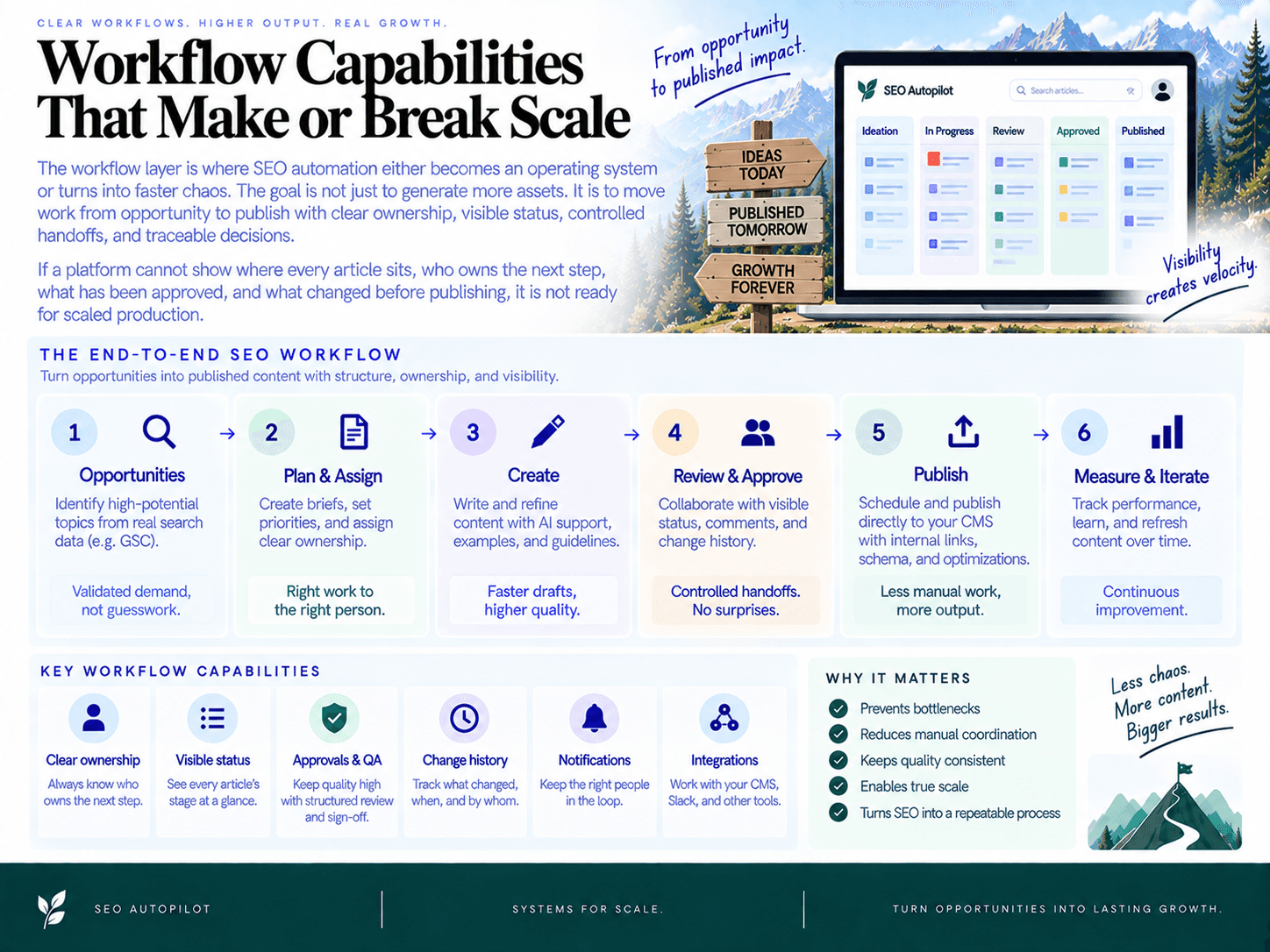
The workflow layer is where SEO automation either becomes an operating system or turns into faster chaos. The goal is not just to generate more assets. It is to move work from opportunity to publish with clear ownership, visible status, controlled handoffs, and traceable decisions.
If a platform cannot show where every article sits, who owns the next step, what has been approved, and what changed before publishing, it is not ready for scaled production.
Queues and backlogs: planned → briefed → drafted → reviewed → scheduled
A serious platform needs a shared backlog that functions as the source of truth for the whole SEO workflow. Spreadsheets break because they do not carry state. A proper queue should show what is proposed, approved, in briefing, drafted, under review, scheduled, published, and ready for refresh.
Look for workflow states such as:
Opportunity identified: A topic, query, or content gap has been found but not approved.
Prioritized: The team has selected it based on impact, intent, difficulty, or business value.
Brief ready: The article has an angle, search intent, target audience, structure, and must-cover points.
Draft in progress: A writer or AI workflow is producing the article.
Editorial review: An editor checks accuracy, differentiation, brand voice, and usefulness.
SEO review: An SEO owner checks intent match, headings, internal links, metadata, schema, and cannibalization risk.
Approved for publish: The article is cleared for CMS scheduling.
Published and monitored: The page is live, tracked, and eligible for refresh decisions.
SEO Autopilot’s Unified Backlog is an example of this operating model for small teams: it turns opportunities from site analysis, competitors, keyword research, and Google Search Console into a prioritized publishing queue. That matters because the team can select what to ship next instead of restarting the planning process every week.
Roles and permissions: speed without accidental publishing
As output increases, access control becomes a quality control mechanism. Writers should not necessarily publish. Editors should not necessarily change CMS settings. Legal reviewers should not need admin rights. The platform should let you assign roles based on responsibility, not convenience.
At minimum, evaluate whether the tool supports distinct permissions for:
Admin: Manages integrations, users, billing, automation settings, and CMS connections.
SEO lead: Approves topics, briefs, target keywords, internal linking strategy, and final SEO QA.
Writer or content producer: Creates drafts and responds to change requests.
Editor: Reviews structure, voice, accuracy, and readability.
Legal or compliance: Reviews claims, regulated language, disclosures, and risk-sensitive pages.
Publisher: Schedules and publishes content to the CMS.
For solo operators, this can be simple. For agencies and multi-stakeholder teams, role design is the difference between controlled scale and “who pushed this live?” panic.
Approvals and gates: automation should pause at the right moments
The best systems do not force every page through the same process. A low-risk informational post may only need SEO and editorial review. A comparison page, medical article, pricing page, or legal-sensitive topic may require extra approval before publishing.
Useful approval features include:
Mandatory checkpoints before draft generation, CMS scheduling, or auto-publishing.
Conditional gates based on page type, topic risk, author, site, or campaign.
Exception handling so urgent posts can move faster without bypassing accountability.
Status visibility so everyone can see exactly why a page is blocked.
SEO Autopilot supports multiple automation modes, including Full Auto, Brief First, and Manual workflows. That type of mode selection is valuable because not every article deserves the same level of autonomy. High-volume supporting content can move quickly; high-stakes pages should keep humans in the loop.
Collaboration: comments, tasks, mentions, and change requests
Collaboration features are not “nice to have” once production volume rises. Without structured comments and tasks, feedback moves into Slack threads, email chains, and undocumented calls. That creates rework and makes it impossible to understand why decisions were made.
In demos, ask vendors to show how a reviewer requests a change, assigns it to a specific owner, resolves the thread, and confirms the update before approval. If the platform cannot preserve that context inside the article workflow, your team will recreate the same coordination mess in another tool.
For a broader vendor evaluation reference, use an end-to-end workflow checklist for SEO automation platforms during demos so you can test how the system handles real production handoffs, not just polished feature screens.
Audit logs and versioning: traceability is non-negotiable
When automated publishing enters the process, traceability becomes a governance requirement. You need to know who changed a title, who approved a claim, when internal links were added, which version went live, and how to roll back if something breaks.
Look for three controls:
Audit logs: A timestamped history of user actions, approvals, publishing events, and integration changes.
Version history: The ability to compare drafts, approved versions, and live content changes.
Rollback: A safe way to revert problematic updates or restore a previous version.
This is especially important for agencies, regulated industries, multi-site teams, and any company using automated CMS publishing. Scale without traceability is not efficiency. It is unmanaged risk.
Content Quality Controls for Automated SEO (Non-Negotiable Guardrails)
Automation should speed up SEO production, not lower the bar. The right quality system catches bad briefs, duplicate angles, unsupported claims, weak internal links, and brand-risky language before anything reaches the CMS. Treat quality as a workflow gate, not a final proofreading pass.
A practical content quality control system should answer six questions for every page: does it match intent, add something useful, avoid overlap, support its claims, follow brand/compliance rules, and meet on-page SEO standards?
SERP intent alignment checks: primary and secondary intent
Before a brief or draft is approved, validate the search intent. Automated clustering and brief generation are useful, but they can still produce the wrong page type if the SERP is mixed.
Primary intent: Is the page meant to inform, compare, convert, troubleshoot, or support implementation?
Secondary intent: What else does the reader need before they can act? Examples: pricing context, alternatives, templates, risks, steps, examples, or integrations.
Format fit: Does the SERP reward guides, listicles, product pages, calculators, comparison pages, or documentation?
Depth fit: Is the draft too thin for a complex query or too bloated for a simple one?
Gate rule: if the page type does not match the dominant SERP pattern, send it back to planning. Do not “optimize” the wrong asset.
Uniqueness and anti-duplication controls
Scaling content creates a new problem: overlapping pages that compete with each other. Automation can generate ten reasonable articles that all target the same buyer question. That is how you create cannibalization at speed.
Every automated content workflow should include:
Topic cluster checks: Map each new topic to an existing pillar, cluster, or product area.
URL collision checks: Compare the proposed page against existing URLs before drafting.
Canonical decisions: Decide whether the new page should stand alone, merge into an existing asset, or support another page.
Information gain review: Require a clear “new value” statement before approval: original examples, stronger methodology, fresher data, better use-case framing, or decision support.
If two pages answer the same query for the same audience at the same funnel stage, merge or reposition one before publishing.
E-E-A-T signals: sourcing, review policies, and provenance
For automated and AI-assisted content, eeat is not a buzzword. It is an operating standard. Readers and search engines need to understand why the content is trustworthy and who stands behind it.
Source requirements: Define which claims require citations, examples, product documentation, customer data, expert input, or screenshots.
Author and reviewer notes: Assign review responsibility for technical, legal, medical, financial, or product-sensitive topics.
Provenance: Track whether a page was AI-drafted, human-written, expert-reviewed, updated from an older page, or assembled from approved snippets.
Refresh triggers: Mark claims that expire quickly, such as pricing, integrations, platform UI, regulations, benchmarks, and competitor comparisons.
The goal is not to hide automation. The goal is to make every important claim traceable, reviewable, and safe to publish.
Brand and compliance rules
AI can drift into language your team would never approve: exaggerated guarantees, unsupported comparisons, off-brand jokes, or risky advice. Build rules into the workflow before drafting, not after.
Brand voice: Define tone, banned phrases, preferred terminology, product naming, and CTA style.
Claims policy: Separate allowed claims, conditional claims, and prohibited claims.
Regulated topics: Require legal or subject-matter review for compliance-sensitive pages.
Competitor mentions: Require evidence and editorial approval before publishing comparisons.
For a deeper operating model, use this guide on how to scale SEO content automation without losing quality.
On-page QA: metadata, schema, links, images, and accessibility
On-page QA is where many “almost ready” drafts quietly fail. Your checklist should be mechanical enough to automate and strict enough to block weak pages.
Title tag and H1: Unique, intent-aligned, not duplicated across the site.
Meta description: Clear value proposition and searcher fit, not keyword stuffing.
Heading structure: Logical H2/H3 hierarchy with no empty or decorative headings.
Internal links: Links to relevant cluster pages, product pages, and supporting content using natural anchors.
Schema: Appropriate structured data where relevant, validated before publishing.
Images: Compressed, named clearly, with descriptive alt text when the image conveys meaning.
Accessibility: Readable formatting, descriptive links, sufficient contrast, and no image-only explanations.
Internal links deserve special attention because automation can either strengthen your site architecture or create noisy, irrelevant links. Use rules around topical relevance, anchor diversity, destination priority, and maximum links per page. These internal linking automation techniques for SEO at scale show where automation helps most and where human review still matters.
Human review design: put people where judgment matters
Good ai content qa does not mean humans review every comma. It means humans review the decisions automation is worst at making.
SEO lead: Confirms intent, target query, cannibalization risk, and internal link strategy.
Editor: Reviews structure, clarity, originality, brand voice, and usefulness.
Subject-matter expert: Checks technical accuracy and missing nuance.
Legal or compliance: Reviews regulated claims, guarantees, comparisons, and sensitive advice.
Use different gates for different risk levels. A low-risk glossary update may only need automated checks and light editorial review. A comparison page, medical article, financial guide, or product-led conversion page should require human approval before publishing.
Non-negotiable rule: no automated page should publish unless it has passed intent, duplication, provenance, brand, compliance, and on-page checks. Speed is useful only when the system protects the business while it scales.
Decision Criteria by Team Size and SEO Maturity
The right platform depends less on company size and more on operational complexity. Buy for the workflow you actually run, not the org chart you hope to have in two years. A solo founder needs speed and safe defaults. A 20-person content operation needs governance. An enterprise team needs security, auditability, and integration control before more generation volume.
Use this rule: choose the lightest system that removes your current bottleneck without creating unacceptable review, brand, or compliance risk. That is the practical buying lens for SEO automation software.
Solo and SMB: prioritize speed, defaults, and minimal setup
Solo operators, founders, consultants, and small businesses usually do not need a heavy procurement-grade platform. Their bottleneck is simple: deciding what to publish, creating the post, adding links, and getting it live consistently.
Look for:
Guided setup: website analysis, Search Console connection, and clear topic recommendations without complex configuration.
Prioritized content queue: not just keyword lists, but a ranked backlog that shows what to create next and why.
Brief-to-publish workflow: briefs, drafts, internal links, CTAs, scheduling, and CMS publishing in one place.
Safe automation modes: the ability to review briefs or drafts before publishing, with optional hands-off publishing for lower-risk content.
Native CMS support: especially if your site runs on WordPress, Framer, Contentful, or another common CMS.
This is where a complete execution platform can outperform a stack of point tools. For example, SEO Autopilot is built for solopreneurs and small teams that want one workflow from Search Console insights and topic planning through brief creation, article generation, internal linking, scheduling, CMS publishing, indexing support, and analytics views. That matters when the alternative is five tabs, three spreadsheets, and “we’ll publish it later.”
Small teams of 2–5: prioritize shared workflow and editorial control
Once more than one person touches content, the problem shifts from speed to coordination. The tool must make ownership obvious. A healthy SEO team workflow should show what is planned, what is waiting on review, what is scheduled, and what shipped.
Look for:
Shared backlog: a single source of truth for approved topics, clusters, priorities, and publish order.
Brief approval: SEO lead reviews the plan before writers or AI create the full article.
Draft review: editors can approve, request changes, or block publishing.
Consistent templates: repeatable briefs, article structures, metadata, CTAs, and internal linking rules.
CMS draft creation: publishing support should reduce copy-paste, not just export a Google Doc.
Do not overbuy here. If your team does not have legal review, multiple brands, or engineering-managed publishing, enterprise governance features may slow you down. Your target is a controlled content pipeline with enough review gates to prevent bad output, not a six-month implementation.
Mid-market teams of 6–20: prioritize governance, attribution, and scale
Mid-market teams typically manage more content types, more stakeholders, and more reporting pressure. The risk is no longer “we forgot to publish.” It is “we published conflicting, off-brand, duplicate, or unmeasured content across multiple properties.”
Look for:
Role-based permissions: separate access for SEO managers, editors, writers, agencies, approvers, and admins.
Workflow states: planned, briefed, drafted, reviewed, approved, scheduled, published, refreshing, and archived.
Analytics attribution: tie content cohorts to GA4 conversions, assisted revenue, pipeline, or qualified leads.
Multi-site support: useful if you manage regional sites, product blogs, acquired brands, or agency clients.
Operational reporting: cycle time, publish rate, approval delays, refresh volume, and content decay.
Service reliability expectations: support response times, publishing safeguards, and documented escalation paths.
At this stage, generation quality is only one part of the buying decision. The stronger question is: can the platform run our content operation without creating invisible risk? If no one can see who approved a page, why it was created, or how it performed after launch, the workflow is not mature enough.
Enterprise: prioritize security, auditability, APIs, and control
Enterprise SEO automation is less about producing more articles and more about safely coordinating content across brands, regions, compliance teams, and technical systems. Enterprises should evaluate automation like infrastructure, not like a writing assistant.
Look for:
SSO/SAML: centralized identity management for internal teams and external partners.
Granular access controls: permissions by role, site, workspace, content type, market, or approval stage.
Audit logs: trace who changed briefs, prompts, drafts, metadata, links, approvals, and publishing settings.
Versioning and rollback: restore prior versions if automated changes create quality, legal, or technical issues.
APIs and data portability: connect with internal CMS, DAM, analytics, BI, localization, and compliance systems.
Multi-brand governance: separate brand voice, claims, templates, legal requirements, and approval rules.
Compliance controls: documented review steps for regulated topics, claims, citations, and subject-matter expert signoff.
Enterprises should be careful not to under-govern. A tool that works for one blog may break down when legal, product marketing, regional teams, and engineering all need visibility. The minimum bar is traceability: every automated recommendation, content change, approval, and publish action should be accountable.
A simple SEO maturity model for choosing the right class of platform
Use this SEO maturity model to match your buying decision to your current operating stage:
Reactive: You publish when someone has time. Choose a tool that creates topic direction, briefs, and a publish cadence quickly.
Structured: You have a calendar and repeatable briefs. Choose a platform with shared queues, approvals, CMS publishing, and internal linking support.
Scalable: You manage multiple contributors, sites, or content types. Choose workflow governance, analytics attribution, refresh workflows, and role-based access.
Autonomous operations: You want parts of the system to run with minimal manual intervention. Choose automation modes, strict guardrails, audit trails, rollback, and exception handling.
The mistake is skipping levels. If your team has no content standards, automating drafts will amplify inconsistency. If your team has strong standards but weak publishing operations, automate scheduling, internal links, CMS handoff, and refresh workflows first. If governance is already the bottleneck, prioritize permissions, approvals, and auditability before output volume.
For a practical way to test whether a vendor supports the workflow depth you need, use an end-to-end workflow checklist for SEO automation platforms during demos instead of relying on feature pages.
The Internal Scorecard: Compare SEO Automation Platforms in 30 Minutes
The fastest way to compare platforms is to score the operating model, not the feature list. A good seo tool scorecard should answer one question: will this platform reduce content cycle time without creating quality, governance, or publishing risk?
Use a 1–5 score for each category, then multiply by the weight. Score only what you can verify in a demo, sandbox, trial, or customer reference. If a vendor cannot show the workflow live, do not give full credit for it.
Step 1: Choose the right weighting model
Different teams should weight the same capabilities differently. A founder-led team should not overbuy enterprise governance. A mid-market team should not underweight approvals, auditability, or CMS fit.
Category | Solo / SMB Weight | Small Team Weight | Mid-Market Weight | What to evaluate |
|---|---|---|---|---|
Data and opportunity discovery | 15% | 15% | 15% | GSC, GA4, keyword/topic inputs, competitor signals, prioritization quality |
Planning and backlog workflow | 20% | 20% | 15% | Topic queue, clustering, intent mapping, brief generation, status visibility |
Production and optimization | 25% | 20% | 15% | Draft quality, on-page QA, internal links, CTAs, schema, refresh support |
Publishing and CMS integration | 20% | 15% | 15% | Draft creation, metadata, scheduling, auto-publishing, custom fields, rollback path |
Governance and collaboration | 5% | 15% | 20% | Roles, permissions, approvals, comments, audit logs, version history |
Measurement and reporting | 10% | 10% | 10% | Performance views, conversion tracking, content cohorts, annotations, refresh insights |
Risk, security, and reversibility | 5% | 5% | 10% | Access controls, data permissions, exportability, vendor lock-in, compliance fit |
Step 2: Score each platform with a simple 1–5 rubric
1 = Not usable: missing capability, manual workaround, or only available through exports.
2 = Basic: capability exists, but it is disconnected from the workflow or requires heavy manual setup.
3 = Functional: supports the core use case, but with limited customization, visibility, or automation.
4 = Strong: works inside the main workflow, reduces handoffs, and supports team controls.
5 = Excellent: end-to-end, demo-proven, configurable, measurable, and safe to scale.
For example, a CMS integration should not score a 5 because it can export HTML. It should create or update CMS drafts, preserve metadata, support scheduling or publishing controls, and fit your real content model. If you need a deeper demo checklist, use this end-to-end workflow checklist for SEO automation platforms alongside the scorecard.
Step 3: Use a copy/paste comparison table
Evaluation area | Weight | Vendor A score | Vendor A weighted | Vendor B score | Vendor B weighted | Notes / proof required |
|---|---|---|---|---|---|---|
Data and opportunity discovery | 15% | Can it turn GSC, analytics, and topic inputs into ranked opportunities? | ||||
Planning and backlog workflow | 20% | Does it maintain one queue from idea to approval? | ||||
Production and optimization | 20% | Can it generate briefs, drafts, internal links, CTAs, and on-page elements? | ||||
Publishing and CMS integration | 15% | Can it create CMS drafts or publish without copy-paste? | ||||
Governance and collaboration | 15% | Are approvals, roles, comments, and change history built in? | ||||
Measurement and reporting | 10% | Can the team connect publishing activity to traffic and conversions? | ||||
Risk and reversibility | 5% | Can you export, pause automation, revert changes, and control access? |
Step 4: Apply pass/fail red flags before totals
A weighted score is useful, but some issues should disqualify a platform regardless of its total. Add these gates to your seo software evaluation before leadership sees the shortlist.
Fail: no real GSC, GA4, or CMS workflow connection for your required use case.
Fail: cannot show how topics move from backlog to brief to draft to review to publish.
Fail: no human approval gate before publishing for high-risk content.
Fail: no clear way to inspect, edit, pause, or reverse automated output.
Fail: content quality checks are vague, unconfigurable, or left entirely to the final editor.
Fail for regulated or larger teams: weak access controls, missing auditability, or no support for required security review.
Shortlist decision rule
Use this rule to keep the decision clean:
Shortlist only vendors that pass every red-flag gate.
Advance vendors with a weighted score of 80 or higher.
If two platforms are within five points, choose the one with lower implementation risk. That usually means better CMS fit, clearer approvals, stronger reversibility, and less process change for the team.
If no vendor reaches 80, do not buy yet. Run a narrower pilot or reduce scope instead of forcing a platform into a workflow it cannot support.
The best seo automation checklist is not a giant procurement spreadsheet. It is a focused test of workflow reality: can the platform find the right opportunities, move them through production safely, publish with minimal friction, and prove the output was worth the investment?
Implementation Plan: Pilot, Prove ROI, Then Scale
A safe seo automation implementation does not start with “turn everything on.” It starts with a controlled pilot: one site, one content type, one workflow, clear guardrails, and measurable before/after data. The goal is to prove that automation reduces cycle time and coordination cost without increasing QA defects, brand risk, or publishing mistakes.
Run a 90-Day Pilot With a Narrow Scope
Your pilot should be small enough to control but large enough to expose real workflow friction. A good starting scope is 10–20 SEO content pieces across one topic cluster or product category. Avoid mixing blog posts, landing pages, comparison pages, localization, and programmatic pages in the same first test.
Days 1–15: Setup and baseline. Connect core data sources, document current workflow steps, assign roles, and measure current cycle time from topic selection to published URL.
Days 16–30: Planning workflow. Test topic discovery, prioritization, brief creation, and backlog states. Do not automate publishing yet. Validate that the system produces useful plans and briefs.
Days 31–60: Production workflow. Generate drafts, apply on-page QA, add internal links, and route content through editorial approval. Track defect rates and revision cycles.
Days 61–75: Publishing workflow. Move approved content into CMS drafts or scheduled publishing. Confirm metadata, schema, authorship, categories, links, and formatting.
Days 76–90: Measurement and scale decision. Compare pilot results against baseline, identify bottlenecks, update SOPs, and decide whether to expand to more content types, sites, or automation modes.
If you are evaluating an end-to-end platform, test the whole chain—not just draft generation. For example, SEO Autopilot supports a workflow from Google Search Console insights and keyword/topic planning through a Unified Backlog, briefs, article generation, internal linking, scheduling, CMS publishing integrations, indexing support, and analytics views. That is the type of connected workflow a pilot should validate.
Select the Right Content Cohort
Do not pilot automation on your riskiest pages first. Choose content where speed matters, but failure is manageable.
Good pilot candidates: informational blog posts, glossary pages, low-risk comparison support content, refreshes of underperforming articles, and topic-cluster expansion pages.
Avoid at first: legal, medical, financial, pricing, homepage, core product positioning, high-revenue landing pages, and pages requiring heavy subject-matter expert review.
Best test pattern: one topic cluster with existing internal link opportunities and measurable search demand.
Measure the Baseline Before You Automate
A pilot without baseline data becomes a vibes-based software rollout. Before the first automated workflow runs, capture the current operating metrics.
Cycle time: average days from approved topic to published URL.
Hands-on time: estimated human hours per page for research, briefing, writing, editing, formatting, linking, and publishing.
Publish rate: pages shipped per week or month.
QA defect rate: issues found per page, such as wrong intent, missing metadata, broken links, formatting errors, factual issues, or off-brand claims.
Revision load: average number of review rounds before approval.
Performance indicators: impressions, clicks, indexed URLs, conversions, assisted conversions, and engagement by landing page.
For the pilot, set practical targets. Example: reduce cycle time by 30%, cut CMS formatting time by 70%, maintain or reduce QA defects, publish 12 approved pieces, and generate the first measurable impressions within 30–60 days of publication.
Create SOPs Before Expanding Access
Automation fails when every user invents their own process. Treat the pilot as a seo ops system, not a writing shortcut. Define the rules before inviting the full team.
Workflow states: backlog, selected, brief ready, draft ready, editorial review, SEO review, approved, scheduled, published, refresh needed.
Approval rules: who can approve briefs, drafts, internal links, compliance-sensitive claims, and final publishing.
Editorial policy: brand voice, prohibited claims, citation expectations, AI-use rules, author/reviewer requirements, and escalation paths.
Template standards: briefs, outlines, metadata, CTAs, image requirements, schema expectations, and internal link rules.
Exception handling: what happens when a draft fails QA, a CMS publish breaks formatting, or a page targets a duplicate intent.
Clean the Data That Automation Depends On
Bad inputs create fast garbage. Before scaling, clean the operational data your workflow will use.
Content inventory: export existing URLs, titles, target topics, status, traffic, conversions, and last updated dates.
Topic taxonomy: define product categories, personas, funnel stages, and primary topic clusters.
URL rules: standardize slugs, canonical patterns, redirect rules, and category structure.
Cannibalization checks: map new topics against existing pages before assigning drafts.
CMS fields: confirm required metadata, authors, categories, tags, images, schema fields, and staging behavior.
Use a Go-Live Checklist and Monitoring Cadence
Before expanding from a seo pilot to recurring production, require a go-live checklist. At minimum, confirm that every approved page has the right intent, title tag, H1, meta description, canonical, internal links, CTA, schema where appropriate, author/reviewer details, indexability, and analytics tracking.
For a broader demo and rollout checklist, use this end-to-end workflow checklist for SEO automation platforms when validating vendors and internal readiness.
After launch, review results weekly for the first month, then monthly once the workflow stabilizes. Track throughput, QA defects, indexing status, organic impressions, clicks, conversions, and refresh candidates. Scale only when the system proves it can publish faster and preserve editorial control.
Common Pitfalls (and How to Avoid Them)
The biggest seo automation risks are rarely about the algorithm. They come from automating a broken process: unclear ownership, weak approvals, disconnected tools, and content pushed live without enough context. Avoiding failure starts with treating automation as an operating system for the seo publishing workflow, not a shortcut around strategy.
Buying “AI writing” instead of a workflow system
An AI writer can generate a draft. That does not mean it can run SEO operations. If your team still has to move ideas from keyword exports to spreadsheets, briefs, docs, CMS drafts, Slack approvals, and reporting dashboards, you have not reduced the workflow. You have just made one step faster.
How to avoid it: evaluate the full chain from opportunity discovery to publishing and measurement. Look for a shared backlog, topic prioritization, brief generation, content creation, internal linking, scheduling, CMS publishing, and performance visibility in one connected process. SEO Autopilot, for example, is built around this operating-system model: it connects Google Search Console insights, a Unified Backlog, briefs, full article generation, internal links, scheduling, CMS publishing for WordPress, Contentful, and Framer, and Google Analytics/live analytics views inside the workspace.
If your current stack feels like handoffs glued together by spreadsheets, use this guide on how to stop fragmented SEO workflows with a single platform to pressure-test whether you need another point tool or a workflow layer.
Publishing at scale without intent and duplication controls
The fastest way to create low-value content is to generate articles from keywords without checking intent, overlap, or site architecture. This creates thin pages, cannibalization, duplicated angles, and posts that compete with your existing winners instead of supporting them.
How to avoid it: require intent categorization before content enters production. Every topic should answer: What is the searcher trying to do? What existing page could conflict with it? What internal links should support it? What unique angle or information gain justifies publishing it?
Before drafting: check the target query against existing URLs, clusters, and canonical priorities.
During briefing: define primary intent, secondary intent, must-include points, and excluded angles.
Before publishing: verify title, H1, metadata, schema, internal links, CTA, and duplication risk.
This is where ai content risks become operational risks. The issue is not that AI helped create the page. The issue is shipping pages without editorial rules. For a deeper guardrail model, see how to scale SEO content automation without losing quality.
Missing CMS edge cases until launch week
CMS integrations often look clean in a demo and break in production. The usual culprits: custom fields, author mapping, category rules, image handling, canonical tags, localization, staging environments, scheduled publishing, and plugin conflicts.
How to avoid it: test the integration with a real page type before signing off. Do not accept “we integrate with your CMS” as enough. Ask the vendor to create a draft using your actual template, populate metadata, assign categories, handle images, add internal links, schedule the post, and publish to staging first.
Can it publish as draft, scheduled, and live?
Can it map custom fields correctly?
Does it preserve schema, metadata, slugs, and canonical settings?
Can editors review inside the CMS before publication?
Does it support your staging and rollback process?
If the tool only exports copy or requires manual paste-and-format work, it may still be useful, but it is not removing the publishing bottleneck.
Over-automation that removes accountability
Full automation is powerful for low-risk, repeatable content. It is dangerous when no one owns quality, accuracy, approvals, or post-publish monitoring. Silent failures are the worst kind: incorrect claims, broken formatting, duplicated topics, missed CTAs, or pages published under the wrong template.
How to avoid it: match automation level to risk. Use more hands-off workflows for low-risk informational posts. Use brief-first or manual review for commercial, legal, regulated, or brand-sensitive content. SEO Autopilot supports multiple automation modes, including Full Auto, Brief First, and Manual workflows, which is the right pattern: automation should flex based on the stakes of the page.
Keep named owners for each gate: topic approval, brief approval, editorial review, compliance review, CMS QA, and performance review. Automation should reduce manual work, not erase responsibility.
Measuring rankings instead of business impact
Rankings matter, but they are not the whole case for automation. A platform can improve operations before rankings move: faster cycle time, lower cost per page, fewer QA defects, more consistent publishing, stronger internal links, and faster refreshes. If you only measure keyword positions, you may miss the operational ROI—or scale content that attracts traffic without conversions.
How to avoid it: track both workflow and outcome metrics:
Workflow: days from idea to publish, approval time, revision count, publish rate, defect rate.
SEO: indexed pages, impressions, clicks, non-brand growth, internal link coverage.
Business: assisted conversions, demo requests, trials, qualified leads, revenue-influenced pages.
The best automation program does not just publish more. It publishes the right pages faster, with fewer mistakes, clearer ownership, and a tighter line between content operations and revenue.
FAQ: SEO Automation Software Buying Questions
Can automation hurt SEO?
Yes—if you automate publishing before you automate control. The risk is not automation itself. The risk is shipping thin, duplicative, off-intent, or unreviewed pages faster than your team can catch them.
Safe automation starts with guardrails: intent checks, topic clustering, duplication detection, internal linking rules, editorial approval gates, and performance monitoring after publish. Automate repeatable work first. Keep humans involved where judgment matters: positioning, claims, examples, subject-matter expertise, and final approval for high-stakes pages.
If a vendor’s workflow jumps from “keyword” to “published article” with no backlog, review state, QA checklist, or rollback path, treat that as a red flag.
What’s the minimum stack if we don’t buy an end-to-end platform?
At minimum, you need five connected functions: search data, analytics, planning, production, and publishing.
Google Search Console for queries, pages, impressions, clicks, and opportunity discovery.
GA4 for engagement, conversions, landing page performance, and business impact.
A planning system for topic prioritization, backlog states, ownership, and due dates.
A briefing and drafting workflow with brand, intent, structure, and quality requirements.
A CMS process for metadata, internal links, schema, scheduling, publishing, and updates.
You can assemble that with spreadsheets, project management software, AI writing tools, and CMS plugins. The tradeoff is coordination cost. Someone still has to move data between systems, maintain status accuracy, enforce approvals, and check whether content actually shipped.
End-to-end platforms reduce that drag by keeping the workflow state in one place. For example, SEO Autopilot connects Google Search Console insights, content planning, brief creation, article generation, internal linking, scheduling, CMS publishing integrations, and analytics views inside one workspace.
How do we keep brand voice consistent?
Turn brand voice into operating rules, not reviewer preference. A style guide sitting in a doc will not scale unless the tool can apply it during briefing, drafting, and review.
Define practical rules before your pilot:
Approved positioning, audience language, product terms, and banned phrases.
Claim rules: what the content can say, what needs proof, and what legal or compliance must review.
Formatting standards for introductions, headings, CTAs, examples, screenshots, and author notes.
Quality thresholds for originality, usefulness, search intent fit, and subject-matter depth.
Then test consistency across five to ten articles, not one perfect demo page. Look for repeated drift: generic intros, exaggerated claims, weak examples, mismatched CTAs, or content that sounds right but says very little. For a deeper control framework, see this guide on how to scale SEO content automation without losing quality.
How do we handle programmatic pages safely?
Programmatic pages need stricter controls than standard blog content. You are not just publishing faster; you are multiplying every template decision across dozens, hundreds, or thousands of URLs.
Before launch, validate four things:
Unique value: Each page must have a real reason to exist beyond swapped city, industry, or product variables.
Indexation rules: Decide which pages should be indexable, noindexed, canonicalized, consolidated, or excluded from sitemaps.
Template QA: Check titles, H1s, schema, internal links, breadcrumbs, metadata, images, and empty-field handling.
Monitoring: Track crawl behavior, indexation, impressions, conversions, duplicate patterns, and pages with no engagement.
Do not approve programmatic publishing without rollback. If a template breaks, you need to pause output, revert affected pages, and identify every URL touched by the rule.
What should we ask in a vendor demo?
Ask workflow questions, not just feature questions. The best seo software demo questions force the vendor to show how work moves from data to decision to published page to measurement.
Can you show how a real Google Search Console opportunity becomes a prioritized topic in the backlog?
What happens between topic selection and brief approval?
Can we require human approval before drafts, publishing, or updates?
How are internal links selected, inserted, and reviewed?
Does the CMS integration create drafts with metadata, formatting, links, and scheduling intact?
Which CMS platforms are supported, and how does the tool handle custom fields or staging?
Can we see who changed a brief, draft, approval, or publish date?
Can we roll back or pause automated publishing?
How does performance data flow back into the content workflow?
What permissions, roles, and approval states can admins configure?
During the demo, ask the vendor to use your site, your CMS, and one real keyword or GSC query. A polished sample account proves very little. A sandbox test with your data exposes integration gaps fast. Use an end-to-end workflow checklist for SEO automation platforms to keep the evaluation consistent across vendors.
How long should a pilot run before we decide?
Run the pilot long enough to measure operational improvement, not full SEO impact. Rankings and conversions may take longer, but cycle time, publish rate, QA defects, approval delays, and CMS rework should improve inside 30 to 90 days.
A strong pilot includes a fixed content cohort, baseline metrics, agreed QA standards, and a clear decision rule. For example: shortlist a platform if it reduces production cycle time, preserves quality scores, supports required approvals, publishes cleanly to the CMS, and gives the team better visibility into what to publish next.
What is the simplest buying rule?
Buy the tool that removes the biggest workflow constraint without creating a bigger governance risk. If your bottleneck is planning, prioritize backlog, clustering, and brief quality. If it is production, prioritize drafting, on-page QA, internal links, and CMS handoff. If it is scale, prioritize roles, approvals, auditability, analytics, and rollback.
Do not choose based on the flashiest AI output. Choose based on whether the platform can help your team publish better pages, faster, with fewer silent failures.

About the author: SEO Autopilot — Get recommended by Google and AI
SEO Autopilot is the SEO operating system for SaaS teams: it finds what to write from your site, competitors, and Search Console — then publishes evidence-verified comparison pages and intent-matched content on autopilot to WordPress, Framer, and more.
Areas of expertise: seo, aeo, geo, Search Engine Optimization, Answer Engine Optimization, Generative Engine Optimization, SEO Expert, Article Writer