How to Find and Prioritize Content Opportunities in Google Search Console
What counts as a “content opportunity” in GSC
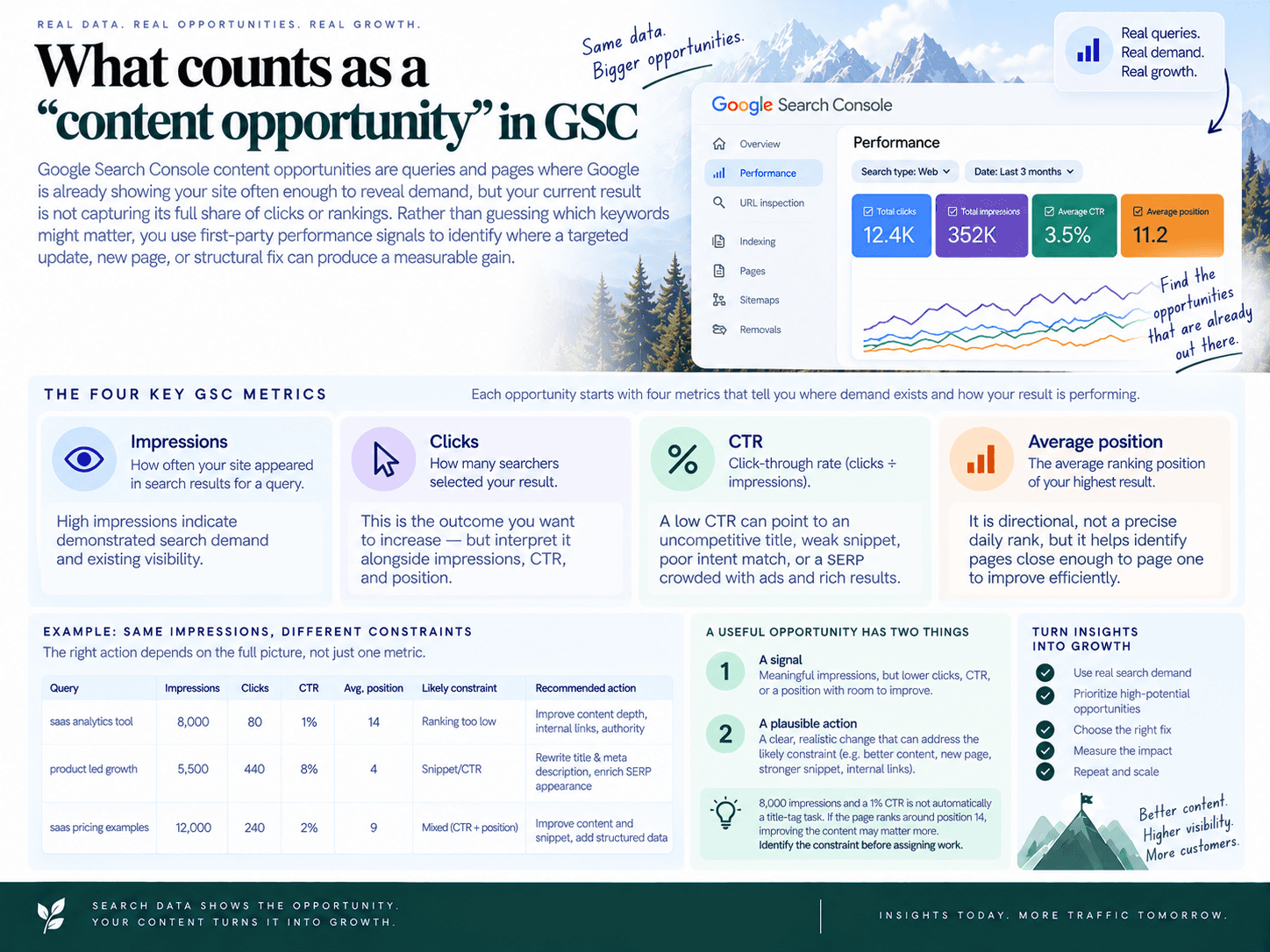
Google Search Console content opportunities are queries and pages where Google is already showing your site often enough to reveal demand, but your current result is not capturing its full share of clicks or rankings. Rather than guessing which keywords might matter, you use first-party performance signals to identify where a targeted update, new page, or structural fix can produce a measurable gain.
Each opportunity starts with four GSC metrics:
Impressions: How often a page from your site appeared in Google Search results for a query. High impressions indicate demonstrated search demand and existing visibility.
Clicks: How many searchers selected your result. This is the outcome you want to increase—but interpret it alongside impressions, CTR, and position.
CTR: Click-through rate, calculated as clicks divided by impressions. A low CTR can point to an uncompetitive title, weak snippet, poor intent match, or a SERP crowded with ads and rich results.
Average position: The average ranking position of your highest result for that query. It is directional, not a precise daily rank, but it helps identify pages close enough to page one to improve efficiently.
A useful opportunity has both a signal and a plausible action. For example, 8,000 impressions and a 1% CTR is not automatically a title-tag task: if the page ranks around position 14, improving the content may matter more than rewriting the snippet. The goal is to identify the likely constraint before assigning work.
The five opportunity patterns worth tracking
High impressions, low CTR: Google shows your result frequently, but searchers choose other listings. This often creates a title, meta description, rich-result, or intent-alignment opportunity.
Positions 8–30: A page is visible but not consistently competitive. These “striking distance” terms are strong candidates for a content refresh, deeper coverage, clearer answers, or an internal-link boost.
Rising queries or pages: Impressions, clicks, or rankings are improving compared with an earlier period. Momentum can reveal an emerging topic, a newly relevant section to expand, or a supporting page to publish quickly.
Query-to-page mismatches: Google ranks a page that only partially answers the query, or several pages compete for the same intent. The solution may be a dedicated page, a rewrite, consolidation, or clearer internal linking—not another loosely related article.
Decaying performance: A formerly useful page loses clicks, impressions, or rankings. Causes can include outdated information, competitors publishing better coverage, changing intent, or site architecture changes that reduce internal support.
These patterns are not mutually exclusive. A page may have rising impressions, sit in position 12, and earn a weak CTR. That combination is usually more valuable than any metric in isolation because it indicates demand, realistic ranking potential, and a clear path to additional traffic.
Why GSC is the right source for prioritization
Keyword tools estimate market demand. GSC shows where your site has already entered the conversation. Its data reflects the actual queries that trigger your pages, the Search Console impressions those queries generate, and whether searchers click when they see you.
That distinction changes prioritization. A high-volume keyword may be strategically interesting but expensive to win. A query with moderate volume where your page already averages position 11 may deliver faster results with a focused update. Likewise, a keyword tool may not reveal the long-tail language Google is already testing your content against.
Use GSC to answer a practical question: Where does existing visibility suggest we can earn more qualified organic traffic with a specific, defensible change? A content opportunity is not every query in the report. It is a pattern with enough data to trust, a page or topic you can improve, and a measurable outcome—more clicks, stronger rankings, or better alignment with the searches that matter to the business.
Set up GSC for reliable analysis (before you filter)
Reliable content decisions start with consistent report settings. A query can look like a growth opportunity simply because you changed properties, compared uneven periods, or mixed desktop and mobile behavior. Before reviewing performance, standardize the property, search type, date range, and segments your team will use every week.
Choose the property that matches the site you manage
In Google Search Console, use a Domain property when you need a complete view of performance across every protocol and subdomain: http, https, www, non-www, blog subdomains, and other hostnames.
Use a URL-prefix property only when your content work is intentionally limited to one version of the site, such as https://www.example.com/blog/. This is useful for a distinct content subfolder, but it can exclude traffic if canonical URLs, redirects, or alternate hostnames sit outside that prefix.
For sitewide editorial planning: default to the Domain property.
For a blog, country folder, or migration analysis: use the relevant URL-prefix property, then confirm it contains the URLs you expect.
For recurring reporting: document the exact property in your template so team members do not mix datasets.
If impressions seem unexpectedly low, check the selected property first. A perfectly filtered report from the wrong property still produces the wrong backlog.
Start in the Performance report and keep Search type consistent
Navigate to Performance → Search results. This is the core Google Search Console performance report for identifying pages and queries with existing search visibility.
Set Search type: Web for most content planning workflows. Image, Video, and News search can be valuable, but they have different click behavior, ranking dynamics, and page formats. Do not combine their conclusions with standard web-search opportunities.
Turn on all four metrics at the top of the report:
Total clicks to measure traffic currently earned.
Total impressions to measure visible demand and SERP exposure.
Average CTR to identify underperforming snippets in context.
Average position to estimate how close a page is to stronger visibility.
Then use the Queries and Pages tabs as two views of the same data: Queries shows demand and search language; Pages shows which URLs receive that visibility. Later, use the tabs together to validate whether the right page is ranking for each important search.
Use a stable baseline: 28 days for weekly work, 3 months for validation
For a weekly operating rhythm, set the date range to Last 28 days. A four-week window is long enough to reduce day-to-day volatility while remaining responsive to recent changes.
Use Last 3 months when you need a larger sample before committing meaningful writing, design, or development effort. This is especially important for lower-volume B2B topics, newer sites, and pages with fewer than a few hundred impressions per month.
A practical standard is:
Weekly opportunity review: Last 28 days.
Trend validation: Last 28 days compared with the previous 28 days.
Seasonality or strategic planning: Last 3 months, with a year-over-year check where enough history exists.
Avoid judging a page from a seven-day sample unless you are reacting to a time-sensitive event. Small samples exaggerate normal variation in rankings, impressions, and CTR.
Enable date comparisons before calling something “rising” or “declining”
In Performance, click the date filter and select Compare. For the default weekly review, choose Compare last 28 days to previous period. This date range comparison GSC setup separates actual momentum from a single-period snapshot.
Read the direction of change across metrics rather than relying on one number:
Impressions up, position improving: Google is testing or rewarding the page more often. Investigate quickly while momentum is building.
Impressions up, clicks flat: visibility is growing but the result may not earn its share of clicks; examine the SERP and snippet.
Clicks down, impressions stable: CTR may have fallen because of title changes, richer SERP features, competitor shifts, or a weaker match to intent.
Impressions and clicks down together: check seasonality, demand changes, indexing issues, and ranking losses before planning a rewrite.
For seasonal businesses, compare the current period with the same period last year when available. A December decline in a summer product category is not automatically a content problem. Likewise, a sharp year-over-year gain can reflect a changing market rather than a page-level improvement.
Segment by country and device before making page-level recommendations
Use the filters at the top of the report to isolate the audience you actually serve. At minimum, review your primary country and compare desktop with mobile. A page can rank well and convert clicks on desktop while losing visibility or engagement on mobile because the SERP, title truncation, page experience, or search behavior differs.
For device segmentation, select + New → Device and review Desktop, Mobile, and Tablet separately. Mobile usually deserves priority because it often represents the largest share of web-search impressions, but use your own data rather than assumptions.
Also apply + New → Country when your business targets a specific market. A global report can hide a strong opportunity in your priority geography or make a low-value international query look more important than it is.
Use Country to focus on markets where you can sell, support, or serve users.
Use Device when CTR or position changes appear inconsistent.
Use Page when evaluating a known URL.
Use Query when investigating a specific topic or term.
Save the setup in a simple team checklist: property, search type, date range, comparison period, primary country, and device view. Once these settings are fixed, your filters reflect real performance changes—not reporting noise.
Workflow overview: from GSC insights to a ranked backlog
A productive weekly process has five stages: pull candidates, isolate the signal, diagnose the cause, choose one action, and rank the work. This prevents a common failure mode in SEO: exporting hundreds of queries, calling them “ideas,” and never deciding what to update or publish.
Run this SEO content workflow in a 60–90 minute weekly session. The output should be a small, owned list of high-confidence tasks—not another spreadsheet tab full of unqualified keywords.
Step 1: Pull candidates from the reports that connect queries and pages
In Google Search Console, go to Performance → Search results. Set the appropriate property, search type, country, and date range before reviewing data. Start in both the Queries and Pages tabs:
Use Queries to find demand signals: searches with impressions, weak click-through rates, improving visibility, or unclear intent coverage.
Use Pages to find URLs that are close to stronger rankings, losing visibility, or attracting queries they were not designed to answer.
Click a query, then open Pages to see which URLs Google associates with that search.
Click a page, then open Queries to see the language and intent it currently captures.
Use Date → Compare to compare the last 28 days with the previous 28 days when looking for momentum or decline.
At this stage, do not decide what to write. Collect candidate query-page combinations with enough impressions to justify a closer look.
Step 2: Apply filters that isolate a specific opportunity pattern
Each candidate should enter the process because it matches a recognizable pattern, not because it happens to appear in an export. Create separate working views for the signals below:
CTR opportunity: high impressions, below-expected CTR, and a ranking where a better snippet could plausibly earn more clicks.
Striking-distance opportunity: a page or query ranking roughly positions 8–30 with meaningful impressions.
Rising opportunity: impressions, clicks, or average position improving in the comparison view.
Mismatch opportunity: Google ranks an irrelevant, overly broad, or secondary URL for an important query.
Decay opportunity: a previously useful page shows a sustained decline in clicks, impressions, or position.
Tag every candidate with only one primary pattern initially. A page can have several problems, but assigning a dominant signal makes the next decision faster and avoids vague tasks such as “optimize this article.”
Step 3: Diagnose search intent and page suitability
Before assigning work, inspect the live search results and the ranking URL. Ask two questions: Does the current page satisfy the query’s intent? And is this the right URL to own the query?
For example, a query that triggers comparison pages, pricing pages, and product category pages is unlikely to be won by a broad educational article. Conversely, a query whose results are guides and tutorials probably needs a useful instructional page, not a thin feature landing page.
Review the page’s title, headings, opening answer, depth, freshness, examples, and internal links. Also check whether another URL on your site addresses the same search need. This turns raw GSC data into a diagnosis rather than an assumption.
Step 4: Map the diagnosis to one clear action
Do not default to publishing a new article. The best response depends on what the data and SERP review reveal.
Rewrite the title and meta description when the page ranks reasonably well and matches intent, but its snippet is not competitive or specific enough.
Refresh the existing page when its topic remains right but facts, examples, structure, or coverage are outdated.
Expand sections when the page addresses the query but lacks the subtopics, comparisons, steps, or proof searchers expect.
Boost internal links when a relevant page is under-supported and stronger related pages can link to it contextually.
Create a new page when the query represents a distinct intent that no current URL can satisfy without becoming unfocused.
Consolidate or retarget pages when multiple URLs compete for the same query or Google consistently selects the wrong page.
Write the action as an executable deliverable: “Add a comparison section and three contextual internal links to /feature-x/,” not “improve page.” That level of specificity makes handoff to an editor, writer, or SEO owner straightforward.
Step 5: Score the work and add it to one publishing queue
Turn validated items into a single content backlog. Give each task a lightweight score so a high-potential refresh does not lose out to a speculative new topic simply because the latter feels more interesting.
A practical model is:
Priority score = Impact × Confidence ÷ Effort
Impact: estimate potential value from impressions, current position, CTR gap, trend direction, and commercial relevance.
Confidence: increase this when GSC data is stable, intent is clear, and the required change directly addresses an obvious weakness.
Effort: estimate the time needed for research, writing, design, review, and technical changes.
Use a simple 1–5 scale for each factor. The goal is not mathematical precision; it is consistent SEO prioritization across refreshes, new pages, and technical-content tasks.
Every backlog item should include the target query or topic, target URL, opportunity pattern, GSC metrics, diagnosis, recommended action, owner, due date, and success KPI. For example:
Signal: “project management templates” has 4,200 impressions, 1.1% CTR, and average position 9.4.
Diagnosis: the existing template page matches intent, but its title is generic and competing results highlight template types and free access.
Action: rewrite the title and meta description, strengthen the opening section, and add links from related project-management guides.
KPI: improve CTR from 1.1% to 1.8% or higher while holding average position.
End the session by selecting only the highest-scoring tasks your team can actually ship that week. Discovery is useful only when it becomes a scheduled decision: refresh, publish, link, consolidate, or test a better SERP snippet.
Report #1: Performance → Queries (high impressions, low CTR)
High impressions with a low click-through rate means Google is already showing your site for a query, but searchers are choosing other results. These are often the fastest opportunities because you do not need to create demand or earn initial visibility—you need to make the existing result more compelling and better aligned with what the searcher expects.
Use this GSC filter recipe to find CTR opportunities
Open Google Search Console → Performance → Search results.
Set the date range to the last 28 days. Use a longer period, such as three months, if your site has lower search volume.
Ensure Total impressions, Average CTR, and Average position are enabled.
Open the Queries tab.
Click + New → Query only when you need to isolate a topic or exclude branded terms. Otherwise, export the table and filter it in a spreadsheet.
Start with these practical thresholds:
Impressions: at least 100 in the selected period; use 500+ for larger sites.
CTR: below 2–3%.
Average position: between 3 and 12.
Query type: exclude your brand name, product names, and obvious navigational searches.
A result in position 20 with a 1% CTR is usually behaving normally. A result in position 4 with 2,000 impressions and a 1% CTR deserves inspection. The position band matters because CTR declines naturally as rankings fall. Your goal is not to force every query toward an arbitrary CTR benchmark; it is to find results performing noticeably below what their visibility suggests.
For a faster pass, sort the Queries table by impressions, flag terms with substantial visibility and weak CTR, then investigate each query individually. Click a query, open the Pages tab, and identify the URL Google is actually showing. This prevents you from optimizing the wrong page.
Determine whether the problem is the snippet or the page
Low CTR has two common causes: a weak search snippet or a weak match between the page and search intent. The fixes are different.
Likely snippet problem: the ranking URL directly answers the query, but the title is generic, outdated, repetitive, or less specific than competing results.
Likely intent problem: the page targets a broader or different subject than the query, while competing results offer the format searchers want—such as a template, comparison, pricing page, checklist, or step-by-step guide.
Likely SERP constraint: ads, shopping units, local results, featured snippets, AI-generated search features, or large publisher brands absorb clicks. In this case, a title rewrite may help, but the opportunity may be smaller than the raw impression count implies.
Before editing, search the query manually in the relevant country and device context. Compare your title, visible date, URL, rich-result treatment, and content format against the first-page results. Ask one direct question: Would a searcher immediately understand why this result is the best click?
Make safe, high-leverage CTR improvements
Start with the title tag. Good title tag optimization makes the page’s specific value clear without changing the promise of the content. Lead with the topic, then add the differentiator that matters for the query: audience, outcome, format, current year when genuinely relevant, or a concrete scope.
For example, a generic title such as “Content Strategy Guide” may be less competitive for a query like “content strategy template” than “Content Strategy Template: Build a 90-Day Editorial Plan”—but only if the page actually includes a usable template and a 90-day planning framework.
Put the primary query or a close natural variant near the beginning of the title.
State the page format clearly: guide, template, checklist, examples, comparison, calculator, or tutorial.
Add a real differentiator, such as a defined audience, a process, or a tangible outcome.
Remove vague modifiers such as “ultimate,” “best,” or “complete” unless the page earns the claim.
Keep the on-page H1, introduction, and title promise aligned so users do not bounce after clicking.
Update the meta description as supporting copy, not as the main lever. Google may rewrite it, but a concise description can still reinforce relevance. Summarize what the reader will get, include the query naturally, and avoid repeating the title word for word.
Also check whether the page qualifies for appropriate rich-result enhancements. Clear headings, accurate structured data, visible author or product information where relevant, and well-formed FAQ-style content can improve how a result is understood and displayed. Do not add markup solely to chase a richer appearance; it must match content visible on the page and follow Google’s guidelines.
Record a controlled test, not a cosmetic edit
Change the title and meta description only after documenting the baseline: query, URL, impressions, CTR, clicks, average position, current title, and proposed replacement. Keep the page content stable where possible, then measure results after Google has recrawled and enough impressions have accumulated—typically several weeks for a meaningful read.
A useful success metric is incremental clicks at a stable average position. If clicks and CTR rise while position stays roughly similar, the snippet improvement likely worked. If position changes substantially, treat the result as a combined ranking and CTR effect rather than crediting the title alone.
When not to optimize for clicks
Do not turn a low CTR into a reason to make a misleading promise. Avoid clickbait titles, adding “free” when the offer is not free, implying a comparison where none exists, or targeting a query whose intent the page cannot satisfy. A temporary click lift followed by poor engagement is not a durable win.
Skip or de-prioritize queries with very low impressions, heavily branded navigational terms, and SERPs where your ranking is too low for CTR to be actionable. Focus on pages with meaningful visibility, a credible path to a more useful snippet, and content that can honestly deliver the promise made in search.
Report #2: Performance → Pages (positions 8–30 “striking distance”)
Pages ranking between positions 8 and 30 are often the fastest organic growth opportunities because Google already sees them as relevant. Rather than starting with a net-new article, improve the page that has existing visibility, strengthen its match to the searcher’s need, and help Google better understand its place in your site architecture.
Set up the Pages report to find realistic wins
In Google Search Console, go to Performance → Search results, set the search type to Web, then open the Pages tab. Use a meaningful evaluation period—typically the last 28 days for active sites, or the last three months when traffic is lower.
There is no direct “position 8–30” filter in the Pages table, so export the data to a spreadsheet or use the table’s filters and sorting to isolate candidates. Start with these thresholds:
Average position: 8–30
Impressions floor: at least 100 impressions in the selected period; use 300+ for established sites with substantial traffic
Clicks: enough activity to confirm the page is receiving relevant demand, but do not exclude zero-click pages if impressions are high
Exclude: pages that are intentionally noindex, campaign URLs, utility pages, and pages with primarily branded demand
Sort first by impressions, then review position. A URL at position 14 with 8,000 impressions is usually more valuable than one at position 9 with 80 impressions. The first may have more upside even if it requires a larger content update.
Use page-level averages as a screening mechanism, not a final diagnosis. One page can rank in position 4 for a low-volume query and position 24 for a high-value query, producing an average that hides the real opportunity.
Choose the primary query behind each page opportunity
Click a promising URL in the Pages tab, then open the Queries tab. This changes the question from “Which page has a middling average position?” to “Which terms is this page close to winning?”
Select a primary query based on four checks:
Demand: It has enough impressions to justify the work.
Proximity: It ranks near the first page or in the upper part of page two.
Intent fit: The existing URL can genuinely satisfy the query without becoming unfocused.
Business value: The query attracts an audience that can reasonably progress to your product, service, or next conversion step.
For example, a guide may show 2,400 impressions at an average position of 16 for “employee onboarding checklist.” If the guide already contains a checklist but buries it below generic advice, the primary opportunity is not simply “rank higher.” It is to make the page the clearest, most complete checklist resource for that intent.
Group close variants under one target rather than trying to optimize a separate section for every wording variation. Queries such as “employee onboarding checklist,” “new hire onboarding checklist,” and “onboarding checklist for employees” may belong to one intent cluster. Review the live search results before deciding: similar result types indicate a shared page can serve them; materially different result types may justify separate pages.
Use the ranking pattern to diagnose the right on-page change
A position range alone does not tell you what to edit. Inspect the target query, the live page, and the current search results before assigning work. Most page-level opportunities fall into one of these actions:
Expand missing sections: Add the subtopics, steps, comparisons, definitions, examples, or FAQs that top-ranking pages consistently cover and your page lacks.
Improve the answer structure: Put the direct answer, template, process, or recommendation earlier on the page. Use descriptive headings, scannable lists, and clear supporting examples.
Refresh outdated material: Update dates, product details, screenshots, regulations, statistics, and recommendations when freshness is clearly part of the result set.
Increase specificity: Replace broad claims with use-case detail, original examples, decision criteria, implementation steps, or practical constraints.
Strengthen commercial alignment: If the SERP favors tools, comparisons, pricing context, or implementation guidance, make sure the page addresses that need rather than remaining purely educational.
A content refresh should be a targeted ranking intervention, not a cosmetic rewrite. Preserve sections that already earn impressions, improve the weak areas revealed by the SERP, and avoid changing the URL or primary topic unless the diagnosis requires a larger consolidation project.
Prioritize pages in positions 8–15 when the content is already fundamentally aligned and needs a focused update. Pages in positions 16–30 can still be strong candidates, but they usually need a more substantial improvement in depth, intent coverage, or topical support.
Boost important pages with internal links
On-page improvements work better when the target page is supported by clear internal links from relevant, already-indexed pages. Internal linking helps search engines discover the relationship between pages and signals which resource is most useful for a specific subtopic.
For each priority URL, find three to five pages that meet these criteria:
They are topically related to the target page.
They already receive organic impressions or links from elsewhere on the site.
They contain a natural sentence where the target resource genuinely helps the reader.
They are not competing pages targeting the same primary intent.
Add contextual links inside the body copy, ideally near a relevant explanation rather than only in a generic “related posts” module. Use descriptive anchor text that reflects the destination topic, but keep it natural. For a page targeting “employee onboarding checklist,” anchors such as “use this employee onboarding checklist” or “follow a structured new-hire checklist” are clearer than repeated exact-match anchors.
Also review whether the page needs a stronger place in its topic cluster. A useful pattern is a hub page linking to major subtopics, with supporting articles linking back to the most comprehensive resource. Avoid adding links solely because a page sits in a target position range; relevance matters more than volume.
Validate the change against the query, not just the page average
After publishing, annotate the date in your tracking process and give Google time to recrawl the page. Then return to the same URL in Performance, open Queries, and compare periods. Measure movement for the primary query cluster alongside impressions, clicks, and average position.
Success is not always an immediate jump to position one. A move from position 18 to 10, followed by rising impressions and clicks, confirms the page is gaining relevance. If impressions rise but rankings remain flat, the page may still need stronger depth, better intent alignment, or more authoritative internal support. If rankings fall after a major rewrite, restore useful lost material and reassess whether the revised page drifted away from the original query intent.
Report #3: Compare date ranges to find rising queries and pages
Rising demand is often the fastest content opportunity to act on. A query that is gaining impressions, clicks, or rankings may signal a new use case, a seasonal shift, a product trend, or growing topical authority on your site. Use a Search Console comparison to spot that momentum before it becomes obvious to competitors.
Run a 28-day comparison in Performance
Open Performance → Search results in Google Search Console.
Set the date filter to Compare.
Select Last 28 days vs previous period.
Keep Search type set to Web unless you are reviewing a specific search surface.
Open the Queries tab to find emerging search terms, then open Pages to see which URLs are gaining visibility.
Enable total clicks, impressions, average CTR, and average position before reviewing the table. Sort first by impressions difference, then repeat the review by clicks difference. Impressions reveal new or expanding demand; clicks show whether your current page is already capturing it.
For a higher-signal review, apply a minimum-volume rule: prioritize queries with at least 50–100 impressions in the latest 28-day period, or pages with at least 200 impressions. Lower-volume terms can matter in narrow B2B niches, but they need a longer comparison window before they justify work.
Interpret the pattern before choosing an action
Not every upward trend requires a new article. Compare changes across impressions, clicks, CTR, and position to understand what is actually happening.
Impressions up, position improving: Google is testing or rewarding your relevance. Strengthen the ranking page quickly with clearer answers, additional examples, updated information, and supporting context.
Impressions up, clicks flat: Visibility is growing, but the result is not earning proportionate clicks. Check whether the title accurately matches the query and whether the page answers the emerging intent near the top.
Clicks up faster than impressions: Your result is becoming more competitive. Protect the gain by reviewing the page for freshness, accuracy, and conversion paths rather than making unnecessary wholesale changes.
New queries appearing around one page: Your page may be broadening into an adjacent topic. Decide whether to add a focused section or create a separate supporting page.
Impressions up but position declines: Demand may be rising faster than your relevance. Treat this as a research signal, not a win: inspect the current search results and improve or expand the content before competitors consolidate their lead.
Turn momentum into rapid content actions
Use the query list to identify the smallest action that can capture the trend. Speed matters, but relevance matters more.
Add a section when the rising query is a clear sub-question that fits the existing page’s intent. For example, a guide gaining impressions for “implementation checklist” may need a practical checklist section rather than an entirely new post.
Publish a supporting article when several rising queries share a distinct problem, audience, or intent. Link it contextually from the existing page so Google and readers can understand the relationship.
Refresh the existing page when the new demand reflects updated terminology, changing regulations, newly released features, or recent market developments.
Create a fast-follow page when an emerging query has commercial or strategic relevance but the current ranking URL only mentions the topic in passing.
For trend-based content planning, look for groups rather than isolated terms. Five related queries gaining impressions around the same workflow are a stronger signal than one query with a temporary spike. Group them by shared intent, choose one primary page or article, and use the remaining terms as section headings, examples, FAQs, or supporting content ideas.
Validate that the trend is real
Before assigning work, check whether the lift is durable. Compare the last 28 days with the previous 28, then switch to a three-month or year-over-year view when enough data exists. A short-term increase may be caused by seasonality, a news event, a campaign, or a one-off ranking fluctuation.
Also filter by country and device when the change looks surprising. A mobile-only lift may point to a different SERP layout or user need than desktop demand. A surge in one market may require localized examples, pricing, terminology, or a dedicated regional page rather than a site-wide rewrite.
The best rising queries GSC candidates have three traits: meaningful recent growth, a clear intent that your site can serve, and an action your team can ship quickly. Capture those candidates immediately with the comparison period, metric changes, likely intent, recommended action, and the page or content owner. That turns a promising chart into an executable opportunity while momentum is still building.
Find query/page mismatches (wrong page ranking for the query)
A query/page mismatch happens when Google shows a URL for a query, but that URL is not the best page on your site to satisfy the searcher’s intent. The result is often weak rankings, poor CTR, stalled growth, or two similar pages competing against each other.
Do not assume the ranking URL is the page you intended to rank. Use Search Console to identify the URL Google has selected, then decide whether to strengthen it, redirect its focus, consolidate competing content, or build a dedicated page.
Use both query-to-page and page-to-query views
Start in Performance → Search results, set a meaningful date range such as the last three months, and enable Clicks, Impressions, CTR, and Average position.
Check a query’s ranking pages. Open the Queries tab, select a non-branded query with enough impressions to evaluate, then click the Pages tab. This reveals every URL receiving impressions for that query.
Check a page’s ranking queries. Open the Pages tab, select a URL you want to assess, then click Queries. Look for important queries that do not match the page’s main topic, format, or commercial intent.
Compare the URLs against the live SERP. Search the query in an incognito window where practical. Review the content types that rank: guides, category pages, product pages, templates, comparisons, or tools. A mismatch is usually clearer once you see what Google is rewarding.
A useful rule: if a query has consistent impressions but the ranking URL only addresses it in passing, treat that as a diagnostic candidate. A relevant mention is not the same as a page built to fulfill the query.
Recognize the common mismatch patterns
Broad guide ranking for a specific subtopic: A pillar page ranks for a detailed how-to, template, integration, or comparison query, but lacks the depth needed to compete.
Blog post ranking for a commercial query: An informational article appears for “best,” “pricing,” “alternative,” or product-comparison searches when a solution, category, or comparison page would better match the SERP.
Wrong format ranking: A definition page ranks for a query whose results are mostly checklists, calculators, examples, or step-by-step tutorials.
Multiple URLs sharing one query: Two or more pages alternate impressions and clicks for the same term. This can indicate keyword cannibalization, especially when the pages have overlapping intent and similar headings.
One page ranking for unrelated query groups: A page accumulates impressions across several distinct topics because its topical focus is too broad or its wording is ambiguous.
Diagnose whether the problem is focus, intent, or duplication
Before changing URLs, answer three questions:
Can the current page satisfy the query without becoming unfocused? If the answer is yes, expand or rewrite the relevant section. If answering the query properly would turn the page into two articles, create a separate page instead.
Does the query have a different intent from the current page? An informational guide should not be forced to rank for a comparison query, and a product page should not be stretched to answer a broad educational question. This is an intent mismatch SEO issue, not simply a missing keyword.
Do two existing pages serve the same job? If both pages target the same audience, query theme, and SERP format, choose a primary URL rather than continually optimizing both.
Use the page with the strongest topical fit, links, conversions, and existing performance as the likely primary URL. Preserve useful material from weaker overlapping pages, but avoid maintaining multiple near-identical answers.
Choose the corrective action
What GSC shows | Likely diagnosis | Best action |
|---|---|---|
A relevant page ranks, but only has a thin section on the query | Insufficient depth | Expand the section with the required steps, examples, FAQs, and supporting evidence. |
A broad page ranks for a distinct subtopic with sustained demand | The topic deserves its own intent-focused asset | Create a dedicated page, then link to it contextually from the broad page. |
An informational URL ranks for a commercial or comparison query | Format and intent mismatch | Create or rewrite the appropriate commercial page; retain the informational article for education-stage searches. |
Two similar URLs receive impressions for the same query | Overlapping targeting | Consolidate content into the stronger URL and redirect the retired URL when appropriate. |
The correct page exists but a weaker URL keeps appearing | Weak site signals about page hierarchy | Improve internal links to the preferred page and reduce confusing, duplicate anchor patterns. |
Use consolidation, canonicals, and internal links correctly
Consolidate when pages are substantially duplicative and should serve one search intent. Merge the unique value from the weaker page into the preferred URL, update internal links, and use a permanent redirect when the old URL is being retired. This gives users and search engines one clear destination.
Use a canonical tag when multiple URLs are genuinely near-duplicates and need a preferred indexing signal. A canonical is not a substitute for resolving two pages with different content, competing headings, and overlapping target queries. If both pages remain indexable and both attempt to answer the same search, Google may still choose either one.
Internal links should reinforce the intended architecture. Link from relevant hub pages and supporting articles to the preferred URL using descriptive anchors that reflect its topic. Avoid repeatedly linking to an older, broader article with the exact language you want the dedicated page to rank for.
Example: A “Complete Email Marketing Guide” ranks for “email marketing campaign template,” but its template section is only 150 words. If template-related queries generate meaningful impressions and the SERP favors downloadable templates and examples, publish a dedicated template page. Add a prominent contextual link from the guide to the new page, include the template and use cases, and keep the guide focused on the broader educational journey.
Record the preferred URL, competing URL, target query, diagnosis, and chosen action before making changes. That documentation prevents teams from creating another overlapping page later—and makes it possible to measure whether Google begins selecting the intended URL after the update.
Turn each opportunity into the right action (decision matrix)
Do not treat every promising query as a reason to publish a new article. The right next step depends on two questions: does an existing URL already satisfy the intent? and is the problem visibility, relevance, coverage, or site architecture?
GSC signal | Likely diagnosis | Best action | Avoid |
|---|---|---|---|
High impressions, low CTR, position 1–8 | Your result is visible but not compelling enough to earn clicks. | Rewrite title tag and meta description; improve snippet relevance; validate rich-result eligibility where relevant. | Rebuilding the entire article when rankings and intent alignment are already strong. |
Position 8–30 with meaningful impressions | The page is relevant but lacks depth, freshness, specificity, or authority signals. | Refresh and expand the existing page; add internal links from related, stronger pages. | Launching a near-duplicate page targeting the same query. |
Impressions rising; clicks flat or slowly rising | Demand or relevance is growing, but the page does not fully capture the topic. | Add a focused section, examples, FAQs, or a supporting article around the emerging subtopic. | Waiting until competitors own the growing query cluster. |
A query ranks, but the landing page has the wrong intent | Google sees topical relevance, but users need a different format or a more focused answer. | Create a dedicated page or substantially retarget the existing URL. | Forcing an informational query into a product or category page. |
Two or more URLs appear for the same query family | Cannibalization, overlapping scope, or unclear internal-linking signals. | Consolidate, differentiate page roles, redirect where appropriate, and update internal links. | Optimizing both pages harder for the identical primary query. |
Good page and query relevance, but weak discovery of a newer URL | The page needs stronger connections within the site. | Add contextual internal links from relevant hub pages and high-traffic supporting content. | Adding sitewide footer links or repeating exact-match anchors unnaturally. |
Refresh, rewrite, or create a new page?
Use this rule of thumb: refresh when the correct URL already ranks; create when no existing URL can meet the searcher’s intent without becoming unfocused.
Refresh an existing page when it ranks in the top 30, the page’s core topic matches the query, and the missing value can be added without changing the page’s purpose. Update stale facts, improve the opening answer, strengthen weak sections, and add practical examples.
Rewrite or retarget a page when the URL is relevant but its angle, format, or primary intent is wrong. For example, turn a broad “SEO tools” explainer into a clear comparison guide only if that is the dominant intent for the page’s main opportunity.
Create a new page when the query represents a distinct intent, audience, workflow stage, or page type. A query for “content refresh checklist” may deserve a dedicated checklist or template rather than one more subsection inside a general content optimization guide.
Consolidate pages when multiple URLs cover substantially the same problem for the same audience. Keep the stronger or more appropriate URL, move unique material into it, then redirect or de-emphasize the weaker page as appropriate.
A practical test: if you can write a precise title for the opportunity that would make your current page title inaccurate, you probably need a separate page. If the new angle naturally improves the current promise, update the existing URL instead.
CTR-only optimization checklist
When rankings are already strong, start with the search result rather than a full content rewrite. The goal is not to manufacture clicks with a misleading promise; it is to make the page’s real value clearer before the searcher chooses another result.
Put the query’s actual task, outcome, or qualifier in the title tag.
Make the title specific: include the format, audience, year, framework, or use case only when the page genuinely delivers it.
Use the meta description to reinforce the benefit and set accurate expectations, not to repeat the title.
Check whether the SERP is dominated by templates, tools, comparisons, videos, local results, or news. Match the format users are choosing.
Improve the opening paragraph and primary heading so the on-page promise matches the snippet promise.
Review the change after enough impressions accrue; do not judge a title rewrite on a handful of searches.
Do not chase CTR for branded queries, queries with unusual SERP layouts, or terms where a higher click-through rate would come from overstating what the page offers. A click that immediately returns to search is not a win.
Expansion checklist for pages in striking distance
A page ranking around positions 8–30 usually needs a stronger answer, not more words for their own sake. Use the results page and the query cluster to identify the missing information that prevents the page from being the best result.
Add the missing subtopic as a clearly labeled section rather than burying it in a paragraph.
Answer related questions surfaced in the page’s query data, especially recurring modifiers and follow-up tasks.
Add examples, steps, screenshots, templates, decision criteria, or comparisons that make the guidance more usable.
Update dated statistics, product details, screenshots, and recommendations.
Clarify who the advice is for and when it does not apply.
Strengthen the page’s conclusion or next step so the reader can act without searching again.
This content update checklist keeps expansion tied to a diagnosed gap. If the query is a separate intent, do not bolt on a shallow section just to capture it—build a supporting page and link the two resources instead.
Internal-linking checklist for under-supported pages
Internal links are the right action when the target page is already a good fit but lacks clear topical connections. Prioritize contextual links that help readers continue their journey and help search engines understand the relationship between pages.
Link from relevant hub pages, category pages, and established articles that already receive organic traffic.
Place links inside useful sentences near the related concept, not in a generic “related posts” block alone.
Use descriptive, natural anchor text that explains the destination without repeating the exact same phrase everywhere.
Link both ways when it improves navigation: hub to supporting page, then supporting page back to the hub.
Update links after consolidations so internal signals point to the preferred URL.
Check that the destination is indexable, canonicalized correctly, and genuinely useful for the reader.
Use a short diagnosis before assigning work
For every candidate, record one sentence before choosing an action: “This query underperforms because…” If the team cannot finish that sentence with a specific diagnosis, it is too early to assign production work.
For example: “This how-to query has 4,200 impressions, ranks at 12.4, and lands on a broad service page; searchers need a step-by-step guide.” The action is a new guide, linked from the service page—not another title-tag test. In contrast: “This guide ranks at 4.1 for a high-impression query but has a 1.8% CTR while competing results promise a template.” The action is to add a usable template, update the title and description to reflect it, and measure the CTR change.
That diagnosis-first approach turns raw search performance into focused content optimization actions, prevents duplicate publishing, and gives writers a concrete brief: target query, intended URL, user need, gap to close, required updates, and success metric.
Create a ranked backlog: scoring model + examples
A list of GSC findings is not a publishing plan. To decide what to work on first, score every candidate using the same criteria, then place the highest-value items into a shared backlog with a clear owner, action, and success metric.
Use a simple ICE-style score for SEO work
A lightweight version of ICE scoring SEO works well for weekly prioritization:
Priority score = Impact × Confidence × Ease
Impact (1–5): How much additional organic traffic or business value could this change produce?
Confidence (1–5): How clearly does GSC data point to a fix you can make?
Ease (1–5): How quickly can the team complete the work? A title rewrite may be a 5; a major consolidation or new pillar page may be a 1 or 2.
The maximum score is 125. You do not need false precision: consistent scoring matters more than debating whether an item deserves a 3 or a 4.
Use GSC signals to guide each score:
Impact: impressions, current clicks, position, CTR gap, and the likely value of the query’s intent.
Confidence: whether one page already ranks for the target query, whether intent is clear, and whether the required fix is obvious.
Ease: estimated production time, review requirements, design needs, and whether technical changes or redirects are required.
Add two modifiers before finalizing the queue
Raw search demand is not enough to prioritize SEO tasks. Add a business modifier and a timing modifier after your ICE score.
Business value: Add 0–20 points for queries that align with a product, service, qualified lead, or high-value audience. A commercial comparison query may deserve priority over a broader informational term with similar impressions.
Timing: Add or subtract up to 10 points for seasonality, launches, industry changes, or rapidly rising demand. Do not prioritize a seasonal query in its off-season solely because last month’s impressions were high.
Final score = (Impact × Confidence × Ease) + Business value + Timing
For most teams, sort items into three execution bands:
80+: Schedule this cycle. These are high-confidence wins or strategically important pages.
45–79: Keep in the active backlog. Pull them forward as capacity opens.
Below 45: Park, monitor, or revisit when impressions rise or the page becomes strategically relevant.
Example: score a CTR improvement opportunity
Suppose a feature page receives 12,000 impressions per month for “project management software for agencies,” ranks at position 4.8, and has a 1.6% CTR. The query has clear commercial intent, but the current title is generic and the snippet does not communicate agency-specific value.
Impact: 5 — high impressions and a large CTR gap for a top-five result.
Confidence: 4 — the page ranks well, the query matches the page, and the likely issue is presentation rather than relevance.
Ease: 5 — update the title tag, meta description, on-page heading, and supporting copy.
ICE score: 5 × 4 × 5 = 100.
Business value: +15 — commercial, product-aligned query.
Timing: 0 — no meaningful seasonal factor.
Final score: 115.
This belongs near the top of the queue. The KPI is not “improve the meta description.” It is: increase CTR from 1.6% to 2.5% or better while maintaining average position over the next 28 days.
Example: score a content expansion opportunity
A guide ranks at position 14 for a non-branded how-to query with 3,500 monthly impressions. Its ranking page answers the main question but lacks comparison examples, implementation steps, and an FAQ that competing results cover.
Impact: 4 — moving from page two to page one could materially increase clicks.
Confidence: 4 — the existing URL already ranks and the missing content is specific.
Ease: 3 — the update needs research, writing, and editorial review.
ICE score: 4 × 4 × 3 = 48.
Business value: +8 — useful awareness-stage query with a relevant product path.
Timing: +3 — impressions have increased over the last 28 days.
Final score: 59.
This is a strong active-backlog item. The action is an expansion of the existing page, not a duplicate post targeting the same phrase.
Build a backlog your team can execute
Your content backlog template should capture enough context for an editor, writer, or SEO lead to act without reopening every GSC report. Use one row per opportunity.
Field | What to record |
|---|---|
Opportunity ID | A simple unique label, such as GSC-042 |
Target query or topic | The main query, plus closely related query cluster where relevant |
Current URL | The ranking page, or “new page” if no suitable URL exists |
Signal | Low CTR, striking distance, rising demand, mismatch, decay, or cannibalization |
GSC baseline | Impressions, clicks, CTR, average position, and comparison-period trend |
Diagnosis | Why performance is constrained: weak snippet, missing section, wrong intent, competing URL, or insufficient internal links |
Recommended action | Refresh, expand, title/meta rewrite, internal-link update, consolidation, or new page |
Priority inputs | Impact, confidence, ease, business value, timing, and final score |
Owner and due date | The accountable person and planned completion date |
Status | Backlog, brief needed, in production, in review, published, or measuring |
Success KPI | The expected lift in clicks, CTR, position, conversions, or assisted conversions |
Completed backlog item example
Opportunity ID: GSC-042
Target query: “employee onboarding checklist”
Current URL: /resources/onboarding-guide/
Signal: Position 11.8, 4,200 impressions, 2.1% CTR; impressions up 34% versus the previous 28 days
Diagnosis: The guide is ranking for checklist intent but provides only a short downloadable template near the end of the page. It lacks a scannable, complete checklist and practical role-based examples.
Action: Expand the guide with a full checklist, add manager and HR variants, improve the title to reflect checklist intent, and add contextual links from HR process articles.
Score: Impact 4 × Confidence 4 × Ease 3 = 48, plus 10 business-value points and 5 timing points = 63.
Owner: Content lead
Status: Brief needed
KPI: Reach top 10 average position and increase organic clicks by 40% within 60–90 days of publication.
Review the ranked list weekly, but keep scoring tied to the same baseline period. That discipline prevents the backlog from becoming a collection of interesting ideas and turns it into a measurable production queue.
Make it repeatable: a weekly GSC cadence that feeds publishing
A useful Search Console review is not a quarterly spreadsheet exercise. Treat it as a 60–90 minute weekly operating rhythm that produces a small, ranked set of publishable work: pages to refresh, snippets to improve, supporting articles to create, and internal links to add.
The goal is simple: every review ends with assigned work in your content calendar—not a longer list of observations.
A 60–90 minute weekly routine
Mine new signals (20–25 minutes). In Performance → Search results, compare the latest 28 days with the prior 28 days. Review new high-impression/low-click query candidates, pages in striking distance, rising queries, and pages losing clicks or position. Add only candidates that clear your established impression and relevance thresholds.
Diagnose and choose an action (20–25 minutes). For each candidate, inspect the query-to-page relationship and the live SERP. Decide whether the problem is CTR, insufficient depth, outdated information, weak internal support, cannibalization, or a missing dedicated page. Do not default to creating a new article when an existing URL already owns the right intent.
Score and plan (15–20 minutes). Apply your impact, confidence, and effort score. Select the highest-value items your team can realistically complete that week. Assign an owner, due date, target query or topic cluster, action type, and success metric.
Ship one batch (15–20 minutes). Publish or schedule the selected refreshes and new pages. Group closely related changes where possible: for example, update a hub page, add contextual links from two supporting pages, and publish one missing subtopic article in the same cluster.
Review prior work (5–10 minutes). Check items shipped four to eight weeks ago. Record movement in clicks, impressions, CTR, and average position, then use the result to improve future prioritization.
This rhythm creates a dependable SEO weekly workflow: mine demand, make a decision, ship work, learn from the outcome, and repeat.
Give each role a clear handoff
Small teams do not need a complex process, but they do need ownership. The SEO lead or marketer owns signal review and prioritization. An editor validates search intent, page angle, and brand fit. A writer or subject-matter expert completes the refresh or draft. The person with CMS access schedules publication and confirms links, metadata, and tracking are in place.
For a lean team, one person may cover several roles. The important distinction is between diagnosis and production: do not send a writer a vague request such as “optimize this post.” Send a defined task such as “expand the implementation section for this query, add two examples, update the title to match the dominant SERP angle, and add three contextual internal links.”
Use a weekly publishing capacity, not an unlimited backlog
A ranked backlog can grow quickly. Limit weekly commitments to your real production capacity. A practical starting point is one substantial refresh plus one new supporting article per week, or three to five smaller optimization tasks. Consistency matters more than attempting to clear every opportunity at once.
Keep fast changes separate from larger editorial work:
Quick wins: title and meta rewrites, internal-link additions, FAQ expansions, broken or outdated examples, and small intent-alignment edits.
Medium lifts: substantive content refreshes, section rewrites, consolidation work, and pages requiring expert review.
Production work: new pages, cluster builds, comparison content, original research, and assets requiring design or product input.
This separation keeps easy improvements moving while preventing high-effort projects from disappearing behind urgent weekly tasks.
Build quality control into the process
Search Console data identifies patterns; it does not automatically explain why a result is underperforming. Add a short quality check before any task enters production.
Remove branded queries unless improving branded navigation is the explicit objective.
Ignore low-volume noise. A dramatic CTR or position change on a handful of impressions is rarely worth prioritizing.
Check seasonality and promotions. Compare against a meaningful prior period, and use longer windows for seasonal topics.
Inspect the actual SERP. A low CTR may be caused by ads, shopping results, videos, forums, or a result type your page cannot realistically displace.
Protect intent alignment. Do not write a more sensational title merely to earn clicks if the page cannot fulfill that promise. Higher clicks followed by poor engagement is not a durable win.
Confirm the property and segment. Review the correct domain or URL-prefix property, country, device, and search type before assigning work.
These checks make content operations more efficient because they prevent teams from spending editorial time on misleading signals.
Report outcomes after changes have had time to settle
For each completed item, track a baseline before publishing: impressions, clicks, CTR, average position, target queries, and publication date. Review small changes after roughly 28 days; allow six to eight weeks or longer for major new pages and competitive topics.
Your weekly SEO reporting should focus on outcomes that connect directly to the action taken:
CTR-focused update: impressions held steady or increased, while CTR and clicks improved for the target query set.
Content refresh or expansion: average position, impressions, and clicks improved for the primary topic and related queries.
New supporting page: the new URL begins earning impressions, while the target hub or commercial page gains better topical support.
Internal-link update: target-page impressions, crawl discovery, and rankings improve over subsequent reporting periods.
Consolidation: one preferred URL increasingly earns impressions and clicks, while competing URLs decline for the same intent.
Maintain a simple “shipped vs. result” view alongside the backlog. Over time, it shows which actions create the most return for your site: snippet work, refreshes, new cluster pages, or internal linking. That feedback loop turns GSC from a reporting destination into a reliable publishing system.
How an AI-driven platform automates the entire pipeline
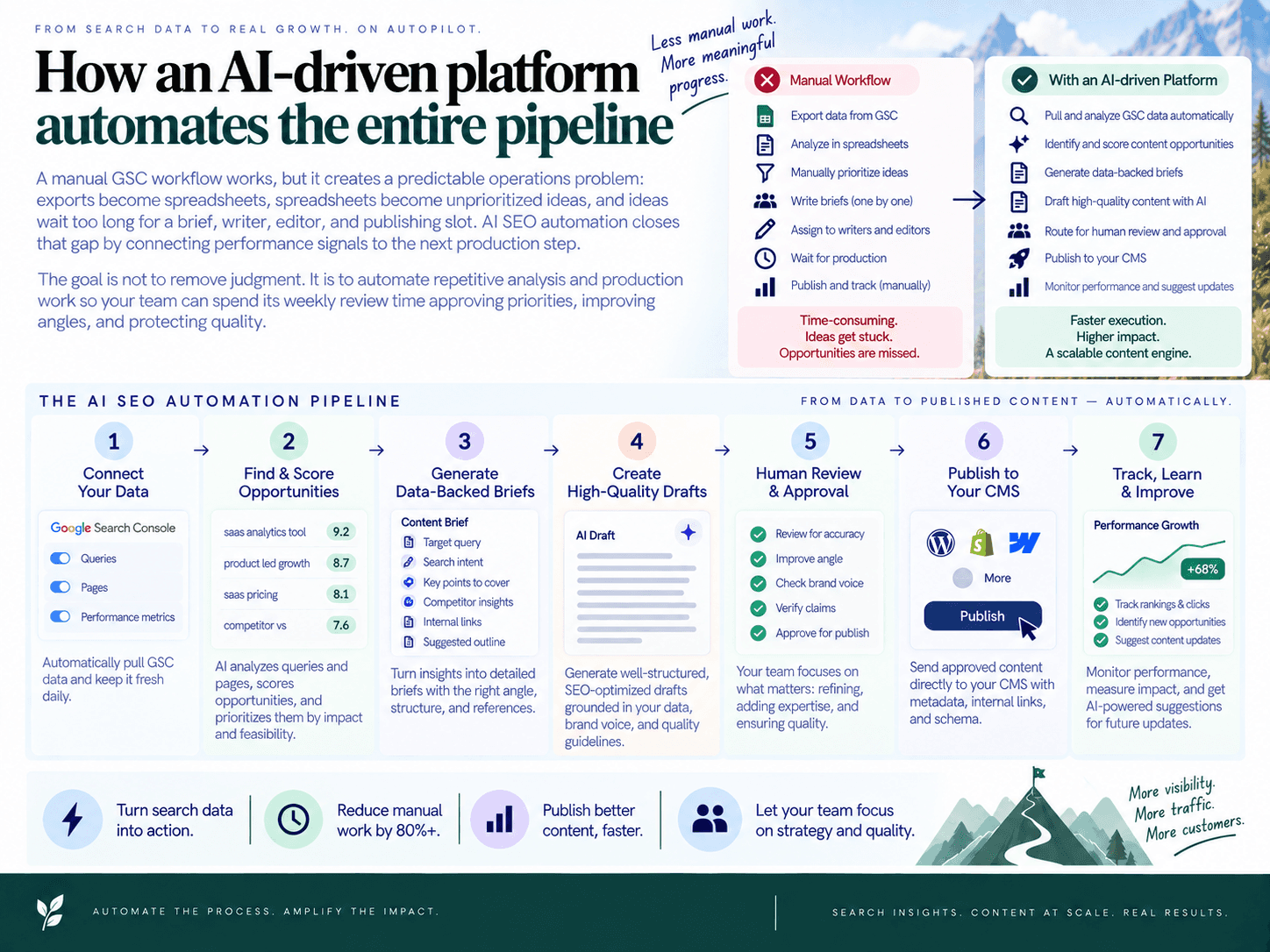
A manual GSC workflow works, but it creates a predictable operations problem: exports become spreadsheets, spreadsheets become unprioritized ideas, and ideas wait too long for a brief, writer, editor, and publishing slot. AI SEO automation closes that gap by connecting performance signals to the next production step.
The goal is not to remove judgment. It is to automate repetitive analysis and production work so your team can spend its weekly review time approving priorities, improving angles, and protecting quality.
Ingest GSC data and turn rows into usable signals
Instead of exporting the Queries and Pages reports every week, connect Search Console to a shared workspace. The platform can ingest first-party performance data, normalize query and page metrics, and combine them with site analysis and competitor patterns.
That gives each opportunity context: the query, ranking URL, impressions, clicks, CTR, average position, trend direction, and likely intent. Rather than reviewing hundreds of disconnected rows, the team starts with candidates that have a clear reason to act.
Cluster related queries into topics, not keyword lists
One topic often appears in GSC as dozens of query variations. An automated workflow groups related terms into a topic cluster and categorizes intent, making it easier to see whether the right response is one stronger page, a supporting article, or a commercial landing page.
This matters because publishing one article per query is inefficient and can create overlap. Topic-level clustering helps teams identify the page that should own a theme, the supporting content it needs, and the internal connections that reinforce the cluster.
Convert approved opportunities into strategy-grade briefs
Once a topic is selected, content brief automation can generate a structured starting point rather than a blank document. In SEO Autopilot, a chosen topic can become a strategy-grade brief with recommended angles, must-include points, and intent alignment.
The brief is where a GSC signal becomes an executable assignment. A useful brief should specify:
The primary query or query cluster and the page to update or create.
The search intent the page must satisfy.
Sections, examples, comparisons, FAQs, or proof points needed to improve the page.
Relevant existing pages to link to and from.
The business CTA and the performance KPI to monitor after publication.
Writers and editors still improve the final angle, add firsthand expertise, and verify claims. Automation simply eliminates the repeated work of assembling the same inputs across documents and tools.
Build a sequenced plan instead of a pile of ideas
A backlog becomes valuable only when it has an execution order. SEO Autopilot brings opportunities from Search Console, website analysis, competitor gaps, and keyword research into a Unified Backlog, where you can prioritize, cluster, and approve topics before turning them into a blog plan.
This is the practical advantage of connected SEO content planning: a refresh with strong existing impressions can be scheduled ahead of a speculative new article, while related supporting pages are sequenced to build a coherent cluster. The result is a publishing queue that reflects opportunity size, intent, effort, and business relevance—not whichever idea was easiest to write.
Move from brief to published, connected content
For teams that want more automation, SEO Autopilot can generate full articles from the plan, add natural CTAs, and automatically connect related articles with internal links. This helps prevent new posts from being published as isolated pages with no contextual path from the rest of the site.
Publishing can remain fully controlled or become more hands-off. The platform supports Manual, Brief First, and Full Auto workflows, plus scheduling and optional CMS publishing for WordPress, Contentful, and Framer. It also includes JSON-LD structured data generation and indexing workflow support to help manage the steps after a page goes live.
Keep human approval where it matters
Automation should accelerate decisions, not make them invisible. Use approval gates for high-stakes pages, brand-sensitive topics, product claims, and major rewrites. Review the target intent, title angle, internal links, CTA, and factual statements before scheduling.
A practical operating model is simple: let the system collect and cluster performance signals continuously; review and approve the ranked queue once a week; then let briefs, drafts, links, scheduling, and performance monitoring flow through the same workspace. That turns Search Console analysis from a periodic audit into a reliable publishing pipeline.

About the author: SEO Autopilot — Get recommended by Google and AI
SEO Autopilot is the SEO operating system for SaaS teams: it finds what to write from your site, competitors, and Search Console — then publishes evidence-verified comparison pages and intent-matched content on autopilot to WordPress, Framer, and more.
Areas of expertise: seo, aeo, geo, Search Engine Optimization, Answer Engine Optimization, Generative Engine Optimization, SEO Expert, Article Writer