AI SEO Tool vs DIY Stack: 7-Point Publishing Checklist
Why most AI SEO tools stop at insights
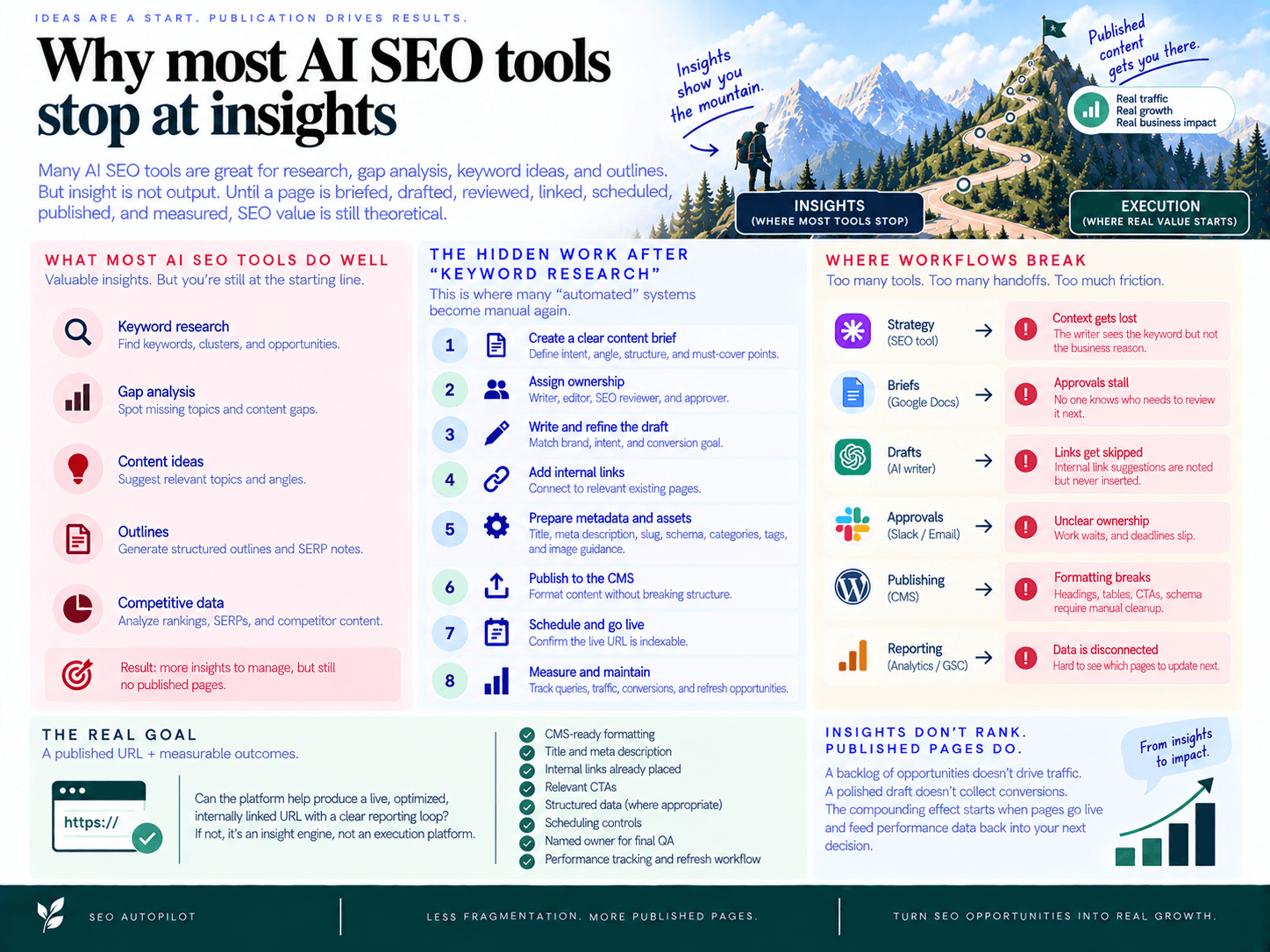
The AI SEO tool vs DIY stack decision usually comes down to one question: does the system actually move content to publication, or does it only create more things for your team to manage? Many platforms are useful for research, gap analysis, keyword ideas, and outlines. The problem is that insight is not output. Until a page is briefed, drafted, reviewed, linked, scheduled, published, and measured, SEO value is still theoretical.
The hidden work after “keyword research”
Keyword research feels like progress because it produces visible artifacts: lists, clusters, difficulty scores, SERP notes, and content ideas. But those assets are only the starting line. The expensive work begins after the team agrees a topic is worth pursuing.
A complete SEO workflow still needs someone to:
Turn the opportunity into a clear content brief with intent, angle, structure, and required points.
Assign ownership to a writer, editor, SEO reviewer, and approver.
Create a draft that matches the brand, search intent, and conversion goal.
Add internal links to relevant existing pages, not just note them in a sidebar.
Prepare metadata, slug, schema, categories, tags, and image guidance.
Move the content into the CMS without breaking formatting.
Schedule publication and confirm the live URL is indexable.
Report on queries, traffic, conversions, and refresh opportunities after launch.
This is where many “automated” systems quietly become manual again. They generate a recommendation, export a document, or produce an outline, then hand the operational burden back to the team.
Where workflows break: handoffs, docs, and CMS friction
Most content delays are not caused by a lack of ideas. They happen at handoff points. Strategy lives in one tool. Briefs live in Google Docs. Drafts move through an AI writer. Internal links are tracked in a spreadsheet. Approvals happen in Slack. Publishing happens in WordPress, Contentful, Framer, or another CMS. Reporting happens somewhere else entirely.
Every handoff creates risk:
Context gets lost: the writer sees the keyword but not the business reason behind the page.
Links get skipped: internal link suggestions are noted but never inserted before publication.
Approvals stall: no one knows whether the blocker is SEO, editorial, legal, or product marketing.
CMS formatting breaks: headings, tables, CTAs, schema, and metadata require manual cleanup.
Performance data is disconnected: the team cannot easily see which published pages should be updated next.
That fragmentation is the core reason teams feel busy without shipping enough. If you want a deeper breakdown of the execution gaps that happen when SEO tools don’t integrate, the issue is rarely one missing feature; it is the absence of an end-to-end operating system for content production.
The real goal: a published URL + measurable outcomes
The standard for evaluation should be simple: can the platform help produce a live, optimized, internally linked URL with a clear reporting loop? If not, it is an insight engine, not an execution platform.
For content operations teams, “publish-ready” should mean more than a decent draft. It should include CMS-ready formatting, title and meta description, clean headings, internal links already placed, relevant CTAs, image or media guidance, structured data where appropriate, scheduling controls, and a named owner for final QA. Anything less still requires manual project management before the content can create business value.
This matters because SEO ROI depends on shipped assets, not research volume. A backlog of 300 opportunities does not rank. A folder of approved briefs does not drive pipeline. A polished draft sitting outside the CMS does not collect impressions, clicks, or conversions. The compounding effect starts only when pages go live, connect to the rest of the site, and feed performance data back into the next publishing decision.
That is the operational line buyers should draw early: dashboards and recommendations are useful, but they are not the finish line. The real benchmark is whether the system reduces the distance between search opportunity and measurable published outcome.
AI SEO tool vs DIY stack: what you’re really buying
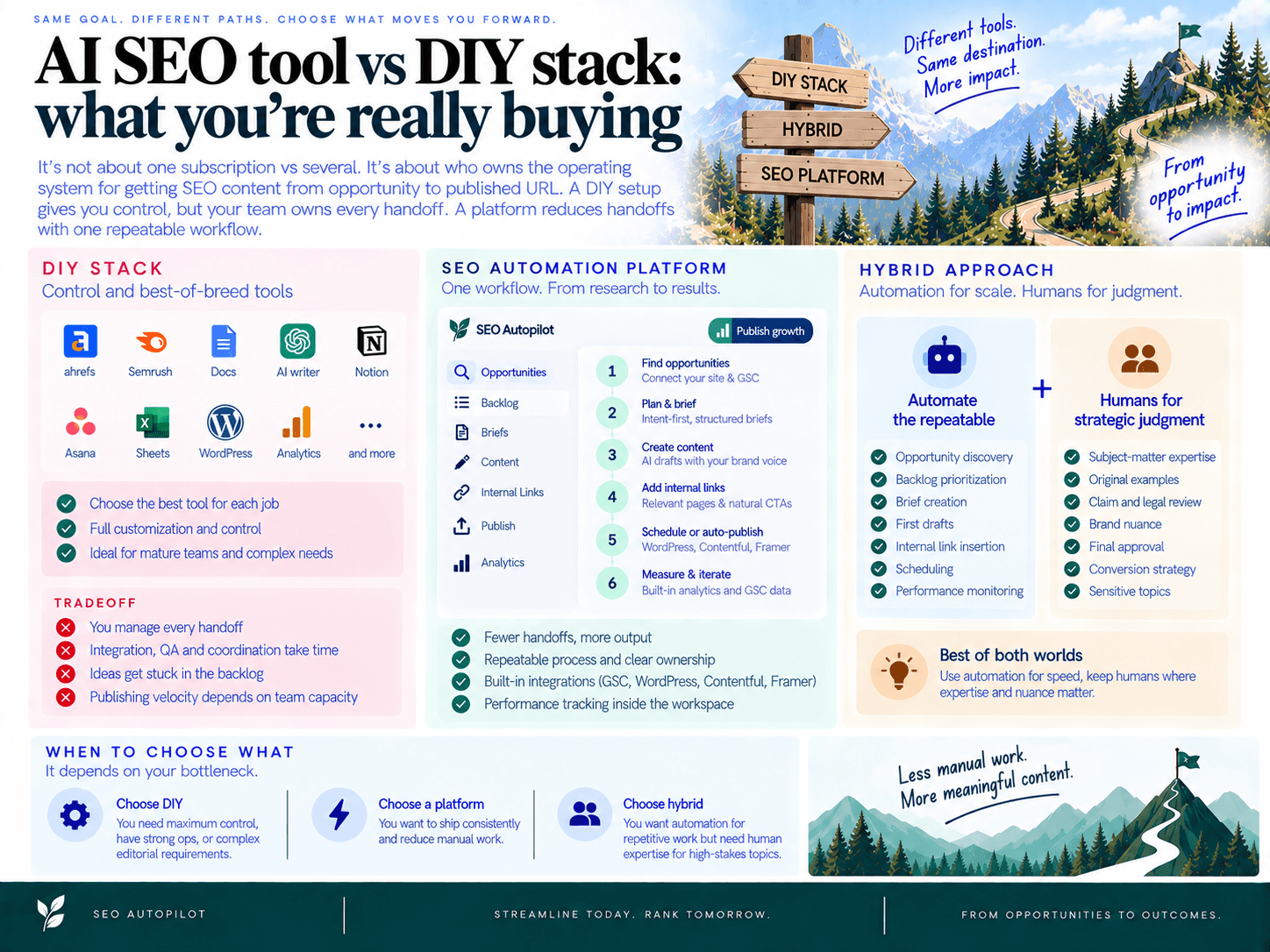
The real choice is not “one subscription versus several subscriptions.” It is who owns the operating system for getting SEO content from opportunity to published URL. A DIY setup gives you flexibility and control, but your team owns every handoff. A platform should reduce the number of handoffs by turning research, planning, drafting, linking, scheduling, and reporting into one repeatable workflow.
DIY stack strengths: control and best-of-breed tools
A DIY SEO stack can work well when you already have strong content operations. You might use one tool for keyword research, another for SERP analysis, a brief template in Google Docs, an AI writer, an editor, a project management board, an internal linking plugin, your CMS, and separate reporting dashboards.
The advantage is control. You can choose the strongest tool for each job, customize every template, and keep specialists in their preferred workflows. This is often the right model for mature SEO teams, agencies with strict delivery processes, or companies with complex editorial and compliance requirements.
The tradeoff is that the system only works if someone manages it. Every article needs an owner to move it from keyword to brief, from brief to draft, from draft to QA, from QA to CMS, and from CMS to performance review. If that owner is overloaded, publishing velocity drops.
DIY stack costs: integration, QA, and project management
The hidden cost of a DIY workflow is not just software spend. It is the labor required to make disconnected tools behave like a single production line.
Integration cost: moving data between keyword tools, briefs, docs, spreadsheets, CMS fields, and reports.
QA cost: checking search intent, factual accuracy, brand tone, formatting, metadata, links, CTAs, and publishing settings.
Coordination cost: assigning work, chasing approvals, resolving comments, updating status, and making sure nothing stalls.
Opportunity cost: good ideas sit in a backlog because the team lacks time to brief, write, link, and publish them.
This is where many teams underestimate the operational gap. The stack may look cheaper on a pricing page, but it can become expensive when every post requires manual assembly. If you want a deeper breakdown of the manual vs automated SEO tradeoffs (time, control, throughput), the key question is simple: how much human effort is required before a page goes live?
Platform strengths: throughput, repeatability, and accountability
A strong SEO automation platform is not just another research dashboard. It should package the workflow so your team can consistently decide what to publish, generate the brief, create the draft, add internal links, schedule the post, and monitor performance from one operating layer.
For example, SEO Autopilot is built around that execution chain: it connects website and Google Search Console inputs, turns opportunities into a Unified Backlog, supports intent-first planning, generates briefs and blog content, adds internal links and natural CTAs, and can schedule or auto-publish to CMS platforms such as WordPress, Contentful, and Framer depending on the selected workflow mode. It also includes Google Analytics/live analytics views inside the workspace, so publishing activity is connected back to performance visibility.
The value is repeatability. Instead of rebuilding the process for every article, the team works from a consistent system. That matters when the goal is not one impressive draft, but reliable content production across a month, quarter, or client portfolio.
When hybrid makes sense
The best answer is not always fully automated or fully manual. A hybrid model works when you want automation for repetitive workflow steps but still need human judgment for sensitive topics, executive thought leadership, legal review, or conversion strategy.
Use automation for: opportunity discovery, backlog prioritization, brief creation, first drafts, internal link insertion, scheduling, and performance monitoring.
Use humans for: subject-matter expertise, original examples, claim review, brand nuance, final approval, and business positioning.
In practical terms, the right choice depends on your bottleneck. If your team has plenty of editorial capacity but needs deeper research control, a DIY model can be justified. If your team knows what it wants to say but cannot ship consistently, the better purchase is an execution system that removes manual steps and creates clear ownership from plan to publish.
The Publishability Checklist (use this in every demo)
Use this checklist to separate a useful execution platform from another insights dashboard. A tool only passes if it can move a topic from search opportunity to a scheduled, trackable URL with minimal manual handoffs.
Publish-ready means more than “an outline in a doc.” It means a formatted draft with title tag, meta description, slug, headings, internal links inserted, CTA placement, image guidance, structured data where relevant, approval status, CMS scheduling, and a reporting path back to search performance.
Bring this AI SEO checklist into every demo and ask vendors to show the workflow live, not describe it from a slide. For a broader set of evaluation criteria, compare this list with the non-negotiables to look for in an automated SEO solution.
1) Planning: turns data into a prioritized publishing backlog
What good looks like: The platform should convert inputs like your site, Google Search Console data, competitor patterns, and topic gaps into a ranked backlog. Each opportunity should have a clear reason to exist: intent, audience fit, cluster relationship, estimated value, and priority.
A strong workflow does not leave you with a keyword export. It gives your team a selectable publishing queue: what to write next, why it matters, how it fits the site, and what order to publish in.
Red flags: Keyword lists with no prioritization, no intent classification, no connection to existing pages, or no way to approve topics into a production plan.
Demo questions: “Show me how the system chooses the next five posts for our site.” “Can I see the backlog, the priority logic, and the cluster this topic belongs to?” “What data sources are used before a topic becomes an approved article?”
Proof test: Ask the vendor to start with your domain and produce a ranked backlog during the demo or trial.
For example, SEO Autopilot is designed around a Unified Backlog that pulls opportunities from website analysis, competitors, keyword research, and Google Search Console, then lets teams prioritize, cluster, and approve topics into a blog plan.
2) Briefs: produces editorial-ready, brand-aligned instructions
What good looks like: A brief should be usable by an editor or writer without another hour of manual research. It should define search intent, target reader, angle, must-include points, structure, internal link targets, CTA guidance, and content constraints.
A content brief generator is only valuable if it reduces editorial ambiguity. The brief should explain what the article must accomplish, not just suggest headings copied from competing pages.
Red flags: Generic outlines, no brand or audience guidance, no differentiation angle, no instructions for claims or examples, and no approval step before drafting.
Demo questions: “Show me a brief for one approved topic.” “Where do brand voice, target audience, and search intent appear?” “Can an editor approve or edit the brief before a draft is generated?”
Proof test: Give the same topic to two vendors and compare whether the briefs produce a distinct article strategy or the same generic SERP summary.
3) Draft generation: creates a publishable first draft, not generic filler
What good looks like: The draft should follow the approved brief, answer the search intent directly, include useful examples, respect brand tone, and arrive in a structure that can move toward publishing without a full rewrite.
For SEO teams, the question is not “Can it write?” The question is “Can it create a draft that an editor can reasonably polish, approve, and schedule?” That requires formatting, heading hierarchy, metadata, CTA placement, and clear ownership for review.
Red flags: Repetitive introductions, vague claims, no business-specific positioning, missing CTAs, weak formatting, or outputs that must be copied into another tool before editing can begin.
Demo questions: “Generate the article from the approved brief now.” “Where are the title tag, meta description, CTA, and image guidance?” “Can the draft be edited in the workflow before it goes to the CMS?”
Proof test: Time how long it takes to get from approved topic to editor-ready draft, including metadata and links.
4) Internal linking: suggestions, insertion, and governance
What good looks like: Internal linking should be treated as part of publishing, not an afterthought. The system should identify relevant source and destination pages, recommend natural anchors, insert links into the draft, and help prevent new posts from launching as orphan pages.
Suggestion-only linking creates manual debt. If the platform says “add links to these five pages” but your team still has to open every post, find placements, rewrite sentences, and track anchors in a spreadsheet, the workflow is not automated.
Red flags: Link recommendations that are not inserted, no anchor text controls, no cluster visibility, no orphan detection, and no process for updating links as new content publishes.
Demo questions: “Show me the internal links inserted inside the article, not just listed in a sidebar.” “How does the system choose anchor text?” “Can it link new posts to existing related content and update older posts when appropriate?”
Proof test: Publish two related posts during a pilot and check whether links are implemented both ways where relevant.
If this is a major bottleneck for your team, review how to automate internal linking (beyond suggestions) before scoring vendors.
5) Approvals: roles, comments, versioning, and audit visibility
What good looks like: The workflow should make ownership obvious. A topic, brief, draft, and scheduled post should each have a status, assignee, and approval path. Editors, clients, founders, or compliance reviewers should know exactly what needs their input.
This matters most for agencies, regulated industries, and teams with multiple stakeholders. Without approval controls, automation can create more risk than speed.
Red flags: No status visibility, approvals handled in Slack or email, no record of who changed what, no way to pause publishing, and no separate brief approval before full drafting.
Demo questions: “Show me the approval workflow from topic to brief to draft to scheduled post.” “Can different users review different stages?” “Can we stop a post from publishing if the brief or draft is not approved?”
Proof test: Run one article through your real review chain and identify every place the process leaves the platform.
SEO Autopilot supports multiple automation modes, including Full Auto, Brief First, and Manual workflows, so teams can choose how much editorial control they want for different types of content.
6) CMS scheduling: pushes the post into your publishing system with metadata
What good looks like: The platform should push or prepare the article for your CMS with the practical publishing details included: title, slug, meta description, headings, categories or tags, internal links, CTA blocks, structured data where relevant, and scheduled publish date.
CMS publishing is where many workflows break. If the “automation” ends in a Google Doc, your team still owns formatting, link checks, metadata, upload, QA, scheduling, and final publication.
Red flags: Export-only workflows, broken formatting after import, no scheduling, no preview, no slug or metadata control, no schema support, and no fallback format if your CMS is not directly supported.
Demo questions: “Show me a post pushed into the CMS with internal links already inserted.” “Can we control slug, title tag, meta description, and publish date?” “What happens if we need manual review before publishing?”
Proof test: During the trial, require one post to move from approved draft to scheduled CMS entry without copy-paste.
SEO Autopilot supports publishing integrations for WordPress, Contentful, and Framer, with scheduling and optional auto-publishing depending on the chosen workflow mode.
7) Reporting loop: ties published content to rankings, traffic, and next actions
What good looks like: Reporting should connect production activity to performance. At minimum, the workflow should help you see which posts were published, how they are performing, what queries they are earning visibility for, and what should be updated next.
The goal is not a vanity dashboard. The goal is a feedback loop: publish, index, monitor, learn, refresh, and prioritize the next opportunity based on performance data.
Red flags: No connection to Search Console or analytics, no article-level performance view, no refresh recommendations, no way to compare planned topics against live outcomes, and no indexing workflow after publication.
Demo questions: “Show me how performance data comes back into the content workflow.” “Can we see traffic or query trends by article?” “How does the system recommend updates or new posts based on what is working?”
Proof test: After publishing during the pilot, confirm whether the platform can show the live URL, indexing status support, and early performance indicators in the same workspace.
SEO Autopilot includes Google Analytics/live analytics views inside the workspace, plus indexing workflow and sitemap/indexing support, so teams can connect publishing activity with post-publication visibility.
Deep dive: pass/fail criteria for each checklist item
A serious AI SEO tool should be graded on output, not interface polish. The test is simple: can it move a topic from opportunity to scheduled, internally linked, measurable content with clear review ownership?
Use a three-point score for each item: Pass if the system performs the step inside the workflow, Partial if it only recommends or exports, and Fail if your team must rebuild the step manually in another tool. For a deeper procurement framework, compare this against the non-negotiables to look for in an automated SEO solution.
Planning criteria: clustering, intent mapping, competitor baselines
Planning passes when the system converts search signals into a prioritized publishing queue, not just a list of keywords. It should group related opportunities, assign intent, explain why a topic is worth pursuing, and make it easy to approve what enters production.
Pass: Topics are clustered, prioritized, and mapped to search intent with inputs from your site, Search Console data, and competitor patterns.
Partial: The tool provides keyword ideas or gap reports, but prioritization happens in a spreadsheet.
Fail: The output is a raw keyword list with volume, difficulty, and no execution queue.
Proof test: Ask the vendor to take one real domain and show the next five articles it would publish, in order, with the reason each topic belongs in the plan. SEO Autopilot, for example, uses a Unified Backlog to turn opportunities from site analysis, competitors, keyword research, and Google Search Console into a ranked, selectable queue.
Brief criteria: SERP-based structure, entities, FAQs, constraints
A brief should reduce editorial ambiguity. It must define the search intent, audience, angle, must-include points, structure, brand constraints, and quality bar before drafting begins.
Pass: The brief includes intent, recommended angle, audience notes, headings, information gain, inclusion/exclusion rules, and questions the page should answer.
Partial: The brief is an outline with headings but no strategic direction or constraints.
Fail: Writers receive only a keyword and target word count.
Proof test: Ask, “Can I approve the brief before the draft is generated?” If the answer is no, your team may lose control over positioning before the content is already written.
Draft criteria: claims, tone controls, and publishable formatting
Draft generation passes only when the output is close to publishable. That means the article follows the approved brief, reflects your brand voice, includes useful examples, avoids unsupported claims, and arrives in a structure that can move into the CMS without heavy rework.
Pass: Drafts include formatted headings, metadata guidance, natural CTAs, clear claims, and brand-aligned language.
Partial: Drafts are useful starting points but require significant rewriting, formatting, and CTA insertion.
Fail: The tool generates generic text that an editor must rebuild from scratch.
Proof test: Provide one approved topic and ask for the full draft. Then measure how many manual steps remain before publishing: rewriting, formatting, adding CTAs, checking claims, inserting links, creating metadata, and scheduling.
Linking criteria: relevance, anchors, orphan prevention, updates
Internal linking is not a suggestion box. It is an execution requirement. A passing system should identify relevant source and destination pages, insert links into the draft, use sensible anchor text, and prevent new posts from shipping as isolated URLs.
Pass: Links are inserted into the content before publishing, with relevant anchors and connections to existing topical clusters.
Partial: The tool recommends links, but an editor must manually place them.
Fail: Internal links are handled after publication, if at all.
Proof test: Ask to see a generated post with internal links already inserted, not a sidebar of suggestions. If this is a weak point in your current process, review how to automate internal linking (beyond suggestions).
Approval criteria: stakeholder views, SLAs, and status visibility
Approval workflows matter when multiple people touch content: SEO, product marketing, legal, client stakeholders, editors, and founders. Strong content governance prevents drafts from stalling in inboxes or publishing without the right review.
Pass: The workflow shows status, owner, next action, approval stage, and what is blocked.
Partial: Approval happens in comments or external documents with no reliable production status.
Fail: Nobody can tell which posts are approved, waiting, scheduled, or live without asking in Slack.
Proof test: Ask, “Show me where an editor approves a brief, where a stakeholder approves a draft, and where the post moves into scheduling.” If the vendor switches to a project management tool to answer, the workflow is not fully contained.
CMS criteria: slugs, schema, images, categories, previews
Publishing passes when the system can move approved content into your CMS with the elements needed for a real live post. Copying from a document into the CMS is not automation; it is a handoff.
Pass: The system supports CMS publishing or scheduling, with control over title, slug, meta description, categories or tags, structured data, and preview/QA steps.
Partial: The system exports clean HTML or Markdown, but your team still handles upload and scheduling.
Fail: The final output is a Google Doc that requires manual formatting and CMS entry.
Proof test: Ask the vendor to push one post to a CMS staging environment with metadata, links, and formatting intact. SEO Autopilot supports publishing integrations for WordPress, Contentful, and Framer, includes JSON-LD structured data generation, and can schedule or auto-publish depending on the selected workflow mode.
Reporting criteria: query-level insights and refresh recommendations
Publishing is not the endpoint. The system should connect live content back to performance so your team knows what worked, what underperformed, and what to update next.
Pass: Reporting connects published URLs to search queries, traffic, engagement, and next-step recommendations.
Partial: The platform shows high-level analytics, but analysis and refresh planning happen elsewhere.
Fail: The tool stops once the article is generated or published.
Proof test: Ask, “Show me a published article, its performance data, and the recommended next action.” Strong SEO performance reporting should feed the next planning cycle, not sit in a disconnected dashboard.
The 10-minute Publishability Index
Score each category from 0 to 2: 0 = manual, 1 = assisted, 2 = executed inside the workflow. A platform that scores below 10 out of 14 will likely still require a project manager to keep the SEO content workflow moving.
Planning: Does it create a prioritized backlog?
Briefs: Does it create review-ready briefs?
Drafts: Does it produce publishable drafts?
Internal links: Does it insert links, not just suggest them?
Approvals: Does it show ownership and status?
CMS: Does it schedule or publish with metadata intact?
Reporting: Does performance data inform what happens next?
The highest-scoring option is not the one with the longest feature list. It is the one that removes the most handoffs between idea, approval, publication, and measurable outcome.
Common traps when evaluating AI SEO platforms
The biggest evaluation mistake is judging AI SEO tools by the quality of their recommendations instead of the amount of work they remove. A strong demo can make keyword discovery, outline generation, and content scoring look impressive, but the real test is whether the system can move one article from opportunity to approved, linked, scheduled, measurable URL.
Use the trial period to run proof tests, not feature tours. Pick one real topic, one real CMS, one real reviewer, and one real publishing deadline. If the platform cannot complete the workflow under those conditions, your team will inherit the missing steps after purchase.
Trap: confusing outline generation with content production
An outline is not a production workflow. Many platforms can generate headings, SERP notes, and suggested talking points. That still leaves your team to write, format, fact-check, add metadata, choose links, insert CTAs, upload to the CMS, and schedule the post.
Proof test: ask the vendor to produce a complete draft from an approved topic during the trial. The output should include the article body, title tag, meta description, slug recommendation, CTA placement, formatting, and publishing destination—not just a document you still need to rebuild manually.
Pass: the system turns a selected opportunity into a draft that is close enough for editorial review and CMS scheduling.
Fail: the system stops at a brief, scorecard, or Google Doc export and calls that “automation.”
Demo question: “Show me the exact point where this becomes a scheduled CMS draft.”
Execution-focused platforms should make this handoff explicit. For example, SEO Autopilot is built around moving from Search Console and keyword opportunities into planning, brief creation, blog generation, automatic linking, scheduling, and optional publishing to CMS platforms such as WordPress, Contentful, and Framer.
Trap: link suggestions that never become live links
Link recommendations are useful, but they are not the same as implemented links. If the platform only tells you which URLs might be relevant, someone still has to open the draft, choose anchors, insert the links, check context, avoid repetition, and update related older posts.
Proof test: publish one trial article and inspect the final draft before it goes live. Confirm that contextual links are already inserted, anchor text is natural, and the new post is connected to existing related content. For a deeper framework, review how to automate internal linking (beyond suggestions).
Pass: links are inserted into the draft and can be reviewed before publishing.
Fail: the tool exports a list of URLs for a human to implement later.
Demo question: “Can you show the links already placed inside the CMS-ready draft?”
Trap: no ownership for QA, brand, and approvals
Automation does not remove accountability. It changes where accountability should sit. If no one owns review status, factual checks, brand fit, compliance notes, and final approval, content velocity creates risk instead of leverage.
Proof test: assign a real reviewer during the pilot and require them to approve or reject the article before publishing. Track where comments live, whether the draft status is visible, and whether the platform supports a controlled workflow such as brief-first review or manual approval for higher-stakes content.
Pass: the workflow makes ownership visible: waiting for brief approval, waiting for draft review, scheduled, published, or returned for edits.
Fail: review happens in Slack, edits happen in Docs, and publishing happens somewhere else with no reliable status trail.
Demo question: “Who approves this before it goes live, and where is that decision recorded?”
This is where content QA needs to be operational, not aspirational. The platform should help reviewers catch issues before publication rather than relying on a final manual scramble.
Trap: no feedback loop after publishing
Publishing is not the finish line. If the platform cannot connect live content back to search performance, the team is forced to rebuild reporting in a separate analytics workflow. That usually means refresh opportunities, declining posts, and query-level wins are noticed late—or not at all.
Proof test: after the trial post is published, confirm how performance will be monitored. Look for visibility into search queries, traffic, engagement, and update opportunities. SEO Autopilot, for example, includes Google Analytics or live analytics views inside the workspace, along with Google Search Console integration for search-driven opportunity discovery.
Pass: the platform shows how published content feeds future planning and refresh decisions.
Fail: reporting is limited to “content created” with no connection to rankings, queries, traffic, or next actions.
Demo question: “After this URL is live, how does the system decide what we should update or publish next?”
Run a pilot that exposes the real workflow
A reliable pilot should test execution under realistic constraints. Do not evaluate ten sample topics in a sandbox. Evaluate one complete publishing cycle with your website, your CMS, your reviewer, and your standards.
Choose one approved topic from real search or Search Console data.
Generate the brief and draft inside the platform.
Review the article for accuracy, brand fit, structure, and CTA placement.
Confirm links are inserted and relevant before scheduling.
Push or schedule the post in the CMS with metadata intact.
Track what happens next through analytics or search performance reporting.
If the vendor cannot complete that sequence during a trial, you are not buying an execution platform. You are buying another partial system that your team must operate around. For teams that need a simple cadence after the pilot, a lightweight weekly SEO automation system for busy teams can help turn the workflow into a repeatable operating rhythm.
Decision guide: choose a platform, DIY stack, or hybrid
The right choice depends on where your bottleneck is. If your team struggles to turn opportunities into published, internally linked URLs, choose an execution platform. If you already have strong editorial operations and only need specialist research or writing tools, a DIY stack can work. If you need automation but also require strict human review, choose a hybrid model.
Choose an execution platform if you need consistent throughput
Choose a platform when your priority is repeatable publishing, not just better keyword lists. This is usually the best fit for founders, small teams, consultants, and lean content teams that need to publish every week without managing six disconnected tools.
A platform makes sense when:
You have Search Console data, competitor ideas, or keyword research but no reliable publishing queue.
Your team loses time creating briefs, assigning writers, adding internal links, formatting posts, and moving drafts into the CMS.
You need a clear plan-to-publish workflow with fewer handoffs.
You want internal links, CTAs, metadata, and scheduling handled as part of the content process.
You care more about content velocity than maintaining a best-of-breed tool for every micro-task.
For example, SEO Autopilot is built around the execution workflow: it connects website and Google Search Console inputs, surfaces opportunities into a Unified Backlog, supports intent-first planning, generates briefs and full articles, adds internal links, and can schedule or publish to CMS platforms such as WordPress, Contentful, and Framer depending on the workflow mode. That is the kind of operating model to look for if the goal is fewer dashboards and more shipped pages.
Choose a DIY stack if you have strong ops and editorial bandwidth
A DIY stack is a better fit when your team already has mature content operations and wants maximum control over each layer: research, briefs, writing, editing, design, CMS production, QA, and reporting.
This route can work well if:
You have a dedicated SEO owner who can prioritize topics and maintain the roadmap.
You have editors who can enforce voice, fact-checking, and compliance standards.
You have a content operations manager or producer who can move work through briefs, docs, CMS, approvals, and reporting.
You need advanced specialist datasets for backlink analysis, technical auditing, or deep competitive research.
Your CMS, approval process, or legal review workflow is too custom for direct automation.
The tradeoff is management overhead. A DIY stack may look cheaper on a subscription line item, but the hidden cost is coordination: templates, handoffs, link implementation, QA checklists, CMS formatting, status tracking, and performance reviews. If those steps are already owned and documented, DIY can be effective. If they are not, the stack becomes another source of unfinished work.
Use a hybrid model when automation should accelerate, not replace, review
A hybrid model is often the safest choice for agencies, regulated industries, technical products, or brands with a strong editorial point of view. In this setup, the platform handles the repeatable production layer while humans retain control over judgment-heavy decisions.
A practical hybrid workflow looks like this:
Platform: identifies opportunities, clusters topics, and creates the backlog.
Platform: generates briefs and first drafts with suggested structure, internal links, and CTAs.
Team: reviews claims, examples, product positioning, compliance language, and brand nuance.
Platform: prepares CMS-ready content, structured data where supported, and scheduled publishing.
Team: reviews performance and decides what to refresh, expand, or consolidate.
This model preserves quality control without forcing your team to rebuild the entire AI content workflow manually. It is especially useful when some content types can be automated heavily, while others require subject-matter expert review before publishing.
Simple decision tree
If your biggest issue is “we know what to write but do not publish enough,” choose an execution platform.
If your biggest issue is “we need deeper research before deciding what to write,” use a specialist research stack or combine research tools with an execution platform.
If your biggest issue is “everything needs expert, legal, or client approval,” choose a hybrid workflow with automation before and after human review.
If your CMS process is highly custom, verify integrations, preview controls, metadata handling, and fallback export options before committing.
If no one owns the publishing calendar, internal links, or reporting loop, avoid a pure DIY stack unless you are also hiring or assigning that ownership.
Minimum viable pilot: 30 days, 5 posts, defined KPIs
Do not evaluate the tool on a feature tour alone. Run a 30-day pilot that proves whether the workflow can produce live URLs with measurable outcomes.
Use this pilot structure:
Scope: publish 5 articles from opportunity selection through CMS scheduling.
Inputs: use your real site, Search Console data, existing content, and target audience.
Workflow test: require briefs, drafts, internal links, metadata, CTA placement, approval steps, and CMS delivery.
Speed metric: measure average time from selected topic to scheduled post.
Quality metric: track how many edits are needed before approval.
Linking metric: measure the percentage of recommended internal links actually inserted before publish.
Publishing metric: count how many posts reached the CMS without copy-paste production work.
Performance metric: monitor early impressions, queries, traffic, and update recommendations.
At the end of the pilot, ask one question: did this system reduce manual workflow management while increasing publish-ready output? If yes, expand it. If not, identify whether the gap is planning, drafting, approvals, CMS integration, or reporting before buying another point solution.
For teams that want a practical operating rhythm after the pilot, use a lightweight weekly SEO automation system for busy teams to turn the chosen workflow into a repeatable cadence.

About the author: SEO Autopilot — Get recommended by Google and AI
SEO Autopilot is the SEO operating system for SaaS teams: it finds what to write from your site, competitors, and Search Console — then publishes evidence-verified comparison pages and intent-matched content on autopilot to WordPress, Framer, and more.
Areas of expertise: seo, aeo, geo, Search Engine Optimization, Answer Engine Optimization, Generative Engine Optimization, SEO Expert, Article Writer